Student Services Center – Financial Aid Tab
This resource explains the various sections of the Financial Aid tab within the Student Services Center pages in MyBU Student. This resource is for staff across schools and colleges to see data such as FA Aid Year application/packaging information, related award summaries, term breakdowns, and more.

Introduction
The Financial Aid tab in the Student Services Center displays information regarding student aid. This includes Aid Year applications & packaging information, Award Summary item types & amounts, and Term Summary academic data.
There are many links or buttons on the FA tab that open other FA pages used in MyBU Student (accessible with the proper security). For this reason, references to materials that provide more detailed instruction on those pages are indicated throughout this resource.
Student Services Center (SSC) consolidates student data from various areas of MyBU Student in one page. Please refer to the Introduction to Student Services Center resource for a general overview, or if detailed instructions are needed for one of the other tabs, please refer to that resource: Student Center, General Info, Admissions, Transfer Credit, and Academics.
⚠︎ Screen options and menus will vary by user; please note that displays may differ for you based on access that has been granted. All screens shown are for training purposes only.
Navigation & Aid Year Data
- Navigate to Student Services Center:
- From the Dashboard left menu, scroll to Student Services Center.
- From the Full Site homepage, navigate to: Compass at top right of Nav Bar > Menu > Campus Community > Student Services Center.
- To find a student, enter the student’s available data in the Find an Existing Value window that displays, and select Search.
- The student’s Service Center page will open. Click the Financial Aid tab to view available data, based on security.
AID YEAR
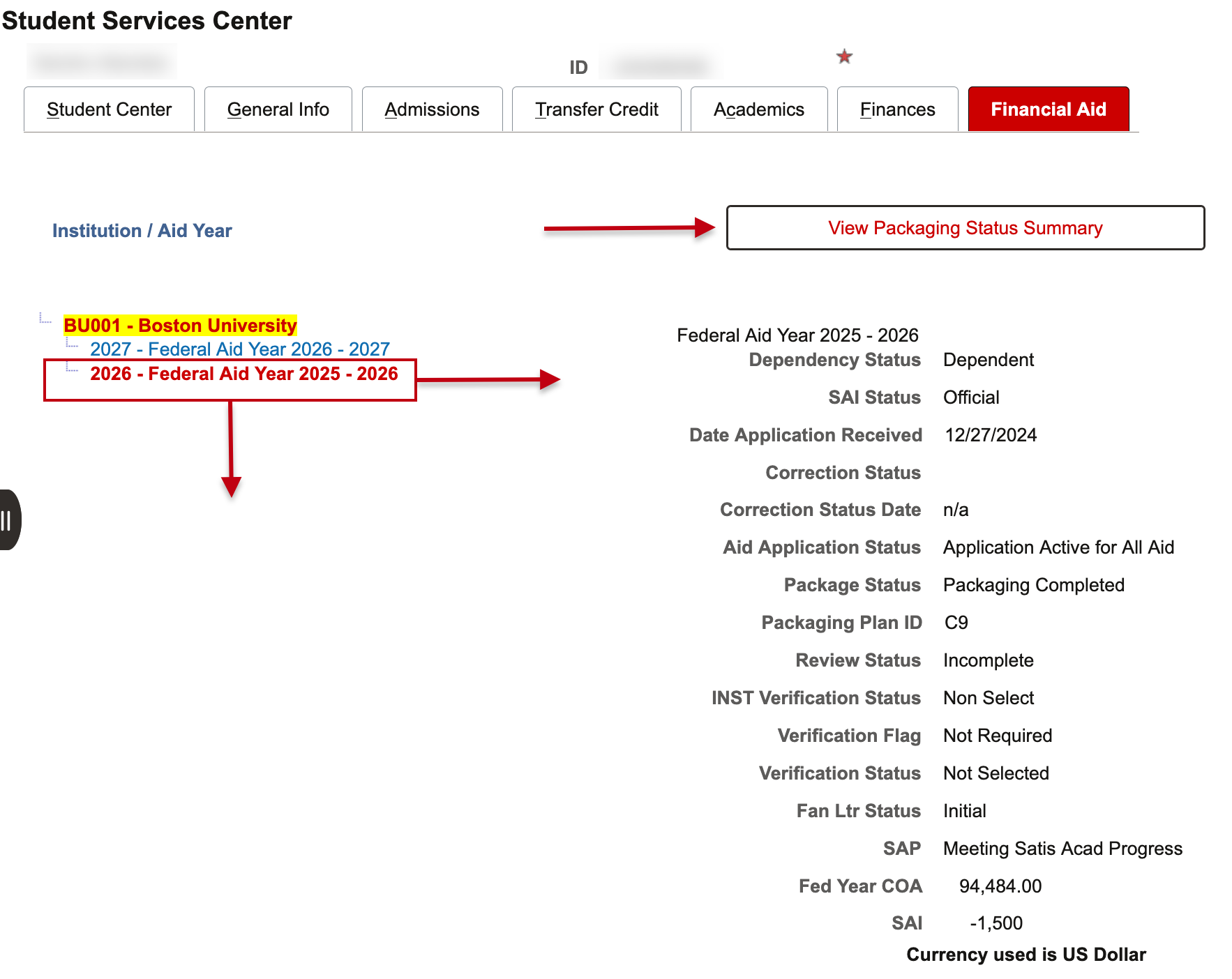
The first set of data that displays relates to the student’s aid and is organized by applicable FA aid years. When multiple aid years exist, select the desired aid year on the left so data related to that aid year will display on the right. In the example below, there are two aid years: “2025-2026” and “2026-2027.”
- This Aid Year selection also dictates the information that displays for the Award Summary and Term Summary sections on the remainder of the page.
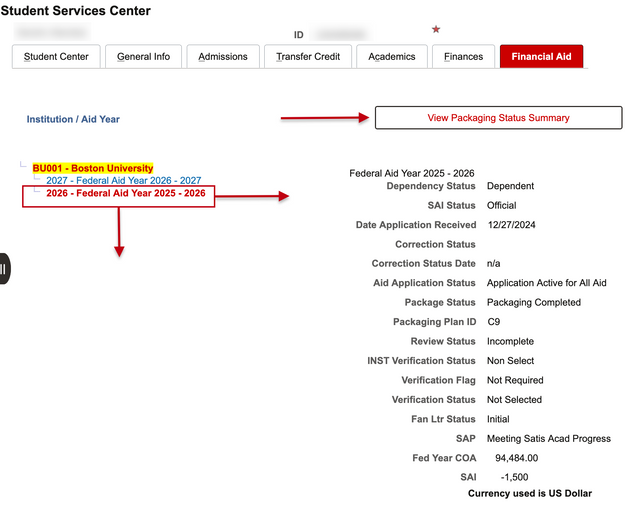
For the selected FA Aid Year, the following information displays on the right:
- Dependency Status: The student’s dependency status according to Federal parameters.
- SAI Status: Student Aid Index status; Replaced the EFC calculation. Shows whether or not a FAFSA has been processed.
- Date Application Received: Date the financial aid application was received.
- Correction Status & Date: Populated when there has been a correction.
- Aid Application Status: Indicates the student’s status within the financial aid application steps.
- Package Status: Indicates the student’s status within the financial aid packaging steps.
- Packaging Plan ID Review Status: Indicates the student’s packaging plan within the financial aid review steps.
- INST Verification Status: Indicates the status of students’ institutional verification. BU may use in the future.
- Verification Flag: Indicates whether Federal Verification is required.
- Verification Status: Federal verification completion status.
- Fan Ltr Status: Financial Aid Notification Letter status.
- SAP: Satisfactory Academic Progress Status indicator.
- Fed Year COA: Federal Year Cost of Attendance values.
- SAI: Student Aid Index status; Replaced the EFC calculation.
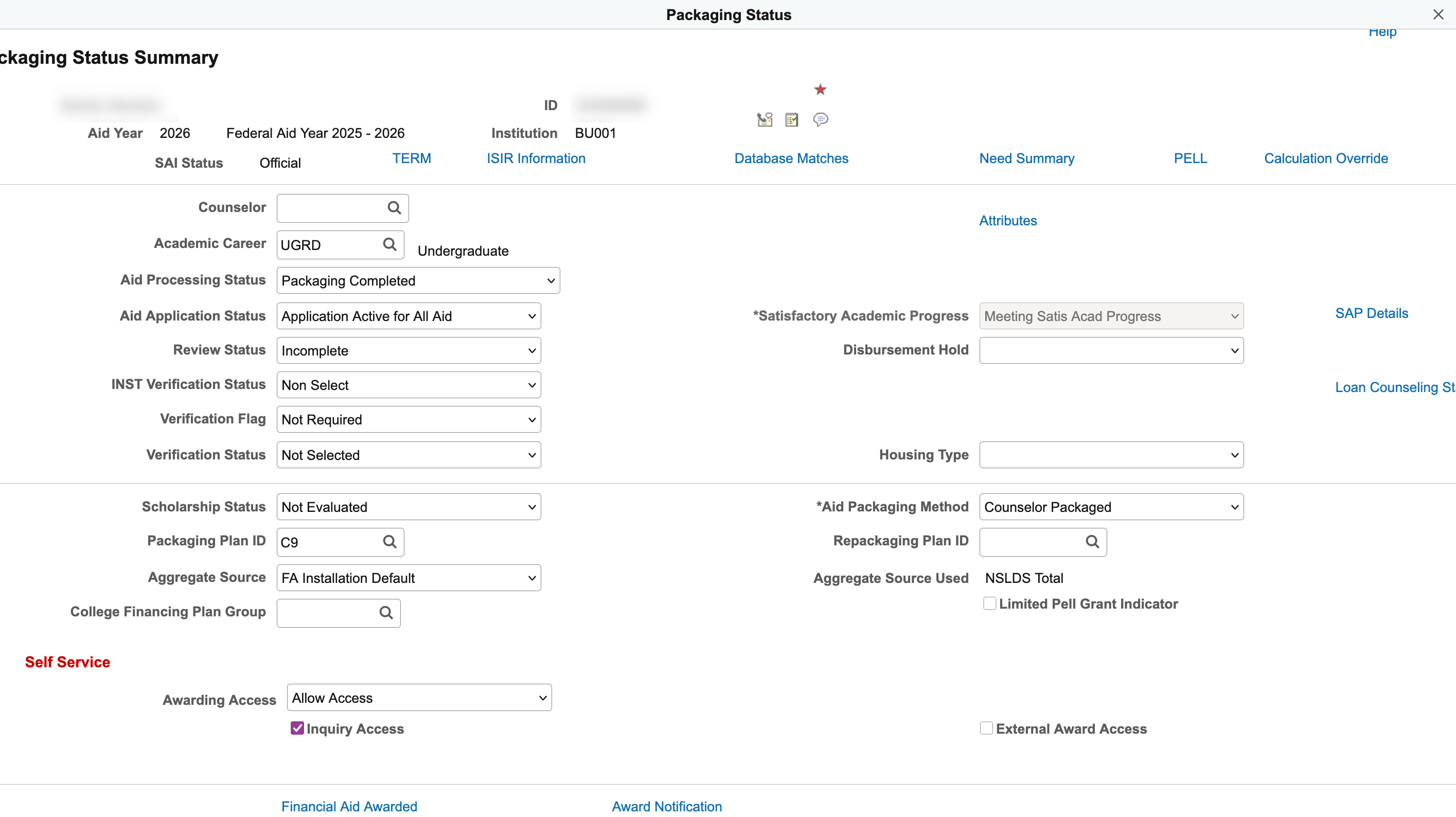
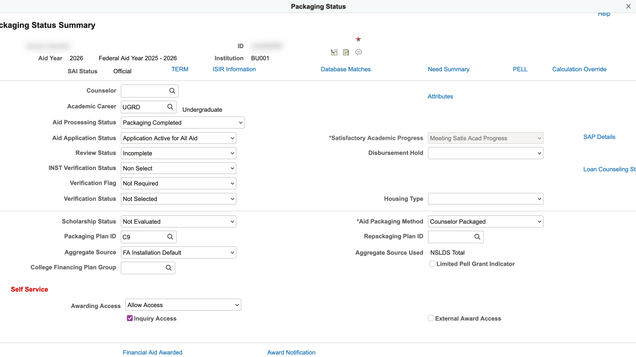
The View Packaging Status Summary button at the top of the page links out to the Packaging Status Summary. This provides additional information regarding packaging progress, for those with security.
Award Summary for Aid Year
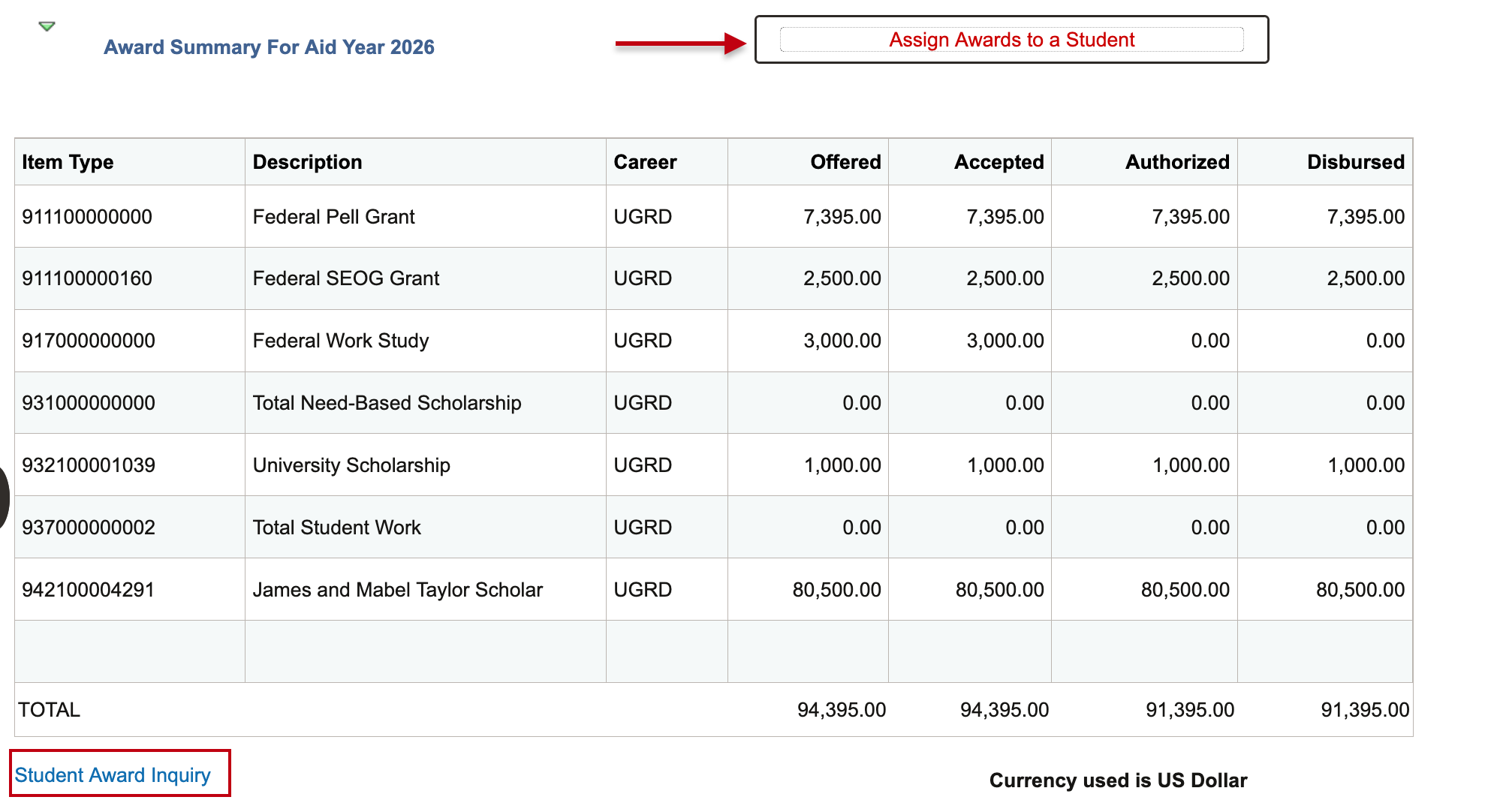
The Award Summary for Aid Year section provides detailed information regarding the student’s aid.
TIP! The award data that displays here is associated to the Aid Year selected in the previous section. If it seems there is missing or incorrect data, try selecting another aid year in the left panel at the top of the FA tab.

Data in this section includes:
- Item Type: Item Types are numbers designating a particular type of student aid.
- Description: The Description of the Item Type which displays for students and counselors to review.
- Career: The Academic Career to which the financial aid was posted. E.g. UGRD, GRAD, etc.
- Offered: The amount of aid offered to a student for the given Item Type.
- Accepted: The amount of aid accepted by a student for the given Item Type.
- Authorized: The amount of aid authorized for the student.
- Disbursed: The amount of aid disbursed to a student for the given Item Type.
ADDITIONAL FUNCTIONS IN AWARD SUMMARY
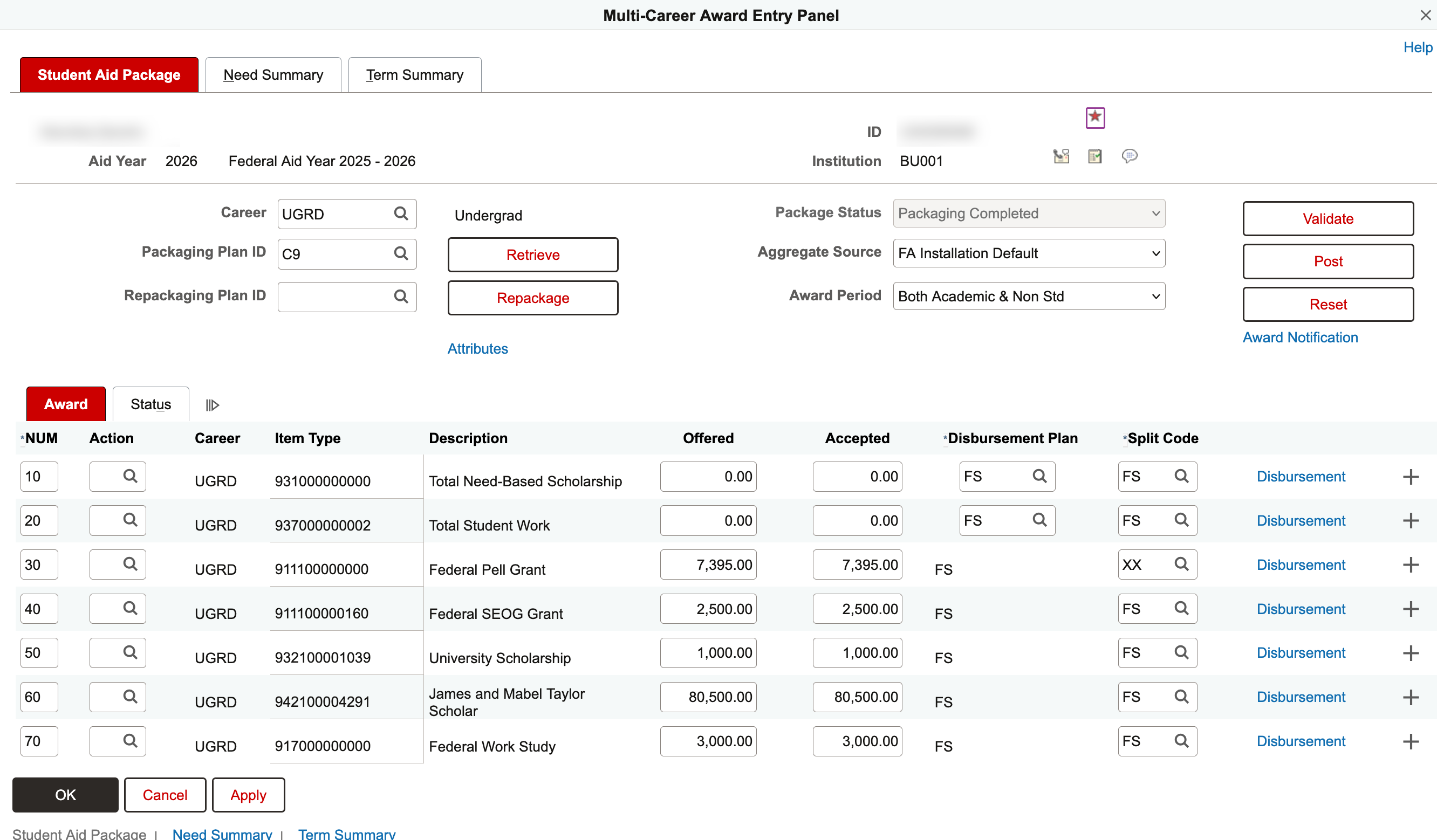
- Assign Awards to a Student: Button above the item types list opens the Multi-Career Award Entry Panel if security has been granted.
The three tabs, Student Aid Package, Need Summary, and Term Summary, allow for management of packaging data and review of aid type amounts and some academic data.

This Multi-Career Award Entry Panel is the same as the Assign Awards to a Student page, and is also utilized as a standalone function within MyBU Student (e.g., not only accessed via SSC). Therefore, a comprehensive walkthrough of these page details can be referenced in the Add Award resource.
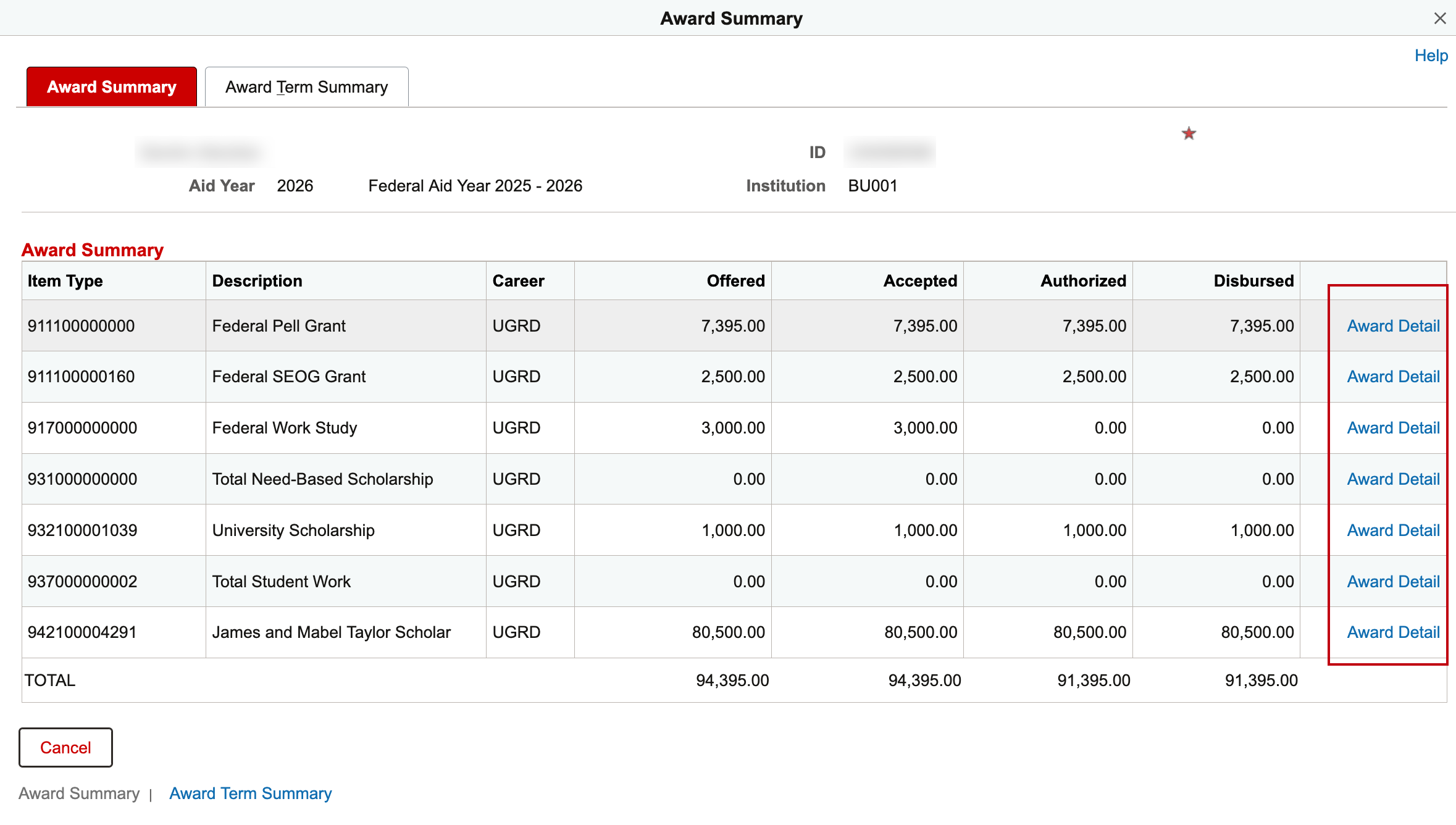
- Student Award Inquiry: Selecting the Student Award Inquiry link below the item types list displays the Award Summary page as a pop-up for those with security access.
The two tabs, Award Summary and Term Summary, allow for the review of similar information to what’s displayed on the main FA tab, but with more details and term breakdown. Additional Award Detail links for each type are also available if permissions allow.
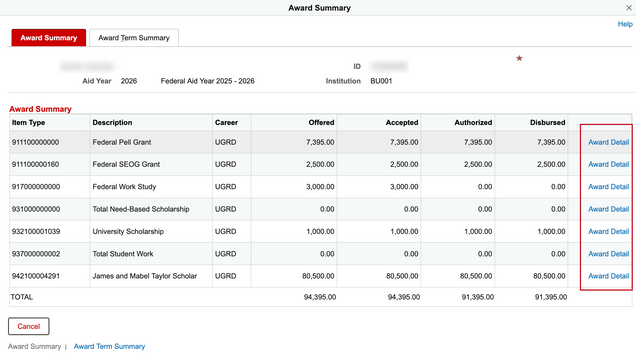
The Award Summary page is also utilized as standalone function within MyBU Student (e.g., not only accessed via SSC). Therefore, a comprehensive walkthrough of these page details can be referenced in the View Award Activity resource.
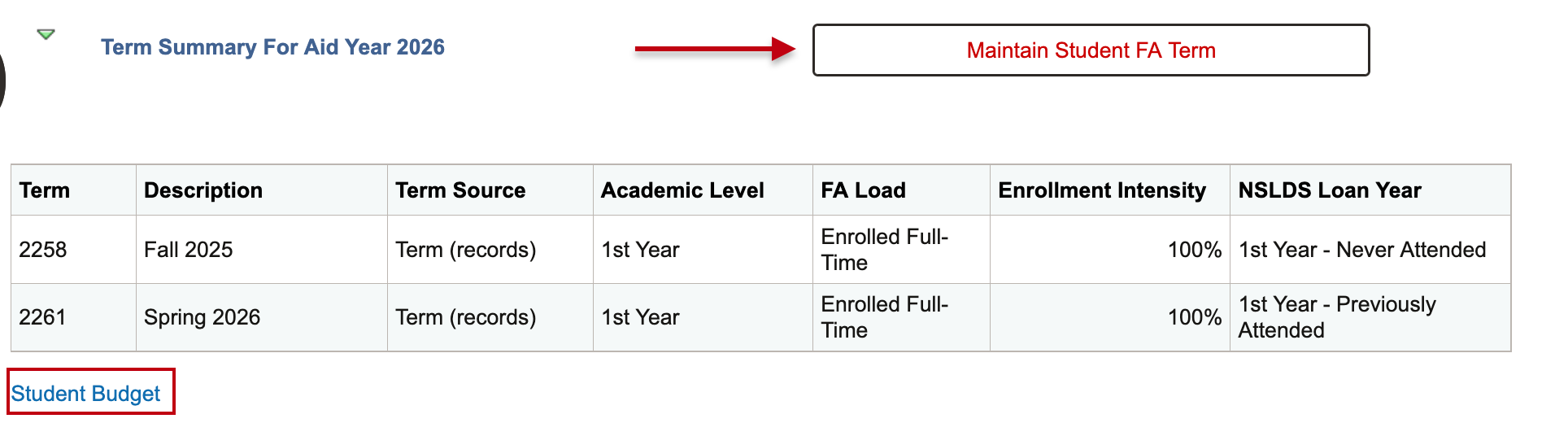
Term Summary for Aid Year
The Term Summary for Aid Year section provides an additional overview of academic related information per term.
TIP! The award data that displays here is associated to the Aid Year selected in the first section. If it seems there is missing or incorrect data, try selecting another aid year in the left panel at the top of the FA tab.

Data in this section includes:
- Term/Description: Indicates the Term and Term Description of disbursement.
- Term Source: Displays the FA build source (i.e., Program, Admissions)
- Academic Level: Student’s Academic Level for that term. (i.e., First Year)
- FA Load: Student’s Financial Aid Load for that term (i.e., Full-Time)
- Enrollment Intensity: A student’s enrollment information, used when calculating Pell Grants.
- NSLDS Loan Year: The loan year according to the National Student Loan Data System (NSLDS)
ADDITIONAL FUNCTIONS IN TERM SUMMARY
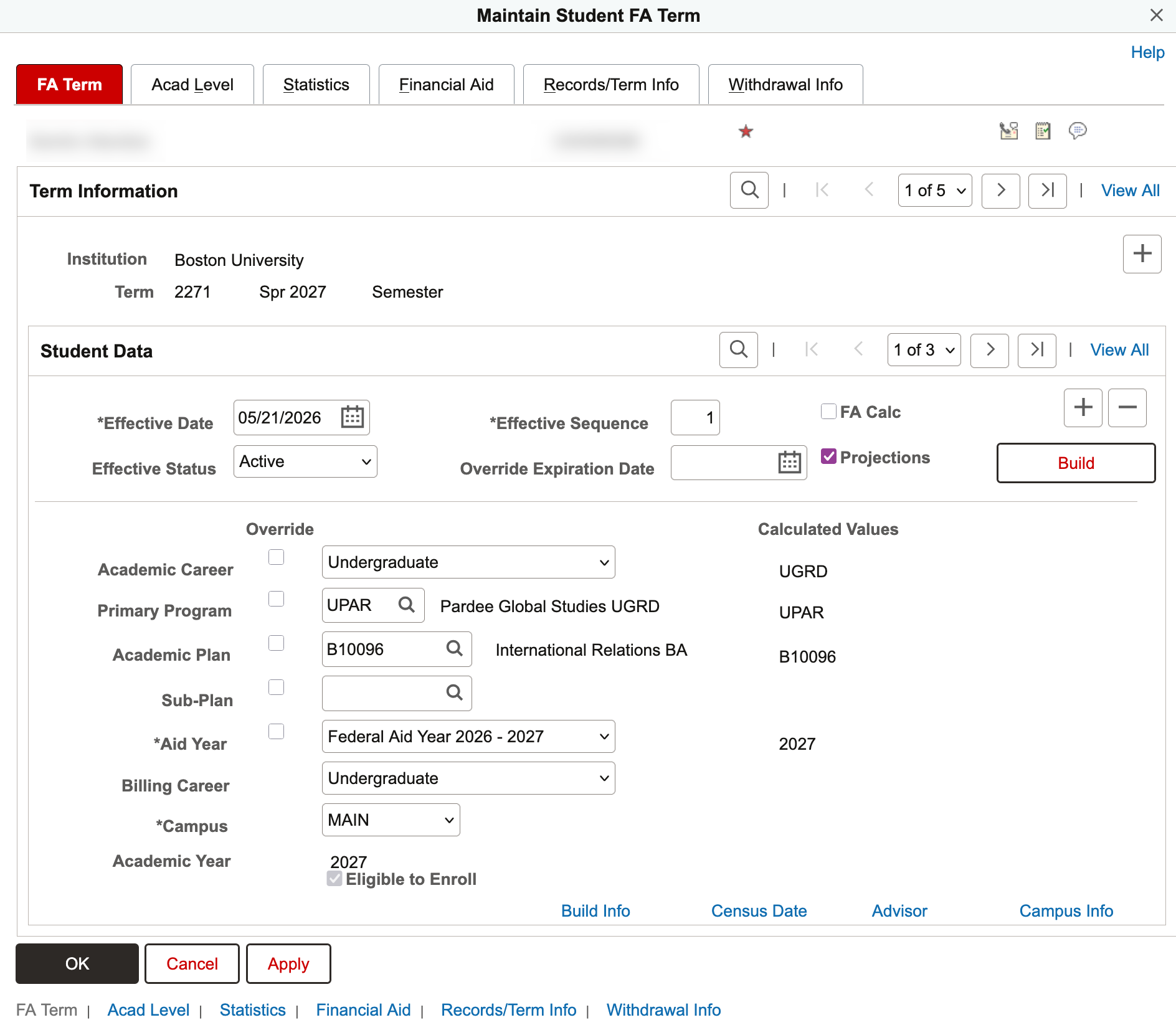
- Maintain Student FA Term: Button above the terms list opens the Maintain Student FA Term page if security has been granted.
The tabs provide details on enrollment, admissions, academic, and financial aid data for the student. This information is important in the awarding processes.

The Maintain Student FA Term page is also utilized as standalone function within MyBU Student (e.g., not only accessed via SSC). Therefore, a comprehensive walkthrough of these page details can be referenced in the View Student FA Term Record resource.
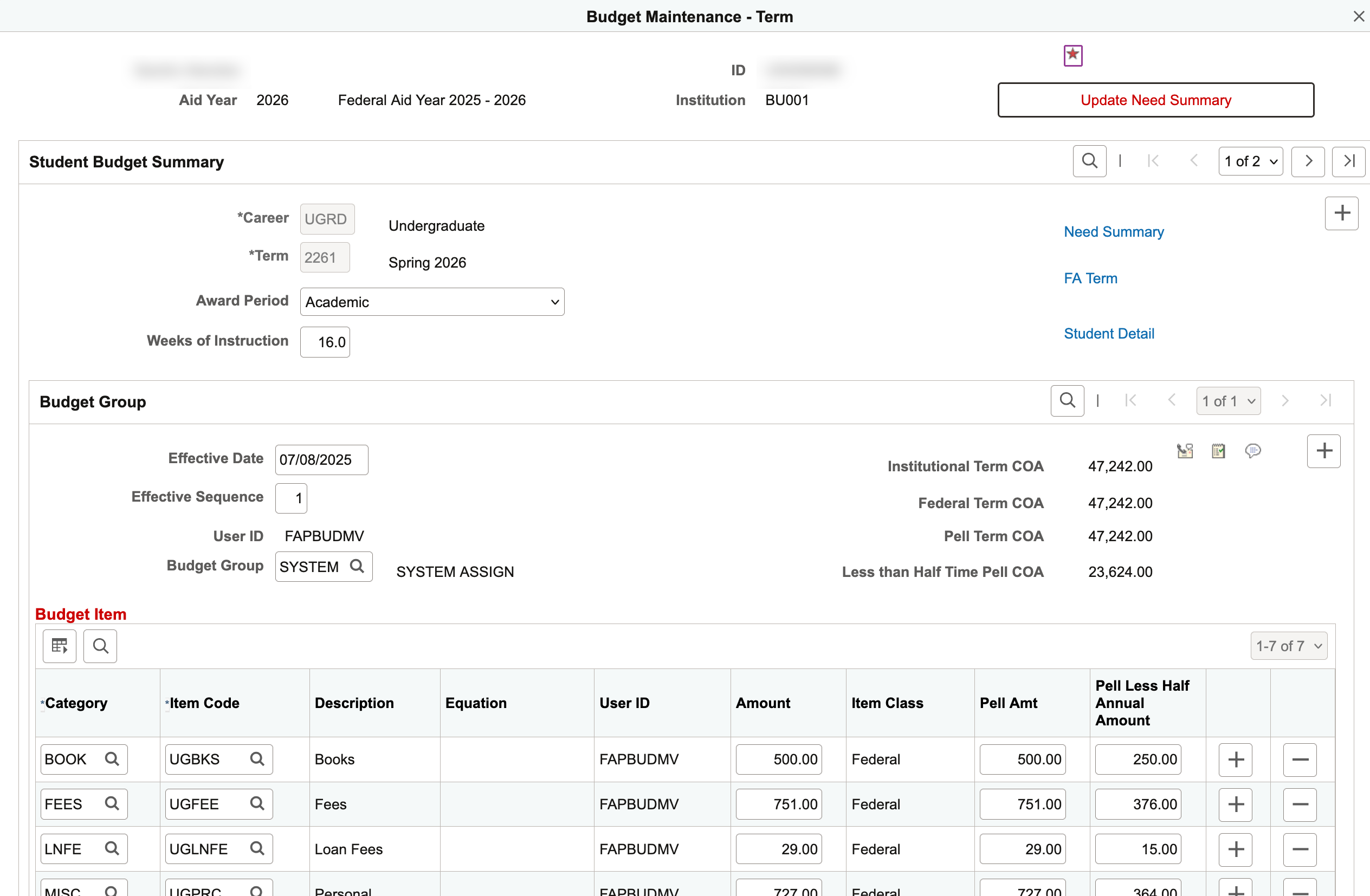
- Student Budget link: Selecting the Student Budget link at the bottom of the page results in the display of the Budget Maintenance-Term page for those with security access.
This page provides details on the student’s annual budget, or cost of attendance, broken down by budget categories.

The Budget Maintenance page is also utilized as standalone function within MyBU Student (e.g., not only accessed via SSC). Therefore, a comprehensive walkthrough of this page can be referenced in the Maintain Student Budgets resource. A resource for a similar, view only page is also available: View Student Budget
Page last updated June 2026. For a PDF copy, print this webpage as a PDF.