Student Services Center – Transfer Credit Tab
This resource explains the various sections of the Transfer Credit tab within the Student Services Center pages in MyBU Student. This resource is for staff across schools and colleges to see student data such as course credit, test credit, and other credit.

Introduction
The Transfer Credit tab in the Student Services Center displays details about types of BU credits awarded, including Course Credit, Test Credit, and Other Credit.
Student Services Center (SSC) consolidates student data from various areas of MyBU Student in one page. Please refer to the Introduction to Student Services Center resource for a general overview, or if detailed instructions are needed for one of the other tabs, please refer to that resource: Student Center, General Info, Admissions, Academics, and Financial Aid.
⚠︎ Screen options and menus will vary by user; please note that displays may differ for you based on access that has been granted. All screens shown are for training purposes only.
Navigation
- Navigate to Student Services Center:
- From the Dashboard left menu, scroll to Student Services Center.
- From the Full Site homepage, navigate to: Compass at top right of Nav Bar > Menu > Campus Community > Student Services Center.
- To find a student, enter the student’s available data in the Find an Existing Value window that displays, and select Search.
- The student’s Service Center page will open. Click the Transfer Credit tab to view available data, based on security.
Course Credit
The Course Credit section displays a table of BU credits awarded for qualified classes completed successfully at non-BU institutions.
MODEL AND STATISTICS TABS
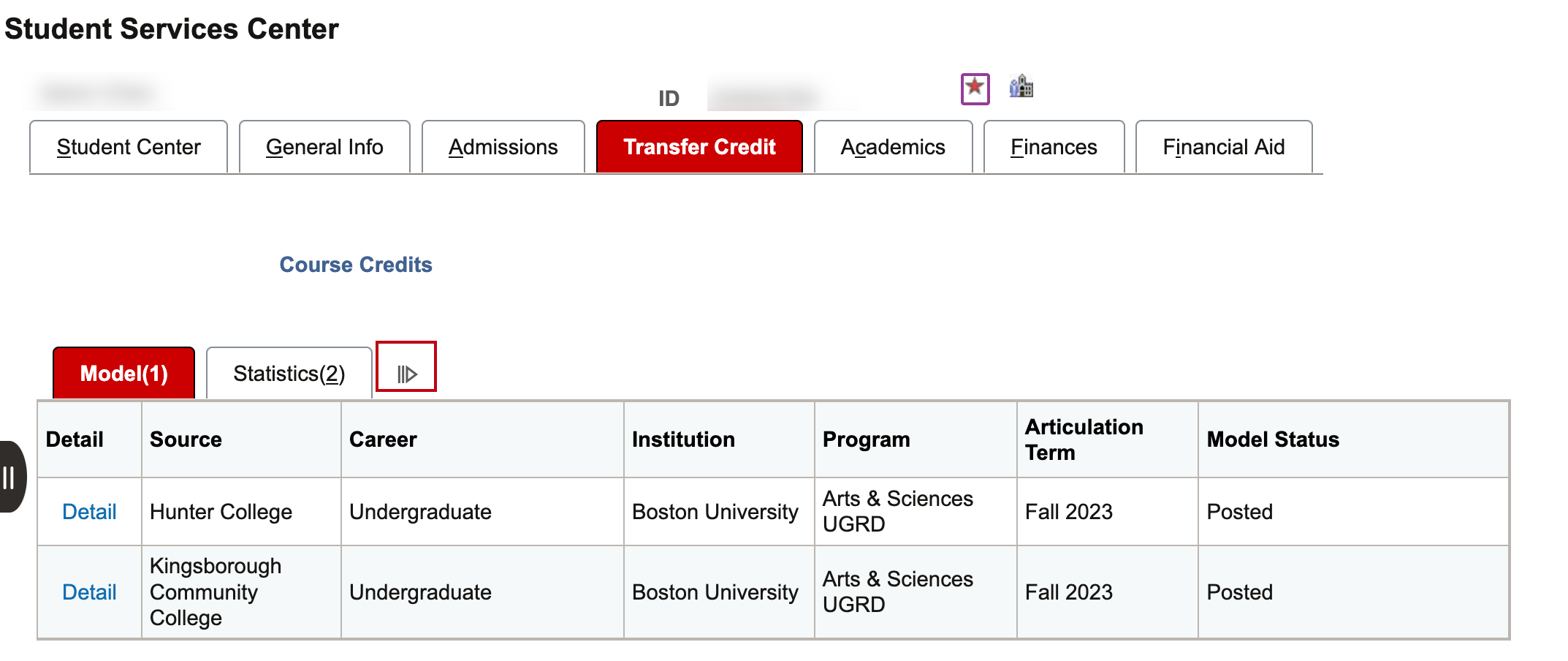
The initial display provides a brief summary on two tabs: Model and Statistics.
TIP! Selecting the double arrows to the right of these tabs opens an extended display that combines all data columns from the Model and Statistics tabs into a single row.

Model tab data:
- Transfer Credit Models: The Course Credits section of the Transfer Credit Tab displays student transfer credits in groups, or “Models.”
- These Models are numbered based on the external institution, the term to which the credits are applied, and the Academic Program (college) in which the student was enrolled at that time.
- In the case above, there is one Model.
- Source: Lists the external institution from which credits have been evaluated.
- Career: Indicates the level of the student at the point the credits were posted to the indicated Articulation Term.
- Institution: Equals Boston University.
- Program: The BU Academic Program or college in which the credits were applied.
- Articulation Term: The term to which the credits were applied. The student should be term activated in this term, for the indicated Academic Program.
- Transfer Credit Model Statuses: Transfer Credit Models can be in Submitted, Completed, or Posted status.
Model tab Statuses:
- Submitted status: the Model has not been Posted, or when there is no credit to post. Examples include non-transferrable courses, or courses earned with a grade less than a C.
- Completed status: the student is not Active at BU (i.e., has not been matriculated), or is not term activated for the Program or Term listed on the transfer Model. Completed status may also indicate an issue with the transfer credit model.
- Posted status: when students are matriculated and term activated for the active Academic Program for the term in which courses were posted.
- TIP! Only credits in Posted status will be visible on Degree Progress Reports and included in credit totals.
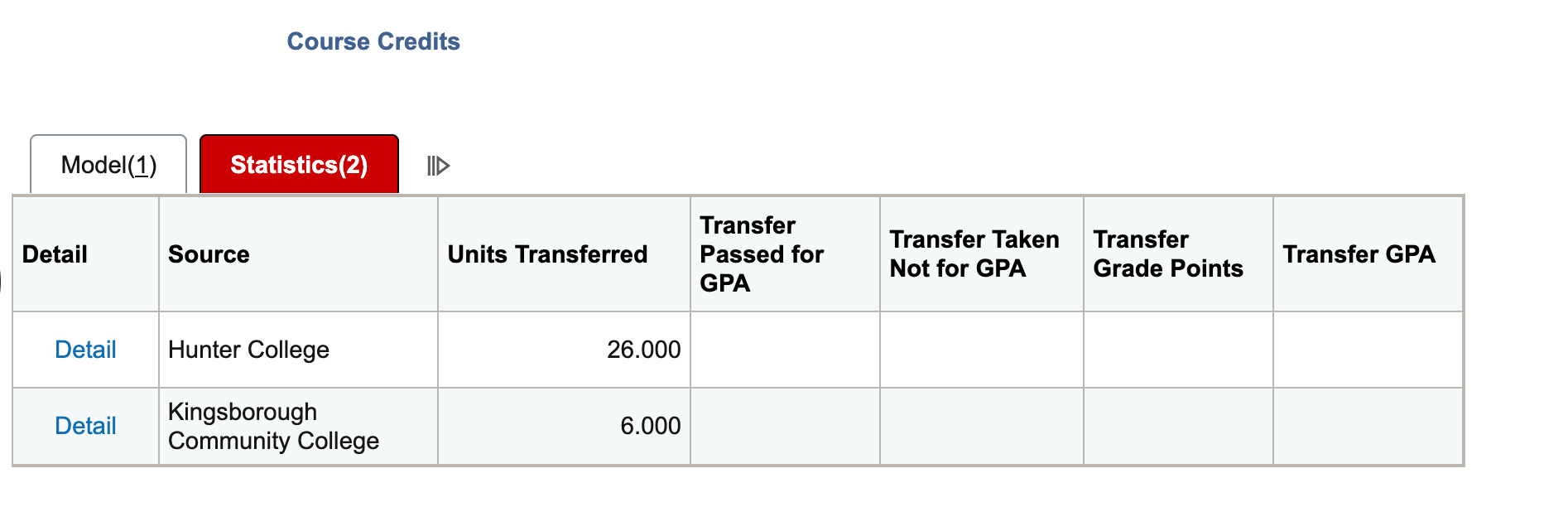
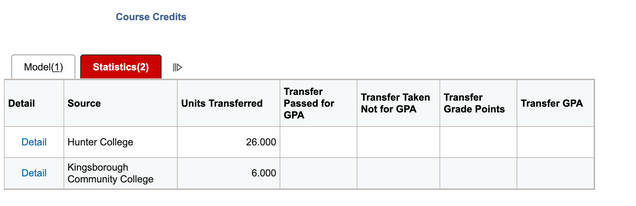
Statistics tab data: Lists Career, Units Transferred, Transfer Passed for GPA, Transfer Taken Not for GPA, Transfer Grade Points, and Transfer GPA.
- The GPA fields will be blank due to BU policy that transfer credit does not contribute toward GPA calculations.
DETAIL
If security permissions allow, additional information on Course Credits can be found by selecting the Detail link on the desired credit.

This action opens a Data Entry for Transfer Credit page, organized into Transfer Course Entry and Course Credits by Term tabs. Access to these pages may be limited, so if staff need additional support, please contact OUR.
- Transfer Course Entry tab:
- Transfer Credit Model section (top of the page): shows rows of high-level information for each Model Number, including the Source (External) Institution.
- Transfer Credit Term section (bottom of the page): shows detailed information about each equivalency including the articulation term, status, Incoming (external) Course, Equivalent (BU) Course, and links to any additional details.
- Course Credits by Term tab: view credit summaries that allow for the following actions, if edit permissions allow:
- Calculate: Calculates the Units Taken and Units Transferred credit amounts.
- Unpost: Unposts a Model, allowing for updates. The model would need to be Posted again once updates have been completed.
- Post: Posts the model.
Test Credit
This section of the Transfer Credit tab page displays BU credit(s) students can earn by successfully meeting requirements on approved exams such as Advanced Placement (AP) and International Baccalaureate (IB).
MODEL AND STATISTICS TABS
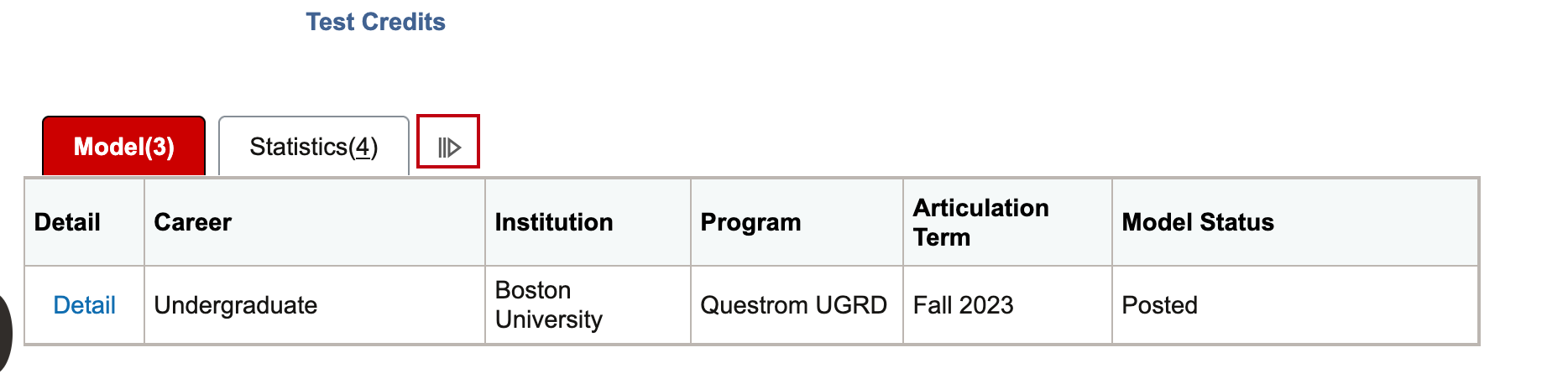
The initial display provides a brief summary on two tabs: Model and Statistics.
TIP! Selecting the double arrows to the right of these tabs opens an extended display that combines all data columns from the Model and Statistics tabs into a single row.
Model tab data:
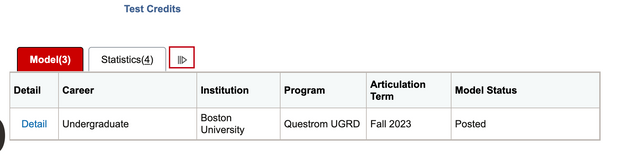
- Test Credit Models: The Test Credits section of the Transfer Credit Tab displays student test credits in groups, or “Models.”
- These models are numbered based the term to which the credits are applied, and the Academic Program (school/college) at BU in which the student was enrolled at that time.
- In the case above, there are three Models.
- Career: Indicates the level of the student at the point the credits were posted to the indicated Articulation Term.
- Institution: Equals Boston University.
- Program: The Academic Program or college in which the credits were applied.
- Articulation Term: The Term in which the credits were applied.
- Test Credit Model Statuses: Models can be in Submitted, Completed, or Posted status. See the previous “Course Credit” section for definitions of the Model statuses.
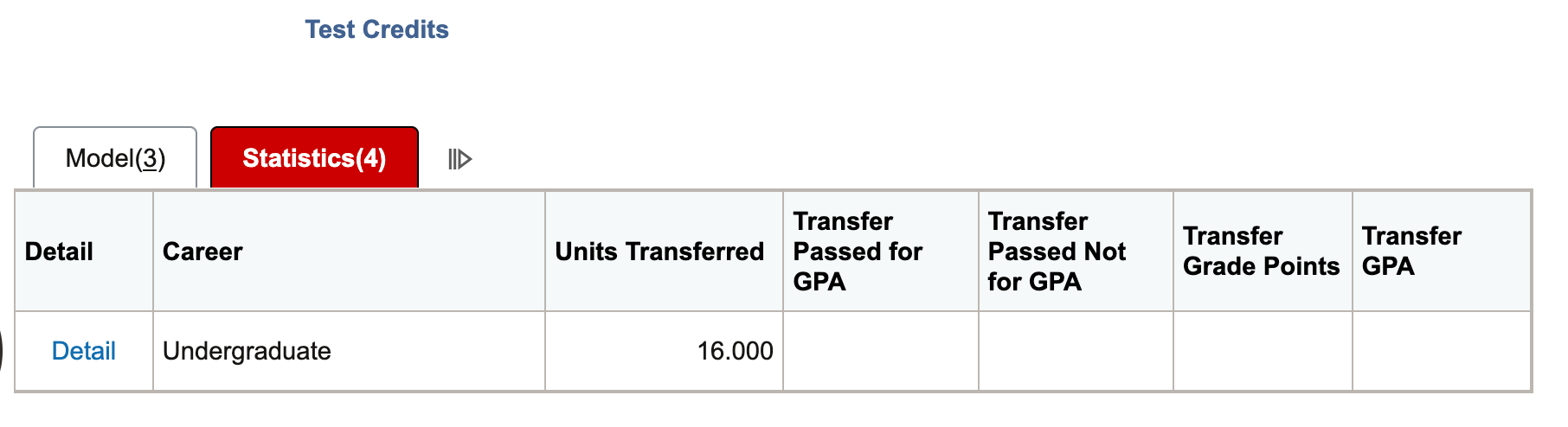
Statistics tab data: Lists Career, Units Transferred, Transfer Passed for GPA, Transfer Passed Not for GPA, Transfer Grade Points, and Transfer GPA.
- The GPA fields will be blank due to BU policy that test credit does not contribute toward GPA calculations.

DETAIL
If security permissions allow, additional information on Test Credits can be found by selecting the Detail link on the desired credit.

This action opens a Test Credits Modeling – Manual page, organized into Test Credit Entry and Test Credit by Term tabs. Access to these pages may be limited, so if staff need additional support, please contact OUR.
- Test Credit Entry tab:
- The rows at the top of the page show the high-level information for each Model Number.
- The bottom part of the page shows detailed information about each equivalency including the articulation term, status, Test ID, Test Component, Equivalent BU course, and links to any additional details.
- Test Credit by Term tab, view credit summaries that allow for the following actions:
- Calculate: Calculates the Units Transferred credit amounts.
- Unpost: Unposts a Model, allowing for updates. The model would need to be Posted again once updates have been completed.
- Post: Posts the model.
Other Credit
Other Credit functionality is typically used as credit for life experiences and portfolios. BU is considering if this functionality may be leveraged. The general structure is comparable to the Test Credit description above.
Page last updated June 2026. For a PDF copy, print this webpage as a PDF.