Student Services Center – Academics Tab
This resource explains the various sections of the Academics tab within the Student Services Center pages in MyBU Student. This resource is for staff across schools and colleges to see student record data such as career/program/plan/subplan, as well as term related data.

Introduction
The Academics Tab in the Student Services Center compiles a significant amount of student data including Student Career(s), Program(s), Plan(s), and Subplan(s) of enrollment (also known as the “Program/Plan Stack”); and Term Data, statistics, class enrollment, and Term and Cumulative course and GPA statistics.
For most staff, this data is view only. Use the Enrollment or Program/Plan Workflows to enter change requests. Refer to the resources for these processes: Enrollment Workflow or Program/Plan Workflow Requests.
Student Services Center (SSC) consolidates student data from various areas of MyBU Student in one page. Please refer to the Introduction to Student Services Center resource for a general overview, or if detailed instructions are needed for one of the other tabs, please refer to that resource: Student Center, General Info, Admissions, Transfer Credit, and Financial Aid.
⚠︎ Screen options and menus will vary by user; please note that displays may differ for you based on access that has been granted. All screens shown are for training purposes only.
Navigation
- Navigate to Student Services Center:
- From the Dashboard left menu, scroll to Student Services Center.
- From the Full Site homepage, navigate to: Compass at top right of Nav Bar > Menu > Campus Community > Student Services Center.
- To find a student, enter the student’s available data in the Find an Existing Value window that displays, and select Search.
- The student’s Service Center page will open. Click the Academics tab to view available data, based on security.
Institution/Career/Program Section
The Institution/Career/Program section displays a view of the student’s Program/Plan stack. It shows the student’s current Career(s), College(s), Plan(s), and Subplans(s). The record information displaying here is the student’s current Program/Plan/Subplan based on today’s effective date (data for historical rows is not displayed).
A hierarchical outline of the student’s Career(s) and Program(s) displays on the left. The selection on the left dictates the related Program/Plan information on the right. When students are in multiple Careers or Programs, all will display in this hierarchy.
- In the example below, the student is in two Careers (NOND and UGRD), two Programs (UCAS and UCOM), and two Majors (Philosophy BA and Advertising BS).
Please refer back to the following images to review the content layout for this section of the Academics tab.
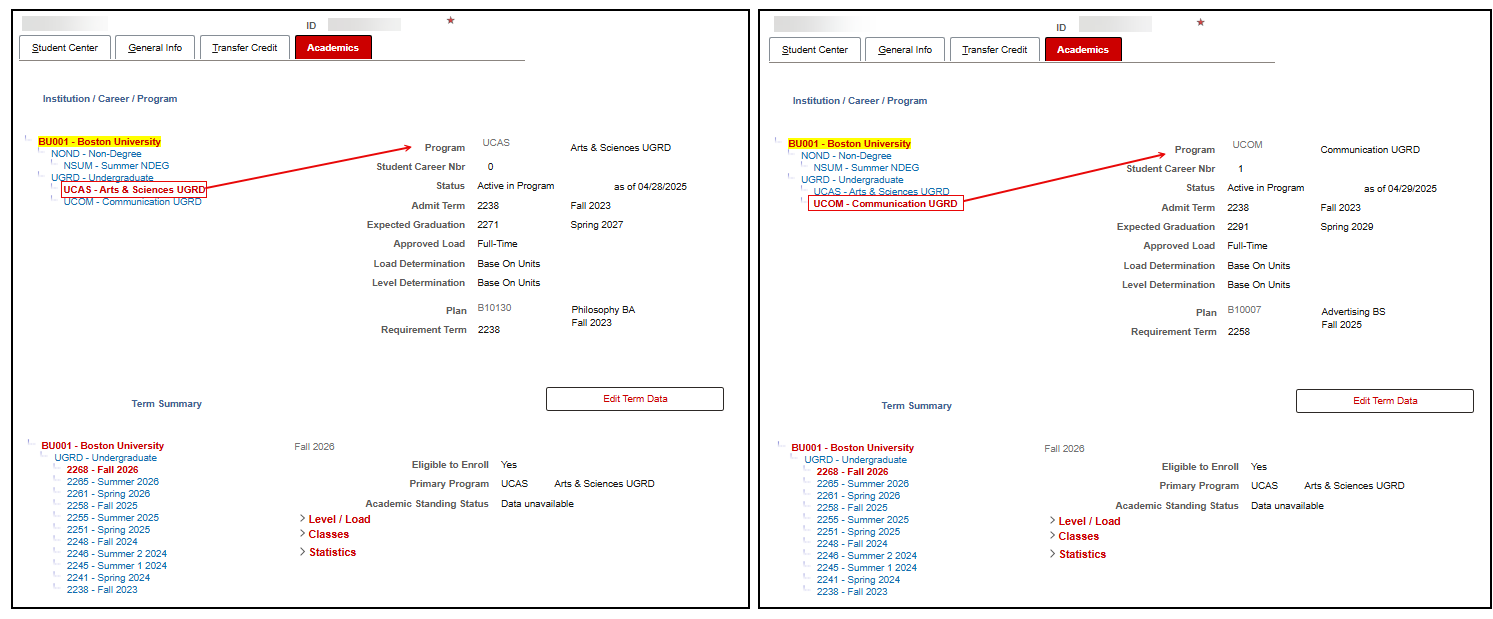
For the selected Career/Program, the following associated record data will display on the right:
- Student Career Nbr (CAR#): Assigned to a Program/Plan(s) combination, per Career.
- The first Career Nbr created typically begins with Career Nbr = 0 and increments by 1 for each addition. It’s possible the first Active CAR# may not be 0; there will be times that the Program/Plan that was added first was since discontinued.
- CAR# does NOT mean “number of careers,” as illustrated by Example #2 in the table below.
| Example | CAR Nbr(s) |
|---|---|
| 1. Student in one UGRD Academic Program and one GRAD Academic Program (in same or sequential terms) |
|
| 2. Student in two different UGRD Academic Programs |
|
| 3. Student in one major and one minor |
|
| 4. Student in two majors in the same Academic Program | UCAS: CAR #0—would include both majors since both are offered by the same Academic Program |
- Status/As of Date: References the student’s Program/Plan status as of the effective date listed.
- Examples include Active, Leave of Absence, Discontinued, Suspended, Dismissed, Cancelled, Completed.
- Since the Program/Plan stack is effective dated, the “As of” date could be any day of the year.
- When a date is in the future (i.e., Return from Leave of Absence), the Status of that row will not display until that future date.
- Admit Term: The Term a student is admitted to BU.
- The Admit Term should remain the same and continue to reflect the Admit Term to the university when students change into new programs or majors.
- Expected Graduation: An estimate of the term in which a student will graduate.
- Approved Load: References the number of units/credits (i.e., Full-Time, Part-Time) a student has been approved to schedule.
- The Approved Load value is determined during the initial admissions application and the value can be changed.
- When requesting a change to the Approved Load, determine if the change is for the entirety of the student’s Career or if it’s just for a particular Term. If it is a change at the Career level, submit a workflow request. Review the Approved Academic Load Updates: Request by Staff resource for instructions.
TIP! Approved Load in the Career/Program section of the page indicates the load at the Career level. It’s possible to have a different Approved Load amount for a specific Term.
- Load Determination: Academic Load can be calculated based on Units or Term Progression, per Career. This references how the student’s actual academic load is calculated—this does not reference their ‘approved’ academic load.
- Level Determination: Academic Level determination is calculated based on Term Progression, per Career.
- Requirement Terms: Used in coding Degree Progress Reports (i.e., Academic Requirements, degree audits, What-If reports). They reference the term for the curriculum version students must follow in order to graduate.
- Students are assigned Career, Program, Plan, and Subplan (when relevant) Requirement Terms.
- The Academics tab shows the Plan Requirement term below the Plan value, and when a student is in a Sub-Plan, the Sub-Plan Requirement Term below the Sub-plan value.
- Program, Plan, and Sub-Plan links: For those with access, these links open a new tab to display the foundational academic structure tables related to the setup of those areas.
Editing Program Data
Users with the security to update Student/Program Plan pages will be able to access those pages by clicking the Edit Program Data button. Permissions for this access are limited. To submit changes, most department administrators can use the relevant workflow functionality. Please refer to the Records/Enrollment Changes: Choosing the Right Process resource to determine the appropriate steps.
Term Summary Section
The Term Summary portion of the Academics tab provides detailed information regarding coursework and corresponding credit and grade information. It is divided into four sections: Term Data, Level/Load, Classes, and Statistics. To help focus a view on particular data, the red section headers are collapsable by clicking the arrow.
The top part of the Term Summary section displays terms for which a student has been Term Activated. Term Activation is the process for creating a term record for a student, allowing them the ability to enroll in that term.
Select the desired term on the left to see related term and cumulative data on the right (similar to how the career/program/plan information at the top of the page displays). In the example below, Spring 2026 is selected.
Please refer to the following image to review the content layout for this Term Summary section of the Academics tab:
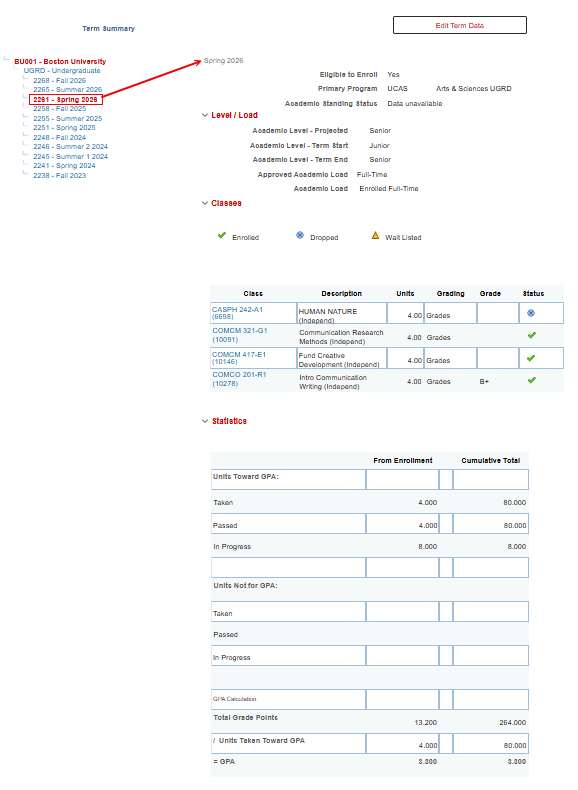
Users with the security to use the Term Activation page will be able to access by clicking the Edit Term Data button. Permissions for this access are limited and individual Term Activation should only be needed occasionally. To submit, use the Student Academic Record Change form under the MyBU Student ‘Manage Workflow’ menu – selecting ‘other’ as the request type.
LEVEL/LOAD
Level / Load information is populated in this section.
- Academic Level indicates the “year” of the student (i.e., 1st Year; Sophomore). Please refer to the values that BU has implemented:
| # of Terms | Academic Level Code | Academic Level Description |
|---|---|---|
| 1 – 2 | U1 | First Year |
| 3 – 4 | U2 | Sophomore |
| 5 – 6 | U3 | Junior |
| 7 and greater | U4 | Senior |
- Academic Load indicates the number of units in which a student can be enrolled (i.e., Full-Time; Part-Time).
- Academic Level-Projected: The anticipated academic level at the start of the term. This field is used for enrollment requirement checking, tuition calculations, and enrollment appointment assignments.
- Academic Level-Term Start: The academic level at the beginning of the term based on term progression. This value displays for:
- Students: Enrollment Dates page.
- Advisors: Student Details page.
- Faculty: Class Roster page.
- Academic Level-Term End: The Academic Level at the end of the term based on term progression.
- Approved Academic Load: References the units a student is approved to take (i.e., Full-Time; Part-Time)
- Academic Load: References the units in which a student is actually enrolled. (i.e., Full-Time; Part-Time)
TIP! Approved Load in the Term section of the page indicates the load for the Term selected (indicated in the left set of links). It’s possible to have a different Approved Load at the Career level.
- When a student is Term Activated each term, their Approved Academic Load amount for that Term will pull from what has been defined at their Career/Program level. It will not look to the value that was approved for the previous Term (it may be the same, but the new Term will only be looking at the Career value).
- When requesting a change to the Approved Load, determine if the change is for the entirety of the student’s Career or if it’s just for a particular Term.
Approved Academic Load for the Term dictates the Bill amount and is referenced by many integrations.
CLASSES
The Classes section displays the Enrolled, Dropped, and Waitlisted classes for the selected term. The image below illustrates graded classes enrolled in a prior term (Fall 2025), where the status = Enrolled.
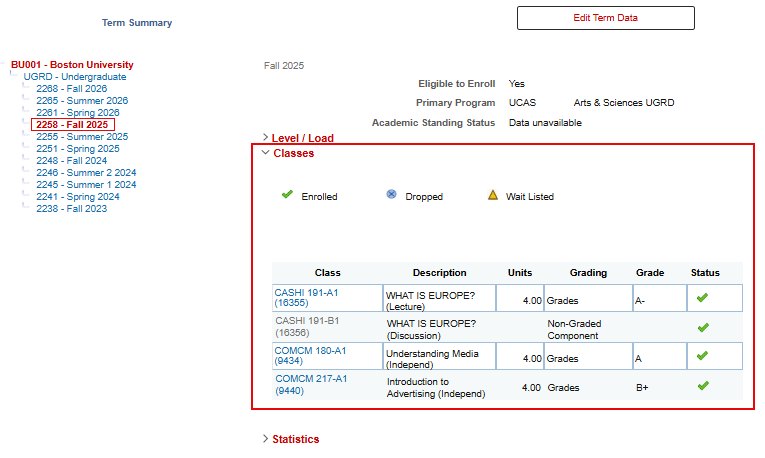
Reminder: to help focus a view on particular data, the red section headers are collapsable by clicking the arrow, as illustrated with the collapsed Level/Load above.
Details and functions available in the Class section table:
- Class: Lists the Subject, Catalog Number, Section, (Class Number). When a class has multiple components, the non-graded component will be listed below the primary section, as illustrated below.
- Description: Description of the class with component in parenthesis after the description. (i.e., Lecture, Lab, Discussion)
- Units: Number of credits
- Grading: The Grading Basis. Converted records will list Conversion/Historical. Other examples include Graded, Non-Graded Component, Audit, and Transfer.
- Grade: Once a grade is earned it will be populated here.
- Status: A green checkmark = Enrolled. A blue circle with an x = Dropped. A yellow triangle = Wait Listed. See image of complete Classes section above for view of these icons at the top of the section.
- Selecting the Class link results in a view of that class section in Class Search.
The Quick Enroll link at the bottom of the page allows access to the Quick Enrollments functionality with appropriate security. Permissions for this access are limited and quick enrollment should only be needed occasionally. Please submit a ticket if appropriate.
STATISTICS
The Statistic section displays the Term and Cumulative credit and GPA calculations relevant for the selected term, grouped by BU enrollments or transfer credit.
Details and functions available in the Statistics section table:
- Units Toward GPA:
- Taken: Units carrying grade points that have been attempted.
- Passed: Units carrying grade points that have been passed.
- In Progress: Units carrying grade points that are in progress and have not yet been graded.
- Units Not for GPA
- Taken: Units not carrying grade points that have been attempted.
- Passed: Units not carrying grade points that have been passed.
- In Progress: Units not carrying grade points that are in progress and have not yet been graded.
- Transfer Units
- Total number of transfer units (transferred course, test, and other credit) applied a term, and cumulatively.
- Per BU policy, transfer units do not apply to GPA.
- GPA Calculation
- Total Grade Points: Calculated by multiplying number of credits times the grade points attached to the grade earned.
- /Units Taken Toward GPA: The Total Grade Points value is Divided by the Units Taken Toward GPA to result in the GPA line below.
- = GPA: Calculated Term and Cum GPA values.
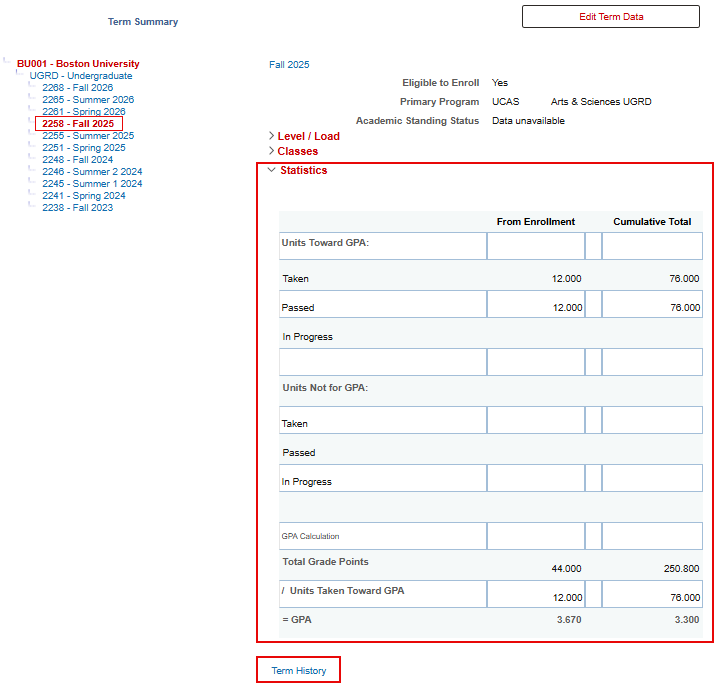
The Term History link at the bottom of the page allows access to the Term History page with appropriate security.
Related Resources
Page last updated June 2026. For a PDF copy, print this webpage as a PDF.