View a Student Budget
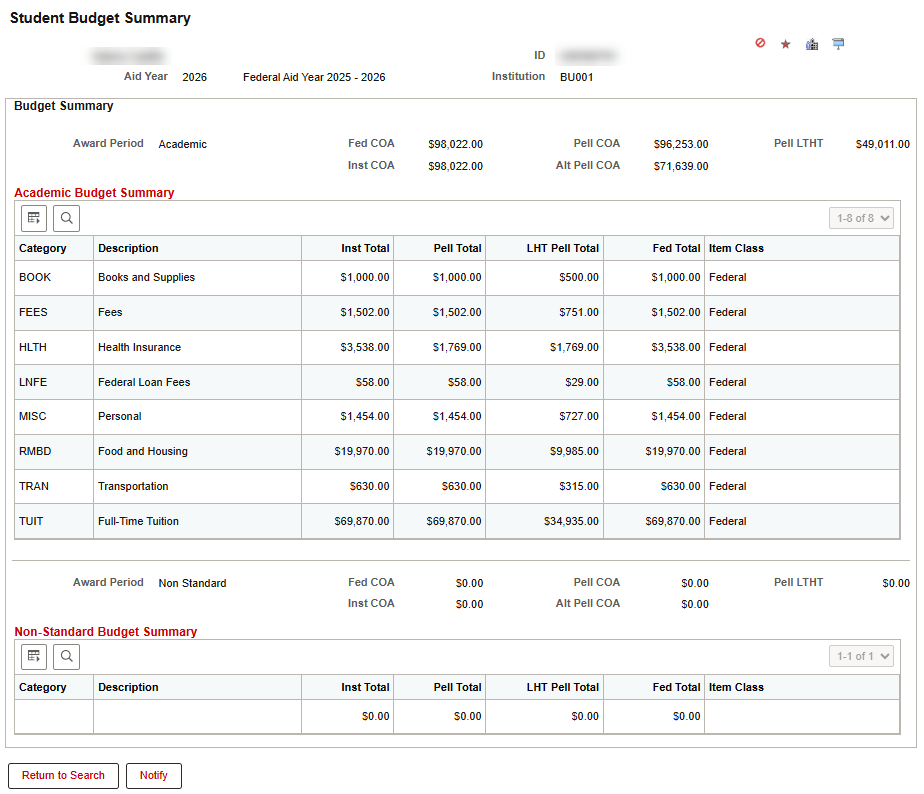
The Student Budget Summary page in MyBU Student allows staff users to view a student’s annual budget/cost of attendance broken down by budget categories. This training resource assumes that the user understands the budget process and the various categories that are used to build a student’s budget/cost of attendance.
Staff will assess awards and budget calculation in multiple use cases, including:
- The student has requested a new loan or an increase to an existing loan
- The student has appealed a financial aid award
- The student is using a Consortium Agreement
Navigation (Full Site): Financial Aid > Budgets > View Student Budget Summary
- Search for the student by entering their UID and the applicable aid year.
- Users may also search by entering the student’s National ID (SSN), and/or Last Name/First Name, if UID is unknown.
- If UID was entered into the search, the Student Budget Summary page will load automatically. Otherwise, select the student from the search results to open the Student Budget Summary page.
- On the Student Budget Summary page, the student’s COA data for the selected aid year will display. The Academic Budget Summary section provides a breakdown of Budget Item categories (e.g., Books and Supplies, Fees, Health Insurance, Food and Housing, Transportation) and the assigned amount based on student eligibility.
- TIP! Click on a column header to sort the table by that column.
- If a non-standard award period applies, budget details for that period will appear below the Academic Budget Summary section.

ⓘ NOTE: This resource includes information related to Federal Financial Aid policies which are liable to change. Staff maintaining this documentation will update terminology, links, or processes in accordance with new information as it becomes available in conjunction with Student Information System updates. The information here identifies salient details regarding the usage of MyBU Student and is designed to be used in conjunction with Financial Aid Procedures and Processes.
This page was last updated April 2026. To download a PDF copy of this resource, print this webpage as a PDF.
