Records/Enrollment Changes: Choosing the Right Process
The process for completing a records or enrollment update related change for a student is dependent on several factors. The information below encompasses common scenarios staff may encounter.
NAVIGATION
Several types of records and enrollment changes are accessed via the MyBU Student Dashboard > Left Menu > Manage Workflow folder.
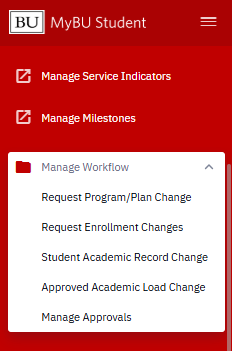
- Links to available Workflow request resources are provided in the table below.
- For guidance on the Manage Approvals option, please refer to the Approve Enrollment Workflow Requests resource.
PROCESS DEPENDENCIES
The process for completing a records or enrollment related change for a student is dependent on:
- Type of update needed: Common scenarios are addressed in the table below. Some are self-processed through MyBU Student Workflow; others are directed to ServiceNow as a manual processing request ticket.
- Security status: Proper security is needed to enter change requests; access will vary by user. Workflow requests from users without approver status are typically routed to department approvers for processing.
- Timing of request: Process choice depends on whether the request is for a current/future term or for a past term. Refer to guidance in the table below for current/future requests. For requests for past terms, use Manage Workflow > Student Academic Record Change.
CHOOSING THE RIGHT PROCESS
ⓘ NOTE: The table’s center column identifies the MyBU Student Workflow processes appropriate for current/future terms. Remember: to request changes for past terms, use Student Academic Record Change instead.
| Change / Update | How to Request/Process Change in MyBU Student | Resources / More Details |
|---|---|---|
| Approved Academic Load Changes to enrollment status (e.g., full-time, part-time) |
Approved Academic Load Change | Approved Academic Load Updates: Request by Staff |
| Enrollment Requests Adding, dropping, swapping, auditing, pass/fail, etc. |
Request Enrollment Changes | Enrollment Workflow: Request by Staff |
| Bulk Enrollment Requests For 25+ enrollments not entered via Workflow |
Student Academic Record Change | Request opens a ServiceNow ticket. Contact registrar@bu.edu for the request template. |
| Expected Graduation Term Change Move up or defer expected graduation date |
Request Program/Plan Change | Program/Plan Workflow Requests |
| Grade Changes Only for changes made outside grade change window (i.e., only after the end of the term following the term for which the grade change is needed) |
Student Academic Record Change | Faculty make grade changes in the Class Roster until the end of the following term (e.g., last day of Spring for a Fall class grade change). Direct Faculty to Grade Changes resource for guidance. |
| Inactivate Student LOA (grad students only), suspension, dismissal |
Request Program/Plan Change | Program/Plan Workflow Requests NOTE: All undergraduates should initiate LOA requests through the MyAcademic Guide agent on the Student Portal. |
| Reinstatement Reinstate student for term (e.g., return after discontinuation or withdrawal) |
Student Academic Record Change | Request opens a ServiceNow ticket |
| Plan/Subplan Changes Add, remove, update major/minor/duals or concentration/specialization |
Request Program/Plan Change | Program/Plan Workflow Requests |
| Program Changes Change primary academic program (undergrad only) |
Request Program/Plan Change | Program/Plan Workflow Requests For grad student program changes, use Graduate Program Change Form. |
| Requirement Term Changes Changes to catalog year-associated degree requirements or conditions student must fulfill |
Request Program/Plan Change | Program/Plan Workflow Requests |
| Study Agreements Update or request new special program code |
Student Academic Record Change | Request opens a ServiceNow ticket |
| Student Groups Update or request new student groups |
Self-processed in MyBU Student; varies by Group. | Student Groups. Refer to List & Managing College/Dept file for details on Group list responsibility. |
| Service Indicators Update or request new holds |
With access, self-processed in MyBU Student | Service Indicators (includes list of SIs that require contacting OUR or other administrators for removal) Credit Overload Tuition Process |
OTHER PROCESSES
- Email registrar@bu.edu if staff need to verify/clarify self-service processes with OUR.
- ⓘ NOTE: This email is not to submit records/enrollment change requests. No record change requests will be processed from this email address.
- Students should not use this email address to request record changes. Please direct students to contact appropriate school/college staff for assistance.
- Term Activation Request:
- Should only be needed on occasion.
- Use Manage Workflow > Student Academic Record Change and select Other from Request list.
- Graduate Students Exception:
- For incoming Grad students before the Term, school/college administrative staff enter Program/Plan changes.
- Manage Workflow > Request Program/Plan Change can be used once Term starts.
This page was last updated August 2026. To download a PDF copy of this resource, print this webpage as a PDF.
