Program/Plan Workflow Requests
This resource outlines the steps required for staff to enter Academic Program/Plan Requests for certain changes to a student’s academic record. This includes actions such as changing plans/subplans, graduation term changes, requirement term changes, inactivating a student, and withdrawing graduation applications to defer graduation.


Introduction
A Workflow procedure is required to request (i.e., initiate) the processing of certain changes to a student’s academic record in MyBU Student. Schools and Colleges staff can request/initiate specific changes to a student’s Program/Plan such as:
- Expected graduation term change.
- Leave of Absence (LOA), suspension, withdrawal, and dismissal.
- Program and plan/subplan changes.
- Requirement term changes.
- Request an exception (not covered in depth here).
- Withdraw graduation application to defer graduation.
There are other methods of requesting changes; the type of change needed will determine the process required to submit that request. Please refer to the Academic Records/Enrollment Changes: Choosing the Right Process resource for those details.
Some types of change requests will only require department/school/college review and approval. If the requesting staff member also has approver status, the system will automatically process and complete those types of changes at the time of submission. Other types of change requests are routed from the requesting department to OUR because a manual process not accessible to school/college staff is required to record the change, and/or external review and approval may be necessary.
For more details about the processing and approval routes applied to each type of change request, refer to the Workflow Approval Information section below.
⚠︎ Screen options and menus will vary by user; please note that displays may differ for you based on access that has been granted. All screens shown are for training purposes only.
Navigation
- Log into MyBU Student and navigate to the Dashboard.
- In the left Menu, click the Manage Workflow tab and select Request Program/Plan Change from the menu.
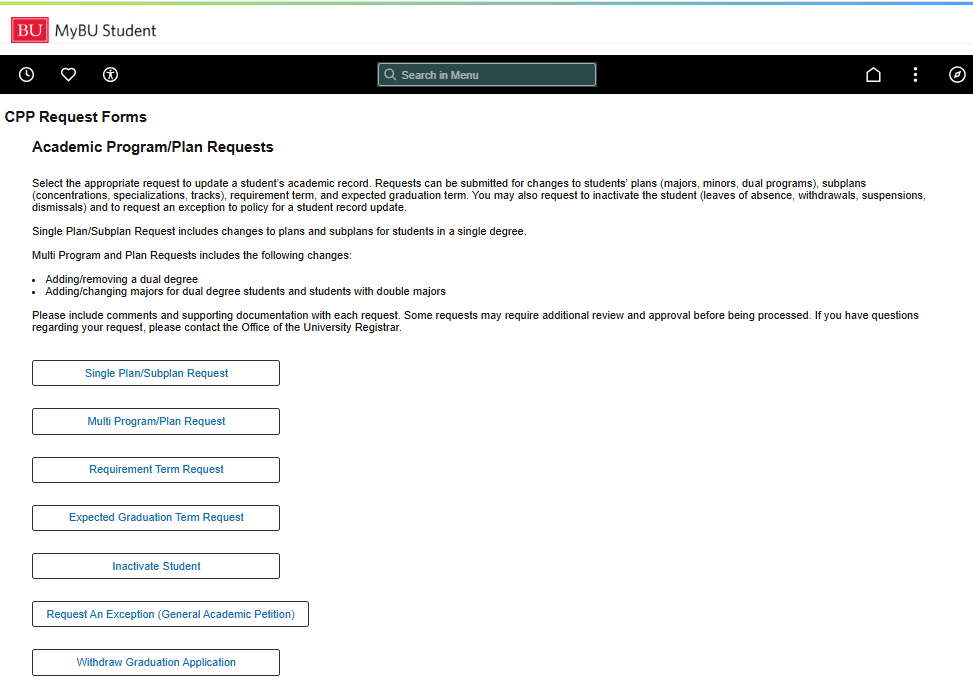
- The Academic Program/Plan Requests – CPP Request Forms page opens. It provides a summary of the form at the top and a list of request type options at the bottom.

- Click to select the type of request required, choosing from:
- Single Plan/Subplan Request: To change plans and subplans for single-degree students.
- Multi Program/Plan Request: To add/remove a dual degree or add/change majors for dual-degree students and students with double majors.
- Requirement Term Request: To change the term for which a certain degree requirement or other condition must be fulfilled by the student.
- Expected Graduation Term Request: To change the term a student is expected to graduate; applies to students NOT currently progressing through the auto-graduation process (has a degree checkout status).
- Inactivate Student: For cases of Leave of Absence (LOA), withdrawal, suspension, or dismissal.
- Withdraw Graduation Application: For withdrawing and deferring a graduation application; includes setting a new expected grad term date. This ONLY applies to students already progressing through the auto-graduation process (has a degree checkout status).
To learn how to view an existing request, refer to the View the Status of a Request section below.
Entering Change Requests: Initial Steps
After navigating to a specific request form type (as explained above), all types of change requests in this Workflow follow the same initial steps (see numbers 1 – 3 in the list below). Learn the initial steps in this section, then continue to the individual form instructions for more details about information required for specific form types.
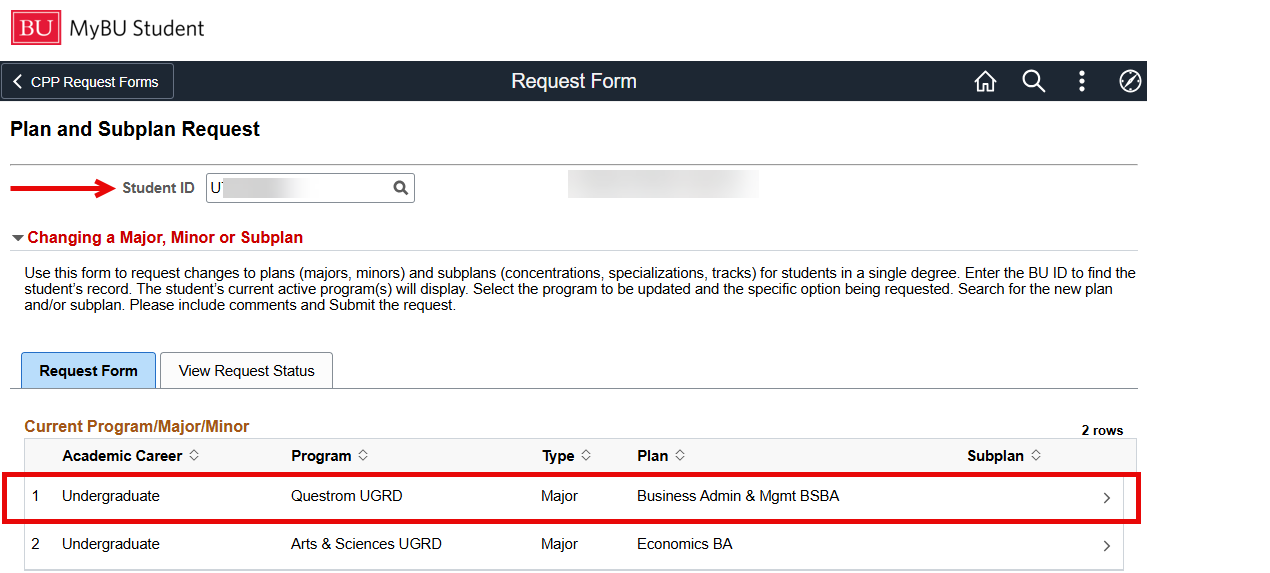
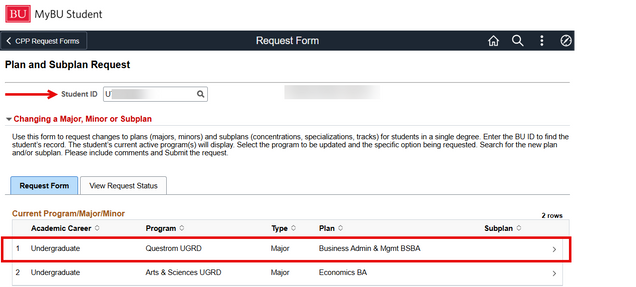
- Upon opening the needed Request Form, enter the Student ID. Their name will populate.
- Review the instructions provided at the top of the form page; these will be specific to the type of request that was selected.
- The Request Form tab should default with the student’s available Career and Program/Plan information. There may be multiple options listed.
- In the Current Program/Major/Minor section, click on the row for which the change is being requested.
- See Auto-graduation & Degree Checkout Status Impacts section below for information about an error message that may appear at this point.
At this point, required information varies by the type of change request being entered. For instructions on next steps, proceed to the relevant section(s) below.
ⓘ NOTE: It is important to include comments and supporting documentation with each request. Also note that some requests may require additional review and approval before being processed. See the tables in the Workflow Approval Information section below for more details.
AUTO-GRADUATION & DEGREE CHECKOUT STATUS IMPACTS
If the student‘s record currently has a graduation/degree checkout status (for those progressing through the auto-graduation process), clicking on the row to start a change request (explained in Step 3 above) will result in an error message, as shown below.

 This error message will appear for all change requests with the exception of “Withdraw Graduation Application,” which does include the updating of the expected grad term date. Using the “Expected Graduation Term Changes” option for students with a degree checkout status will not process and will also receive this error message.
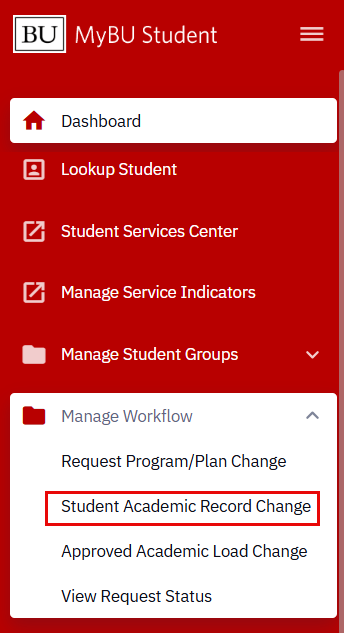
For change requests that generate the error message, the requested update will not proceed, and the request to change the student’s record must be submitted as an academic record change: navigate to Dashboard > Manage Workflow > Student Academic Record Change to begin this process.
Single Plan/Subplan & Multi Program/Plan Requests
For both form types, follow the Initial Steps 1-3 as explained above. Then:
-
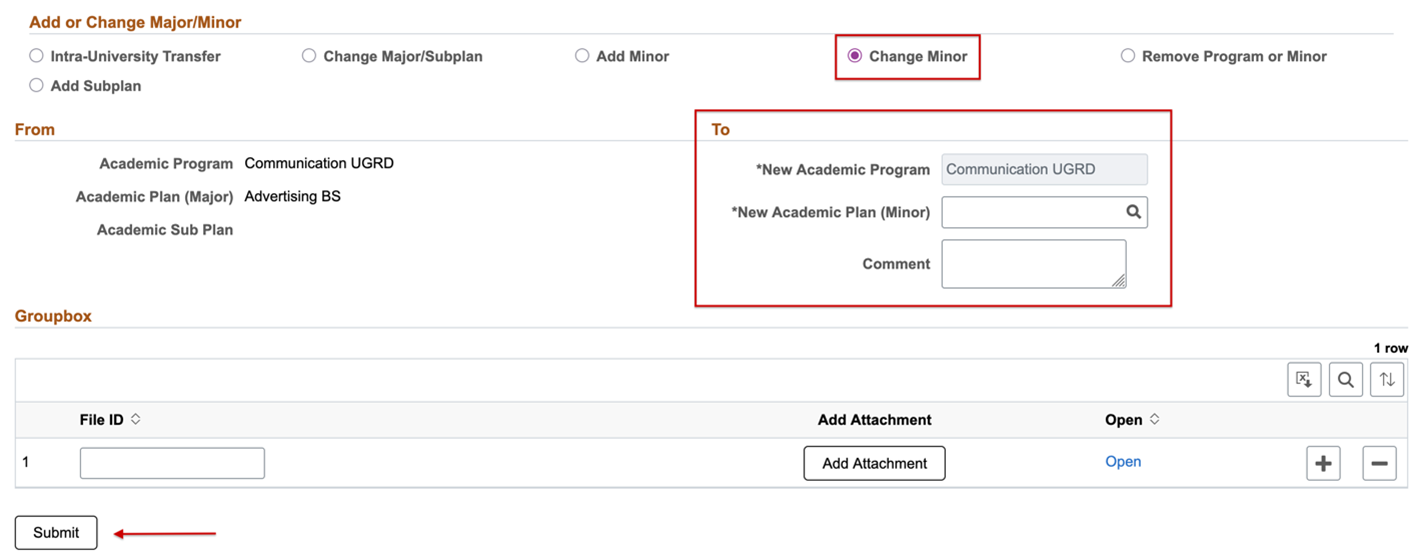
- From the Add or Change menu, select the type of change needed, noting that options vary by form type:
- Intra-University Transfer
- Change Major/Subplan
- Add Minor
- Change Minor
- Remove Program or Major/Minor
- Add Subplan
- Remove Plan
- Add a Major
- Double-check details in the From section (on the left).
- This section summarizes the student’s current status. This is the information that will be changed once the request has been approved and processed.
- Complete all required information in the To section (on the right).
- Enter the data or perform a lookup to search for the new values.
- Any details that cannot be changed are automatically populated and grayed out.
- Enter Comment and Attachments.
- Click Submit.
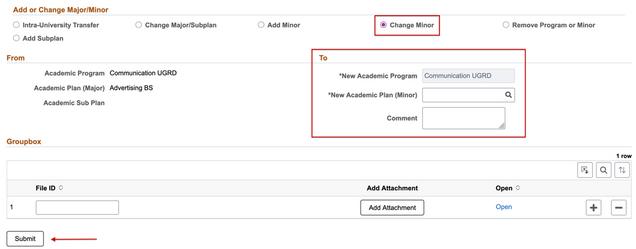
ⓘ NOTE: The fields that display will vary slightly based on the Add or Change menu selection. To review all requirements for each type of change, refer to the tables in the Plan/Subplan Field Requirements section below. The image above provides an example of what displays with the Change Minor selection.
- In the pop-up that appears, indicate whether another request will be submitted at this time.
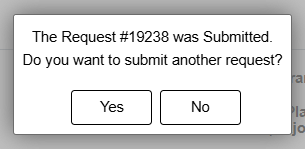
- Click “Yes” to return to the main Academic Program/Plan Request Form page to select the next form type needed.
- Click “No” to return to a blank request form, where a confirmation message will appear at the bottom of the screen to indicate that the request submission process is now complete.
Only one request can be made per form. If an additional change is needed for the same student, a new Request Form must be submitted.
ⓘ NOTE: Single plan/subplan and multi program/plan change requests will not be processed for students currently with a graduation/degree checkout status. An error message will pop up explaining that these record changes must be submitted through an academic record change. Navigate to Dashboard > Manage Workflow > Student Academic Record Change to begin this process.
Requirement Term Request
Follow the Initial Steps 1-3 as explained above. Then:
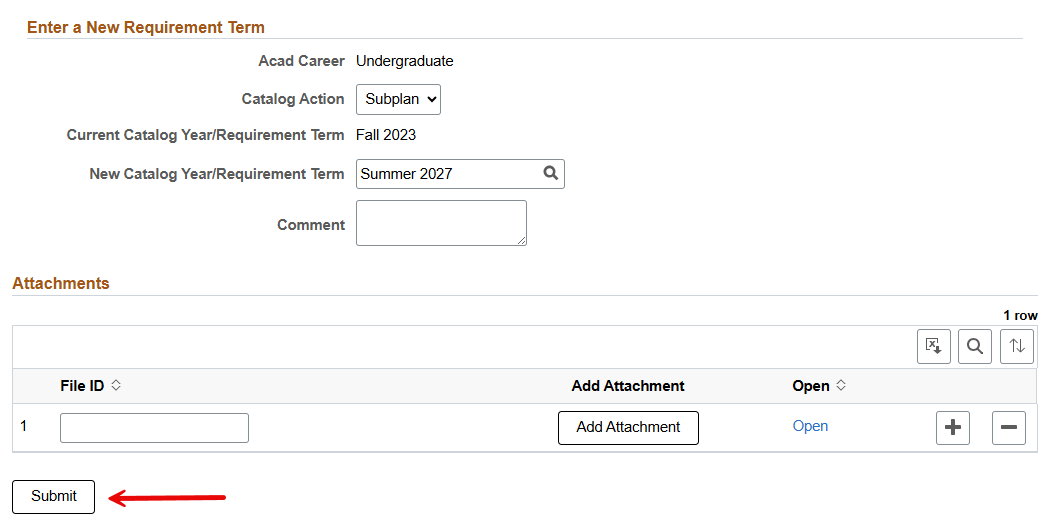
- Complete all required information in the Enter a New Requirement Term field:
- Double-check the Academic Career and Current Catalog Year/Requirement Term boxes have populated correctly.
- Provide data for Catalog Action and New Catalog Year/Requirement Term.
- Add Comment and Attachments.
- Click Submit.
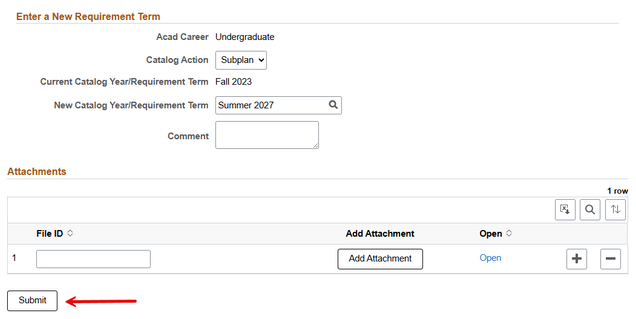
- In the pop-up that appears, indicate whether another request will be submitted at this time. See Step 9 in the Single Plan/Subplan & Multi Program/Plan section above for instructions.
Only one request can be made per form. If an additional change is needed for the same student, a new Request Form must be submitted.
ⓘ NOTE: Requirement term change requests will not be processed for students currently with a graduation/degree checkout status. An error message will pop up explaining that these record changes must be submitted through an academic record change. Navigate to Dashboard > Manage Workflow > Student Academic Record Change to begin this process.
Expected Graduation Term Request
ⓘ NOTE: Do not use the Expected Graduation Term change request option for students with a graduation/degree checkout status who are progressing through the auto-grad process; an error message will be generated. Follow the instructions in the Withdraw Graduation Application section below for steps to change the expected graduation term and defer graduation for those students already with graduation/degree checkout status.
Follow the Initial Steps 1-3 as explained above. Then:
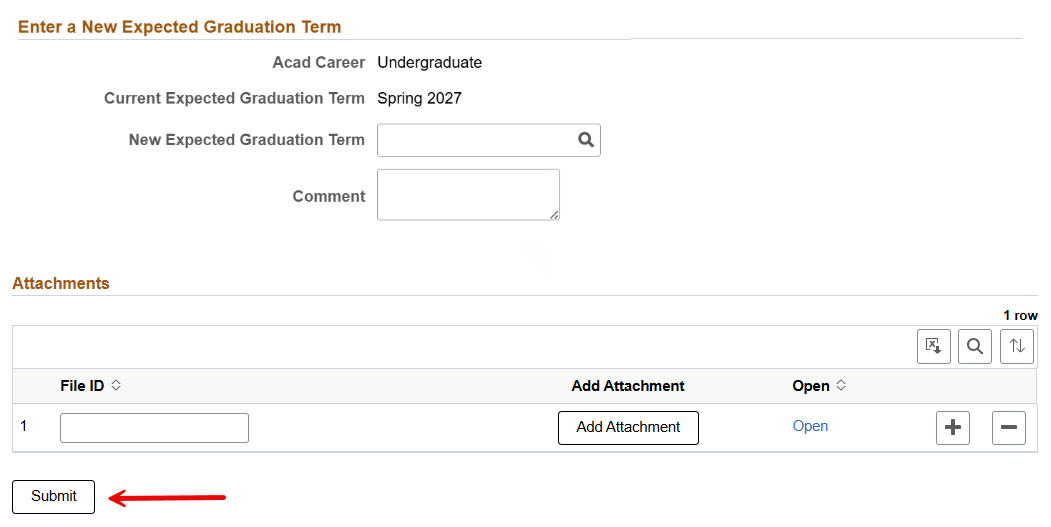
- In the Enter a New Expected Graduation Term field:
- Double-check the Academic Career and Current Expected Graduation Term have populated correctly.
- Enter the New Expected Graduation Term.
- Add Comments and Attachments.
- Click Submit.
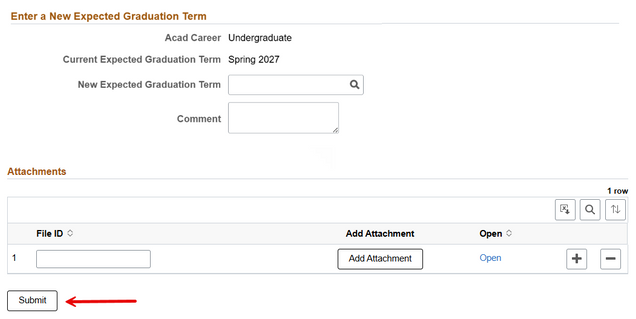
- In the pop-up that appears, indicate whether another request will be submitted at this time. See Step 9 in Single Plan/Subplan & Multi Program/Plan section above for instructions.
TIP! When changing a student’s expected graduation term, you may also need to update the student’s graduation status on the Graduation Tracking page. This applies to students NOT progressing through the auto-graduation process.
Inactivate Student Request
Follow the Initial Steps 1-3 as explained above. Then:
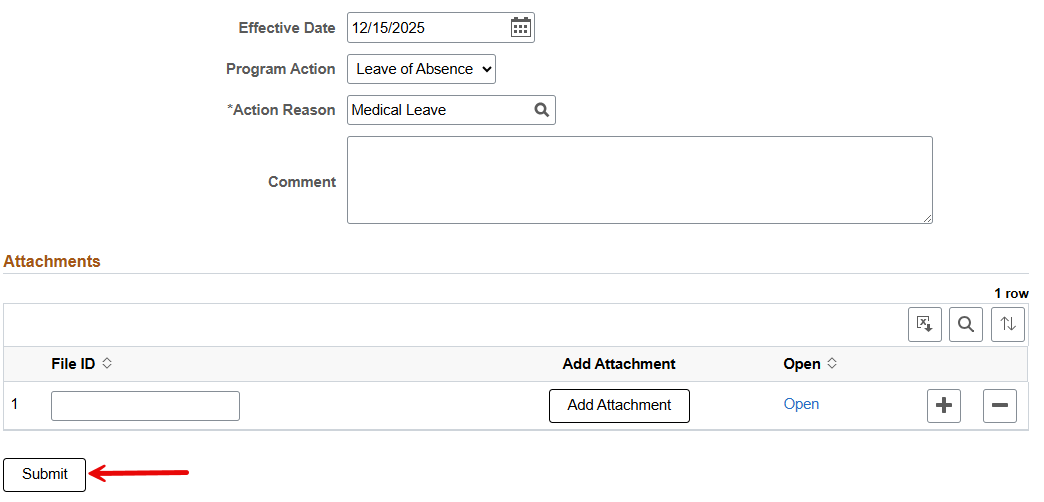
- Check the Effective Date and update if necessary.
- Provide the information required in the Program Action and Action Reasons boxes.
- Add Comment and Attachments.
- Click Submit.
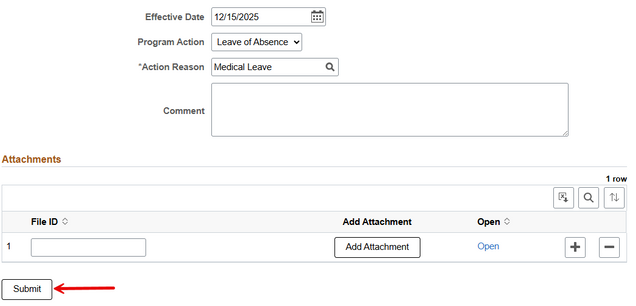
- In the pop-up that appears, indicate whether another request will be submitted at this time. See Step 9 in Single Plan/Subplan & Multi Program/Plan section above for instructions.
ⓘ NOTE: Inactivate student requests will not be processed for students currently with a graduation/degree checkout status. An error message will pop up explaining that these record changes must be submitted through an academic record change. Navigate to Dashboard > Manage Workflow > Student Academic Record Change to begin this process.
Withdraw Graduation Application Request
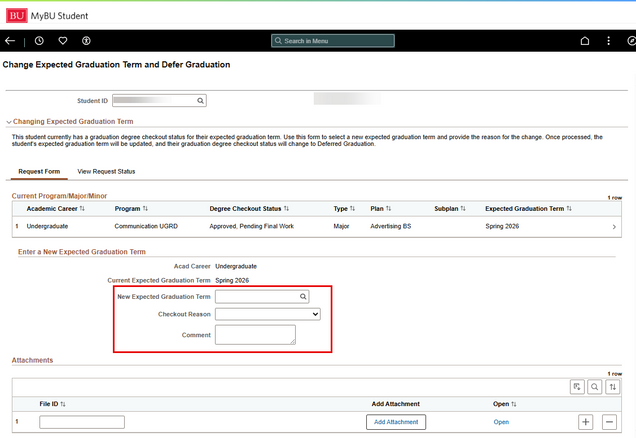
This request can ONLY be used for students with a graduation/degree checkout status. This is the correct request to submit to change the expected graduation term and defer graduation for these students. After the request is processed, the student’s expected graduation term will be updated and their degree checkout status will change to Deferred Graduation.
- This request form will not be available for students who are not progressing through the auto-grad process, and therefore do not have a graduation/degree checkout status. Attempting to enter the ID number will result in a blank search results page.
Follow the Initial Steps 1-3 as explained above. Then:
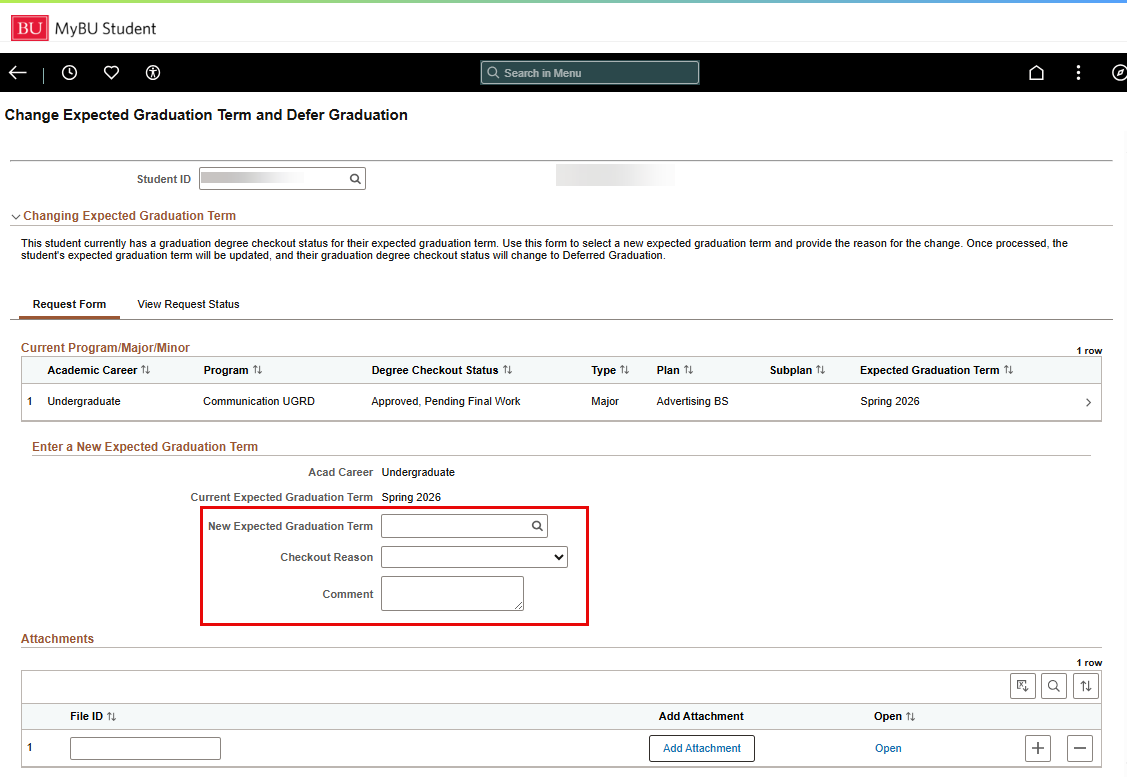
- In the Enter a New Expected Graduation Term field:
- Double-check the Academic Career and Current Expected Graduation Term have populated correctly.
- Enter the New Expected Graduation Term.
- Select the Checkout Reason from the dropdown menu.
- Add Comments and Attachments.
- Click Submit.
View the Status of a Request
There are two ways to check the status of a request.
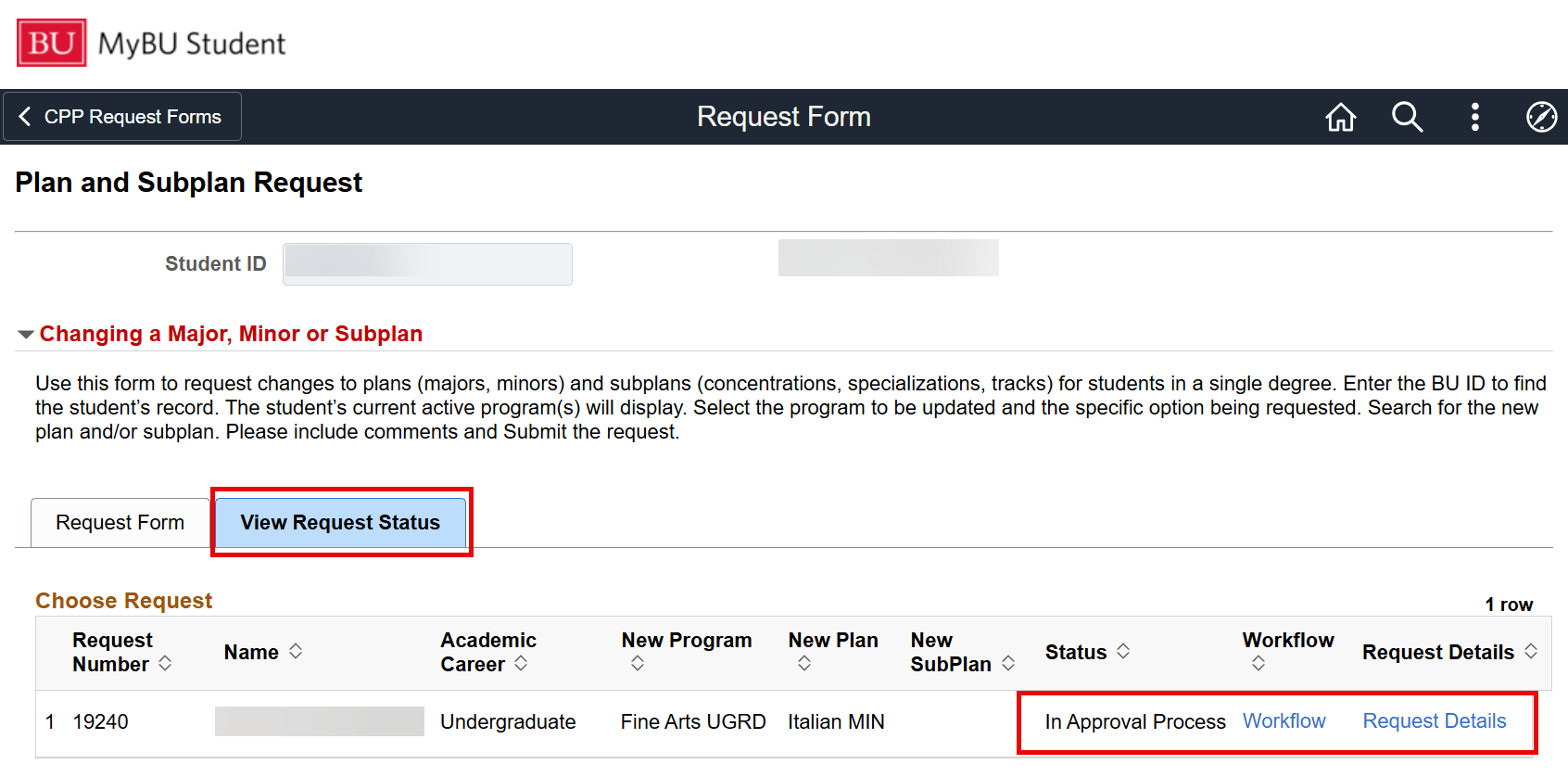
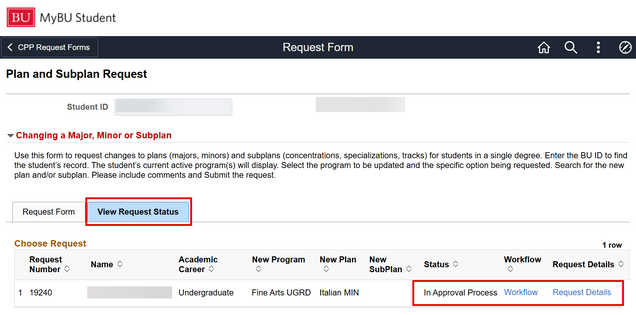
- After submitting a request form, click the View Request Status tab to check the status of this Workflow.
- Click Workflow to view the request number, status, and list of approvers.
- Click Request Details for a summary of the request.
- From the MyBU Student Dashboard, under Manage Workflow, click View Request Status.
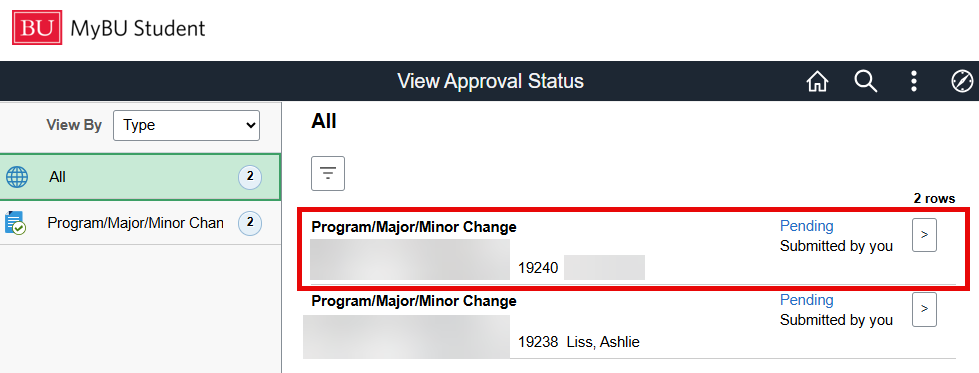
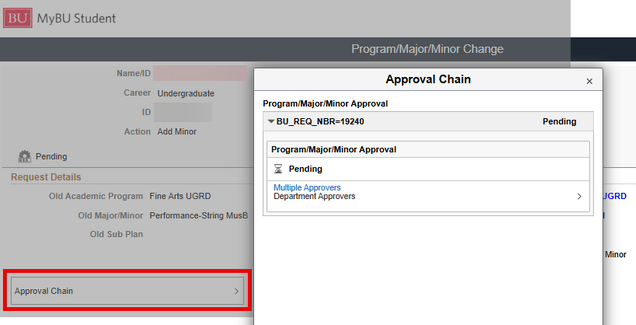
- The View Approval Status page displays status information for a list of change requests; click on a row for more details.

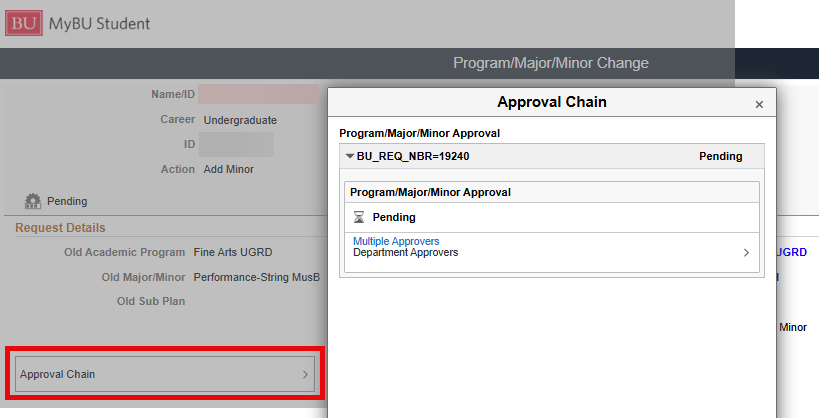
- Click Approval Chain to view status and approvers list for the request.
Workflow Approval Information
The general workflow steps are:
- Program/Plan Change Request submitted by department/school/college staff.
- If the request is a type that requires only department consent, and:
- if the submitter is also a department approver, then the submission triggers the MyBU Student system to automatically process the change.
- if the submitter is not a department approver, then the request will be sent to the associated department approver(s). The department approver’s consent triggers the MyBU Student system to automatically process the change.
- If the request is a type that requires OUR review, then the Program/Plan Change Request will be sent to OUR for approval and manual updating in the MyBU Student system.
To confirm the associated approvers for a School/College, use either the BU_ENRLMNT_WORKFLOW_APPROVERS or BU_CPP_WORKFLOW_APPROVERS query.
The following table outlines the associations between types of Program/Plan Change Requests and Approval/Processing steps.
-
- (DPT): Request goes to department approvers, and then MyBU Student automatically updates.
- (DPT > OUR): Request goes to department approvers and then OUR to approve and manually update.
| Program/Plan Change Request Form |
Add/Change Request or Action |
Approval/Processing Route |
| Single Plan/Subplan |
Intra-University Transfer |
DPT > OUR |
| Single Plan/Subplan |
Change Major/Subplan |
DPT |
| Single Plan/Subplan |
Add Minor |
DPT |
| Single Plan/Subplan |
Change Minor |
DPT |
| Single Plan/Subplan |
Remove Program or Major |
DPT |
| Single Plan/Subplan |
Add Subplan |
DPT |
| Single Plan/Subplan |
Remove Plan |
DPT |
| Multi Program/Plan |
Add a Major |
DPT > OUR |
| Multi Program/Plan |
Intra-University Transfer |
DPT > OUR |
| Multi Program/Plan |
Change Major/Subplan |
DPT > OUR |
| Multi Program/Plan |
Add Minor |
DPT > OUR |
| Multi Program/Plan |
Change Minor |
DPT > OUR |
| Multi Program/Plan |
Remove Program or Minor |
DPT > OUR |
| Multi Program/Plan |
Add Subplan |
DPT > OUR |
| Requirement Term Request |
Various Catalog Actions |
DPT |
| Expected Graduation Term |
N/A |
DPT |
| Inactivate Student Request |
Various Program Actions and/or Action Reasons |
DPT > OUR |
| Withdraw Graduation Application |
Various Checkout Reasons |
DPT |
Plan/Subplan Field Requirements
Single Plan/Subplan “To” Field Requirements
| Add/Change Menu Selection |
Review Populated Information |
Provide Required Information |
| Intra-University Transfer |
N/A |
- New Academic Program
- New Academic Plan (Major)
- New Academic Subplan (if applicable)
- Comment
- Attachment(s)
|
| Change Major/Subplan |
New Academic Program |
- New Academic Plan (Major)
- New Academic Subplan (if applicable)
- Comment
- Attachment(s)
|
| Add Minor |
New Academic Program |
- New Academic Plan (Minor)
- Comment
- Attachment(s)
|
| Change Minor |
New Academic Program |
- New Academic Plan (Minor)
- Comment
- Attachment(s)
|
| Remove Program or Major |
N/A |
Blocked: It is not possible to remove a student’s only Major |
| Add Subplan |
- New Academic Program
- New Academic Plan (Major)
|
- New Academic Subplan
- Comment
- Attachment(s)
|
| Remove Plan |
- New Academic Program
- Academic Plan (Major)
- New Academic Subplan (if applicable)
|
|
Multi Program/Plan “To” Field Requirements
| Add/Change Menu Selection |
Review Populated Information |
Provide Required Information |
| Add a major |
New Academic Program (can be changed) |
- New Academic Plan (Major)
- New Academic Subplan (if applicable)
- Comment
- Attachment(s)
|
| Intra-University Transfer |
N/A |
- New Academic Program
- New Academic Plan (Major)
- New Academic Subplan (if applicable)
- Comment
- Attachment(s)
|
| Change Major/Subplan |
New Academic Plan |
- New Academic Plan (Major)
- New Academic Subplan (if applicable)
- Comment
- Attachment(s)
|
| Add Minor |
New Academic Program |
- New Academic Plan (Minor)
- Comment
- Attachment(s)
|
| Change Minor |
New Academic Program |
- New Academic Plan (Minor)
- Comment
- Attachment(s)
|
| Remove Program or Minor |
- New Academic Program
- Academic Plan (Minor)
|
|
| Add Subplan |
- New Academic Program
- New Academic Plan (Major)
|
- New Academic Subplan
- Comment
- Attachment(s)
|
Page last updated June 2026. For a PDF copy, print this webpage as a PDF. Other resource formats can also be accessed via the relevant icons below.