Introduction to Queries for Staff
Queries in MyBU Student are reports. This resource provides an introduction to queries; where to find them and how to run them, along with details of queries found in the Reporting Center folder of the MyBU Student Dashboard.


Introduction
Queries pull data from across the Student Information System (MyBU Student) and its integrated systems. They support a variety of informational and operational purposes across the University. This resource focuses on queries used to generate reports for informational purposes.
Explore the sections below for additional information and instructions on how to navigate to and run queries using the Reporting Center folder in MyBU Student, as well as the Query Viewer page.
Note that access to certain queries is limited by user security. Available data may also restricted.
⚠︎ Screen options, menus, and reports will vary by user; please note that displays may differ for you based on access that has been granted. All screens shown are for training purposes only.
QUERY FOUNDATIONS
COMPONENTS OF A QUERY
- All queries have a unique identifier called the Query Name. This is not necessarily a user-friendly title but rather a system identifier composed of keywords and abbreviations separated by underscores (for example: BU_R0010M_SR_CPP_HIST).
- The Query Name appears at the top of the page when running the report, typically followed by a more descriptive Query Title/Short Description.
- TIP! This query naming convention doesn’t always give a clear indication of the full description/scope of the report, so once a helpful query has been identified, be sure to add it to your Favorites. Refer to the Navigation section below for more information.
- The system is “queried” by inputting search prompts that are specific to a given Query. These search prompts serve to narrow down the dataset in the resulting report.
- The data fields/columns included in the results can also vary from query to query. Two similar queries may have identical search prompts but return a different set of data fields in the results.
- Minor adjustments/improvements may be made to various components of a query in response to user feedback, for example adding additional prompts or Data Fields. The Query Name will not change.
FINDING THE RIGHT QUERY
MyBU Student has hundreds of available queries, with improvements and additional queries developed regularly. Given the expansive options, it may be helpful to use the tools described below to find the right query for a particular need. Remember that access to certain queries is limited by user security.
- Details about frequently used queries can be found in the Reporting Center Queries section of this resource, as well as in Functional Area Queries resources.
- Query Report Library: this tool compiles all queries (reports) available in MyBU Student. It is meant to function as a way to search the library of reports to find the one that satisfies a particular need. MyBU Student reports cannot be run from here, but direct links are available to easily open to them in MyBU Student. For help with how to use this tool, refer to the Query Report Library Guide.
- The List of Queries report can also be used to quickly look up queries by keywords found in their Query Name, Short Description, or Long Description. Refer to the section below for more information.
- June 2026 News: Significant updates have been made to the List of Queries report to make finding existing queries easier. Descriptions for 21 commonly used queries have been updated and other query descriptions will continue to be updated.
- Specific departments may maintain lists of queries and/or resources specific to their own operational needs.
Please be sure to review the Support Process section of this resource if looking for a particular report, requesting a report modification, or encountering an issue.
NAVIGATION & QUERY VIEWER
There are two primary methods for staff to access reports:
- Reporting Center folder: a selection of queries commonly used by BU staff, which can be quickly accessed from the left-side menu of the MyBU Student Dashboard.
- Query Viewer: this page can be used to search for and run reports that are not listed in the Reporting Center folder.
The look and feel of queries varies slightly between those found in the Reporting Center folder and those run in Query Viewer.
REPORTING CENTER
To access a query in the Reporting Center folder:
- Log into MyBU Student.
- Upon landing on the Dashboard, use the left menu to select the Reporting Center folder
- Click on a query to open it.
- Refer to the Reporting Center Queries section below for a detailed breakdown of the queries many users will see there, including a list of the search prompts and data fields for each.
- Note that the title shown in the folder gives a shorthand summary of what that query does, but it may differ from both the Query Name and description shown when actually running the query.
ⓘ NOTE: Some users will also see a ‘Reporting Center’ tile on the Full Site/Staff Homepage. This is different from the Reporting Center folder described herein, though it does contain shortcuts to reports for specific functional areas. All queries accessed via this tile can also be accessed via the Query Viewer page.
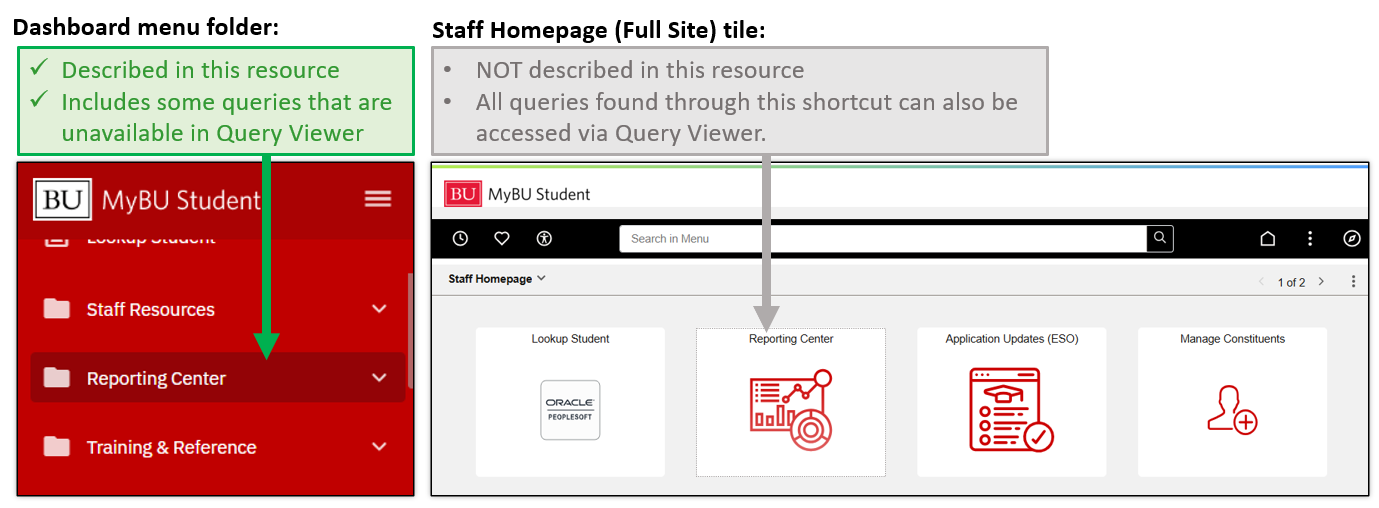
ⓘ The queries included in the Reporting Center folder may vary by user and are subject to change.
QUERY VIEWER
The Query Viewer page can be accessed a few different ways:
- From within the Reporting Center folder,
- Or, from the the Full Site via the right-side navigation menu. Select Reporting Tools > Query > Query Viewer
To pull up a query:
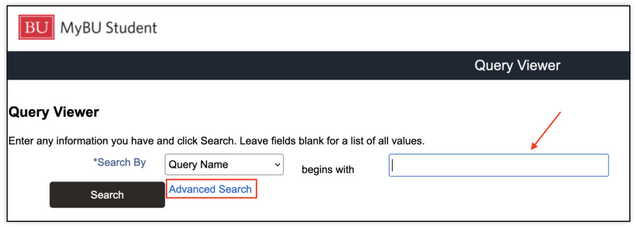
- If the Query Name is known, enter/paste into the ‘begins with’ field.
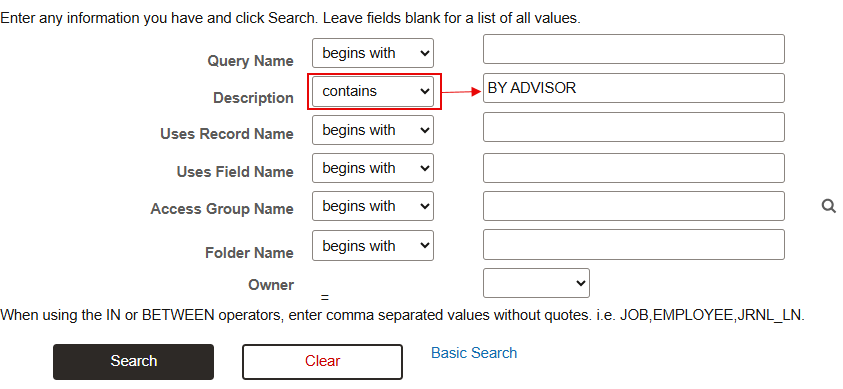
- If more criteria are needed to find the desired query, click Advanced Search.
- For example, it may be helpful to use Advanced Search to enter a keyword or phrase into the ‘Description’ field.
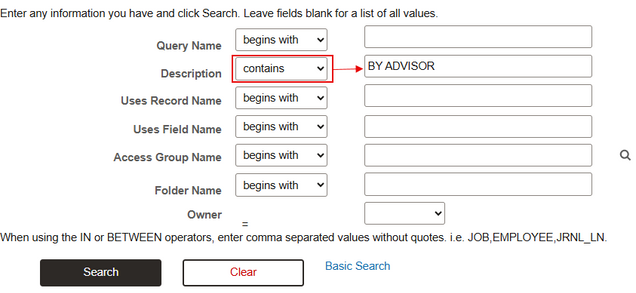
- Click Search.
- Available queries matching the search values will be listed, along with various options to compile the report. Click on one of these Run options to proceed with the search prompts. Commonly used run options include:
- Run to HTML: click to run report directly in the web browser. Once compiled, the report can still be exported to excel.
- Run to Excel: click to run report directly as a spreadsheet download.


SAVING FAVORITES
Query Viewer allows users to mark a query as a favorite, for easier access later.
After searching for a particular query, click Favorite.

When the Query Viewer page is opened, any queries that have been saved as favorites will automatically display.

A query can be removed from My Favorite Queries by clicking the minus sign under the ‘Remove’ column. Clicking ‘Clear Favorites List’ will remove all saved queries.
RUN A QUERY & VIEW RESULTS
ENTER PROMPTS
Once a Query has been opened, the search prompts must be entered to run the report. Each query’s prompt fields will vary depending on the content of the report.
The following instructions and screenshots will use the Students by Prgm/Plan/Subplan report (BU_R0010M_SR_CPP_PROG_BY_TERM) to demonstrate running a query. This query is available in the Reporting Center folder, labeled ‘By Career/Program/Plan/SubPlan’.

GENERAL TIPS
- Some prompts are pre-populated but can be updated as needed.
- Many queries include a required ‘Institution’ or ‘Academic Institution’ field. In virtually all cases, the default code ‘BU001’ applies here.
- Prompts with an asterisk (*) indicate a required field.
- Some queries have no required fields, meaning the report can be run without inputting prompts. Note this may return a very large dataset, so it may be ideal to narrow down the results using the available prompts.
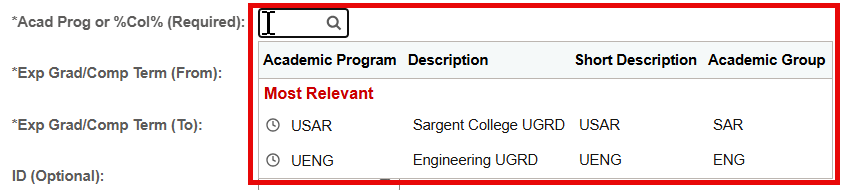
- Depending on the browser and interface used (i.e., Query Viewer or Reporting Center), when clicking into a field, suggested ‘Most Relevant’ inputs may appear based on user history. Click on a suggested input to populate it into the field.
- Many queries allow the user to search for data from a specific term (i.e., semester) by inputting the Term Code as a search prompt. For help understanding Term codes, please refer to the Term Convention overview.
- For help with searching and understanding class/course numbers, please refer to the Course/Class Identifier Information resource.
LOOKUP TIPS
- A magnifying glass icon next to or within the search field box indicates the ability to perform a lookup for that field. Click the magnifying glass icon to look up available field inputs.
- The lookup will display in a pop-up window, listing all possible results.
- Depending on the field, this could be 300+ results. To help narrow down the search, enter a full or partial value in the Search By field, or use the Advanced Lookup option to enter additional criteria. Example for Academic Plan below:

- Note that available lookup results may vary by user as determined by security access.

%COLLEGE% TIPS
A field with the label, Acad Prog or %College%, indicates that a specific Academic Program value can be entered or selected. This can be performed by looking up in that field or entering a known value.
- Or, College values between percent symbols (%) can be used to compile students in all Academic Programs associated to that School/College. This could also be a partial College search to get results for more than one School/College.
ⓘ NOTE: If using the %College% search option, enter the needed value directly into the field without performing a lookup. Performing a lookup may cause confusion as the window will display no results. This is ok – proceed with the desired report prompts and the results compilation will still be successful.
For example:
- All students in the College of Communication are needed.
-
- Career: no selection
- Acad Prog or %College%: %COM%

-
- All graduate students regardless of School/College.
-
- Career: Graduate
- Acad Prog or %College%: %%

-


VIEW REPORT: ACTIONS & DATA FIELDS
- Once all desired search prompts have been entered, run the report by selecting the View Results button (for Reporting Center queries) or OK (for Query Viewer queries).
- Depending on the criteria entered, the report may take some time to compile. A processing icon will typically appear in the top-right-most corner of the page.
- In the compiled report, the columns display the Data Field names associated to the compiled results. Each report will display different data depending on the configuration of the query and search prompt inputs.
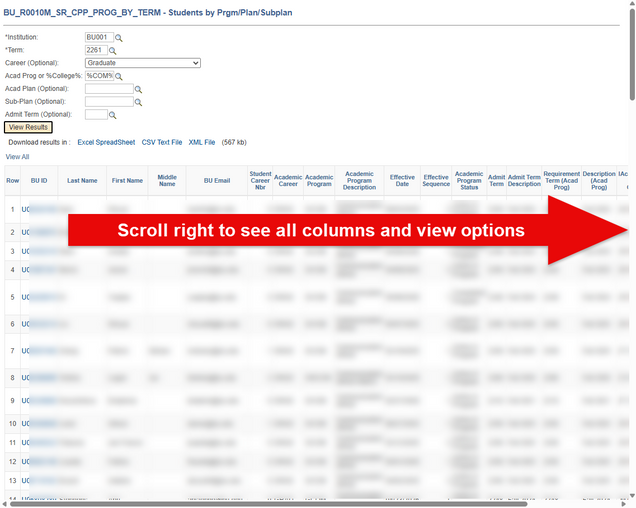
- Be sure to scroll to the far right of the page to see all data fields that display for the selected report.
- The below screenshot is an example of results from the Students by Prgm/Plan/Subplan query (note that student data has been blurred). For a more detailed breakdown of this query, including all the data fields displayed in the results, refer to the Reporting Center Queries section below.
- The results can be downloaded or reviewed directly on the page.
- Downloading to a spreadsheet is the only way to modify/filter the data, change the sort order, etc. To download, select the Excel Spreadsheet, CSV Text File, or XML file links above the compiled results. (The display/wording of this option may vary between Reporting Center and Query Viewer interfaces.)
- If the results return a large dataset, only the first 100 results will display on the page. To review all data:
- Use the page navigator options above the results: arrows <>, Last/First links. These appear on the far right for Reporting Center queries and in center for Query Viewer:
- Download the report.
- Click the View All link in the far-left location above the results.
- To rerun the same report with different search criteria:
- For Reporting Center queries, simply modify the prompt fields at the top of the screen as needed, and then click View Results.
- From Query Viewer, click the Rerun Query link above the results.
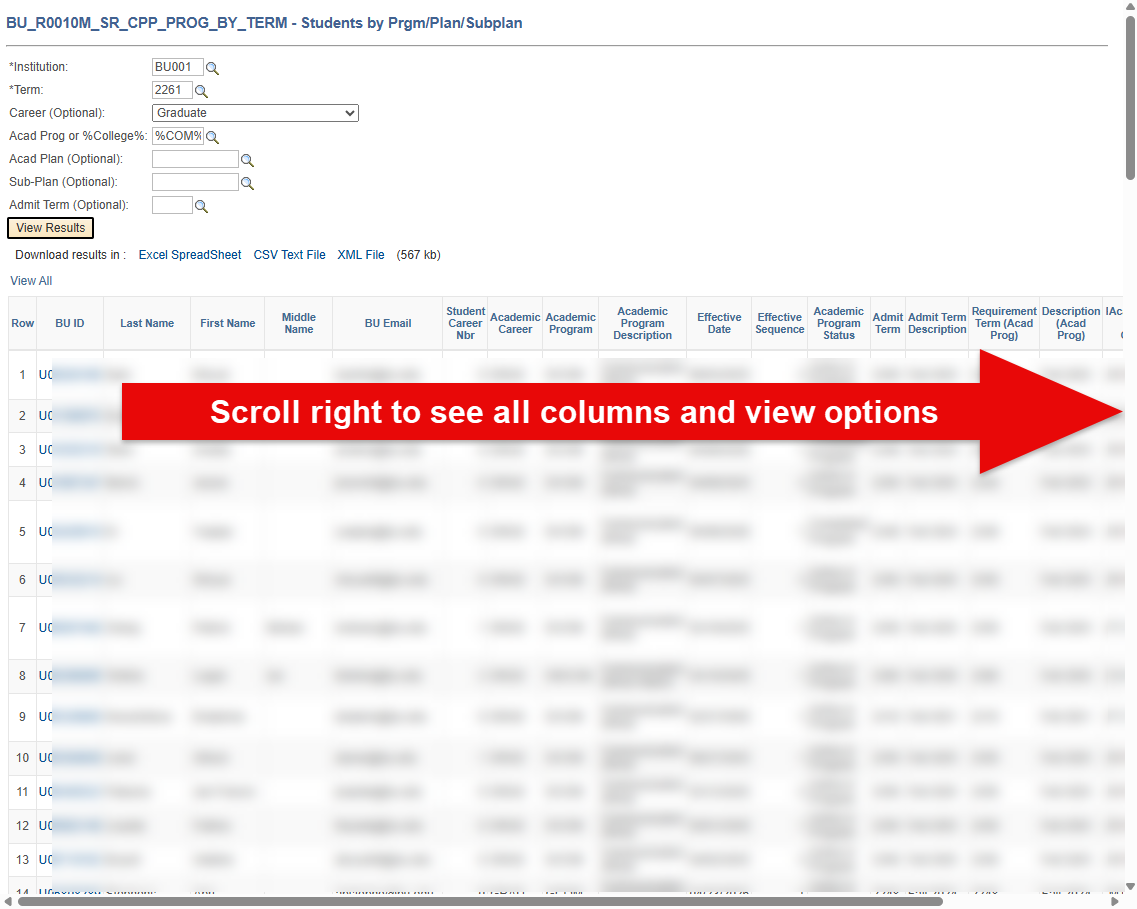
TIP! Some reports include clickable drill-down links, which will appear in blue when viewing the results on the page. For example, in the ‘Students by Prgm/Plan/Subplan’ results example shown above, clicking on a student’s UID will open a sub-report of that student’s CPP history in a new window.
'LIST OF QUERIES' REPORT
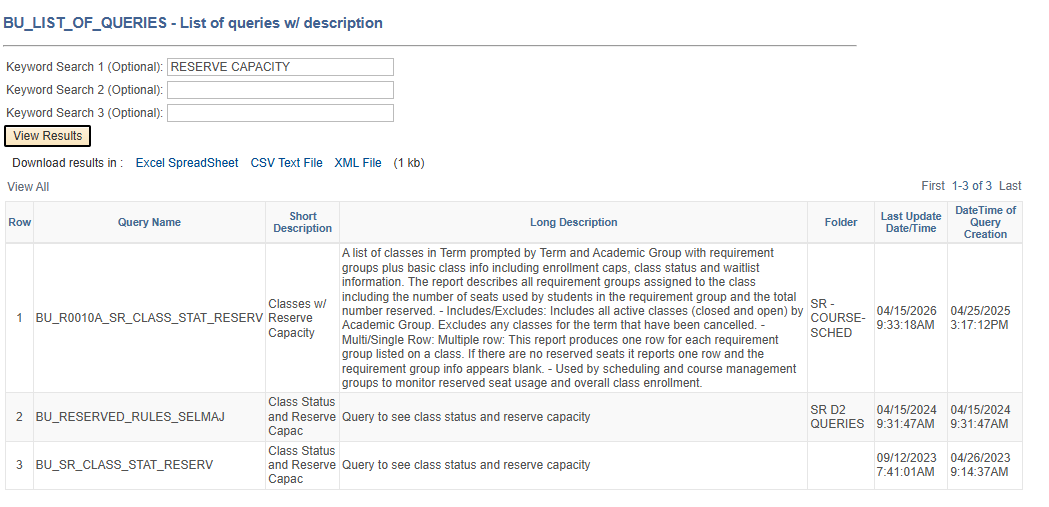
The List of Queries report provides a list of all available MyBU queries, including both their Short Description/Title and a helpful longer description.
The search prompts allow users to search by keyword(s) contained in the Query Name, Short Description, or Long Description. For example, searching for “schedule of classes” or “graduation” will return queries containing those terms.
ⓘ NOTE: This report is intended to complement – not replace – the Query Report Library tool in PowerBI, which provides a more comprehensive search experience. Refer to the Query Report Library Guide for more information.
Navigation: From the MyBU Student Dashboard, the List of Queries can be found in the Reporting Center folder in the left-side navigation menu.

- Or, on the Query Viewer page, search for BU_LIST_OF_QUERIES.
Search Prompts: Keyword Search 1, Keyword Search 2, Keyword Search 3
- All 3 prompt fields are optional – leave all blank to return the full list.
- No wildcards are needed (e.g., enter “graduation”, not “%graduation%”).
- Note that this query searches for the keyword(s) found only in the Query Name, Short Description, or Long Description. Keywords contained in query prompt or result fields cannot be searched.
ⓘ Results are not security-based. Users may see queries they do not have access to run.
Example search and results:
To run a query found in the results:
- Copy the Query Name.
- Navigate to Query Viewer.
- Paste and search.
Direct links to the queries are not currently available from the results (as of June 2026).
REPORTING CENTER QUERIES
The queries listed below are available to most users in the MyBU Student Dashboard left-side menu Reporting Center folder. For each query, the system’s Query Name, Title/Short Description, prompts, and data fields are listed, along with additional helpful details and screenshots. Note that any identifying data has been blurred in screenshots.
TIP! Use the Ctrl+f keyboard shortcut to search the below content for a particular keyword or data field.
ⓘ The queries included in the Reporting Center folder may vary by user and are subject to change.
STUDENT ID LOOKUP
This query allows the user to look up a student’s UID by searching for them by name, primary program, and/or email address.
System Details:
- Query Name: BU_SR_STUDENT_LKUP_SEARCH
- Query Title/Short Description: Lookup Student
- Search Prompts (asterisks indicate required field): *Institution, Last Name, First Name, Primary Program, Term, *Email Type, Email Address, *Name Type
ⓘ NOTE: If searching by email address, enter it in ALL CAPS.

Additional Info & Tips:
- The first and last name fields only need the % if searching for a partial value.
- For the purposes of this query, the Term field indicates the student’s first recorded term of enrollment, if applicable.
- Email Type will default to BU Email, and Name Type will default to PRF (Preferred Name).
- Unless the student has specified differently, the Preferred Name will be the same as the Primary Name on the student’s record.
Data Fields Displayed In Results:
| ID | Name Type | Last Name | First Name | Middle Name |
| Term | Academic Program | Email Type | Email Address | Term Description |
STUDENT PROGRAM/PLAN HISTORY
This query displays a specified student’s academic program/plan history, including the Action(s) and Action Reason(s) for the creation of each new data row.
System Details:
- Query Name: BU_R0010M_SR_CPP_HIST
- Query Title/Short Description: Program/Plan by BUID
- Search Prompts: The student’s UID is all that’s needed to run this report.

Additional Info & Tips:
- If UID is unknown, try using the Student ID Lookup report. Clicking the magnifying glass for lookup in the prompt field may take a long time to open.
- Related Resource: Academic Structure in MyBU Student
- Related Resource (for more info about data rows and effective dates): Intro to Using MyBU Student
Data Fields Displayed In Results:
| BU ID | First Name | Last Name | Career Nbr |
| Academic Career | Academic Program | Descr | Eff Date |
| Eff Sequence | Program Action | Action Reason | Action Reason Description |
| Admit Term | Admit Term | Req Term | Req Term (Catalog Year) |
| Exp Grad | Exp Grad Term | Joint Program Indicator | Dual Program |
| Plan Sequence | Academic Plan Code | Academic Plan Description | Academic Plan Type |
| Degree Type | Academic Sub-Plan Code | Academic Sub-Plan Description | Academic Sub-Plan Type |
| Completion Term |
STUDENT TERM ACTIVATED BY TERM
This report lists students that have been term-activated by program, college, or career for a given term. Or, search by UID if looking for an individual student. Optional drill-down links are available to view a student’s entire program stack history from the list of results.
System Details:
- Query Name: BU_R0010H_SR_TERMACT_STUDXPROG
- Query Title/Short Description: Term Activated Student
- Search Prompts (asterisks indicate required field): *Term, Acad Prog or College, *Institution, ID, *Academic Career

In the above example, the prompts entered will result in a list of all undergraduate COM students who are term activated for Spring 2025.
Additional Info & Tips:
- Term activation is a largely automated process in which term records are created for eligible students. Term activation is required for enrollment calculation and tuition.
- For a brief walkthrough of some of the major data fields in the results of this query, please refer to the Reporting Introduction Using the ‘Student Term Activated by Term’ Report video.
Data Fields Displayed In Results:
| ID | Last Name | First Name | Middle Name |
| BU Email | Preferred Email | Term | Term Description |
| Academic Career | Primary Academic Program | Academic Program(s) | Academic Plan(s) |
| Academic Plan Description(s) | Joint Program Approved | Admit Term(s) | Admit Term Description(s) |
| Academic Level – Term Start | Academic Level – Projected | Academic Level – Term End | Approved Academic Load |
| Academic Load | Certified Load | Eligible to Enroll | Enrollment Status |
| Registration Hold | Term Units In Progress | Total Cumulative Units | Cumulative GPA |
| Withdrawal \ Cancel | International Indicator | Study Agreement | Study Agreement Description |
| Reg Group |
BY CAREER/PROGRAM/ PLAN/SUBPLAN
This query searches for students who are Term Activated for a given Term, with the option of specifying Career/Program/Plan/SubPlan. The results provide a broad range of academic program/plan data for each student.
System Details:
- Query Name: BU_R0010M_SR_CPP_PROG_BY_TERM
- Query Title/Short Description: By Career/Program/Plan/SubPlan
- Search Prompts (asterisks indicate required field): *Academic Institution, *Term, Career, Acad Prog or College, Acad Plan, Sub-Plan, Admit Term

In the above example, the prompts entered will result in a list of undergraduate students enrolled in the Spring 2025 term in the COM Journalism BS plan, who were admitted in the Fall 2022 term.
Data Fields Displayed In Results:
| BU ID | Last Name | First Name | Middle Name |
| BU Email | Student Career Nbr | Academic Career | Academic Program |
| Academic Program Description | Effective Date | Effective Sequence | Academic Program Status |
| Admit Term | Admit Term Description | Requirement Term (Acad Prog) | Description (Acad Prog) |
| Requirement Term (Acad Plan) | Description (Acad Plan) | Expected Graduation Term | Expected Grad Term Description |
| Graduation Review Status | Joint Program Indicator | Dual Program | Plan Sequence |
| Academic Plan Code | Academic Plan Description | Academic Plan Type | Degree |
| Academic Sub-Plan Code | Academic Sub-Plan Description | Academic Sub-Plan Type | Term Units In Progress |
| Enrollment Status | Academic Level – Projected | Academic Level – Term Start | Academic Level – Term End |
| Student Group(s) | Advisor ID(s) | Advisor Name(s) | Approved Academic Load |
| Academic Load | Term Units | Cumulative Units | Current GPA (GPI) |
| Cumulative GPA |
LIST OF CLASSES W/ ENROLLMENT
This report lists classes that meet the entered criteria. Classes can then be drilled down to view enrolled students.
System Details:
- Query Name: BU_R0010K_SR_ROSTER_FROM_LIST
- Query Title/Short Description: List of Classes
- Search Prompts (asterisks indicate required field): *Institution, *Term, Acad Org, Acad Group, Subject, Catalog Number (starting from), Section, Incl Class w/No Enrollment?

In the above example, the prompts entered will result in a list of all classes in the CFA Theatre department for the Fall 2024 term, including classes that didn’t have any students enrolled.
Related Resource: Class Numbers Explained
Data Fields Displayed In Results:
| Term | Term Description | Session | Class | Subject |
| Catalog Nbr | Section | Class Nbr | Component | Description |
| Academic Organization | Location Code | Instruction Mode | ||
| Enrollment Total | Enrollment Capacity | Wait List Total | List of Students |
ALL PHOTO CLASS ROSTERS
This query generates a PDF with a grid format of student photos for a class.
ⓘ NOTE: This query is particularly limited to those with appropriate security access. Users who do not see this report in the Reporting Center folder will not be able to access it.
System Details:
- Query Name: N/A (This query was designed to be viewed in the Reporting Center folder only. It is NOT available in the full site/Query Viewer.)
- Query Title/Short Description: N/A
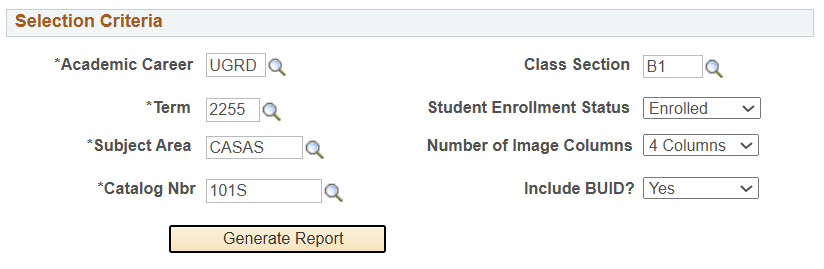
- Search Prompts (asterisks indicate required field): *Academic Career, *Term, *Subject Area, *Catalog Nbr, Class Section, Student Enrollment Status, Number of Image Columns, Include BUID?
Viewing Results:
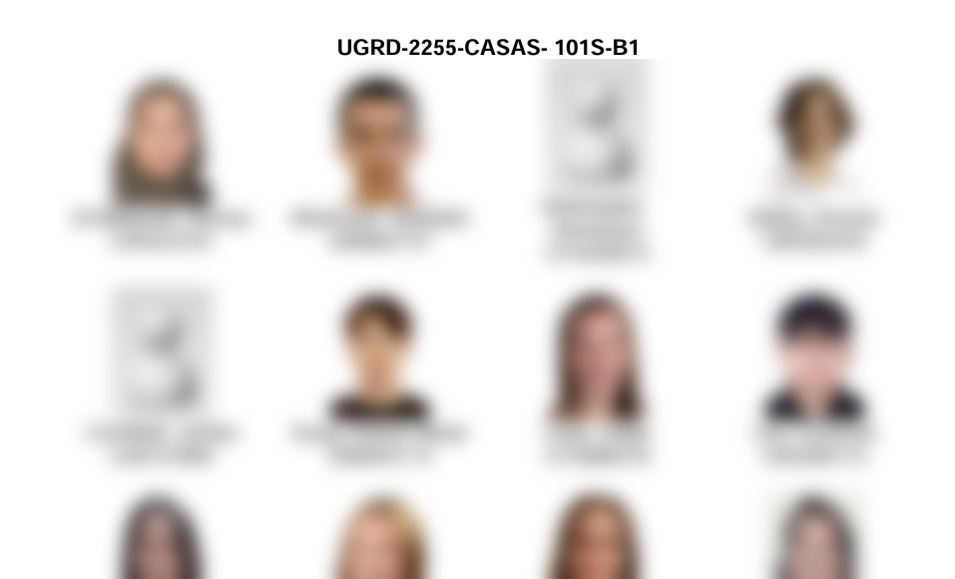
The All Photo Class Rosters output is different than the other reports detailed here. Student photos will display in a grid format, adhering to the number of columns indicated in the prompts. For example, the report below illustrates the selection of ‘4 columns’ in the prompts. If ‘2 columns’ were chosen, the pictures would be larger and would only have two students per line. Students without a photo on file will appear with a placeholder image.
ROSTER FOR A CLASS
This report lists enrolled, dropped, waitlisted, or all students for a specified class in a given term.
System Details:
- Query Name: ROSTER FOR A CLASS
- Query Title/Short Description: Roster for a Class
- Search Prompts (asterisks indicate required field): *Institution, *Term, *Subject, Catalog Nbr, Section, Class Nbr, Enrollment Status
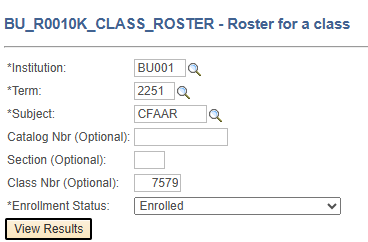
In the example above, the prompts entered will result in a list of all the students enrolled in CFAAR 132 Drawing 1 (Class Nbr 7579) for Spring 2025.
Additional Info & Tips:
- This report is the result of drilling down into a class from the List of Classes w/Enrollment report.
- Related Resource: Class Numbers Explained
Data Fields Displayed In Results:
| Term | Subject | Catalog Nbr | Section |
| Student ID | Last Name | First Name | BU Email |
| Student Enrollment Status | Enrollment Add Date | WaitList Position Nbr | Academic Program |
| Academic Program Description | Academic Plan | Academic Plan Description | Academic Subplan |
| Academic Subplan Description | Academic Level – Term Start | Grade | Units Taken |
| Session | Course Component | Repeat Code | Repeat Code Description |
| Approved Academic Load | Academic Load | Term Units Taken for Progress | Expected Grad Term(s) |
UNIVERSITY CLASS SCHEDULE
This report lists schedule information for classes within a particular Academic Group/Subject/Academic Organization (i.e., academic department), and/or assigned to a particular Instructor, and/or with a particular Class Status for a given term.
System Details:
- Query Name: BU_R0032B_SR_CLASS_SCHD_DOWNLD
- Query Title/Short Description: University Class Schedule
- Search Prompts (asterisks indicate required field): *Institution, *Term, Campus, Acad Group, Subject, Instructor ID, Class Status, Acad Org

Additional Info & Tips:
- Don’t forget that the prompt field lookups are dynamic! For example, selecting a particular Academic Group (i.e., school/college) will narrow the possible options for Subject, Instructor, etc. performing a field lookup. This can be helpful if looking up a particular instructor’s schedule when that instructor’s UID is unknown.
- Note that Academic Organization is typically a broader categorization than Subject.
- Related Resource: Class Numbers Explained
Data Fields Displayed In Results:
| Course ID | Term | Session | Subject Area |
| Catalog Nbr | Class Section | Class Nbr | Instructor Last Name |
| Instructor First Name | Career | Description | Credit Hours |
| Campus | Days of the Week | Start Time | End Time |
| Facil ID | Meeting Start Date | Meeting End Date | Cap Enrl |
| Waistlist Cap | Min Enrl | Tot Enrl | Wait Tot |
| Academic Group | Enrl Stat | Class Stat | Class Type |
| Mode | Notes | Final Exam |
STUDENT MATRIX
This query can be used to check when students in a specific class have other classes on their schedule. A version of this query is also available to instructors in Faculty Reports.
ⓘ NOTE: This report is particularly limited to those with appropriate security access. Users who do not see this report in the Reporting Center folder will not be able to access it.
System Details:
- Query Name: N/A (This query was designed to be viewed in the Reporting Center folder only. It is NOT available in the full site/Query Viewer.)
- Query Title/Short Description: N/A
- Search Prompts (asterisks indicate required field): *Instructor ID, *Career, *Term, *Course
Prompting Tips:
- Use the magnifying glass to look up an Instructor’s ID and then Course input. Inputting the Instructor ID first helps narrow down the Course field lookup.
- Upon selecting the Course from the lookup, the results will automatically display on the page.
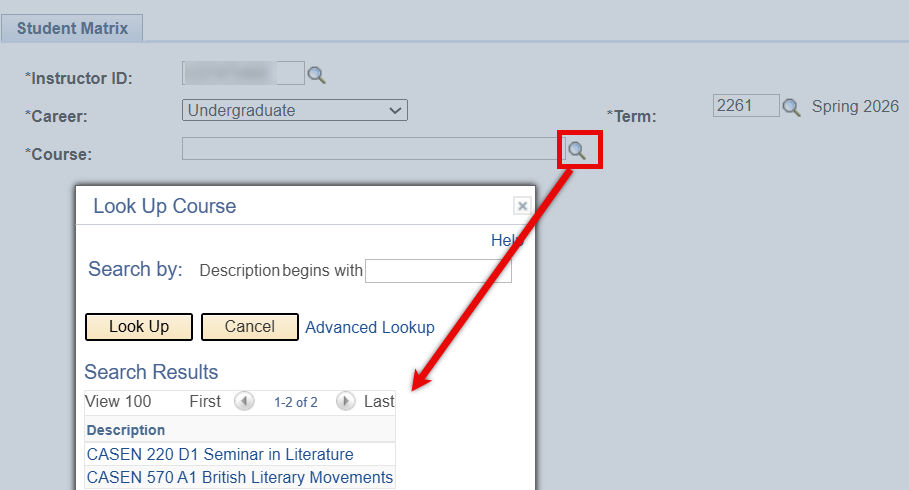
Viewing Results:
The Student Matrix output is different than the other reports detailed here. A table will display with rows that correspond to time blocks for each day. Each cell indicates the number of students who have a conflicting class during that timeframe.
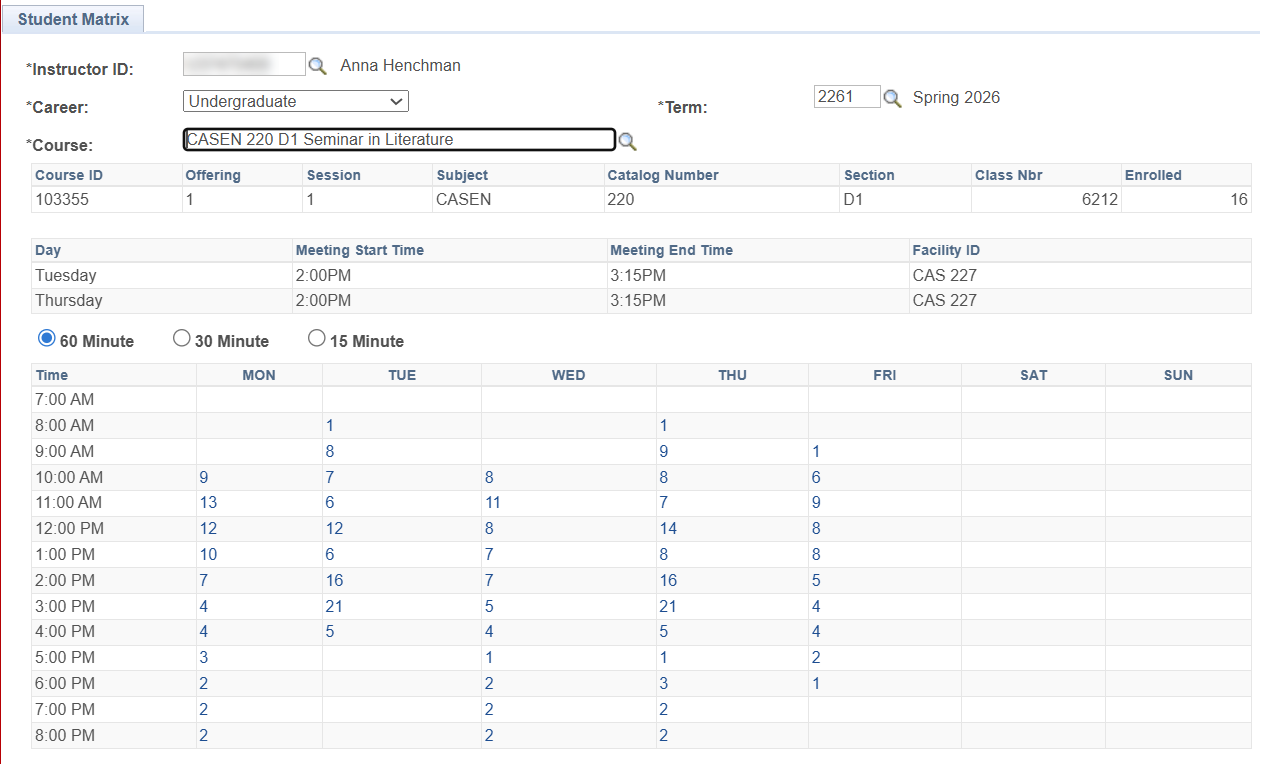
The Student Matrix results can be further drilled down, with additional data appearing below the table:
- Click on the count to see WHICH students are enrolled in other classes during that time.
- From that list, an individual student can be selected to view the details of the class(es) that student has during that timeframe, as well as the rest of their current schedule of classes.
- In the example below, the time block on Monday at 10am was selected. Then, the student who is in 4th Semester French at that time was selected. The details of that French class are shown, as well as that student’s schedule.

Functional Area Queries
Refer to the resources linked below for a breakdown of commonly used queries by functional area. These queries are accessed via Query Viewer, though user security may limit who can use them.
TIP! A query listed under one functional area may be helpful to staff who work in a different functional area.
For help in supporting faculty and advising colleagues with queries specific to their processes, please refer to the following resources:
SUPPORT
SUPPORT PROCESS
If you encounter an issue with a report, submit a ticket to ithelp@bu.edu outlining the report name and title and details of the issue.
If you’re looking for a particular type of report, please follow these steps:
- Check to see if an existing report meets your needs:
- Use the Frequently Used Staff Reports section of this resource to review if any contain the desired Prompts and Data fields.
- Or search the Query Report Library (refer to the Guide for assistance in using the tool).
- Remember that the download option can be used to further sort, filter and organize data if you find a report that captures some of what’s needed.
- If there are no existing reports that satisfy your needs, please submit a Request an Operational Report form in ServiceNow. This will generate a ticket for the operational reporting team.
OTHER HELPFUL SUPPLEMENTS
- For help understanding class identifiers refer to the Course/Class Number explainer.
- For an overview on Term codes and concept, refer to the Term convention resource.
Page last updated September 2026. For a PDF copy, print this webpage as a PDF. Other resource formats can also be accessed via the relevant icons below.