Queries: Student Records
This resource provides information and instructions for running common Student Record-focused queries using Query Viewer.

Introduction
Queries in MyBU Student are reports. This resource describes some frequently used queries in the Student Records functional area. These reports typically include data related to academic career/program/plan (CPP), class enrollment, term activation, Student Groups, certain Service Indicators, and/or transcripts/degrees, for one or multiple students.
ⓘ New to queries? Be sure to check out the Introduction to Queries resource first for foundational concepts, detailed instructions on how to find and run a query, and support information. Support and query request information is also available via that resource.
All the queries included in this resource are run using Query Viewer in MyBU Student. Several other frequently used student record queries can be quickly accessed via the Reporting Center folder in the left-side menu from the MyBU Student Dashboard. Refer to the Intro to Queries resource for a breakdown of the queries found in the Reporting Center folder.
For each query included below, the system’s Query Name, Title/Short Description, search prompts, and report data fields are listed, along with additional helpful details and screenshots.
⚠︎ Screen options, menus, and reports will vary by user; please note that displays may differ for you based on access that has been granted. All screens shown are for training purposes only.
STUDENT GROUPS
This report lists students with associated Student Group(s). The list can be pulled by Academic Program and/or by a particular Student Group.
System Details:
- Query Name: BU_SR_STUDENT_GROUPS
- Query Title/Short Description: Students with Student Groups
- Search Prompts (Asterisks indicate required field): Term*, Institution*, Student Group, Primary Acad Prog
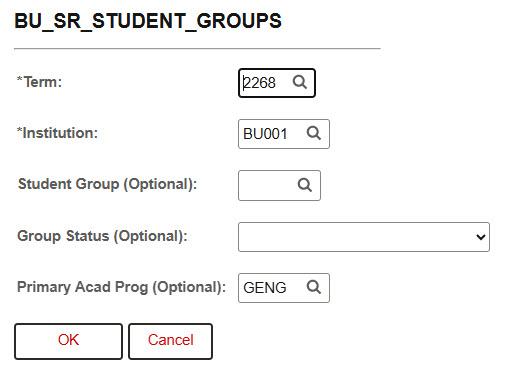
In the example shown above, the results will list all Graduate Engineering students in the Fall 2026 term, with all applicable Student Groups for each student.
Additional Info & Tips:
- If compiling a list of incoming first years, select the ‘RIFY – Incoming UG First Year’ value in the Student Group field (other options available – perform a lookup to review).
- The default format of the results are sorted by Student Group (and not by student, even though the student data appears in the left-most columns).
Data Fields Displayed in Results:
| ID |
Last Name |
First Name |
Middle Name |
| BU Email |
Pronouns |
Term |
Academic Career |
| Primary Academic Program |
Study Agreement |
Student Group |
Student Group Description |
| Withdrawal \ Cancel |
Academic Level – Projected |
Academic Level – Term Start |
Academic Level – Term End |
| Eligible to Enroll |
Enrollment Status |
Term Units in Progress |
Advisor(s) |
PROGRAM/PLAN BY UID
This query searches for students by BUID and returns the associated Program/Plan information at the time of the defined Term.
System Details:
- Query Name: BU_R0010H_SR_CPP_BUID
- Query Title/Short Description: Program/Plan by BUID

- Search Prompts (Asterisks indicate required field): ID, *Term
In the example shown, any student’s BUID entered into the ‘ID’ prompt will pull up that student’s academic Program/Plan information for the Spring 2025 term.
Data Fields Displayed in Results:
| BU ID |
Last Name |
First Name |
Middle Name |
| Career Nbr |
Academic Career |
Academic Program |
Descr |
| Eff Date |
Eff Sequence |
Admit Term |
Admit Term |
| Req Term |
Req Term (Catalog Year) |
Exp Grad |
Exp Grad Term |
| Joint Program Indicator |
Dual Program |
Plan Sequence |
Academic Plan Code |
| Academic Plan Description |
Academic Plan Type |
Degree Type |
Academic SubPlan Code |
| Academic SubPlan Description |
Academic SubPlan Type |
Completion Term |
STUDENTS ON LEAVE OR WITHDRAWN
This query generates a report of students who have either taken a leave of absence or withdrawn in a particular Term, along with relevant data about the leave or withdrawal. The report can be run for all students across the University, or narrowed to a particular academic career, program, college, or even a single student UID.
System Details:
- Query Name: BU_R0010N_SR_LOA_WD
- Query Title/Short Description: Students on LOA or W/D
- Search Prompts (asterisks indicate required field):*Institution, *Term, Academic Career, Academic Program or %Col%, ID
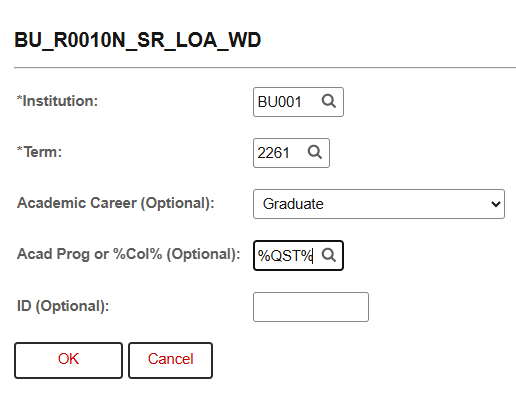
In the example shown above, the report will pull all graduate students in Questrom (QST) who are on leave or withdrawn for the Spring 2026 term.
Data Fields Displayed In Results:
| ID |
Last Name |
First Name |
Middle Name |
| BU Email |
Term |
Term Description |
Academic Career |
| Academic Program |
Dual Academic Program |
Approved Academic Load |
Academic Load |
| Academic Level – Projected |
Academic Level – Term Start |
Academic Level – Term End |
Academic Program Status |
| Program Action |
Action Reason |
Action Reason Description |
Effective Date |
| Withdrawal \ Cancel |
Withdrawal \ Cancel Reason |
Withdrawal \ Cancel Date |
Last Date of Attendance |
GRADUATION REPORT
This query generates a report displaying student academic information and graduation-related data. Prompts allow for application of specific graduation filters to find desired student populations.
System Details:
- Query Name: BU_R0046L_SR_GRADUATION
- Query Title/Short Description: Graduation Report
- Search Prompts (asterisks indicate required field): Institution, Career, *Acad Prog or %Col%, Exp Grad Term, Grad Review Status, ID, Acad Plan
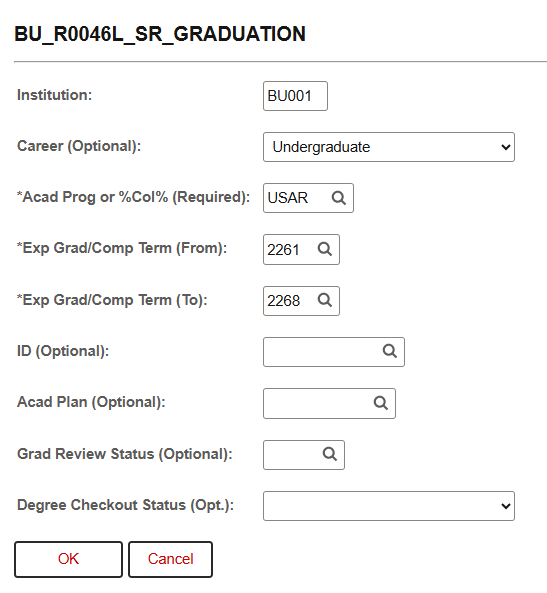
In the example shown above, the report will generate a list of all undergraduate students in Sargent College (SAR) with an expected Grad Term of Spring 2026, Summer 2026, or Fall 2026.
Additional Info & Tips:
- This query is identical in prompts and result fields to BU_R0046L_SR_GRADUATION_STNT, which has also been used by staff for similar purposes.
- Related Resource: Graduation Tracking
Data Fields Displayed in Results:
| ID |
Last Name |
First Name |
Middle Name |
| Last Name (Diploma) |
First Name (Diploma) |
BU Email |
Personal Email |
| FERPA |
International Student Indicator |
Visa/Permit Type |
Country |
| Academic Career |
Academic Program |
Academic Plan |
Academic Plan Description |
| Academic Sub-Plan |
Academic Sub-Plan Description |
Degree |
Academic Program Status |
| Admit Term |
Expected Graduation Term |
Graduation Review Status |
Graduation Review Status Date |
| Degree Checkout Status |
Academic Degree Status |
Completion Term |
Confer Date |
| Honors Code |
Honors Code Description |
Term (of Last Enrollment) |
Online Indicator |
| Total Units Attempted |
Total Units Earned |
Total Cumulative Units |
Cumulative GPA |
| Advisor(s) |
Advisor Email(s) |
|
|
Page last updated October 2026. For a PDF copy, print this webpage as a PDF. Other resource formats can also be accessed via the relevant icons below.
