Queries: Scheduling
This resource provides information and instructions for running common Scheduling-focused queries using Query Viewer.

Introduction
Queries in MyBU Student are reports. This resource describes queries identified as frequently used for staff needs and processes in the Scheduling functional area. This typically includes data related to class enrollments/waitlists/reserve capacities, class schedule details, academic calendar and exam dates, and instructor class lists.
ⓘ New to queries? Be sure to visit the Introduction to Queries for Staff resource first for foundational concepts, detailed instructions on how to find and run a query, and links to other functional area reports. Support and query request information is also available via that resource.
All the queries included in this resource are run using Query Viewer in MyBU Student. Several other frequently used student record queries can be quickly accessed via the Reporting Center folder in the left-side menu from the MyBU Student Dashboard. Refer to the Introduction to Queries for Staff resource for a breakdown of the queries found in the Reporting Center folder.
For each query included below, the system’s Query Name, Short Description, prompts, and data fields are listed, along with additional helpful details and screenshots.
⚠︎ Screen options, menus, and reports will vary by user; please note that displays may differ for you based on access that has been granted. All screens shown are for training purposes only.
Class Status & Reserve Capacity
A list of classes prompted by Term and Academic Group. The report describes all requirement groups assigned to the class, including the number of seats used by students in the requirement group and the total number reserved and waitlisted.
Used by scheduling and course management groups to monitor reserved seat usage and overall class enrollment.
System Details:
- Query Name: BU_R0010A_SR_CLASS_STAT_RESERV
- Query Title/Short Description: Classes w/ Reserve Capacity
- Search Prompts (asterisk indicates required field): *Institution, *Term, *Academic Group, Subject Area, and Requirement Group.

In the example above, the report will generate results narrowed by Term: Fall 2026 (2268), Academic Group: CFA, and optional Subject Area: Applied Music Lessons (CFAML).
Additional Info & Tips:
- Includes all active classes (closed and open) by Academic Group. Excludes any classes for the term that have been cancelled.
- Multiple row: This report produces one row for each requirement group listed on a class. If there are no reserved seats, it reports one row and the requirement group info appears blank.
Data Fields Displayed in Results:
| Course ID |
Term |
Session |
Subject Area |
| Catalog Nbr |
Class Section |
Course Component |
Description |
| Class Nbr |
Class Status |
Type of Consent Required |
Enrollment Status |
| Enrollment Capacity |
Enrollment Total |
Open Seats |
Wait List Capacity |
| Wait List Total |
Requirement Group |
Requirement Group Description |
Reserve Capacity Sequence |
| Reserve Start Date |
Reserve Capacity |
Reserve Seats Total |
|
Final Exam Schedule for a Term
A list of classes prompted by Term and narrowed by other optional details, with their final exam schedule information such as day, time, room, room capacity, class enrollment, and instructor.
Used by faculty and administrators to see the Final Exam Schedule.
System Details:
- Query Name: BU_R0032C_SR_FINAL_EXAM_SCHDL
- Query Title/Short Description: Final Exam Schedule
- Search Prompts (asterisk indicates required field): *Institution, *Term, Academic Group, Subject Area, Catalog Nbr, Course ID, Instructor, and Academic Org.
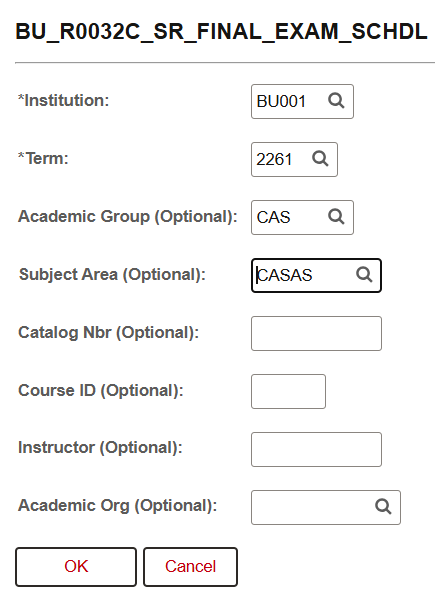
In the example above, the search will produce a report of the final exam schedule for Term: Spring 2026 (2261), optional Academic Group: CAS, and optional Subject Area: Astronomy (CASAS).
Additional Info & Tips:
- Includes classes that have a final exam schedule during the university’s final exam week.
- A single row per class with instructor and room information consolidated for the class.
Data Fields Displayed in Results:
| Academic Career |
Academic Group |
Course ID |
Subject Area |
| Catalog Nbr |
Class Section |
Description |
Session |
| Enrollment Total |
Exam Time Code |
Exam Date |
Exam Start Time |
| Exam End Time |
Facility ID(s) |
Room Capacity |
Combined Exam |
| Instructor(s) |
Instructor’s Email(s) |
|
|
Class Roster by Instructor
A list of classes taught by the instructor prompted by Institution (required) and Instructor ID (required). Can also narrow results by Term (optional). Report includes class information, class location, and enrollment.
Used by faculty and administrators to look at the instructor teaching history for any semester.
System Details:
- Query Name: BU_R0031_SR_INSTRUCTOR_SCHDL
- Query Title/Short Description: Class roster(s) by instructor
- Search Prompts (asterisk indicates required field): *Institution, Instructor ID, and Term.

Additional Info & Tips:
- Includes all classes taught by the instructor in the prompted term (if specified) or for as long as the instructor has been teaching at BU (if the term is not specified).
- Single row per class section. By clicking on the linked columns, user can drill down to the class roster (BU-ROO31_SR_INSTRUCTORS_CLASS).
Data Fields Displayed in Results:
| Course ID |
Effective Date |
Academic Organization |
Academic Group |
| Academic Career |
Subject Area |
Catalog Nbr |
Status as of Effective Date |
| Short Title |
Long Title |
Minimum Units |
Maximum Units |
| Repeatable |
Total Units Allowed |
Total Completions Allowed |
Grading Basis |
| Primary Component |
Final Exam |
Course Component |
Course Description |
| Course Attributes |
Equivalent Course Group |
Equivalent Course Description |
|
Classes With All Schedule Fields
A list of all classes prompted by Term, with almost all class schedule-related fields from the Maintain Schedule of Classes screens.
Used for class scheduling and registration planning.
System Details:
- Query Name: BU_R0012G_SR_SOC_EXTR
- Query Title/Short Description: Classes w/ all schedule fields
- Search Prompts (asterisk indicates required field): *Institution, *Term, Academic Group, Subject, Class Status, and Academic Org.
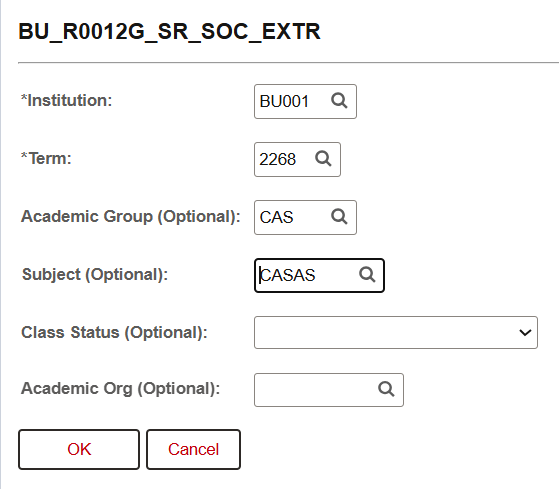
In the example above, the search will produce a report on Term: Fall 2026 (2268), Academic Group: CAS, and Subject; Astronomy (CASAS).
Additional Info & Tips:
- Includes all classes/sections.
- One row per class/section.
Data Fields Displayed in Results:
| Course ID |
Class Nbr |
Term |
Term Description |
| Type of Consent Required |
Schedule Print |
Consolidated Class Field |
Subject |
| Catalog Number |
Class Section |
Description |
Component |
| Associated Class |
Grading Basis |
Grading Basis Description |
Location |
| Instruction Mode |
Minimum Units |
Maximum Units |
Course Contact Hours |
| Session |
Academic Group |
Academic Career |
Enrollment Status |
| Class Status |
Class Type |
Enrollment Capacity |
Minimum Enrollment Number |
| Wait List Capacity |
Auto Enroll from Waitlist |
Enrollment Total |
Wait List Total |
| Course Attributes |
Enrollment Capacity |
Academic Organization |
Session Start Date |
| Session End Date |
Cancel Date |
Combined Section |
Combined Sections ID |
| Combined Sections |
Combined Section Capacity |
Combined Section Enroll Total |
Exam Seat Spacing |
| Class Meeting Pattern Nbr |
Building |
Room |
Room Capacity |
| Meeting Days |
Meeting Start Time |
Meeting End Time |
Meeting Start Date |
| Meeting End Date |
Standard Meeting Pattern |
Basic Data Topic ID |
Description |
| Meetings Topic ID |
Meetings Topic Description |
Meetings Free Format Topic |
Meetings Print Topic |
| Final Exam |
Class Notes |
Note Nbr |
Note Nbr Description |
| Class/Instructor Assign Seq # |
Instructor Role |
Instructor Type |
Grade Roster Access |
| Print Instructor in Schedule |
ID |
Last Name |
First Name |
| Middle Name |
Email |
|
|
Course Catalog
A list of courses prompted by Effective Date (On/Before), with options to narrow by Academic Group, Academic Org, or Subject. Displays all course catalog fields such as course title, description, components, units, grading basis, final exam Yes/No, etc.
Used by class schedulers and course catalog administrators to review and manage all course catalog attributes.
System Details:
- Query Name: BU_R0012L_SR_CRSE_CATALOG
- Query Title/Short Description: Course Catalog
- Search Prompts (asterisk indicates required field): *Institution, *Effective Date (On or before), Academic Group, Subject Area, Academic Organization, and Status.

In the example above, the search will produce a report narrowed by Effective Date on/before: 12/31/2027, for Academic Group: COM.
Additional Info & Tips:
- Includes all requested courses. It is recommended to Select “Active” from the Status prompt for a list of only active courses.
- Single row per course.
Data Fields Displayed in Results:
| Course ID |
Effective Date |
Academic Organization |
Academic Group |
| Academic Career |
Subject Area |
Catalog Nbr |
Status as of Effective Date |
| Short Title |
Long Title |
Minimum Units |
Maximum Units |
| Repeatable |
Total Units Allowed |
Total Completions Allowed |
Grading Basis |
| Primary Component |
Final Exam |
Course Component |
Course Description |
| Course Attributes |
Equivalent Course Group |
Equivalent Course Description |
|
Waitlisted Classes With Available Details
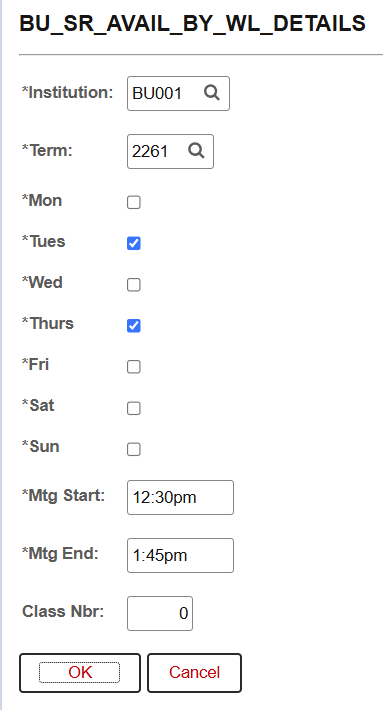
This query is used as drilling URL query by BU_SR_AVAIL_BY_WAITLIST_CLASS. Report provides a list of students waitlisted for classes that meet at requested days and times.
System Details:
- Query Name: BU_SR_AVAIL_BY_WL_DETAILS
- Query Title/Short Description: Waitlisted class-Avail-Details
- Search Prompts (asterisk indicates required field): *Institution, *Term, *Mon/Tues/Wed/Thurs/Fri/Sat/Sun, *Mtg Start, *Mtg End, and Class Nbr.
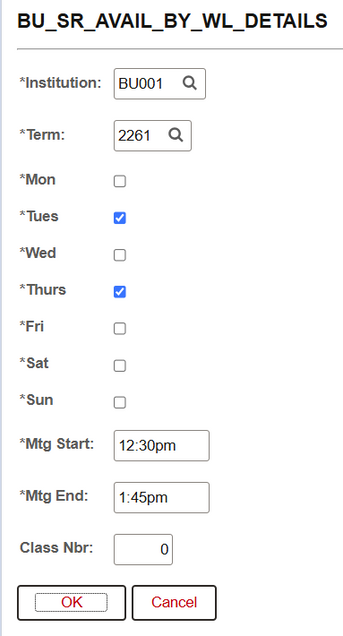
In this example, the user is searching for waitlisted students in classes for Term: Spring 2026 (2261), that meet Tues/Thurs, start at 12:30pm, and end at 1:45pm.
Data Fields Displayed in Results:
| ID |
Last Name |
First Name |
Middle Name |
BU Email |
Add/Drop Withdrawal Dates
This report displays add, drop, and withdraw dates for classes.
System Details:
- Query Name: BU_SR_SOC_DEADLINE_DATES
- Query Title/Short Description: Deadline Dates for Classes
- Search Prompts (asterisk indicates required field): *Institution, *Term, Academic Group, Subject Area, Starting Catalog Nbr, and Session. Click checkbox (as shown in the image below) to Omit Cancelled Sections.
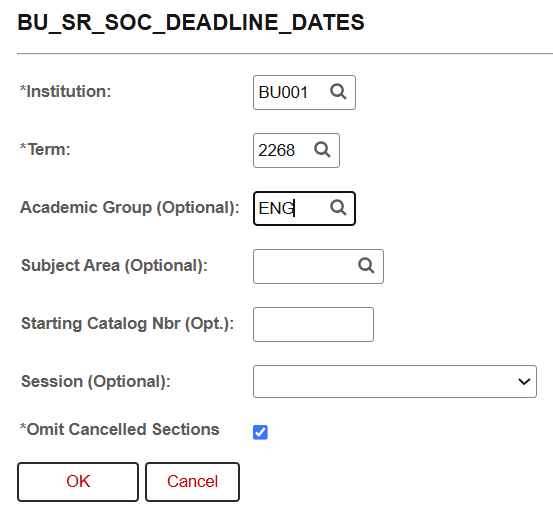
In the example above, the user is running a report for Term: Fall 2026 (2268), Academic Group: ENG, and omitting any cancelled sections.
Additional Info & Tips:
The Search defaults to Omit Cancelled Sections, so be sure to uncheck the box if cancelled sections should appear in the report.
Data Fields Displayed in Results:
| Term |
Session |
Class Nbr |
Subject Area |
| Catalog Nbr |
Class Section |
Course Component |
Course Title |
| Location Code |
Instruction Mode |
Enrollment Status |
Class Status |
| Class Type |
Combined Section |
Class Start Date |
Class End Date |
| Use Dynamic Class Dates |
Dynamic Date Rule |
Last Date to Add |
Withdraw Deadline No W Grade |
| Drop Deadline (Retain Record) |
Withdraw Deadline w/ W Grade |
Drop Deadline w/ W Grade |
|
Enrollment Requirement Groups
A list of classes prompted by Term that displays fields related to course registration restrictions, Enrollment Requirement Group (ERG) rules, and Reserve Caps such as course, enrollment capacity, waitlist capacity, ERG rules (i.e. how each ERG is defined), etc.
Used by course schedulers and anyone planning registration restrictions to review how each ERG is defined.
System Details:
- Query Name: BU_RESERVED_RULES
- Query Title/Short Description: Classes w/ Req. Grp definition
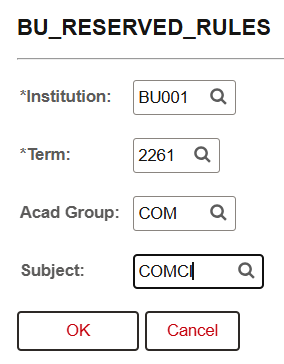
- Search Prompts (asterisk indicates required field): *Institution, *Term, Acad Group, and Subject.
Additional Info & Tips:
- Includes all classes in the prompted term and academic group or subject area.
- Multi-row per class: one line per aspect of the enrollment requirement group rule. For example, if an ERG is defined as “any student in program UCAS, UQST, UENG, or UCOM,” that rule will appear on four rows.
Data Fields Displayed in Results:
| Course ID |
Term |
Session |
Subject |
| Catalog |
Section |
Component |
Descr |
| Class Nbr |
Cap Enrl |
Tot Enrl |
Open Seats |
| Wait Cap |
Wait Tot |
Enrl Stat |
ReserveNbr |
| Start Date |
Cap Enrl |
Rq Group |
Descr |
| Consent |
Line |
Line Type |
Cond Code |
| Operator |
Value |
Course ID |
Valid Beg |
| Valid End |
Conn |
Parenth |
—— |
Page last updated September 2026. For a PDF copy, print this webpage as a PDF.