Queries: Admissions
This resource provides information and instructions for running common Admissions-focused queries using Query Viewer.

Introduction
Queries in MyBU Student are reports. This resource describes queries identified as frequently used for staff needs and processes in the Admissions functional area. This typically includes data related to application materials and details, application status, and matriculation rosters.
ⓘ New to queries? Be sure to visit the Introduction to Queries for Staff resource first for foundational concepts, detailed instructions on how to find and run a query, and links to other functional area reports. Support and query request information is also available via that resource.
All the queries included in this resource are run using Query Viewer in MyBU Student. Several other frequently used student record queries can be quickly accessed via the Reporting Center folder in the left-side menu from the MyBU Student Dashboard. Refer to the Introduction to Queries for Staff resource for a breakdown of the queries found in the Reporting Center folder.
For each query included below, the system’s Query Name, Short Description, prompts, and data fields are listed, along with additional helpful details and screenshots.
⚠︎ Screen options, menus, and reports will vary by user; please note that displays may differ for you based on access that has been granted. All screens shown are for training purposes only.
Admissions Checklist
This is a report based on the status of checklist items. It is used to determine if students are missing certain credentials or application materials.
System Details:
- Query Name: BU_R0019O_AD_CHECKLIST
- Query Title/Short Description: Admissions Checklist
- Search Prompts (asterisk indicates required field): *Institution, *Admit Term, Checklist, List Status, Chklist Itm, and Item Status.
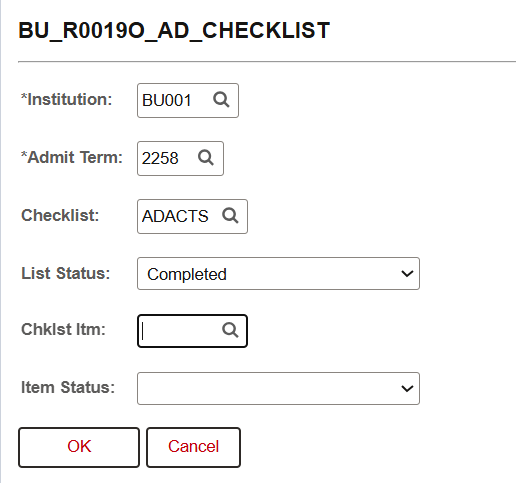
In the example shown above, the report will run for Admit Term: Fall 2025 (2258). Results will narrow by Checklist Item: ACT Scores (ADACTS) with List Status: Completed.
| ID |
Function |
Checklist |
Checklist Descr |
| Chklist Itm |
Stat Dt |
Status |
Descr |
| Career |
Acad Prog |
Admit Term |
Status |
| Prog Actn |
Action Rsn |
Admit Type |
Notificatn |
| Appl Meth |
Citizenship Status |
|
|
Contact List of Admitted Students
This report creates a contact list for reaching out to the admitted undergraduate students included in the search.
System Details:
- Query Name: BU_R0019F_AD_CONTACT_REPORT
- Query Title/Short Description: Contact List Admitted Students
- Search Prompts (asterisk indicates required field): *Admit Term, *Career, Acad Prog or %Col%, and Institution.
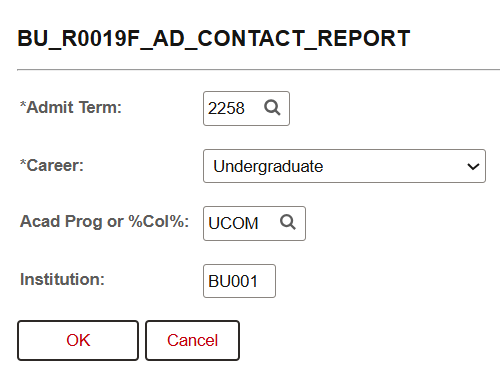
In the example above, the report will run for Admit Term: Fall 2025 (2258), Career: Undergraduate, and Acad Prog: UCOM.
| Admit Term |
Admit Type |
First Name |
Middle |
| Last |
ID |
Appl Meth |
Acad Prog |
| Notificatn |
Prog Actn |
Actn Rsn |
Acad Plan |
| Descr |
Type |
Country |
Phone |
| Ext |
Type |
Email |
Partnership |
| Partnership Descr |
US Citizenship Status |
1st Gen Ind |
|
All Applications By Admit Term
A report of all admission applications by admit term range prompt. Report will include applications of any status (Active in Program, Admitted, Cancelled).
System Details:
- Query Name: BU_AD_APPL_ALL_STATUS
- Query Title/Short Description: All applications by admit term
- Search Prompts (asterisk indicates required field): *Institution, *Academic Career, and *Admit Term (From/To).
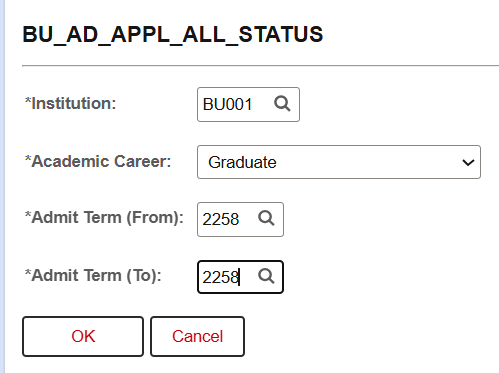
In the example above, the report will run for Academic Career: Graduate, and Admit Term From/To: Fall 2025 (2258).
Additional Info & Tips:
Running this report from Query Viewer may produce results that exceed maximum result size for the application server. It’s recommended to schedule these runs rather than use Query Viewer.
Data Fields Displayed in Results:
| ID |
Last Name |
First Name |
Middle Name |
| Academic Career |
Academic Program |
Academic Plan |
Admit Term |
| Academic Program Status |
Effective Date |
Action Date |
Program Action |
| Program Action Description |
Action Reason |
Action Reason Description |
Country of Citizenship |
| Current Address Line 1, 2, 3, 4 |
Current City |
Current State |
Current Postal Code |
| Current Country |
Home Address Line 1, 2, 3, 4 |
Home City |
Home State |
| Home Postal Code |
Home Country |
|
|
UGRD Admissions Detail Query
A report of multiple admissions details by admit term.
System Details:
- Query Name: BU_R0006_AD_UG_APPL_DTL_QRY
- Query Title/Short Description: Detailed Undergraduate Application Report
- Search Prompts (asterisk indicates required field): *Admit Term, Admit Term 2, School/College, FRS or TRN, Notification Plan, and CEEB.
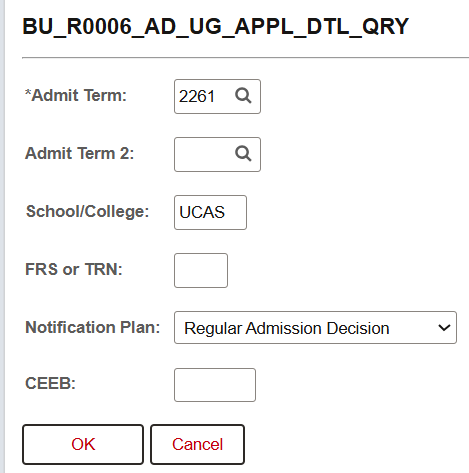
In the example above, the report will run for Admit Term: Spring 2026 (2261), narrowed to School/College: UCAS and Notification Plan: Regular Admission Decision.
Additional Info & Tips:
To narrow the report to show only first-year or transfer student Admit Types, enter FRS or TRN, respectively, in the relevant search field.
Data Fields Displayed in Results:
| ID |
Last Name |
First Name |
Birthdate |
| US Citizenship |
Admit Term |
Admit Type |
Notification Plan |
| Appl Meth |
Academic Program |
Academic Plan |
Plan Description |
| Academic Subplan |
Fac/Staff |
Prog Actn |
Action Rsn |
| Decision/Status Date |
WITHDRAW / DEFER DATE |
WITHDRAW / DEFER REASON |
Honors College Admit |
| Last School Attended |
CEEB |
HS State |
HS Country |
| Visa Type |
App Fee Status |
First Gen |
Financial Aid Interest |
CEEB Not Assigned Audit
This query generates a report of last school attended and external education values by applicant.
System Details:
- Query Name: BU_AD_UG_CEEB_NA_AUDIT
- Query Title/Short Description: CEEB Not Assigned Audit
- Search Prompts (asterisk indicates required field): *Admit Term, Admit Term 2.
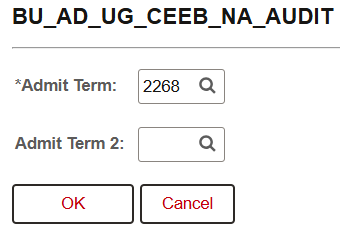
In the example above, the report will run for Admit Term: Fall 2026 (2268).
Data Fields Displayed in Results:
| ID |
Admit Term |
Admit Type |
Notificatn |
| Appl Meth |
Acad Prog |
Prog Actn |
Action Rsn |
| Last School Attended |
LSA School Type |
Education |
Program Action Date |
Matriculated Non-withdrawn Applicants
Report displays a current roster of matriculated applicants for a given term with prompts for Career and Academic Program.
System Details:
- Query Name: BU_AD_UG_MATR_DATABASE
- Query Title/Short Description: Matriculation Database
- Search Prompts (asterisk indicates required field): *Career, *Admit Term, Admit Term 2, Academic Program, Academic Program 2, Exclude Academic Program, FRS or TRN, and Notification Plan.
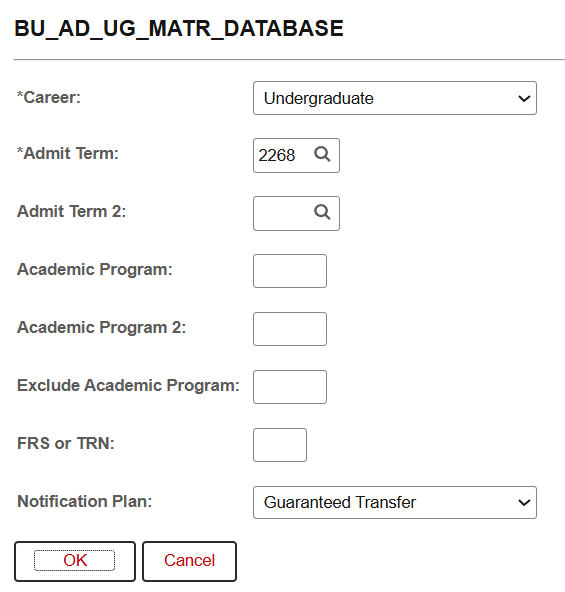
In the example above, the report will run for Career: Undergraduate and Admit Term: Fall 2026 (2268). The search is also narrowed by Notification Plan: Guaranteed Transfer.
Additional Info & Tips:
IS&T staff distribute this report to school/colleges weekly through the summer to ensure they have an updated listing of their incoming students.
Data Fields Displayed in Results:
| ID |
Preferred First Name |
Last Name |
Gender |
| International |
First Generation |
Address |
City |
| State |
Postal |
Country |
Home Phone |
| Cell Phone |
Application Email |
BU Email |
Academic Program |
| Academic Plan |
Academic Subplan |
Program/Plan Change Date |
Honors College |
| Admit Term |
Admit Type |
Notification Plan |
Program Action |
| Action Reason |
Status Date |
Description |
QuestBridge Applicant |
| Scholarships Awarded |
Previously Deferred |
|
|
Page last updated September 2026. For a PDF copy, print this webpage as a PDF.