View Financial Aid Status
This resource breaks down the Financial Aid Status page, which provides staff users a summary of information pertaining to a student’s Institutional Student Information Record (ISIR) status, Checklists, Comments, and Packaging Status Summary. It includes items such as federal and institutional verification status, disbursement hold, satisfactory academic progress, and packaging information.



Introduction
View Financial Aid Status is a landing page for a set of view-only screens that allows staff to perform the following processes related to supporting a student’s aid application:
- Check a student’s application status
- View checklist items
- View FAFSA transactions, C Codes, & Reject Codes
- View financial aid that has been awarded
- View the cost of attendance and need information for a student
ⓘ NOTE: This resource includes information related to Federal Financial Aid policies which are liable to change. Staff maintaining this documentation will update terminology, links, or processes in accordance with new information as it becomes available in conjunction with Student Information System updates. The information here identifies salient details regarding the usage of MyBU Student and is designed to be used in conjunction with Financial Aid Procedures and Processes.
⚠︎ Screen options and menus will vary by user; please note that displays may differ for you based on access that has been granted. All screens shown are for training purposes only.
Navigation & Status Overview
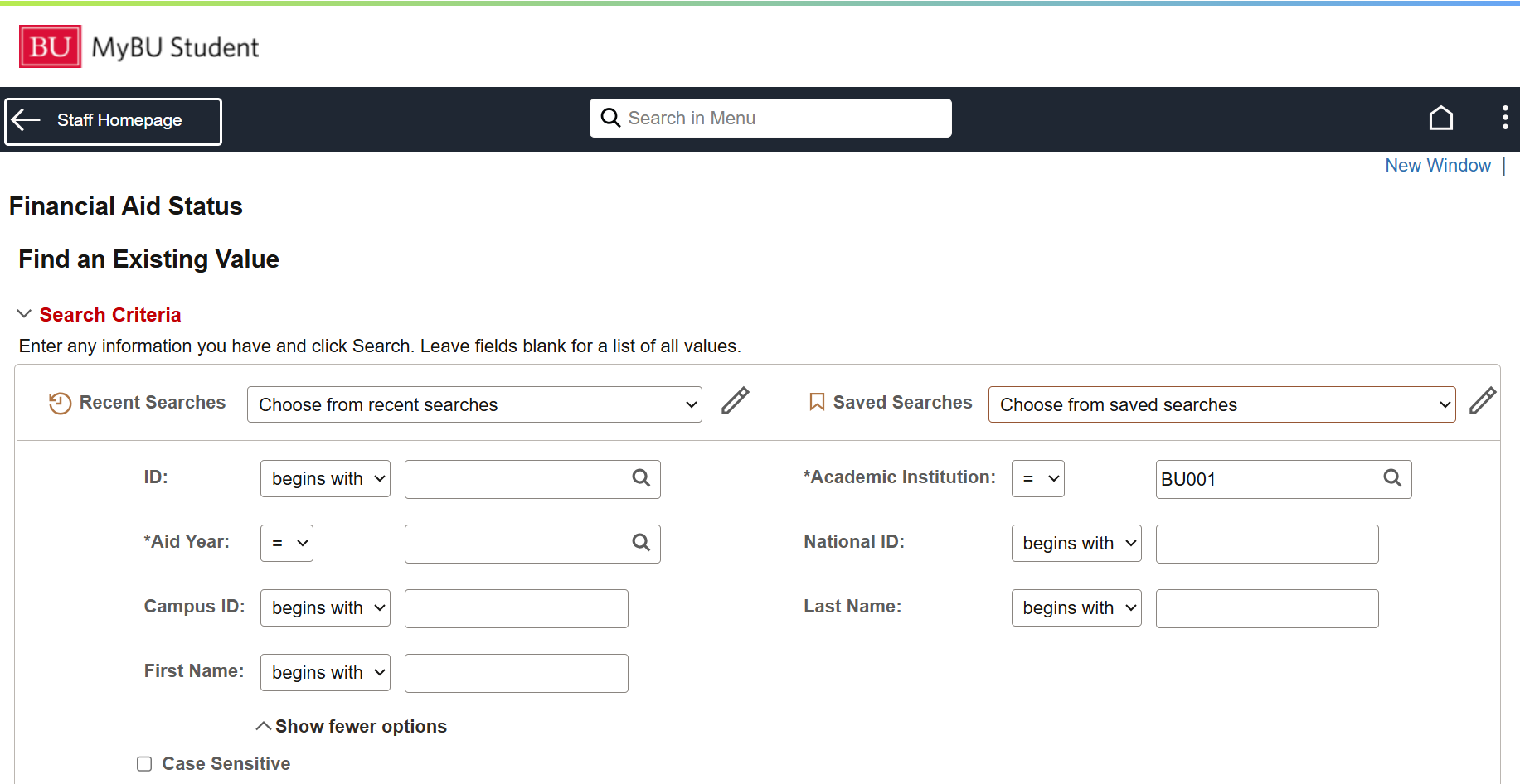
Navigation (FULL SITE): Financial Aid > View Financial Aid Status
- Search for the student by UID:
- Enter UID into the ID field.
- Academic Institution should remain as the auto-filled default (BU001).
- Enter or select Aid Year.
- Click the Search button.
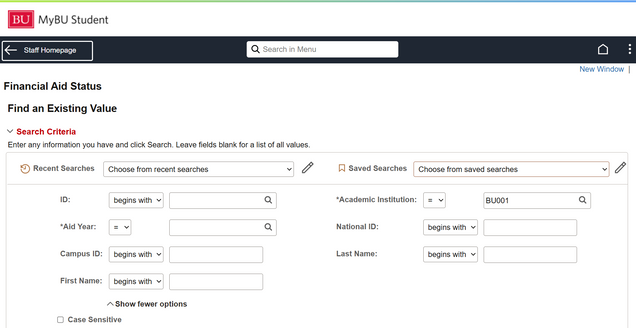
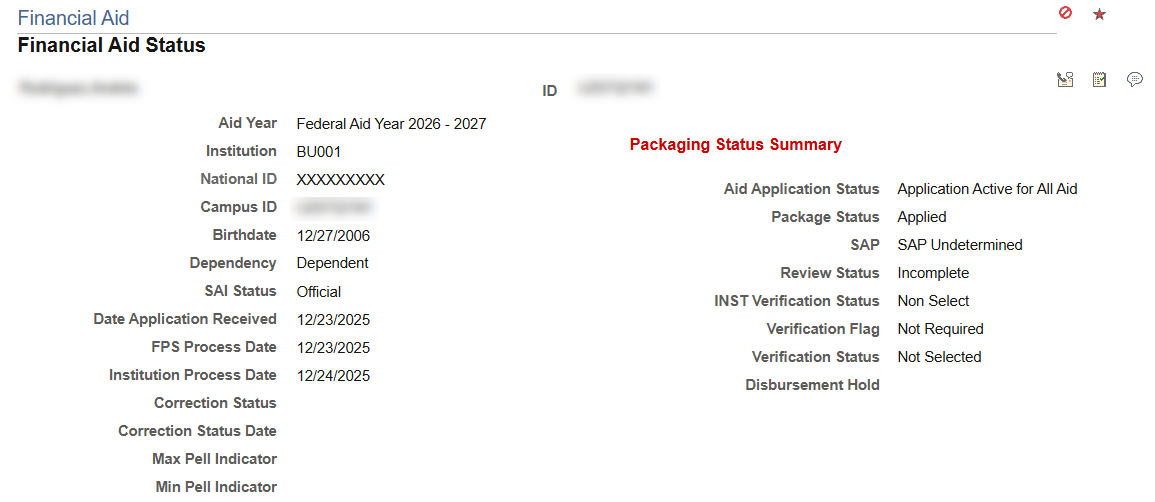
The View Financial Aid Status page will display, providing a high-level assessment of a student’s financial aid application for the aid year.
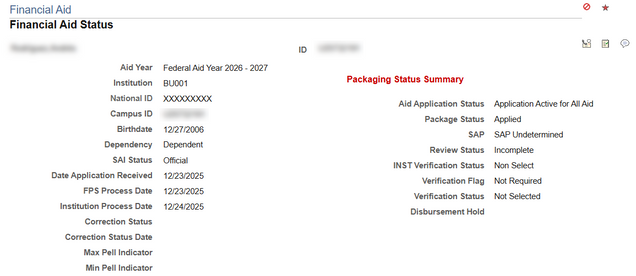
The following overview information is located in the overview at the top of the View Financial Aid Status page:
- EFC Status: represents data from the financial aid application. Statuses are:
- Official: assigned when the student’s EFC has been calculated through the submission of the FAFSA. This status indicates that the EFC value can be used for financial aid packaging and awarding.
- Unofficial: refers to a preliminary or estimated EFC value that has not undergone the full verification or validation process yet. It may occur when a student submits an incomplete financial aid application or if the application requires further review or documentation. The unofficial EFC status does not have the same level of reliability or accuracy as the official EFC status. Financial aid 3 View FA Status administrators may use the unofficial EFC status for planning purposes, but it is subject to change pending verification.
- Rejected: indicates that the student’s EFC could not be determined or accepted due to various reasons. It may occur if the financial aid application is incomplete, contains errors, or fails to meet the required criteria for processing. Until the rejected status is resolved, the student’s financial aid eligibility may be on hold.
- Date Application Received: Displays the date that the U. S. Department of Education’s Central Processing System (CPS) received the initial application for the Aid year in context. This date never changes, even on subsequent Institutional Student Information Record (ISIR) transactions.
- CPS Process Date: Displays the CPS Transaction Processed Date from the most recently loaded ISIR. This date changes with each ISIR transaction.
- Institution Process Date: Displays the date when the Institution loaded the most recent ISIR for the student. This date changes with each new ISIR loaded.
- Correction Status: Displays the student’s current ISIR Correction Status.
- Correction Status Date: Displays the date when the student’s current ISIR Correction Status was set.
Packaging Status Summary
The details under Packaging Status Summary will depend on the Aid Application Status field. This indicates whether the student’s financial aid application is available for processing.
The possible Aid Application Status are:
- Active Aid Application Status: indicates that the student’s financial aid application is currently in progress and being actively reviewed or processed by the financial aid office. An active status typically means that the application has been submitted and is undergoing verification, evaluation, or awarding. It indicates that the student’s application is being actively considered for financial aid eligibility.
- Cancelled Aid Application Status: informs the user that the student’s financial aid application has been cancelled or terminated for some reason. This could happen if the student withdraws their application, requests cancellation, or fails to meet certain requirements or deadlines. A cancelled status means that the application will no longer be considered for financial aid, and the student will not be eligible for aid unless they submit a new application or take appropriate actions to reinstate their application.
- Restricted Aid Application Status: indicates that the student’s financial aid application is subject to certain restrictions or conditions that need to be resolved before it can be fully processed or considered for financial aid. This status typically arises when there are missing documents, unresolved issues, or discrepancies that require further clarification or action from the student or their family. While the application is in a restricted status, the financial aid office may communicate with the student to provide instructions on how to address the specific restrictions and move the application towards an active or resolved status.
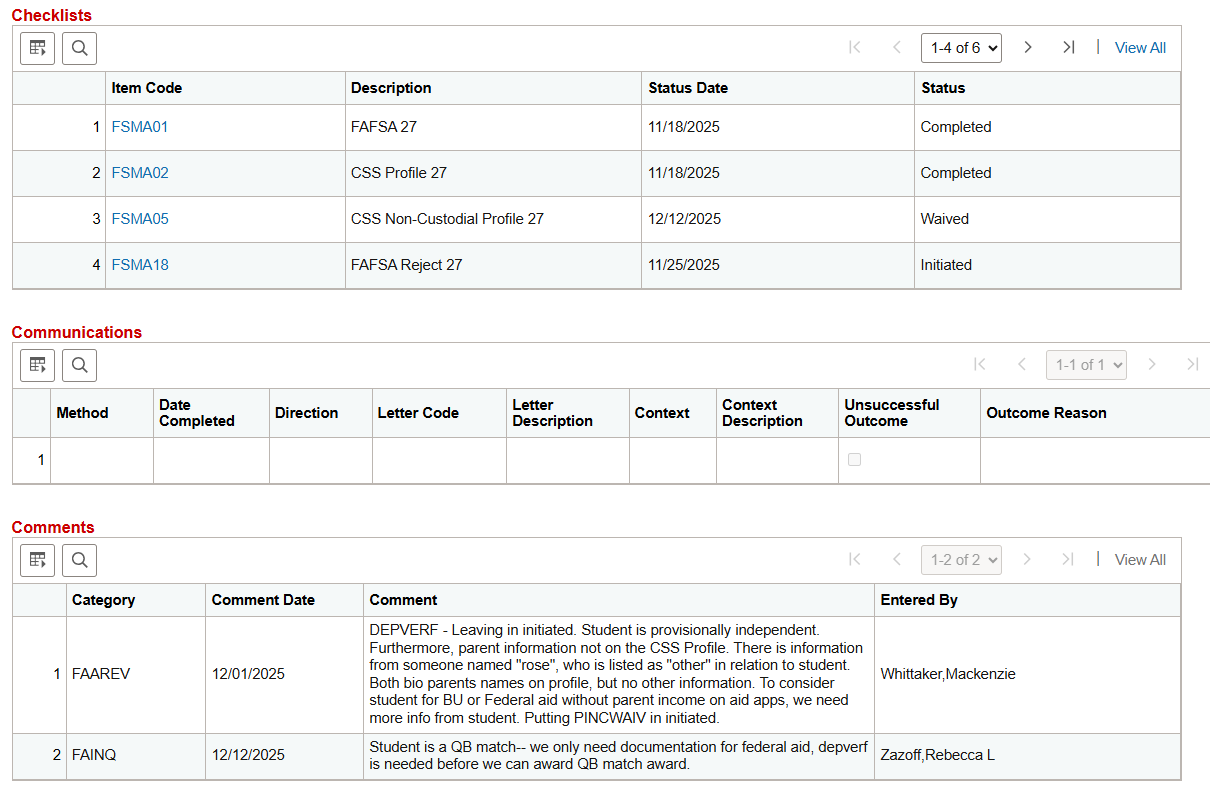
Checklists, Comments, Comments
Loan Counseling Status
Review the student’s Loan Counseling Status; if the student completed an entrance or exit counseling. For more information regarding Loan Counseling, please see the Federal Student Aid Website found here: https://studentaid.gov/entrance-counseling/

FA Term Information
The FA Term Information table displays high level details about the student’s career, academic plan code, NSLDS Loan year and source for the data.

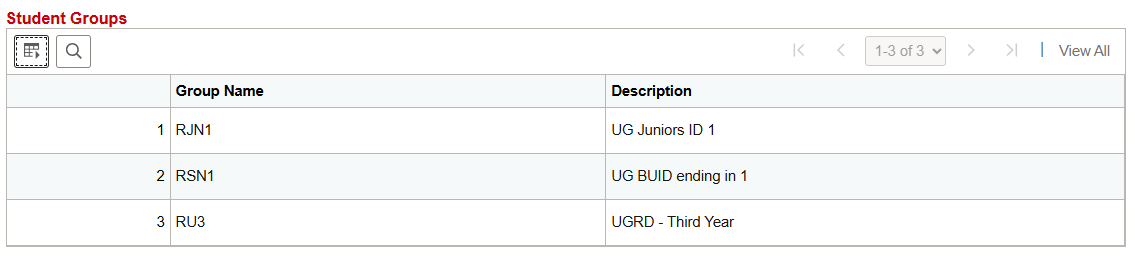
Student Groups
If the student is assigned to a Student Group, the details will be displayed in the Student Groups table. Note that some Student Groups may not display due to security restrictions.
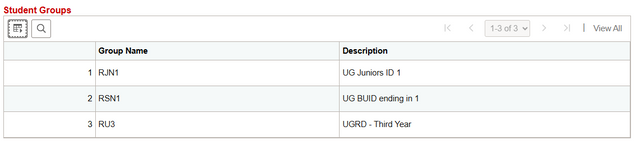
For more information on Student Groups, refer to the Student Groups resource.
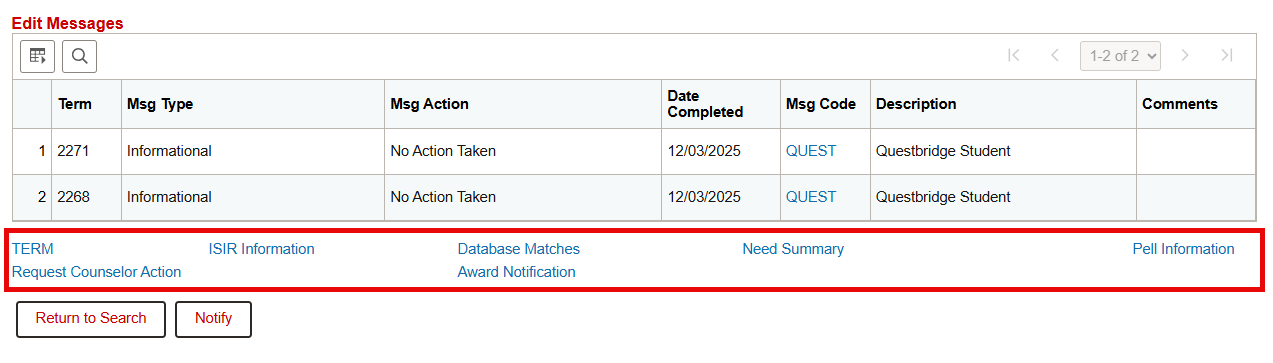
User Edit Messages
User Edit Message: allows users to define and configure messages for user input. These messages are displayed to users to provide a way to validate data against predefined rules. User Edit Messages can act as a flag on a file to notify users of processing stages. For example, FA will utilize a UEM to signify where a student is in the file review process.
If the student is assigned a User Edit Message (UEM) for the selected Aid Year, the details will be displayed in the Edit Messages table.

Additional Links
Use the hyperlinks at the bottom of the page to view more details about a student’s ISIR, Term, Award, Need status. Note: Staff will not be using the Request Counselor Action link.
Upon clicking a link, the relevant information for the selected student will be displayed. Click the Return link to go back to the main View Financial Aid Status page.

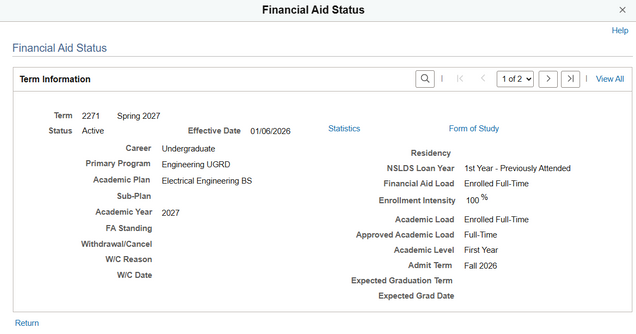
Term
View the student’s Term, Career, and other term information.
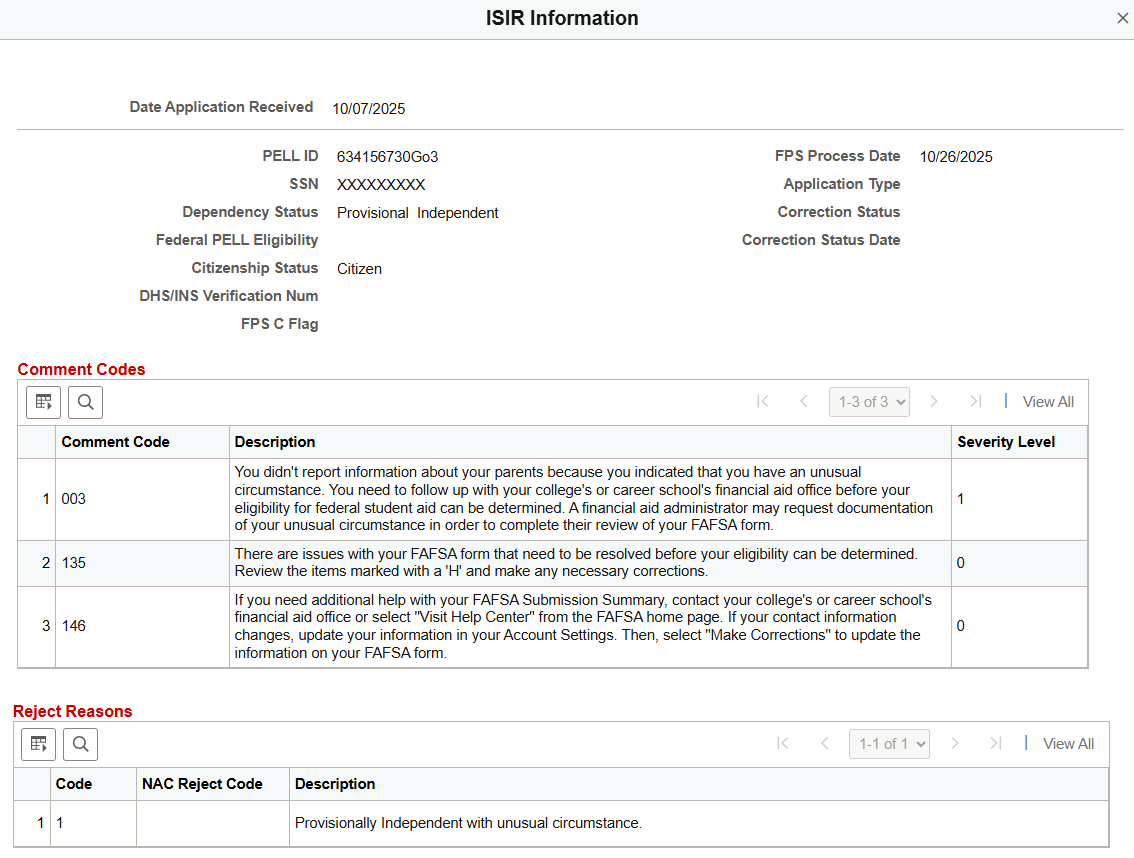
ISIR Information
View information from the student’s most recently loaded ISIR. This pop up also includes the ISIR comment and reject codes for review by Financial Assistance Staff.

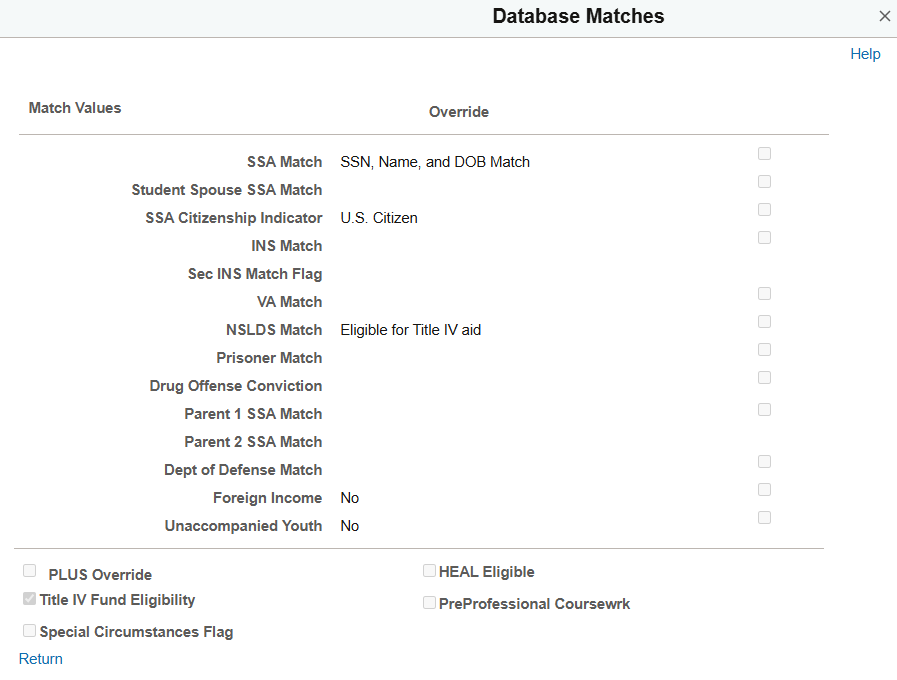
Database Matches
Review or manually override a student’s status for the U.S.E.D. federally required database matches (populated by the ISIR data load process). The ability to make changes on this page is strictly limited to authorized users.
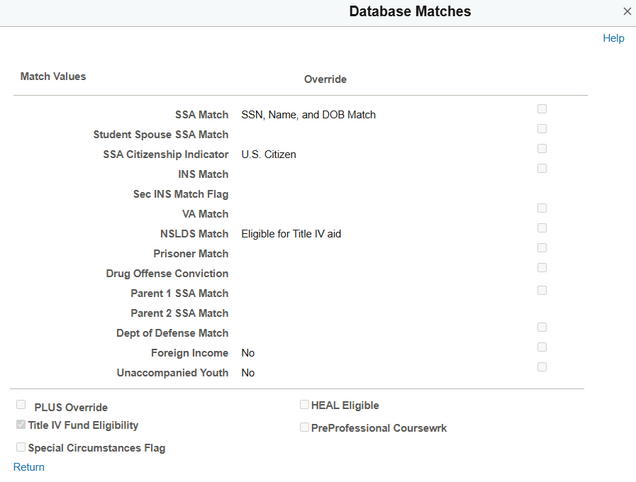
- Match Values Override: Authorized FA staff may select to override the federally reported match value, indicating to the system to award and disburse federal financial aid for this student.
- PLUS Override: Selected to define those dependent undergraduates who are eligible for additional Unsubsidized Loan funds because their parents are deemed a credit risk or for professional judgement reasons. By selecting this check box, the packaging process does not award a PLUS loan and allows a dependent undergraduate student to become eligible for additional Unsubsidized Stafford Loan funds.
- HEAL Eligible: Selected to increase Direct Loan limits for eligible health professional candidates.
- Title IV Fund Eligibility: Selected to identify students who are eligible for Title IV funds. Clearing this check box directs the system to not award federal aid to the student.
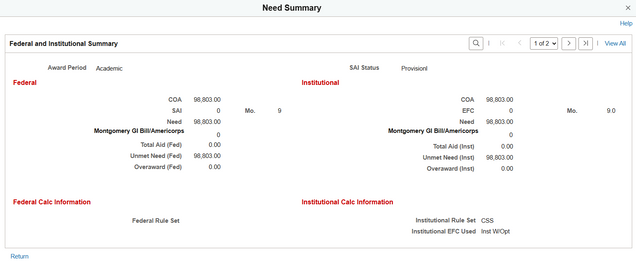
Need Summary
View the student’s cost of attendance (COA) and need, calculated with both Federal and Institutional methodologies. Related fields include COA, federal Student Aid Index (SAI), Estimated Family Contribution (EFC), as well as both Federal and Institutional need calculations.
Pell Information
Review Pell information or initiate Pell Payment processing for a student if they have received a Pell Grant award.

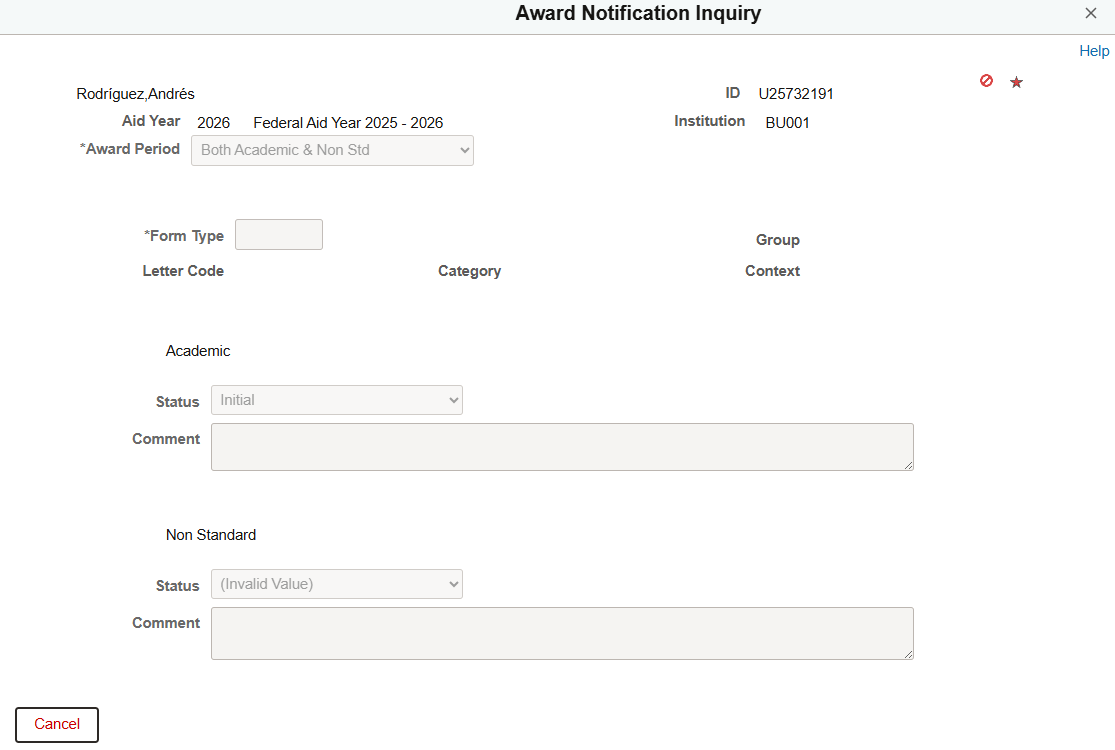
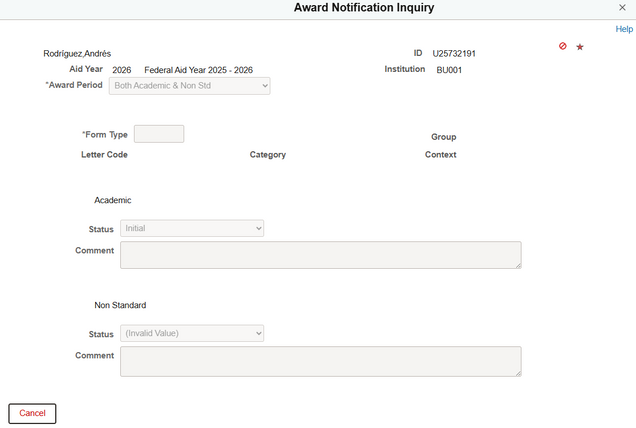
Award Notification
Display the status of the award letter sent to the student, if applicable.
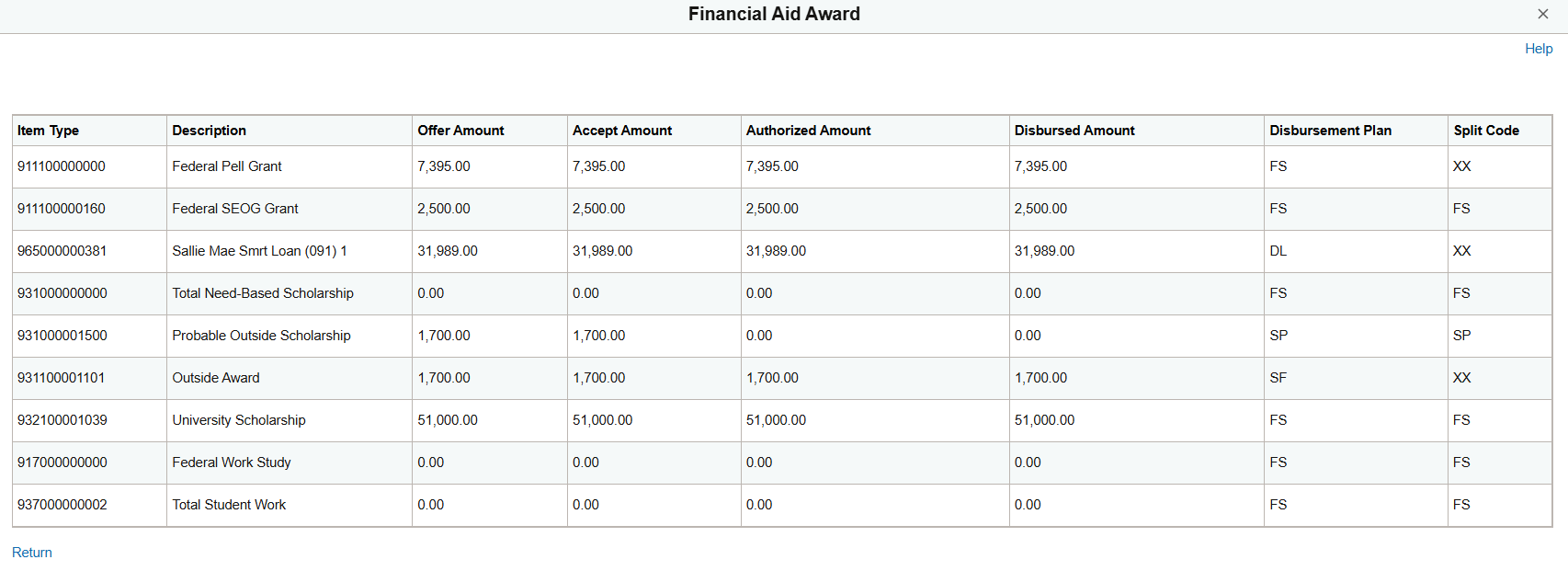
Financial Aid Awarded
Display high-level award information (if applicable) for the aid year selected.

Common Use Case Scenarios
Customer Service Inquiries
Common Questions:
- Did you receive my Financial Aid Documentation?
This could be any of the items listed under the Checklist section of the page. Clicking on any Item Code links brings the user to the Checklist Management Screen for further information and updates. Staff may also refer to the Comments section of the page for more information for any notes regarding the processing status of certain documentation (e.g., appeals).
- What is the status of my financial aid?
Staff would utilize this page to determine the timeline based on normal processing such as User Edit Messages indicating the status of the File Review process or any processing blockers such as SAP status, comment or reject codes (in the ISIR Information link) or missing required Checklist documentation.
Internal Processing Uses
Staff may use this page to glean more information regarding why a student appears on a Quality Check report or to determine their readiness to move to a next processing step:
- Staff may need to review ISIR comment or reject codes before reaching out to a student to request additional information either by adding a checklist item or through a direct communication to the student.
- Staff may have received a customer service contact from the student regarding another module but may utilize this screen to remind students about outstanding FA items, check where students are in the application, review, or packaging process, or confirm general information about a student such as birthdate, BU ID, or full name.
- Staff may utilize this page to determine students’ progression status in communication with ESO regarding scheduled jobs.
Page last updated September 2024. For a PDF copy, print this webpage as a PDF. Other resource formats can also be accessed via the relevant icons below.