Students: View Academic Information
The MyBU Student Academics menu provides information related to student academics. This resource outlines general navigation and how a student can view these pages.

Introduction
 The MyBU Student Academics menu provides students with pages to view their academic-related information. Initial navigation for all pages in this resource is: MyBU Student Dashboard > Left Menu > Academics.
The pages covered in this resource are:
- Programs
- Test Scores
- Course List
- Student Milestones
- View Graduation
- View Unofficial Transcript
- Grades
- Special GPA Display
- Transfer Credit
- Honors and Awards
- Degree/Cert Completion
NOTE: Pages listed under the Academics tab could differ for different types of students and careers. The pages covered in this resource are not exhaustive of all the pages available.
Please refer to the Advising Degree Progress & What-If Reports and the Advisor Information Lookup resources for information on those pages in MyBU Student.
⚠︎ Screen options and menus will vary by user; please note that displays may differ for you based on access that has been granted. All screens shown are for training purposes only.
View Programs
Navigate to: Dashboard left menu > Academics > Programs to view all associated programs.
The Programs page displays and includes the student’s Programs and Plans, their associated Admit Term, Expected Grad Term, and current Program Status.

View Test Scores
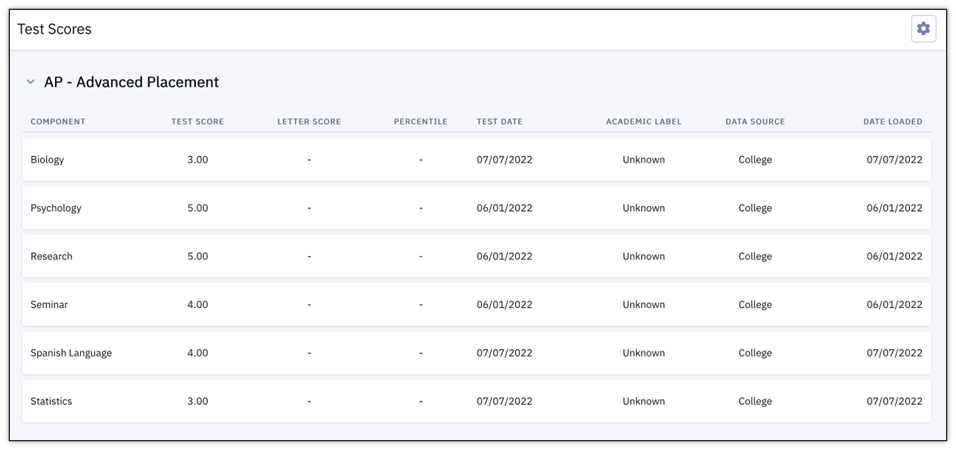
Navigate to: Dashboard left menu > Academics > Test Scores to view recorded scores for tests taken prior to matriculation at BU, such as AP (Advanced Placement) tests in high school.
The Test Scores page displays. Where applicable, each test lists the Components with the associated Test Score, Letter Score, Percentile, Test Date, Academic Label, Data Source, and Date Loaded.

NOTE: If no test scores are available for a student, this page will display a message that the student has no test score data at this time.
View Course List
Navigate to: Dashboard left menu > Academics > Course List to view a list of all BU courses in the student’s record.
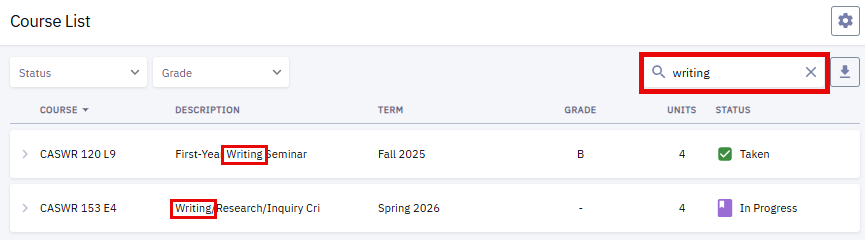
The Course List page displays and includes the Course Description, the Term when the course activity took place, a Grade if applicable, the number of Units, and the current Status.
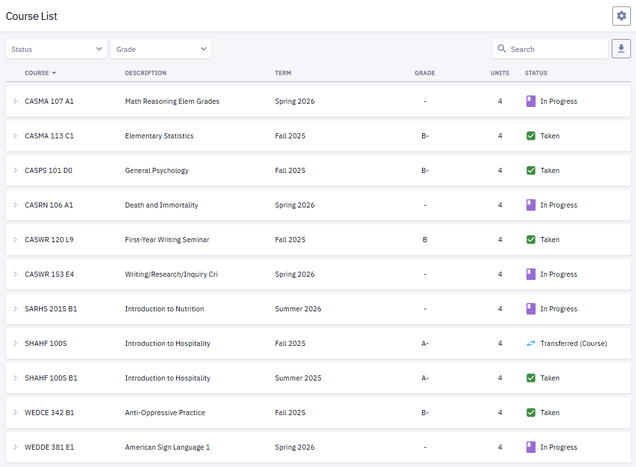
Several actions are available on this page:
- To filter the courses that display:
- Select a Status or Grade value from the drop down menus in the upper left corner of the page.

- Enter a key word in the Search field. In the example below, entering the key word “writing” has narrowed the course list down to two classes that contain the word “writing” in the Description field.

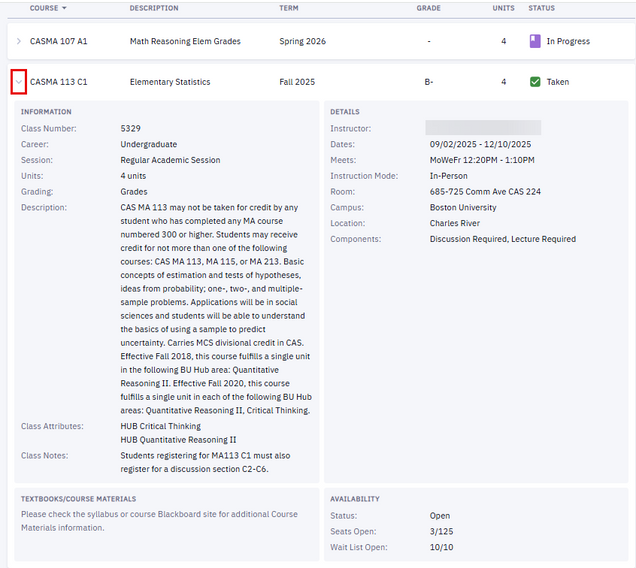
- To view more details about a course, click the arrow on the left side of the course row.
View Student Milestones
Navigate to: Dashboard left menu > Academics > Student Milestones to view a list of milestones on the student’s record.
The Student Milestones page displays. Several actions are available on this page:
- The list can be filtered using the Status dropdown or the Search field.
- Click on the arrow on the milestone row to expand to see more information.

View Graduation
Navigate to: Dashboard left menu > Academics > View Graduation to view expected graduation date and degree status for all programs a student is associated with.
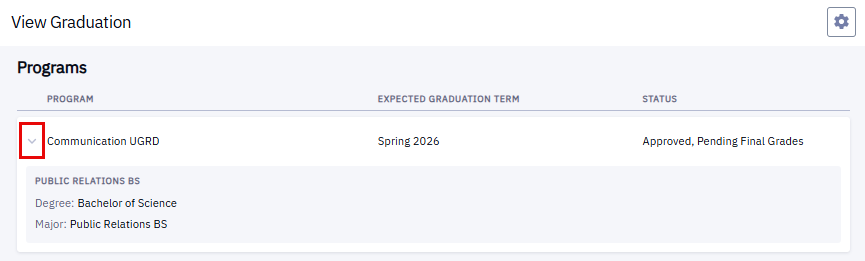
The View Graduation page displays. The page identifies all Programs associated to a student, the Expected Graduation Term, and Degree Status.
Click on the arrow next to the program name to see additional degree, program, and plan details.
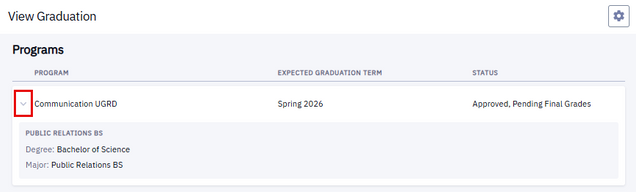
NOTE: Degree Status will remain blank until the external processes for applying, approval, and awarding are complete.
View Unofficial Transcript
Navigate to: Dashboard left menu > Academics > View Unofficial Transcript to run an unofficial transcript that includes summaries of programs, milestones, enrollment, degrees, transfer credit, test credit, and GPA data.
The Unofficial Transcript page displays.
- Select or verify the Transcript Type and Career fields.
- For students who are not Med, Dent, or Law students, select the BU Grade Report and associated Career.
- For Med, Dent, or Law students, the Transcript Type will indicate the appropriate academic area.
- Click the View PDF button to view, download, or print a PDF version of the Unofficial Transcript.
- Review Enrollment, Transfer, and Combined Credit Totals and GPA Statistics.
- Click Expand All to view the details of all sections or click each section individually to expand. Sections include the following information:
- Degrees: Degree (if applicable), Date, Associated Plan.
- Milestones: Milestone & Level, Associated Program, Status.
- Enrollments: Per Term, Courses Enrolled, Credits Attempted & Earned, Grades (if applicable), Points, Term Credit Totals & GPA.
- Programs: Program/Plan, Date, Status.
- Transfer Credit: Source Institution, Associated Program, Courses. Term Taken, Status, Units, Grade.
- Test Credit: Term, Test ID & Component, Date, Score.
- Other Credit: Displayed if applicable.

View Grades
Navigate to: Dashboard left menu > Academics > Grades to view a list of grades by term.
The Grades page displays.
- Select the desired Term.
- The Term Information section shows the overall grade-related data for that term as well as some cumulative information:
- Term GPA
- Cumulative GPA
- Term Units Passed for GPA
- Cumulative Total Units
- The Class List section shows the class with its Units, Grading type, Grade Points, and Official Grade.
- Click the Print icon to print the page.

- Other actions available on this page:
- Click the arrow next to the class for an expanded view of class details.
- Click the three dots menu for more actions.
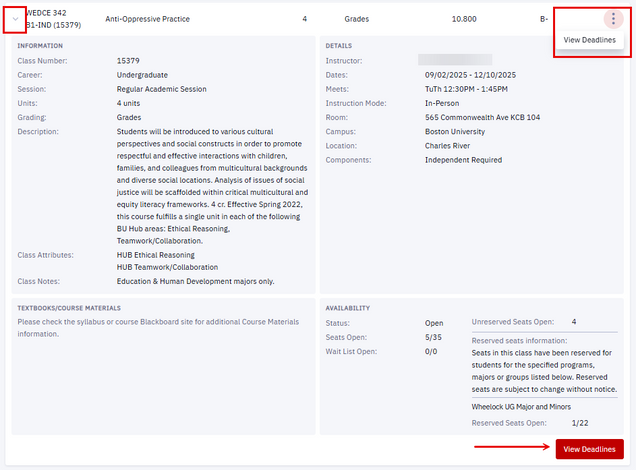
- Click the View Deadlines button (or the View Deadlines link in the three dots menu) to see important Academic Calendar dates for the class including session, drop, and withdrawal dates.

TIP! Depending on the Term selected, it’s possible that some of this information may not be complete and not ready for display at the time of viewing (e.g., if the current term is selected before final grades have been posted).
View Special GPA Display
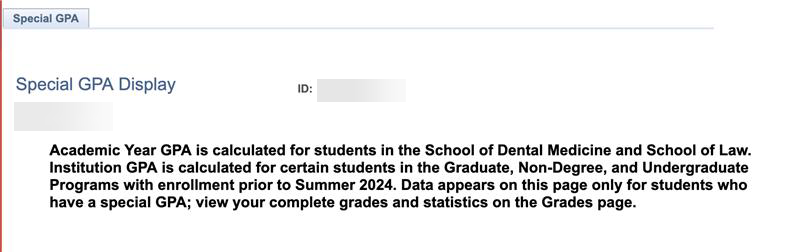
Navigate to: Dashboard left menu > Academics > Special GPA Display to view the following information, if available:
- Academic Year GPA (available only for students in the School of Dental Medicine and the School of Law).
- Institution GPA (calculated for certain students in the Graduate, Non-degree, and Undergraduate Programs with enrollment prior to Summer 2024).
Data appears on this page only for students who have a Special GPA. All other students will receive a message when selecting this option from the Academics tab, instructing them to go to the Grades tab to view their complete grades and statistics.

View Transfer Credit
Navigate to: Dashboard left menu > Academics > Transfer Credit to view recorded transfer credits.
The Transfer Credit page displays, with expandable rows of information, if available, about Course Credits, Test Credits, and Other Credits.
- Click a credit type to expand and view additional details. If applicable, click the arrow next to a listed item to further expand.
The information that displays is determined by the type of credit listed. For example:
- Course Credits: for the identified Source Institution and Program, the Term, Source Term, Incoming Course, Units Taken, Grade Input, Equivalent Course, Units, Grade, and Status values will be populated where applicable.
- Test Credits: for each credit, the Program it’s applied to will be listed along with the Term, Test ID, Test Component, Score, Course, Units, Grade, and Status.

View Honors and Awards
Navigate to: Dashboard left menu > Academics > Honors and Awards to view a list of honors and awards.
The Honors and Awards page displays, including honors such as Dean’s List or relevant scholarships.

View Degree/Cert Completion
Navigate to Dashboard left menu > Academics > Degree/Cert Completion to print a letter verifying the completion of a degree or certificate.
NOTE: This action can only be performed for degrees or certificates that have been completed.
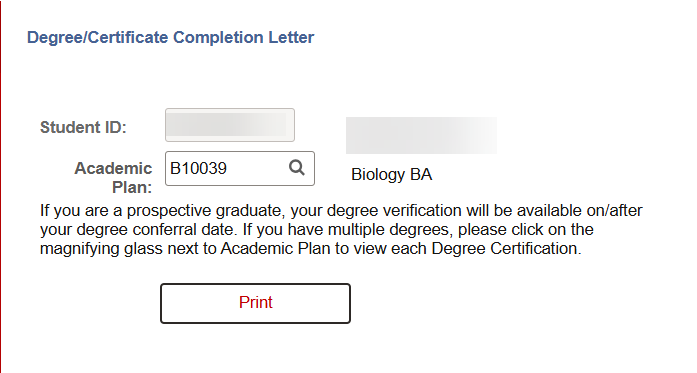
In the Degree/Certificate Completion Letter window that opens:
- Search and select the Academic Plan for the completed degree or certification.

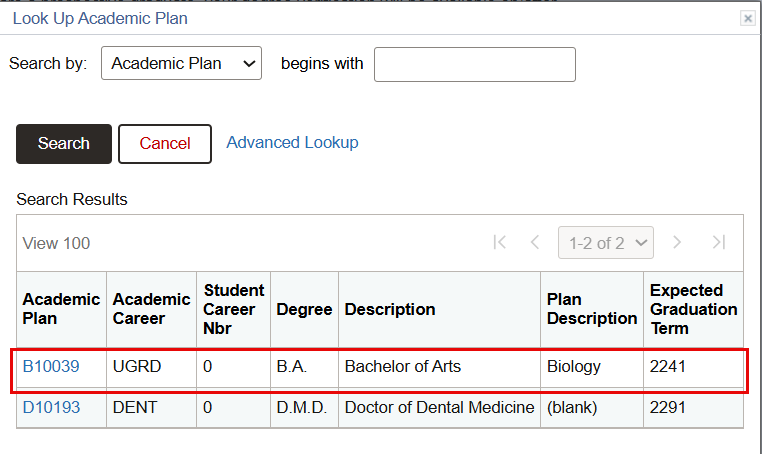
- In the Look Up Academic Plan window that opens, identify the appropriate Academic Plan:
- Find the appropriate Academic Plan using the search features at the top of the window.
- Alternatively, click the Academic Plan link on the left of the appropriate academic plan row.
NOTE:This option is only available for degrees or certificates that have been completed. For students with dual degree status or multiple careers, a “blank” plan description will indicate academic plans that have not yet been completed and are not available for printing.
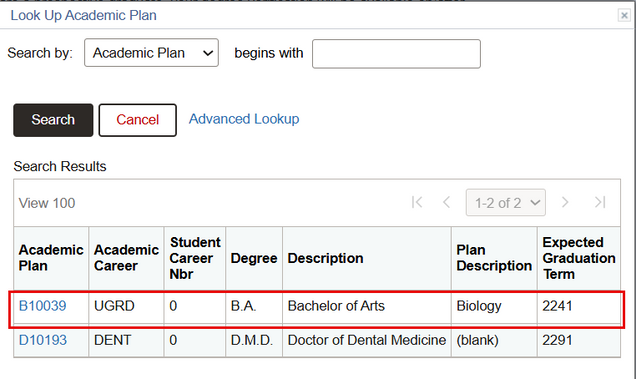
- The Degree/Certificate Completion Letter window will open again, with the Academic Plan populated. Press Print to generate the completion letter for the selected Academic Plan.

When identifying an Academic Plan that has not yet been completed, a message will appear that explains the requested degree certification/certificate of completion Print will not be generated.

Page last updated May 2026. To download a PDF copy of this resource, print this webpage as a PDF.