Student Account
This resource explains how students can access their billing and account information with the Student Account page in MyBU Student.

Introduction
The Student Account page allows students to view their current balance and review charges, payments, and credits by Term. The page also allows users to click through to the Nelnet service to make payments.
Students may provide Guest User access to anyone who is assisting them with bill payment. To add or update access for a Guest User, students should use the Manage Guests page. Refer to the Managing Guests resource for more information.
For additional information about billing and payment, including payment deadlines, visit the BU Student Financials website.
⚠︎ Screen options and menus will vary by user; please note that displays may differ for you based on access that has been granted. All screens shown are for training purposes only.
Navigation & Overview
To access Student Account:
- Login to MyBU Student and navigate to the Dashboard.
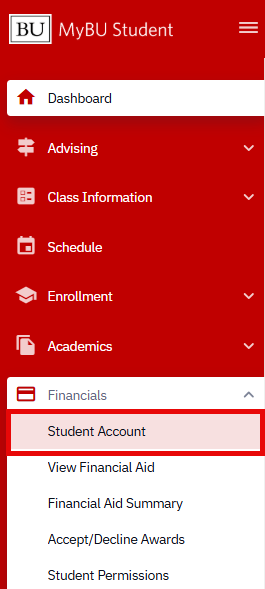
- Using the left-side navigation menu, select the Financials folder and then select Student Account.
Page Overview
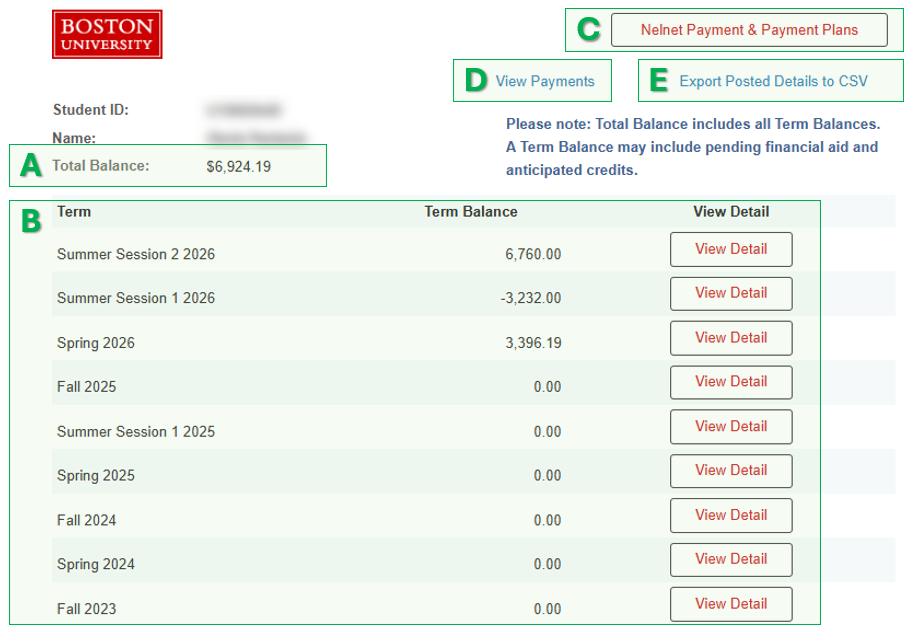
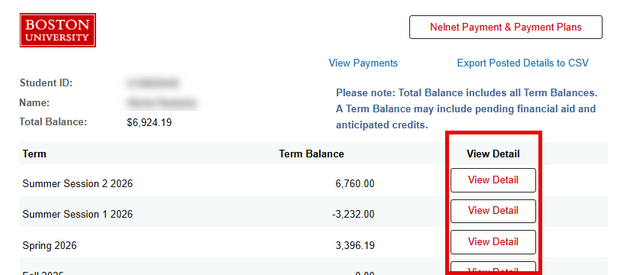
Refer to the letter labels on the example below to learn about the features of the Student Account page.

- Total Balance: shows the current total amount owed. The total is comprised of all Term Balances, which may include pending financial aid and anticipated. Amounts are subject to change.
- Term Balances: shows any balances from all applicable Terms.
- Terms where the balance has been fully settled will show as 0.00.
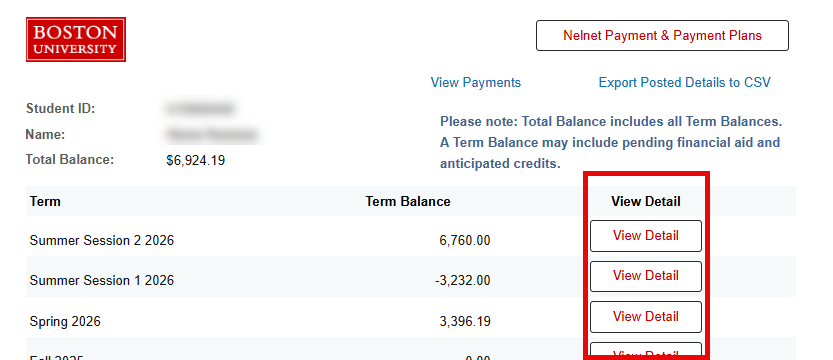
- Click View Detail to see the breakdown of that Term’s charges and credits. Refer to the View Term Detail section of this resource for more information.
- Nelnet Payment & Payment Plans: opens the Nelnet QuikPAY® system, which allows users to make payments using a U.S. bank account. (Note: Part-time students also have an option to pay by credit card.)
- The QuikPAY® interface will open in a new browser tab, and will securely carry over the student’s account information so no new login is required.
- For more information about payment options, please visit the Student Financials website.
- View Payments: opens a complete Payment Activity history. Refer to the View Payment section below for more information.
- Export Posted Details to CSV: prompts a CSV download which can be used to view a complete history of charges and payments/credits for all Terms in a spreadsheet.
ⓘ NOTE: The Term Details section will not list an upcoming term until the billing cycle has begun for that term. Use View Payments to display all payments, deposits and housing guarantee payments regardless of term.
View Payments
To view a history of all payments made towards the account, including which Terms the payments were allocated to, select View Payments from the Student Account page.
- The list of payments will appear in order of Posted Date, starting from the most recent.
- Returned or cancelled payments will also appear here in the form of a deduction, as shown in the first line item of the example screenshot below.
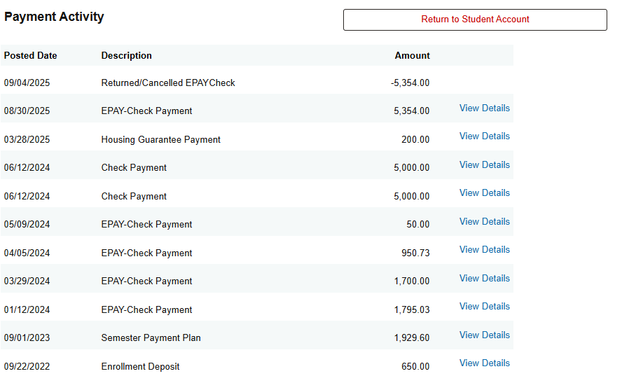
- To view which Term(s) a payment was applied to, click View Details on that line item.
- In the example below, an EPAY Check Payment of $5,354.00 was allocated to charges across both the Spring 2025 and Fall 2025 terms.

To see all charges, payments, and credits applied to a particular Term, click the Return to Student Account button at the top of the screen and then select View Detail for that term. Refer to the View Term Detail section below for instructions.
View Term Detail
To view all charges, payments, and credits applied to a Term, select the View Detail button for that term on the Student Account page.
On the Term Detail screen:
- Charges will be itemized and may include tuition, fees, housing, dining plans, convenience points, etc. These will display alongside any payments or disbursed credits/aid applied towards the balance.
- Any pending financial aid (e.g., loans that have not yet been disbursed) or other anticipated credits will display in separate sections, but will still be credited towards the balance for that term.
- Keep in mind that pending/anticipated amounts are subject to change.
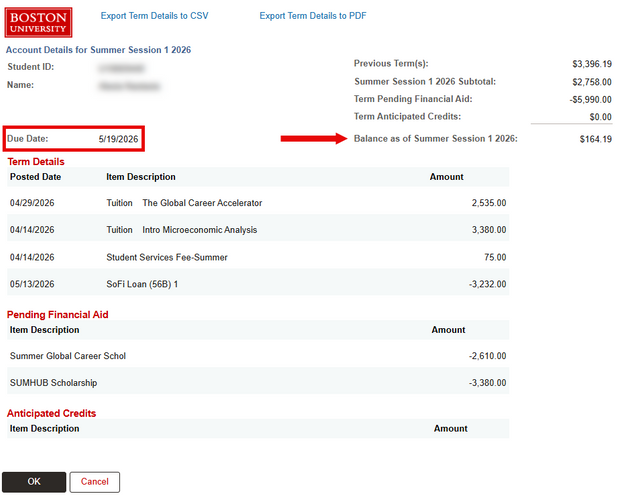
- The payment deadline for the Term is also included on this screen.
Example 1: Summer Term with Pending Financial Aid
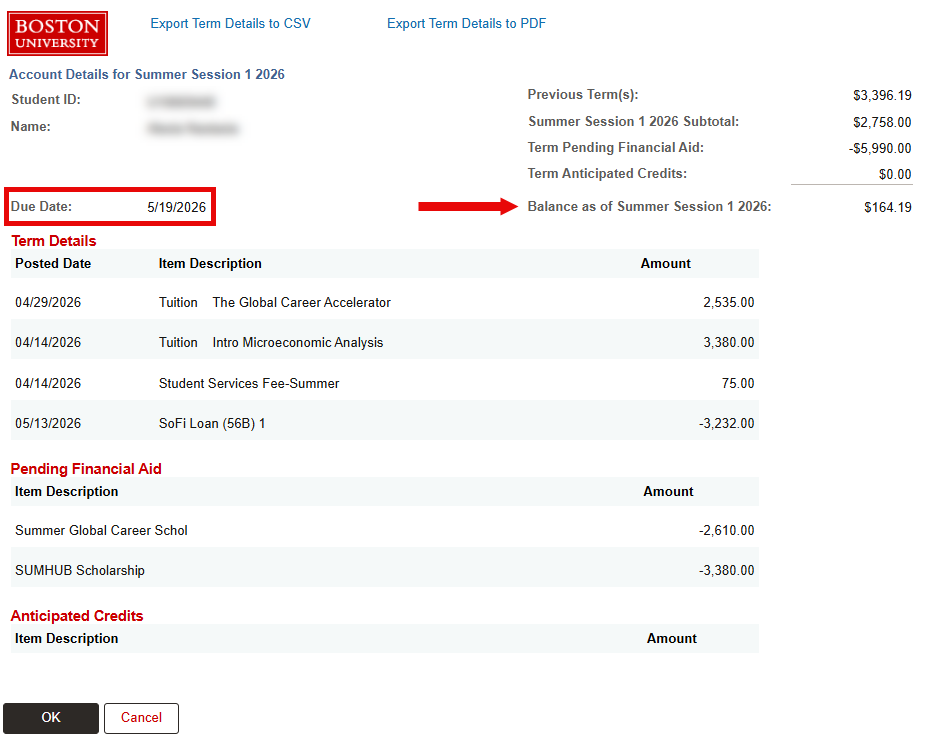
The below screenshot shows the Term detail for a student enrolled in Summer Session 1.
- A tuition charge is shown for each class in which the student is enrolled. Summer Term tuition is typically charged by the course.
- The student has a SoFi loan which has already been disbursed, as well as two scholarships which are still pending.
- A prior balance of $3,396.19 has been carried over from the Spring term. This balance, totaled with the Summer Session 1 charges and loan disbursement, along with the pending scholarships, result in a balance of $164.19 which must be paid by the May 19 due date.
ⓘ NOTE: Recall that this student is also enrolled in Summer Session 2 classes, which affects the Total Balance shown back on the Student Account page, but is not reflected in the Term Detail for Session 1 above. Future-term enrollment/charges are not reflected on the Term Detail for current or prior terms.
Example 2: Undergraduate Semester with Enrollment Overload
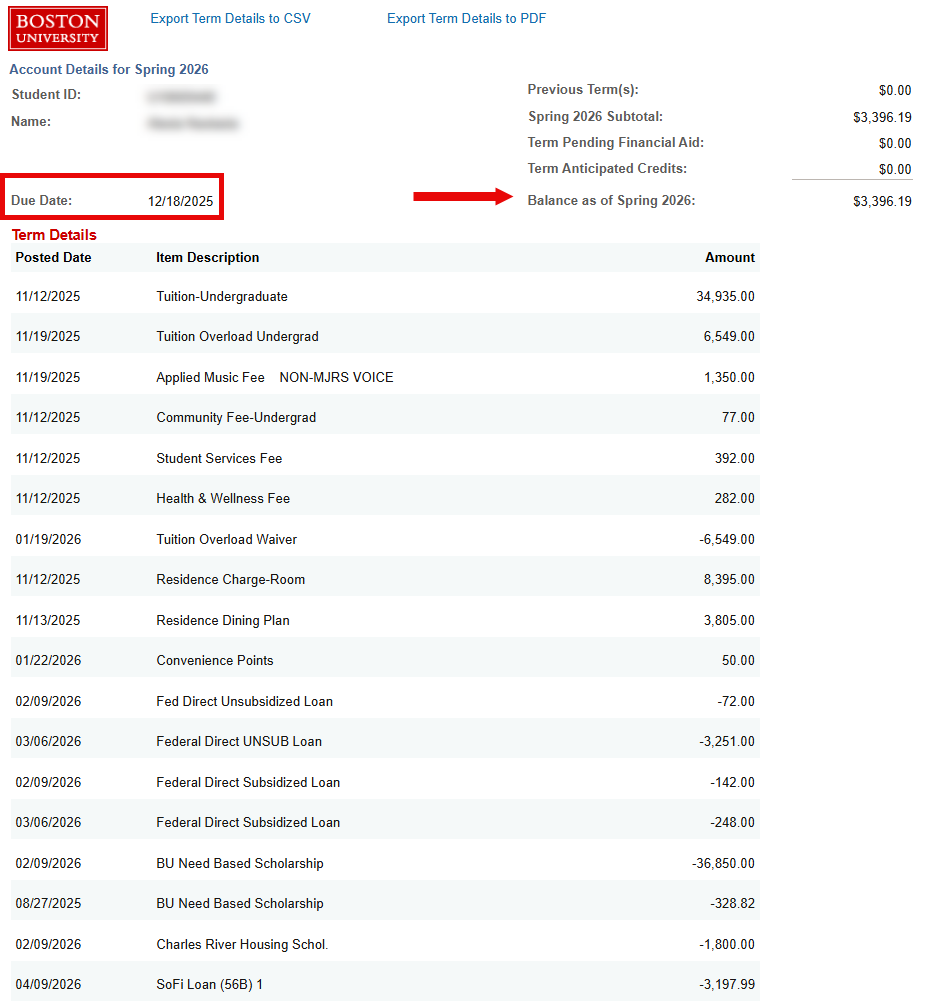
The below screenshot shows the Term detail for an undergraduate student enrolled in the Spring term. Click on the screenshot to view larger if needed (then click the browser ‘Back’ button to return to this page).
- Note how charges and credits appear in order of their Posted Date.
- In addition to the standard undergraduate tuition charge, this student has incurred a tuition overload charge of $6,549.00, indicating they have enrolled in more than the standard full-time credits. However, this student was approved for a tuition overload waiver for this amount. Note how the waiver was posted before the actual charges were incurred.
- For questions about overload waivers, students should contact their primary school/college of enrollment.
- The student’s loans and scholarships have all been disbursed for this Term. This example does not include any pending financial aid or anticipated credits.
- The total tuition, fee, and housing/dining charges, combined with the credits from scholarships, loans, and tuition overload waiver, result in a balance of $3,396.19, which must be paid by the December 18 due date.
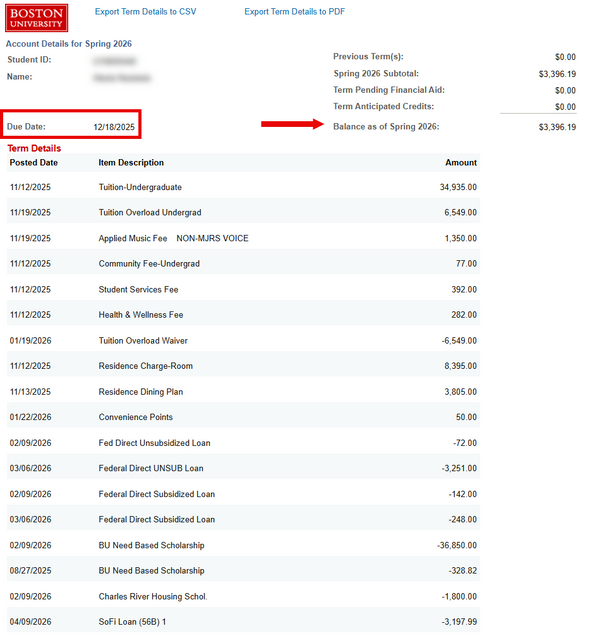
The Term Detail can be exported as a CSV file or PDF using the links at the top of the screen.
For more information about tuition and fees, please refer to the Student Financials website.
This page was last updated May 2026. To download a PDF copy of this resource, print this webpage as a PDF.