Service Indicators
This resource introduces the concept and functionality of Service Indicators in MyBU Student for staff. It includes a walkthrough of the Manage Service Indicators page, with a focus on service indicators that block a student’s enrollment activities, including registration holds.


Introduction
Service Indicators are essentially flags on a student record that provide or limit services and access for a student user. There are two types of service indicators — positive and negative.
- Negative Service Indicators create holds that prevent the student from engaging in specific processes or services, such as registration for classes or library privileges.
- Negative Service Indicators are often configured with a message visible to the student explaining the reason for the hold and/or actions to have the hold released.
- Positive Service Indicators are used to identify specific populations of students to facilitate a process or for reporting.
- Most service indicators are not visible to students as they do not cause holds.
The most broadly used service indicators at BU are the Registration Hold, which can be released by authorized staff, and the Advisor Hold, which can be released by a student’s assigned academic advisor. Instructions on how to release a hold can be found in the sections below.
Service Indicators vs. Student Groups
In MyBU Student, a Student Group is used to identify a group of students of similar affiliations, e.g., student athletes. Student Groups can be used similarly to positive Service Indicators for administrative/reporting purposes, but in different contexts. Refer to the Student Groups resource for more information.
⚠︎ Screen options and menus will vary by user; please note that displays may differ for you based on access that has been granted. All screens shown are for training purposes only.
Navigation & Overview
Users who have access to Manage Service Indicators can navigate to the page from the MyBU Student Dashboard.
- Log into MyBU Student.
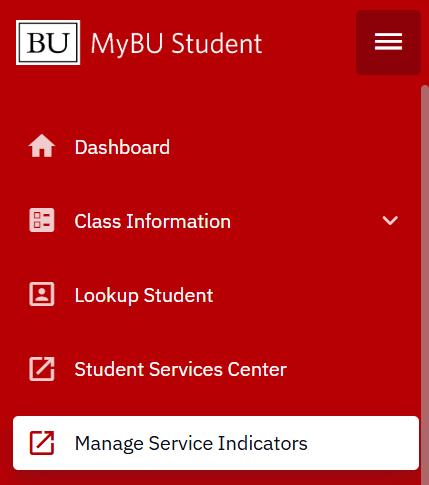
- In the left-side navigation menu, select Manage Service Indicators.
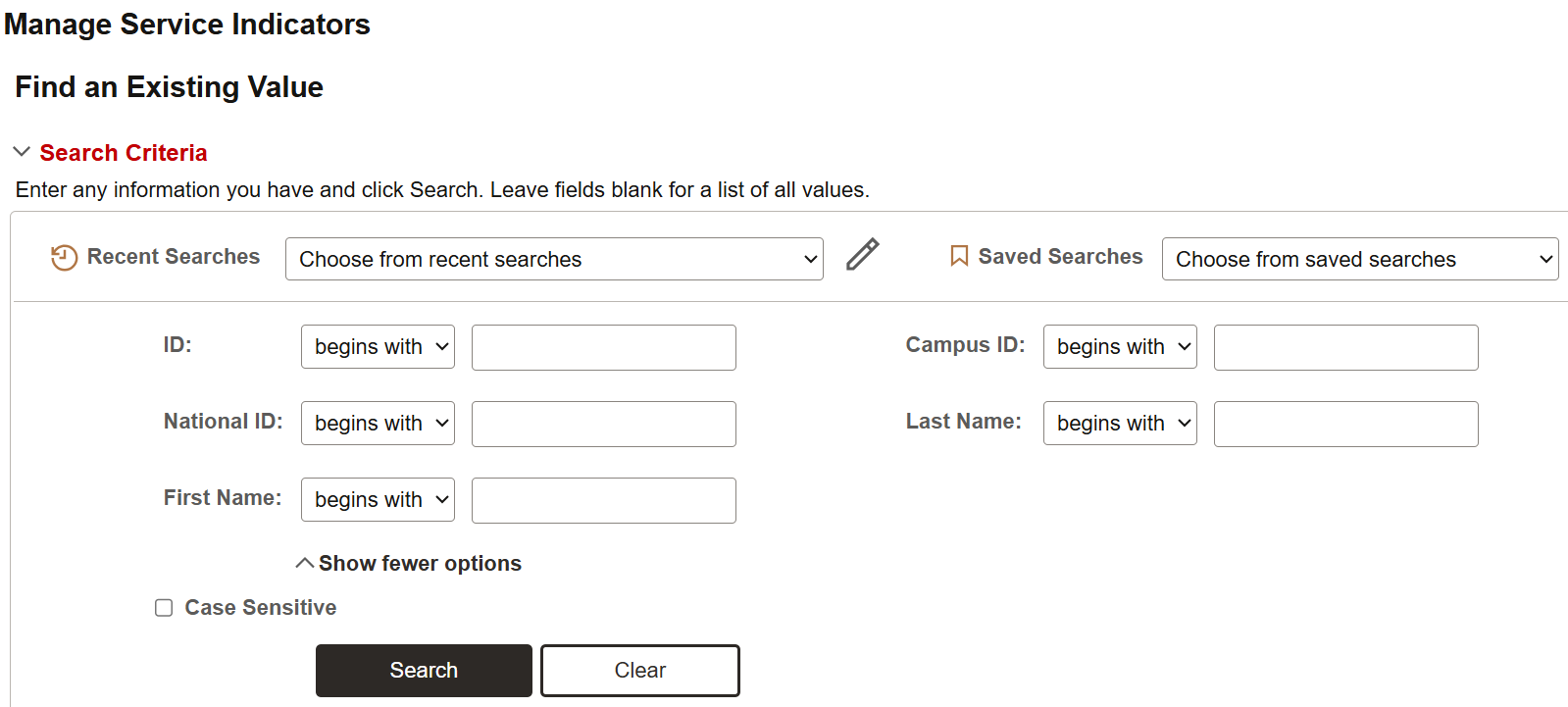
- On the Manage Service Indicators page, enter search criteria for the student whose Service Indicators need to be managed.
- If the student’s UID is known, enter it into the ID field and click Search to open the student’s service indicators.
- If the student’s UID is NOT known, enter other search criteria as needed and click Search. (Note: Campus ID is the same as UID. National ID is social security number.)
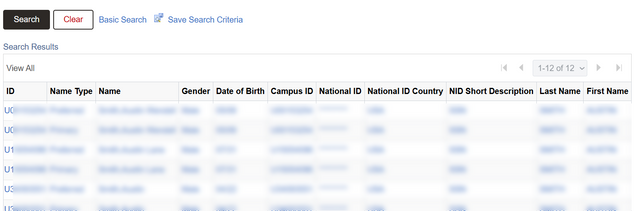
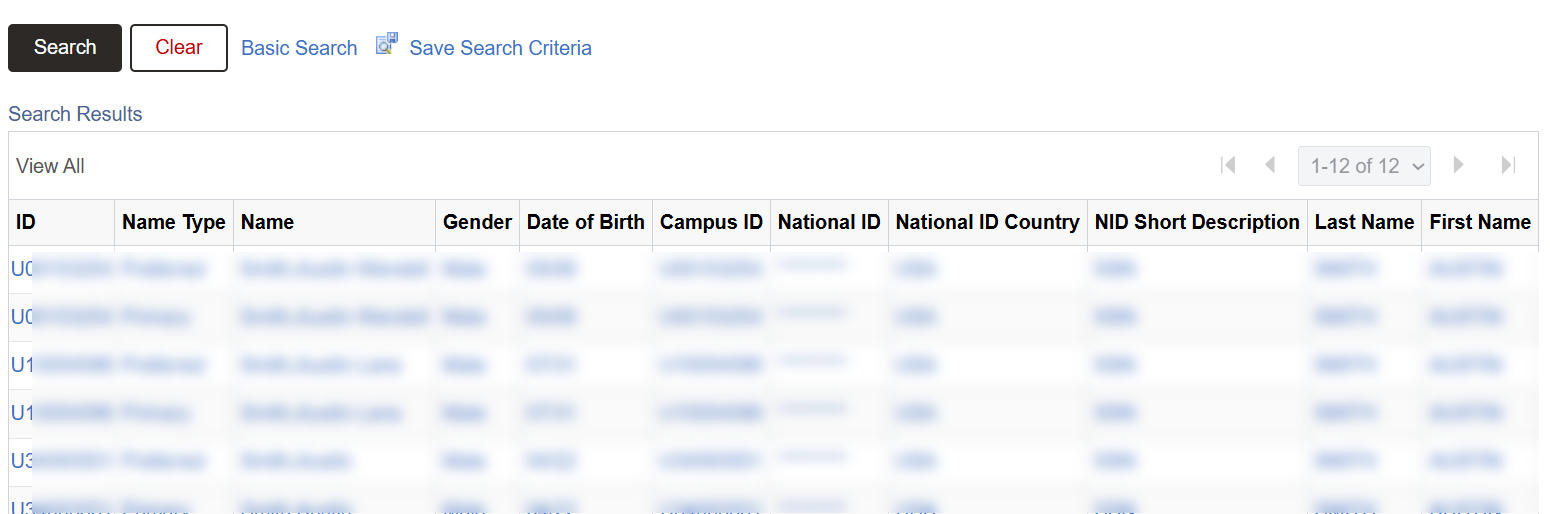
- Select the correct student from the list of Search Results. Clicking any blue hyperlinked field on the correct row will open the service indicators for that student.
- Note that the student may appear on multiple rows, but all rows with that student’s UID will go to the same place.
- The Manage Service Indicators page for the selected student will appear.
ⓘ NOTE: Security access will determine which Service Indicators can be seen. Some Service Indicators will not be shown to some users. For example, positive Service Indicators used by Student Financials staff for record-keeping purposes will not display for most Advisor users.
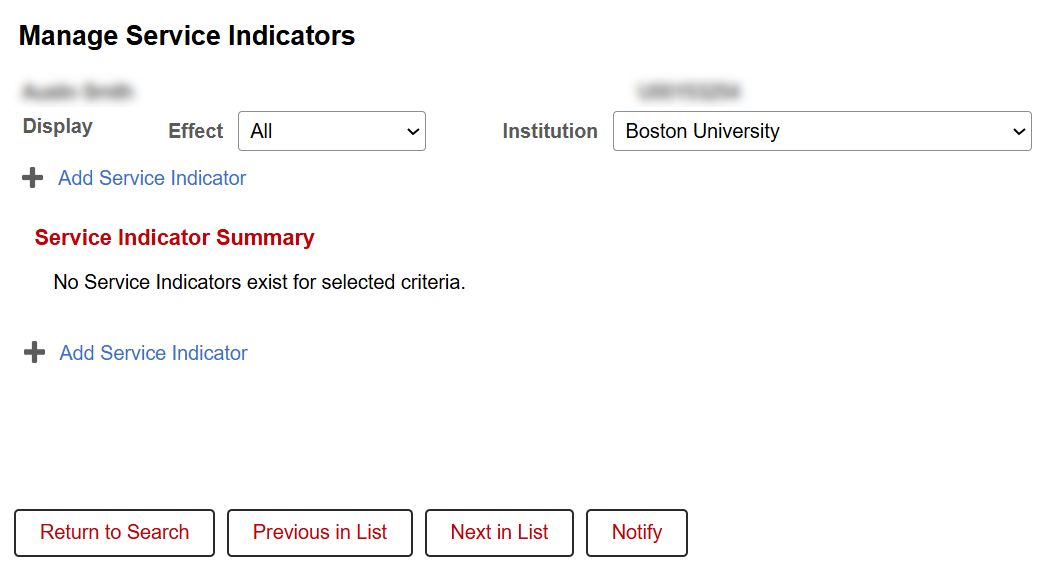
Below is an example of a student with no Service Indicators applied to their record:
Below is an example of existing Service Indicators associated to the student:
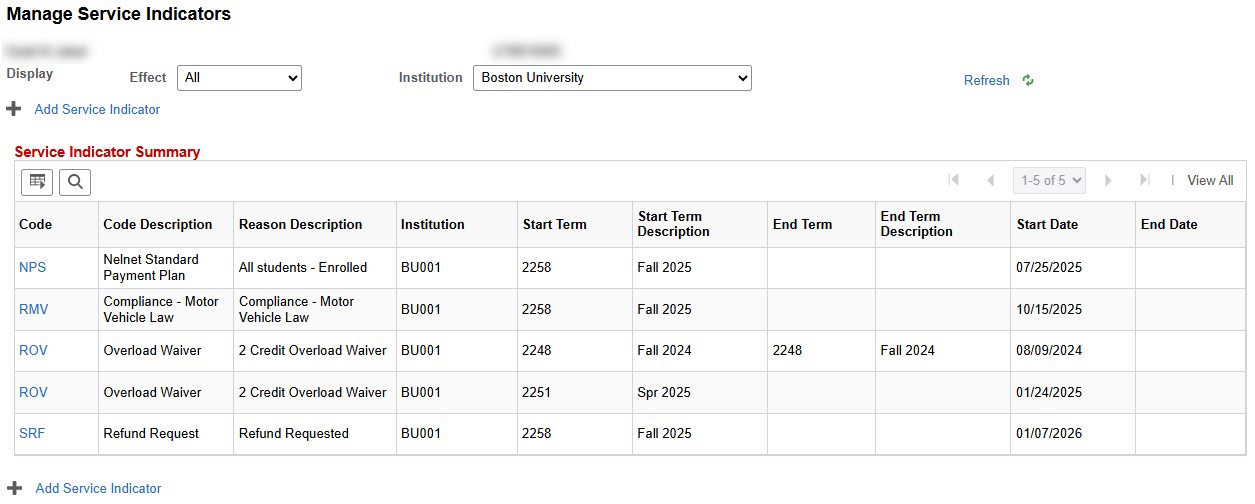
TIP! To change the view to only Positive or only Negative service indicators, select from the ‘Effect’ dropdown and then click ‘Refresh’.
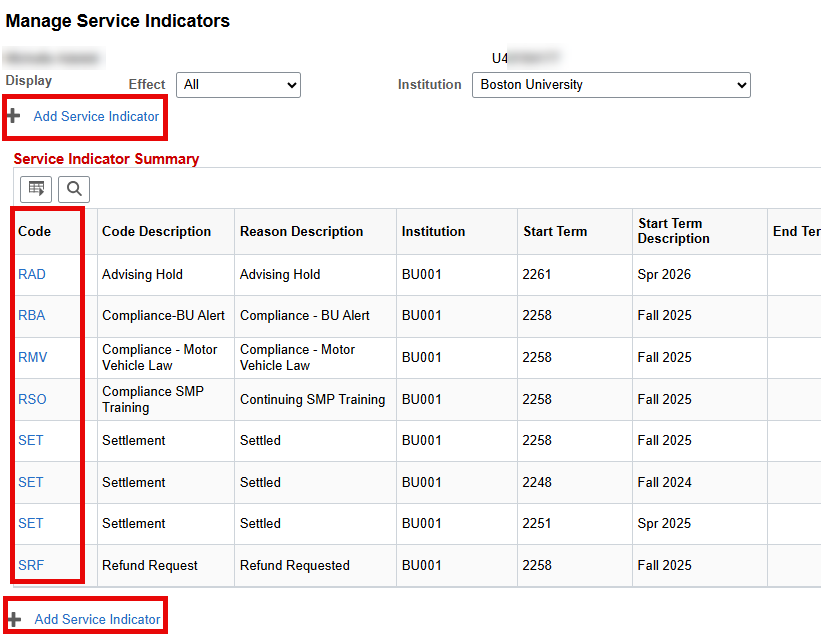
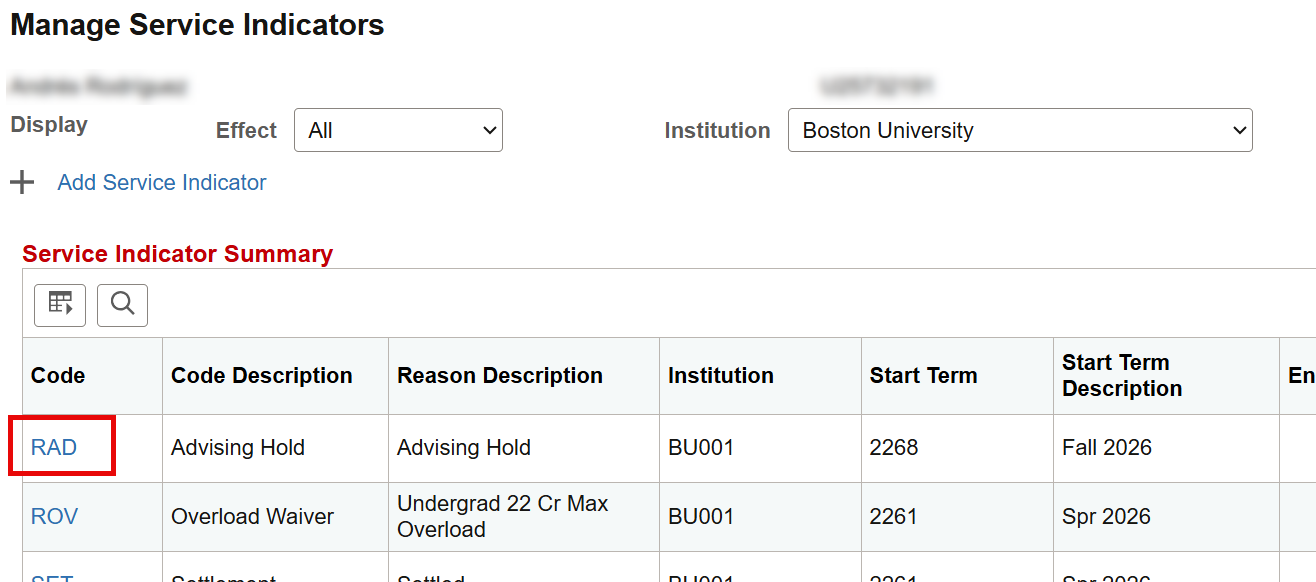
- To view and/or edit Service Indicator: click on its Code.
- To apply a new Service Indicator: click Add Service Indicator above or below the table.
Additional information about the data shown in the Service Indicator Summary table can be found in the ‘Add or Edit Service Indicators’ section below.
Add or Edit Service Indicators
ⓘNOTE: The ability to add service indicators is restricted by security access. Many users will have access to VIEW service indicators but not to add/edit them.
Be sure to adhere to any established policies and procedures at the department or school/college level when inputting service indicator data.
After navigating to the Manage Service Indicators page for the student, click the Add Service Indicator link or the Service Indicator Code for an existing indicator.
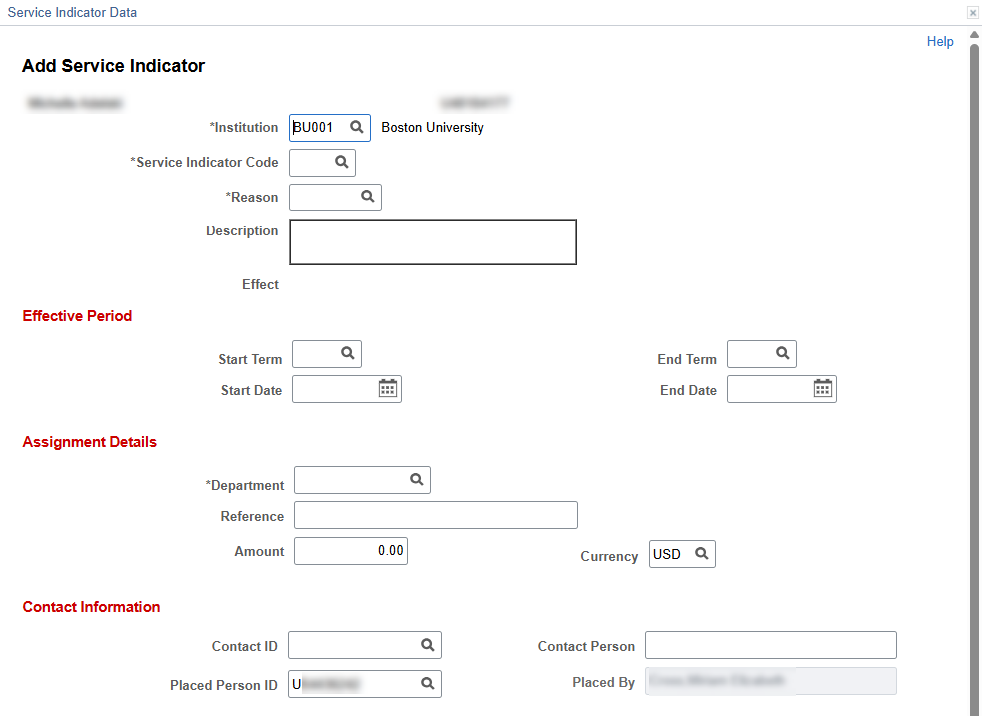
Whether viewing, editing, or adding a service indicator, the Service Indicator Data screen is used. The components of this screen are outlined below, with screen shots for adding a new service indicator. If an existing Service Indicator Code was selected, the fields on this screen would be populated with the appropriate data. Allowed edits can then be made.
BASIC DATA
- Institution Code – This should always be BU001 for BU.
- Service Indicator Code – Enter code, or use the magnifying glass to look up the code needed.
- Reason – The Reason field is dynamic based on the Service Indicator Code input Specific Reason Codes are configured for each specific Service Indicator, and can be entered or looked up using the magnifying glass.
- Note that some Service Indicators do not have specific reasons associated with them. In these instances, the Reason code is the same as the Service Indicator code.
- Description – The Description field is automatically populated based on the Service Indicator Code and Reason input. The Description usually contains the message visible to students associate with a hold.
- Effect – Positive or Negative. This is dynamically auto populated based on the Service Indicator Code and Reason input.
EFFECTIVE PERIOD
The service impacts associated with a service indicator can be term-based or date-based. They are applied or released based on the start and end information entered in this section. Entering a particular Start Term or Start Date allows for a Service Indicator such as a hold to be applied for an upcoming term.
If no End Term value is entered, term-based impacts will be in effect until the service indicator is released. Similarly, if no End Date value is entered, date-based impacts will be in effect until the service indicator is released. For term-based impacts that will be in effect for all terms, a Start Term value of 0000 can be entered.
The information required for Effective Period may be dependent on Service Indicator and scenario.
For example, for students who need a Service Indicator code of ‘RFT – Certified PartTime’, the Start Term entered should be the term for which the status applies. The Start Date entered should be the date the Service Indicator is added, even if it’s after the start of the term. No End Term or End Date should be entered for the RFT Service Indicator. For other scenarios, please refer to OUR policies.
ASSIGNMENT DETAILS
- Department – Enter or use the magnifying glass to look up the code for the applicable department that manages the Service Indicator.
- Reference – This field is optional and should only be used when established in departmental/administrative procedures.
- Amount – This field is for monetary amount that may be required to satisfy a particular service indicator. This field should not be used unless established in departmental/administrative procedures.
CONTACT INFORMATION & COMMENTS
- Contact ID – This field is optional and should only be used if established in departmental/administrative procedures when there is a particular person to be contacted with any questions about this Service Indicator other than the user who added it
- The Contact Person field will dynamically populate based on the Contact ID entered.
- Placed Person ID & Placed By will automatically populate with the UID and name of whoever is adding the Service Indicator.
The Comments section is optional and should only be used when established in departmental/ administrative procedures.
SERVICES IMPACTED
Any impacted services will automatically display in this table based on the Service Indicator code. Services Impacted are configured for each Service Indicator. Click on the code in the Impact column to view more information.

ⓘ NOTE: The Basis-Date and Basis-Term columns indicate if the impacts apply on a date or term basis. It may be helpful to check here when figuring out whether to enter Effective Period data for a particular Service Indicator.
How to Release a Hold
Registration Holds (REG) and Advising Holds (RAD) are some of the most broadly used Service Indicators at BU, and will direct a student to their advisor or school/college to have it lifted.
Authorized users can release a hold (i.e., remove the Service Indicator) using the Manage Service Indicators page or the Act As User feature. Instructions for both of these options are included below.
ⓘ NOTE: For questions regarding security access to release a hold, contact your Data Security Administrator (DSA).
RELEASE A HOLD FROM THE MANAGE SERVICE INDICATORS PAGE
- Click on the Service Indicator code to open the Service Indicator data screen.
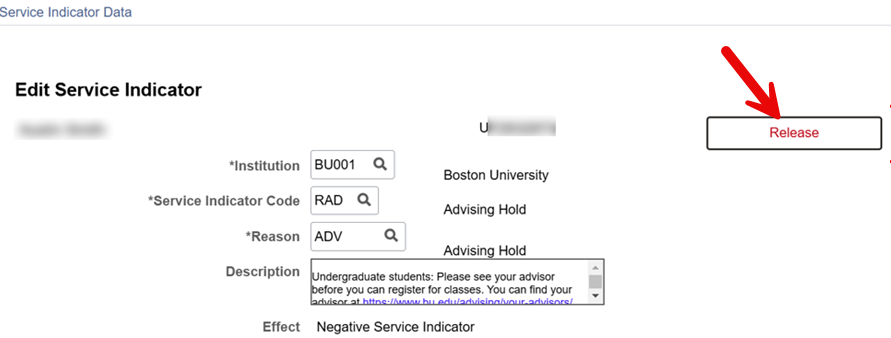
- Users who are authorized to release the hold will see a Release button in white with red text. Click the button to release the hold and instantly remove the Service Indicator from the student’s record.
- Users who are not authorized to release the hold may still see the Release button, but it will be greyed out and not functional.
- Once released, the hold will no longer be seen on the Manage Service Indicators page.
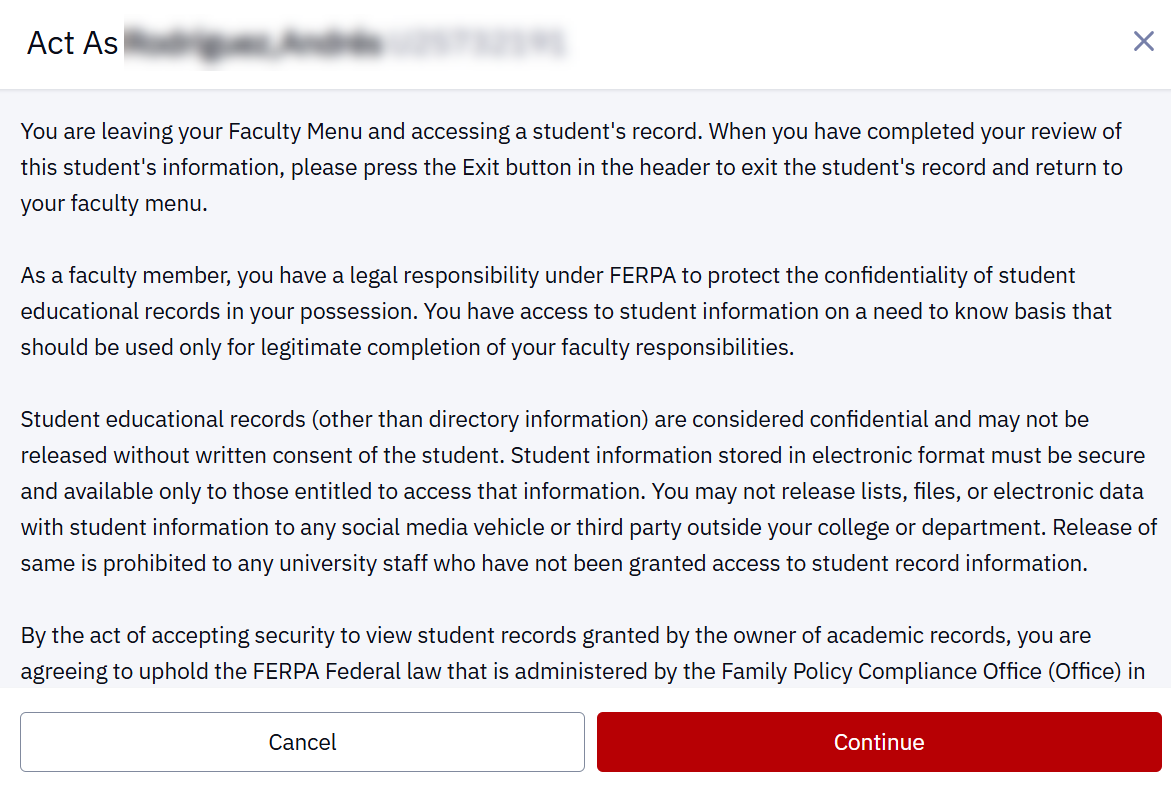
RELEASE A HOLD WITH ACT AS USER
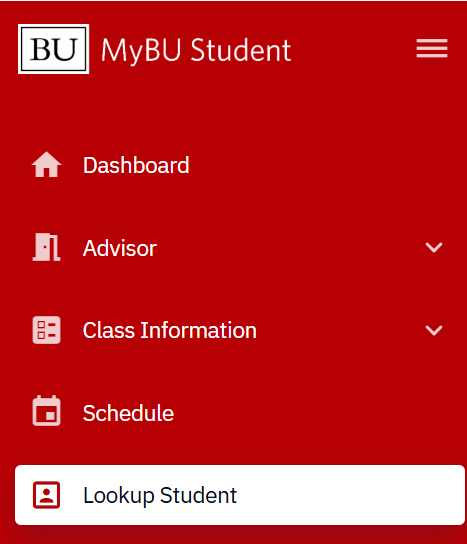
- In the left-side navigation menu, select Lookup Student.
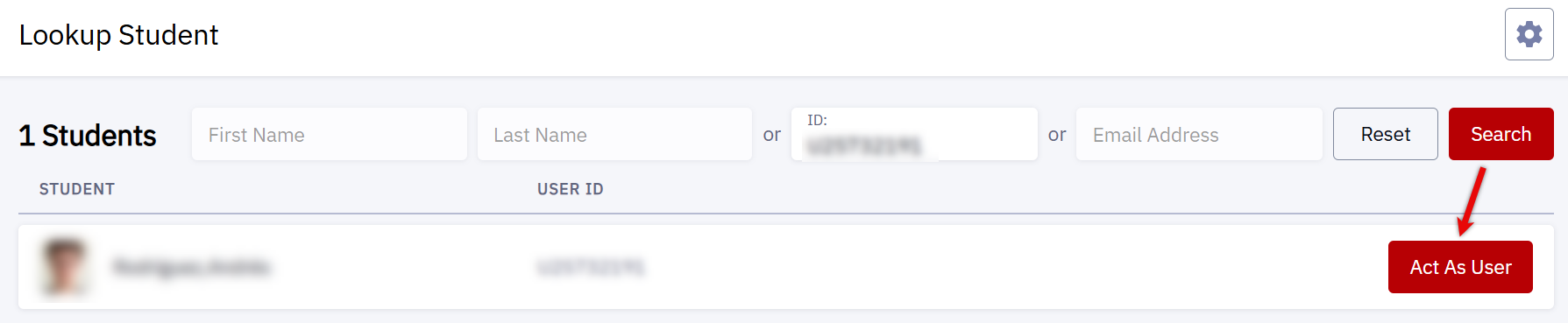
- Search for the applicable student, and then select Act As User.
- Review the FERPA disclaimer and select Continue.
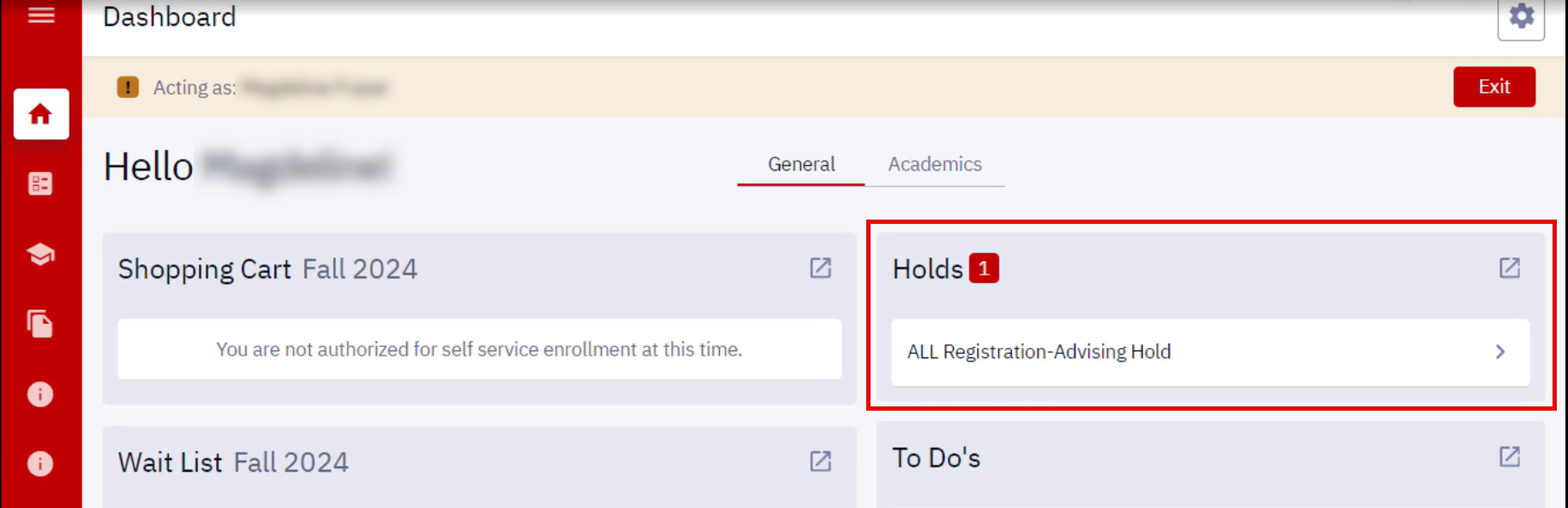
- Under the Holds section of the Dashboard, click on the hold to be released to open its details.
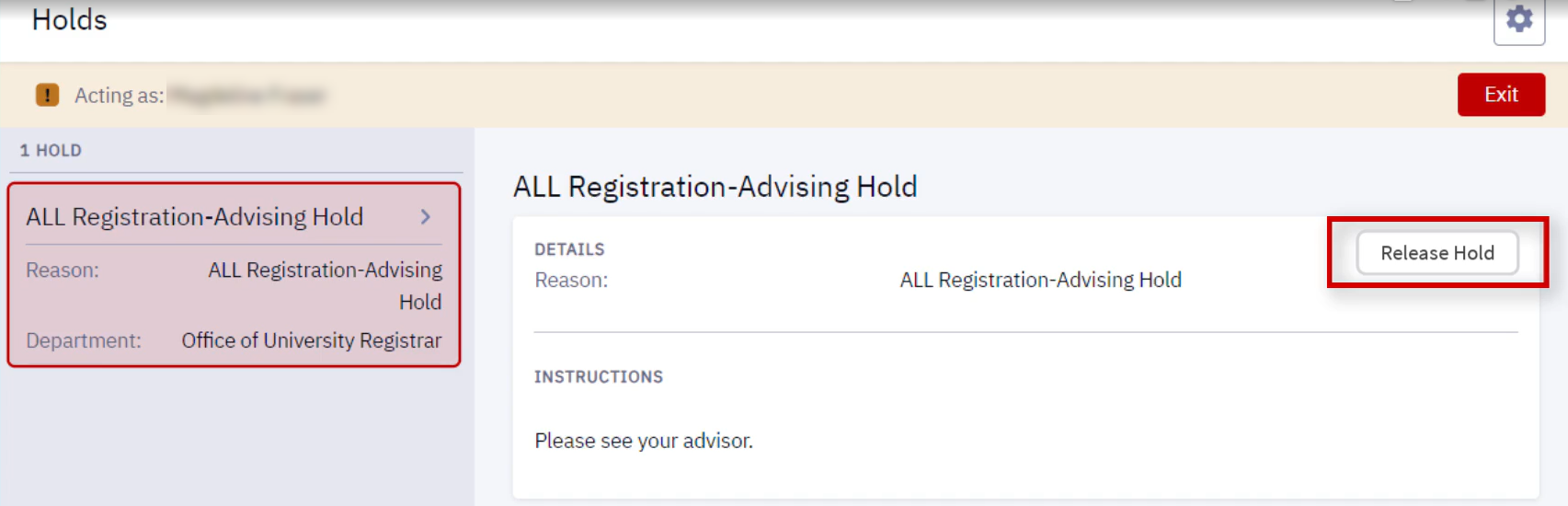
- Alternatively, click the expand icon to navigate to the Holds page.
- Users who are authorized to release the hold will see a Release Hold button. Click the button to immediately release the hold.
- Users who are not authorized to release the hold will not see the button.
- Once released, the hold will be instantly removed from the student’s Holds page.
Service Indicators in Student Services Center
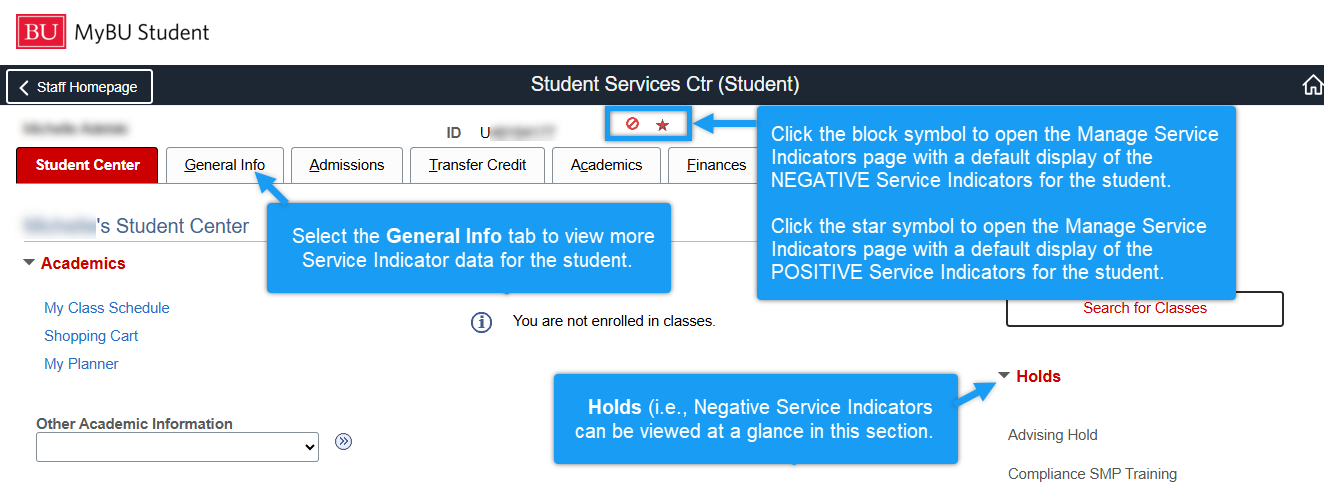
Student’s Service Indicators can also be viewed and managed in the Student Services Center, for those who have access to it.
The Service Indicator Summary and Service Indicator Data screens appear as described in the navigation from the dashboard above, but with the additional use of helpful icons to distinguish between Positive Service Indicators and Negative Service Indicators. Refer to the screen shots below, which highlight how Service Indicators appear on the Student Center tab and the General Info tab of the Student Services Center.
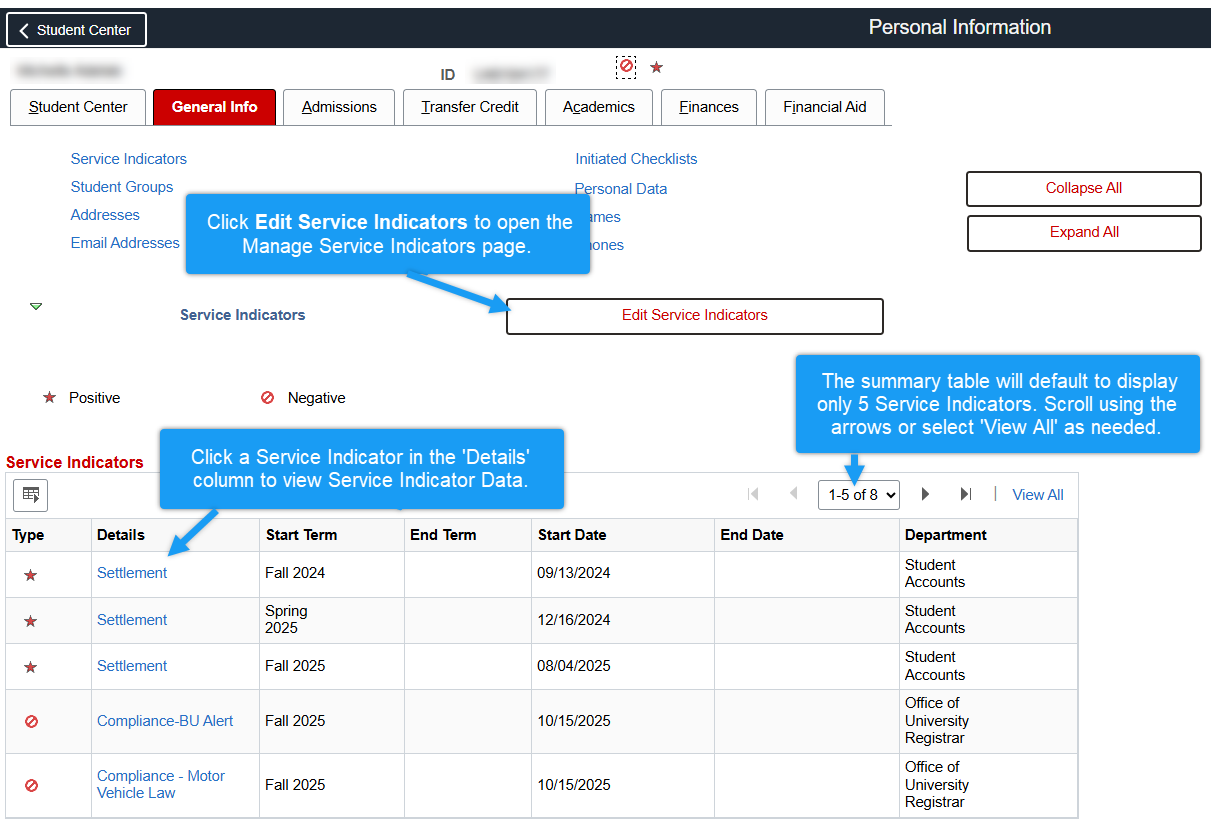
For more information about the Student Services Center, refer to the Student Services Center: View Student Information resource.
Requests for Staff Without Access
The above processes for directly managing Service Indicators requires the appropriate access. Staff who do not have access should request the adding or removing of a value via the MyBU Student Service Indicator Place/Release Request Form in ServiceNow.
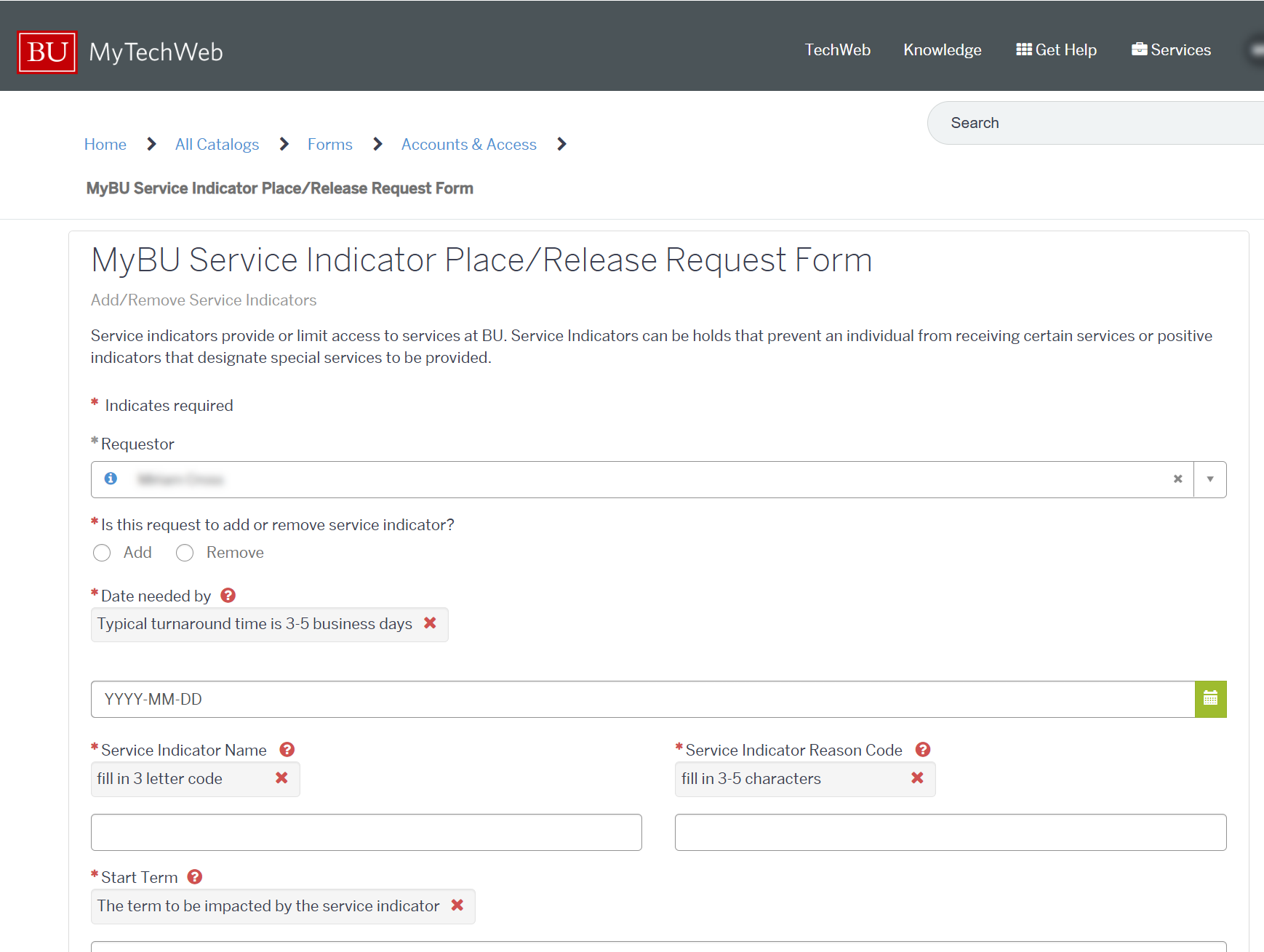
Enter all required and known information to streamline the submission. Click Submit when ready.
Common Service Indicators
ⓘ This section is NOT an exhaustive list of all service indicators. New service indicators may be configured in MyBU Student as additional needs arise, and the ability to view and/or manage certain service indicators may be restricted by security access.
For the purposes of this resource, service indicators are grouped into the following categories:
- University Compliance Service Indicators
- Administrative Holds
- Service Indicators used for Approved Academic Load
- Service Indicators used to Identify Students
UNIVERSITY COMPLIANCE SERVICE INDICATORS
Students must be in compliance with certain requirements in order to register for classes. Negative service indicators for compliance are automatically applied to student records as applicable, resulting in a hold on enrollment activity. The holds (and thus, the service indicators) are removed upon completion of the compliance requirements as described by the instructions in the message to the student.
Some of these indicators block ALL enrollment activities while others only block students from ADDING classes (so they can still drop classes).
Compliance holds that block ALL enrollment activities:
| Service Indicator | Code | Population | Message visible to student | Who manages |
|---|---|---|---|---|
| Alcohol EDU | RAE | Incoming undergrad first year and transfer students | All incoming first-year and transfer students are required to complete an alcohol and drug prevention training as part of BU’s commitment to wellbeing. | System Process |
| Sexual Misconduct Training (AKA SMP Training) | RSU, RSG, RSO | All students – course depends on population | BU requires sexual misconduct prevention training as part of its commitment to a healthy and respectful campus community. | System Process |
| Immunization | RIM | All full-time students; all full and part-time Health Science and International Students (including Visiting Scholars and Foreign Exchange Students) | Boston University policy, and Massachusetts law requires full-time students, and part-time Health Science and International Students (including Visiting Scholars and Foreign Exchange Students), to provide proof of immunization compliance before the start of classes. | System Process |
Compliance holds that block ADDING classes; allows for drops:
| Service Indicator | Code | Population | Message visible to student | Who manages |
|---|---|---|---|---|
| BU Alert | RBA | All students with MA campus as primary location | Boston University requires all students studying on a Massachusetts location to provide/confirm a BU Alert phone number which is used to notify you of a University-wide emergency. Please complete the BU Alert – Telephone Verification task list item on your MYBU Dashboard to release your compliance requirement. | System Process |
| Current Address | RLA | All students with MA campus as primary location | In order to comply with the safety regulations of the City of Boston, Boston University requires all students studying on a Massachusetts location to provide/confirm a current address. Please complete the Current (Local) Address task list item on your MYBU Dashboard to release your compliance requirement. | System Process |
| Motor Vehicle Law | RMV | All students with a non-MA home address | The Massachusetts Motor Vehicle Law requires that all out-of-state students sign an acknowledgment that they have been informed of the law (compliance required in the fall semester only). Please complete the Massachusetts Motor Vehicle Acknowledgement, the task list item on your MYBU Dashboard to release your compliance requirement. | System Process |
ADMINISTRATIVE HOLDS
These negative service indicators are applied by various administrative personnel and result in a hold on enrollment activity and/or other services for the student. These holds can only be removed by authorized administrator(s).
Some of these indicators block ALL enrollment activities while others only block students from ADDING classes (so they can still drop classes).
Administrative holds that block ALL enrollment activities:
| Service Indicator | Code | Population | Message visible to student | Who manages |
|---|---|---|---|---|
| Advising Hold | RAD | Students in programs or majors that require advising | You have an advising hold. Please contact your advisor for more information. | Department or School personnel |
| Registration Restriction | REG | As determined by the department | Please contact your school/college for more information. | Department or School personnel |
| Suspension Hold – Academic | RSP, with Reason Code ACAD | Students who have received academic suspension | Academic Suspension: please contact your Advisor for further information. | Department or School personnel |
| Suspension Hold – Disciplinary | RSP, with Reason Code DISP | Students who have received disciplinary suspension | Disciplinary Suspension – see Dean of Students for more information. | Dean of Students |
| Suspension Hold – DOS/OJA Approval Required | RSP, with Reason Code OJA | Students whose suspension requires DOS/OJA resolution | Dean of Students/Office of Judicial Affairs approval required for return. | Dean of Students, Judicial Affairs |
| Medical Leave Registration Hold | RML | Students on a medical leave | Please contact your school/college for more information. | USC/OUR |
Administrative hold(s) that block ADDING classes; allows for drops:
| Service Indicator | Code | Population | Message visible to student | Who manages |
|---|---|---|---|---|
| Financial Hold | SCH (various Reason Codes) | Students with balance issues | A hold has been placed on your student account: Please make a payment to resolve your account status. | Student Accounts |
Additional service indicators such as a Diploma Hold (RDP) or Transcript Hold (RTR) may be applied by the Office of the University Registrar (OUR) to restrict the release of academic documents. Contact OUR for more information about these holds if needed.
- Additional Resource: Diploma Contact Information: Manage Task/Hold
SERVICE INDICATORS USED FOR ACADEMIC LOAD
These service indicators are used to denote an exception to a student’s Academic Load, for the purposes of tuition charges and/or specific financial aid eligibility. School/College policies and procedures must be followed when adding/editing these service indicators. These service indicators do NOT impact student enrollment access.
- Additional Resource: Credit Overload & Service Indicator Process for Tuition
| Service Indicator | Code | Population | Message visible to student | Who manages |
|---|---|---|---|---|
| Overload Waiver | ROV | Students enrolled in more than 18 credits who have been approved to have additional tuition charges waived | N/A | Department or School personnel |
| Certified Full-Time, Part-Time Load | RFT, with reason code PTLD | Students enrolled in fewer than 12 credits who but are “certified” as full-time students | N/A | Department or School personnel |
| Certified Full-Time, No Load | RFT, with reason code NOLD | Students who are not enrolled in any classes but are “certified” as full-time students | N/A | Department or School personnel |
| Certified Part-Time, No Load | RPT, with reason code NOLD | Students who are not enrolled in any classes but are “certified” as part-time students | N/A | Department or School personnel |
SERVICE INDICATORS USED TO IDENTIFY STUDENTS
These service indicators help staff to identify and/or track various aspects of a student record. Some commonly seen examples are included below. These service indicators do NOT impact student enrollment access.
| Service Indicator | Code | Population | Message visible to student | Who manages |
|---|---|---|---|---|
| Attendance Verification Needed | RAV | Students undergoing the Attendance Verification process (enrolled but bill is not settled and no Blackboard, housing and card swipe activity) | N/A (not visible to students) | OUR |
| International Students | RIN | Students who meet the criteria for international | N/A (not visible to students) | System process |
| Student Applied to Online Prog | ROL | Students who applied to online program (based on admission to online program) | N/A (not visible to students) | System process/ Admissions |
| Online Student Only | RON | Students taking only online classes (based on enrollment) | N/A (not visible to students) | System process |
| Settlement | SET | Applied once a student’s account is settled for a given term | N/A (not visible to students) | System process/ Student Accounting Services |
Users may see other service indicators such as MyBU Student Record Validation (RCV) or Conversion Error (RCN), which were used to support data conversion during the initial deployments of MyBU Student in 2024. These types of service indicators should be seen less frequently in subsequent years.
Helpful Queries
Refer to the Staff Queries resource for more information about how to use queries. The queries below may help with managing service indicators, but new queries are added continuously.
- BU_SR_ADVSG_HOLD_NEW – List of students with an Advising Hold for a particular primary academic program and term
- BU_R0046D_SR_BY_COLLGE_LIST – Lists students with their academic information for a particular program/college and term, which can be narrowed to a specific service indicator in the search prompts
- BU_R0046I_SR_BY_COLLGE_PERS – Lists students with their personal information for a particular program/college and term, which can be narrowed to a specific service indicator in the search prompts
- BU_SR_SERVICE_IND_STDNT_LIST – List of all UIDs with a particular service indicator applied (not specific to term or program)
Appendix
In this section:
- A list of Service Indicators that specifies their impacts on services/activities for students
- Information about the use of Service Indicators for international students and student athletes.
SERVICES INDICATORS WITH SERVICE IMPACTS
NOTE:This list list subject to change.
| Code | Service Indicator | Impact 1 | Impact 2 | Impact 3 |
|---|---|---|---|---|
| RAD | Advising Hold | Block All Enrollment Activity | ||
| RAE | Compliance-Alcohol/Edu | Block All Enrollment Activity | ||
| RBA | Compliance-BU Alert | Allow Drop Only – No Add | ||
| RBU | BU Academy | Block All Enrollment Activity | ||
| RCN | Conversion Error | No Unofficial Transcripts | No Transcripts | |
| RCV | MyBU Student Record Validation | No Unofficial Transcripts | No Transcripts | |
| RDC | Deceased Student | Block All Enrollment Activity | 3C Deletion Exception | No Diploma |
| RDP | Diploma Hold | No Diploma | ||
| REG | Registration Restriction | Block All Enrollment Activity | ||
| RGD | No Graduation | No Diploma | No Graduation Processing | |
| RIM | Compliance – Immunization | Block All Enrollment Activity | ||
| RJD | Judicial Diploma Hold | No Diploma | ||
| RLA | Compliance-Current Address | Allow Drop Only – No Add | ||
| RMF | Microfiche | No Unofficial Transcripts | No Transcripts | |
| RML | Medical Leave | Block All Enrollment Activity | ||
| RMV | Compliance – Motor Vehicle Law | Allow Drop Only – No Add | ||
| RQA | CELOP Registration Hold | Block All Enrollment Activity | ||
| RSG | Compliance SMP Training | Block All Enrollment Activity | ||
| RSO | Compliance SMP Training | Block All Enrollment Activity | ||
| RSP | Suspension Hold | Block All Enrollment Activity | ||
| RSU | Compliance SMP Training | Block All Enrollment Activity | ||
| RTR | Transcript Hold | No Unofficial Transcripts | No Transcripts | |
| SA1 | Student Account 1 | Block All Enrollment Activity | No Diploma | Do Not Bill |
| SA3 | Student Account 3 | Allow Drop Only – No Add | No Diploma | No Housing Move-in |
| SBA | Bad Address | No Refund | ||
| SBL | Bill | Do Not Bill | No Refund | |
| SCB | Collection Bill | Allow Drop Only – No Add | No Diploma | Do Not Bill |
| SCH | Financial Hold | Allow Drop Only – No Add | No Diploma | No Housing Move-in |
| SCL | Collections Acct Hold | Allow Drop Only – No Add | No Diploma | No Housing Move-in |
| SET | Settlement | No Late Fee | ||
| SHP | Financial Hold | Allow Drop Only – No Add | No Diploma | No Housing Move-in |
| SWO | Write-off | Block All Enrollment Activity | No Diploma | |
| WLF | Waive late fee | No Late Fee |
INTERNATIONAL STUDENTS & ATHLETES
International students and student athletes must maintain full-time status at BU. To prevent students from dropping classes, a service indicator is added to those student records to prevent any drop activity. For both populations, the appropriate Service Indicator is added by OUR/ESO after the standard add deadline for each term.
Approval may be granted by ISSO/Student-Athlete Academic Support Services for students to have a reduced course load. Management of service indicators in those scenarios will be carried out by authorized ISSO or Athletics staff as applicable.
Review the following for additional details:
| Population | SI & Reason Code | Impacts | Message Visible to Students |
|---|---|---|---|
| International Students (Identified by the RIN Service Indicator; Undergrad & Grad careers) |
SI: RCL (Class Drop Hold) Reason Code: ISSO |
The hold will prevent students from dropping classes – full time or part-time status. The service indicator can only be removed by ISSO staff. |
International students are required to enroll full-time each semester; they are restricted from dropping classes to prevent jeopardizing their student immigration status. Students wishing to drop a class will need to submit a ‘Drop Class’ request in the ISSO Portal for ISSO approval. |
| Athletes (Identified by the RATH Student Group; Undergrad & Grad careers) |
SI: RCL (Class Drop Hold) Reason Code: ATHL |
The hold will prevent students from dropping classes – full time or part-time status. The service indicator can only be removed by Athletic Support staff. |
NCAA student-athletes must consult with their Student-Athlete Support advisor before receiving permission to drop a course. Students can reach out to Student-Athlete Academic Support Services for assistance. |
Page last updated February 2026. For a PDF copy, print this webpage as a PDF. Other resource formats can also be accessed via the relevant icons below.