MyBU Student for Guest Users
This resource has information and instructions for family members and other third parties who have been granted guest access by a student. It includes a step-by-step walkthrough of how to access a guest account for the first time, as well as other helpful navigation and support information.

Introduction
ⓘ This resource is for Guest Users. If you are a student and want more information about how to use the Manage Guests page in MyBU Student check out the Manage Guests knowledge article.
BU students can grant guest access to family members or other third parties to view certain aspects of their student information in MyBU Student.
Once a student has added a Guest User, the guest must then set up their own unique user account in MyBU Student. Depending on the permissions granted by the student, Guest Users can view certain academic and financial details of the student, as well as take certain actions, such as paying bills or downloading a copy of the student’s unofficial transcript.
The ability to manage guest users in MyBU Student is in accordance with Boston University’s obligations under the federal Family Educational Rights and Privacy Act (FERPA).
The University policy on the release of student information can be found here: bu.edu/reg/academics/ferpa/release/
⚠︎ Screen options and menus will vary by user; please note that displays may differ for you based on access that has been granted. All screens shown are for training purposes only. The student has full control over the access granted to their Guest Users. Students may revoke some or all of the Guest User’s permissions at any time.
Available Permissions
Students may grant any or all of the following permissions to guests in MyBU Student. Available permissions may be subject to change in accordance with policy and/or system updates.
- CONSENT TO DISCLOSURE – This authorization allows the University to communicate with parents/guardians/others in certain limited circumstances, including the following:
- The student voluntarily withdraws or takes a leave of absence
- The student is suspended or dismissed from the University
- The student is required to leave University housing
- The permitted person has questions or concerns about the student’s financial aid or student account
- The student is placed on academic probation (a school or college official may notify parents)
- VIEW FINANCIAL AID – Allows Guest User to view student Financial Aid award information
- VIEW UNOFFICIAL TRANSCRIPT – Allows Guest User to view the following academic information:
- Cumulative statistics: GPA, academic units (credits)
- Program/Plan (e.g, major/minor)
- Milestones: non-course related requirements (e.g., thesis), where applicable
- Enrollment by term: Courses, units, final grades
- Degrees earned
- Transfer and Test Credit
- VIEW/PAY STUDENT ACCOUNT – Allows Guest User access to the following 2 pages:
- Student Account Details – Shows all charges and payments/credits made on the student account
- Student Account Balance Due – Shows the current student account balance due and allows user to click through to Nelnet (the service used to make payments)
Accessing Guest User Account
Setting up a Guest User account can be more complicated than setting up a typical user account for most websites. It is recommended to pay close attention to these steps to ensure successful login.
- The first and most important step to access a Guest User account is for the student to add the guest (name and email address) and select their desired permissions using the Manage Guests page in MyBU Student. It is not possible for a Guest User to create an account unless the student initiates it.
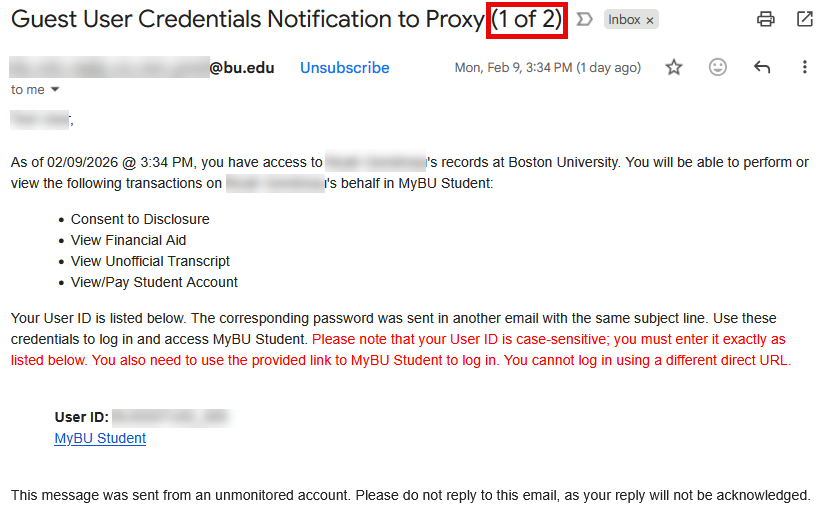
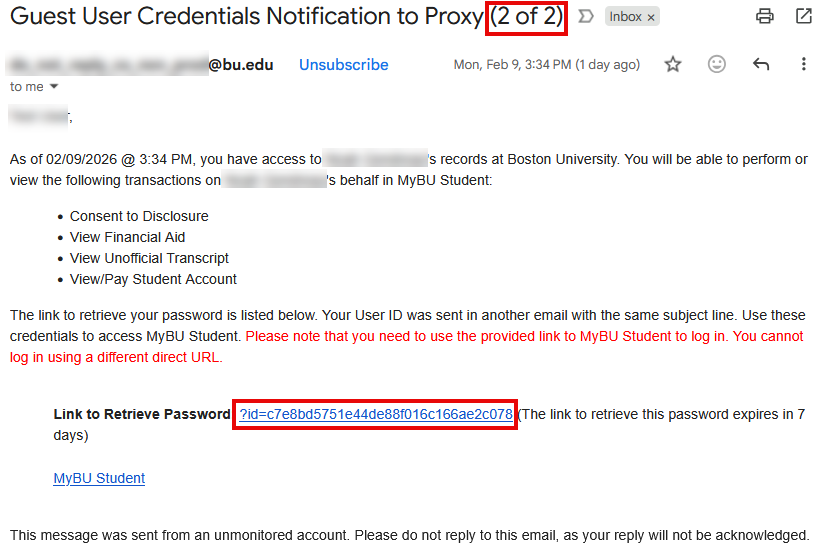
- Once the student has initiated guest access, the Guest User will receive two (2) emails:
- Email 1 of 2: contains User ID
- Email 2 of 2: contains secure link for user to view and copy their password
TIP! If one or more of the emails don’t arrive, be sure to check junk/spam folders, and double check with the student that they entered the correct email address.
- Open email 1 of 2 to access the User ID.
- Open email 2 of 2 to retrieve the account password. In the body of the email, click the “Link to Retrieve Password”.
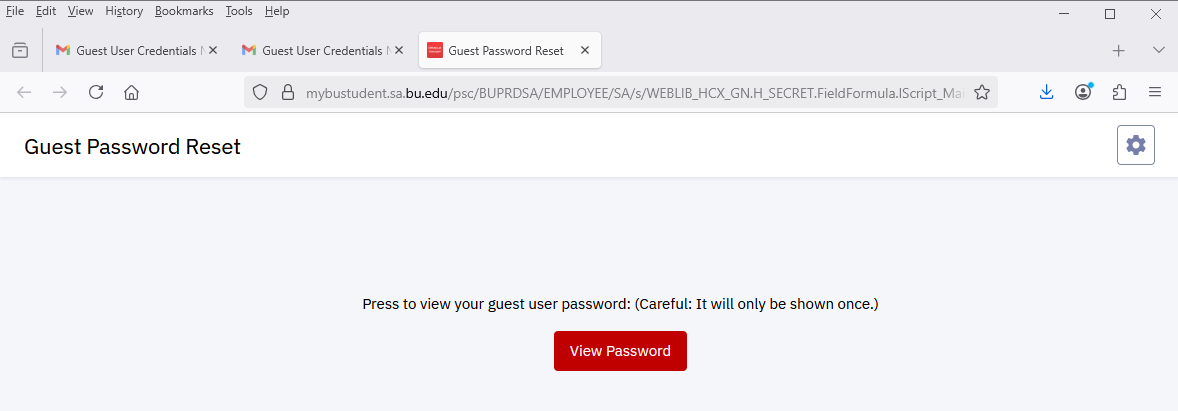
- A new browser window/tab will open, labeled “Guest Password Reset.” (Note the header will say “reset” even if the password is being accessed for the first time.) Click View Password.
- Click the Copy button to copy the password to the device’s clipboard.
- In either of the two emails, open the link for MyBU Student to access the login page. It should open in a new browser tab.
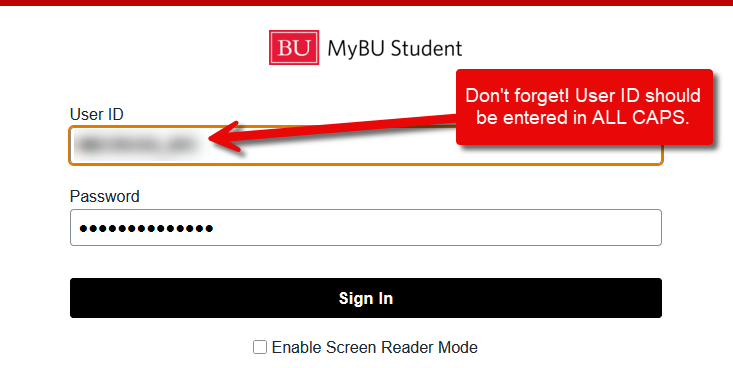
- Enter the User ID from the first email into the User ID field and enter the Password from the retrieval page. Both fields are CASE SENSITIVE; the User ID must be entered in all caps.
- Click Sign In.
ⓘ This is a one-time use link. Once the password has been retrieved, the link cannot be used to view the password again. If a password is lost, the student will need to initiate a password reset from their own account.
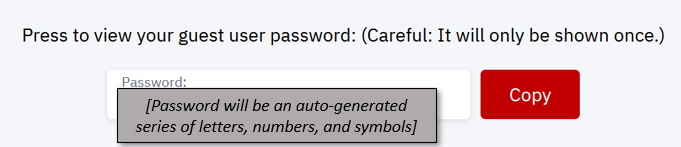
TIP! Keep the password page open until login is successful – in case there is a need to copy the password again.
ⓘ NOTE: Guest Users should always use the link in the emails to access MyBU Student as it is specific to guest users.
TIP! Use a browser keychain or other password tools to save the password on your browser/device. Currently, it is NOT possible for Guest Users to change their password.
Viewing Guest User Pages
Below is an overview of each of the pages Guest Users may currently see in MyBU Student. The pages available to Guest Users will depend on student-granted permissions. The layout and information available are subject to change in accordance with policy and/or system updates.
What the Guest User sees will be very similar in both information and appearance to those same pages on the student’s experience.
ⓘ NOTE: Be sure to access MyBU Student using the link from the Guest User Credentials emails. The URL that students and faculty/staff use does not allow guest access.
DASHBOARD
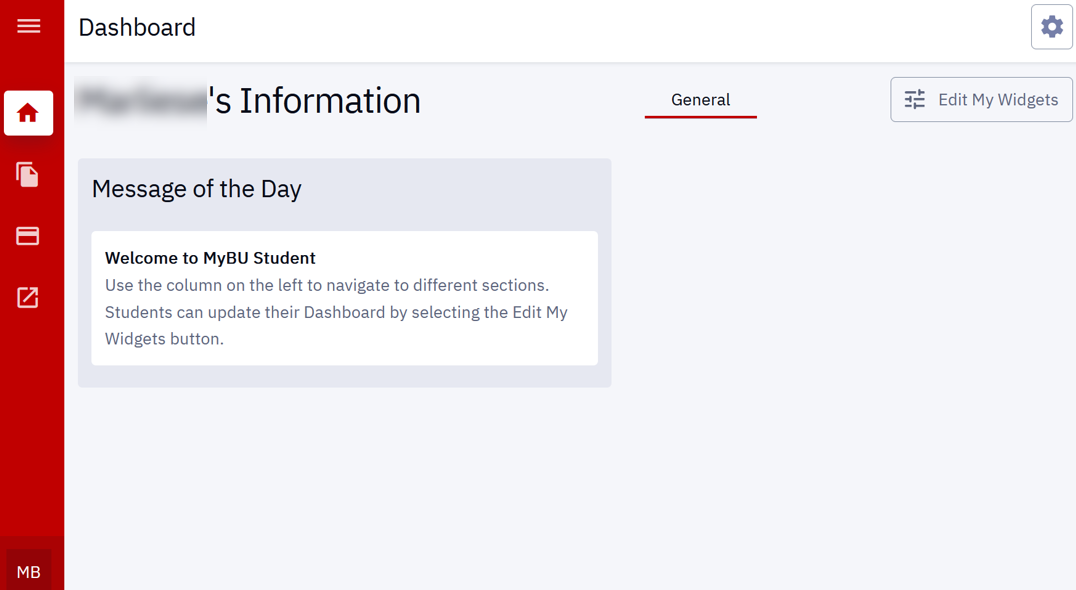
Upon login, all users will be brought to the MyBU Student Dashboard displaying the student’s name at the top. Any system-wide messages will appear under ‘Message of the Day’.
MENU
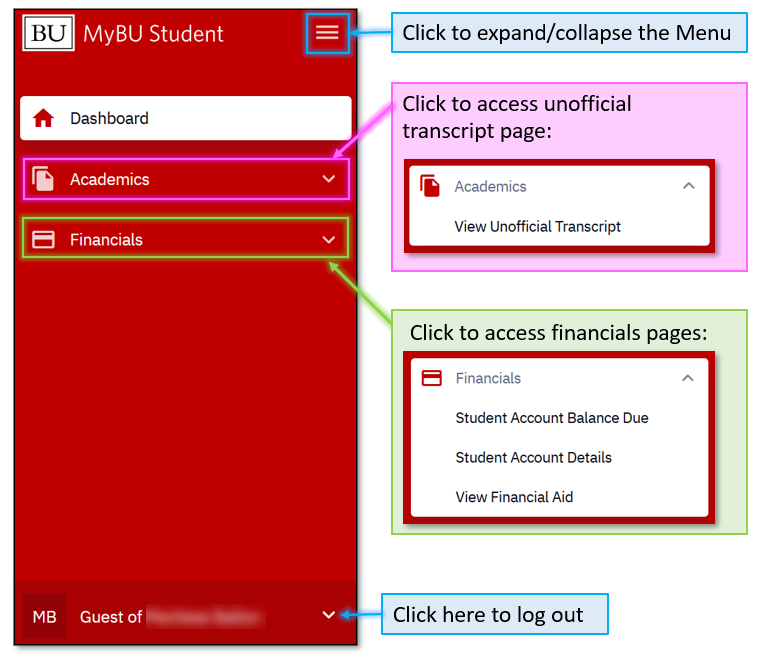
Click the menu icon on the top-left of the Dashboard page to expand/collapse the Menu.
ⓘ NOTE: Don’t forget that Guests will only see the Academics and Financials pages they have been granted access to by the student.
VIEW UNOFFICIAL TRANSCRIPT
Only Guest Users who have been granted permission to View Unofficial Transcript will be able to access this page.
Depending on the student’s enrollment history, it may be necessary to choose which transcript type and Career (e.g., Undergraduate or Graduate) to display. If the student has only been enrolled in one academic career at BU, that transcript will display automatically.
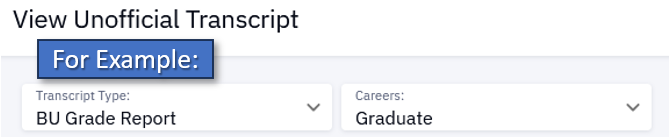
Transcript Types:
- BU Grade Report – for all undergraduate and most graduate/post-grad students
- Unofficial Dental Transcript – for dental students only
- Unofficial Law Transcript – for law students only
- Unofficial Medical Transcript – for medical students only
VIEWING TRANSCRIPT DATA
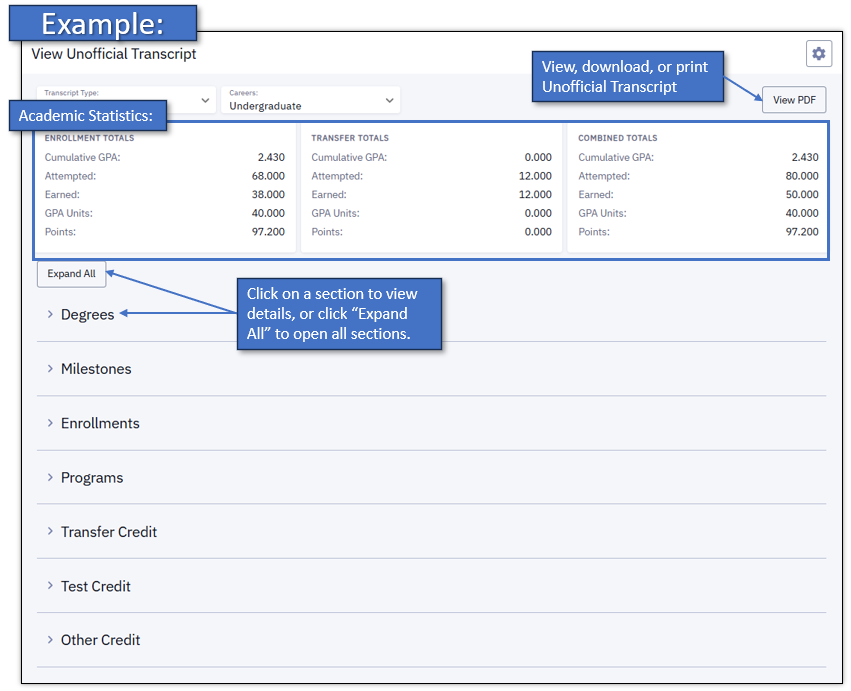
The student’s academic data will display as applicable in the sections described below. The layout and information contained in these sections may vary:
- Academic statistics: This data will display in the boxes at the top of the transcript.
- Enrollment Totals – GPA and units attempted and earned from BU coursework in the applicable program
- Transfer Totals – credit from coursework or tests taken externally (note that per BU policy, transfer and test credit are not calculated into GPA)
- Combined Totals
- Degrees: Record of any degrees/certificates conferred
- Milestones: If applicable for the given academic program, Milestones may be used to document non-course related requirements (e.g., thesis)
- Enrollments: Coursework, grades, and credits by term
- Programs: Record of Academic Program(s) (i.e., degree program), and Plan(s) (i.e., major)
- Transfer Credit: Record of BU credit awarded for qualified classes completed successfully at non-BU institutions
- Test Credit: Record of BU credit earned by successfully meeting requirements on approved tests/exams such as Advanced Placement (AP) and International Baccalaureate (IB)
- Other Credit: Record of any other BU credit earned through external channels
Note that this page accesses the Unofficial Transcript only. Official transcripts can be ordered only by the students themselves. More information about transcripts can be found on the Registrar’s website.
VIEW/PAY STUDENT ACCOUNT BALANCE DUE
Only Guest Users who have been granted permission to View/Pay Student Account Balance Due can access this page.
This page allows Guest Users to see the current amount owed, including a list of outstanding charges, as in the example below. It also allows Guest Users to click through to Nelnet to make payments, set up payment plans, and more. Nelnet access is linked directly to the MyBU Student account, so the amount due, student ID, etc. will all be auto-populated when opening Nelnet.
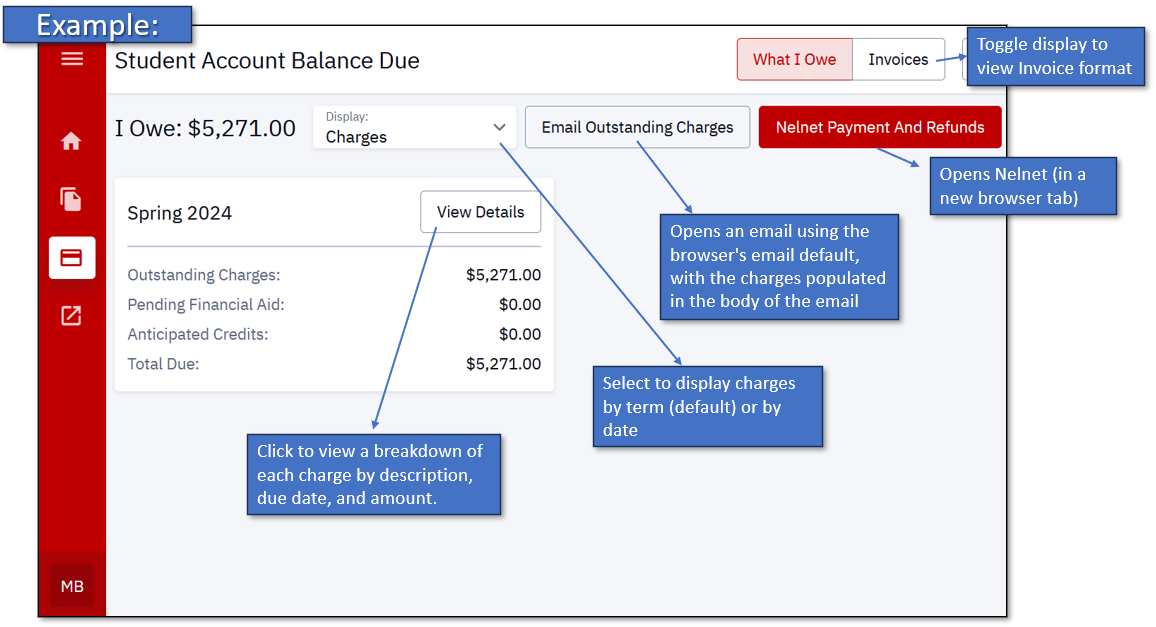
For more information about payment options, including payment plans, visit the BU Student Financials website: bu.edu/studentfinancials/your-bill/payment-plans.
STUDENT ACCOUNT DETAILS
Only Guest Users who have been granted permission to view Student Account Details can access this page.
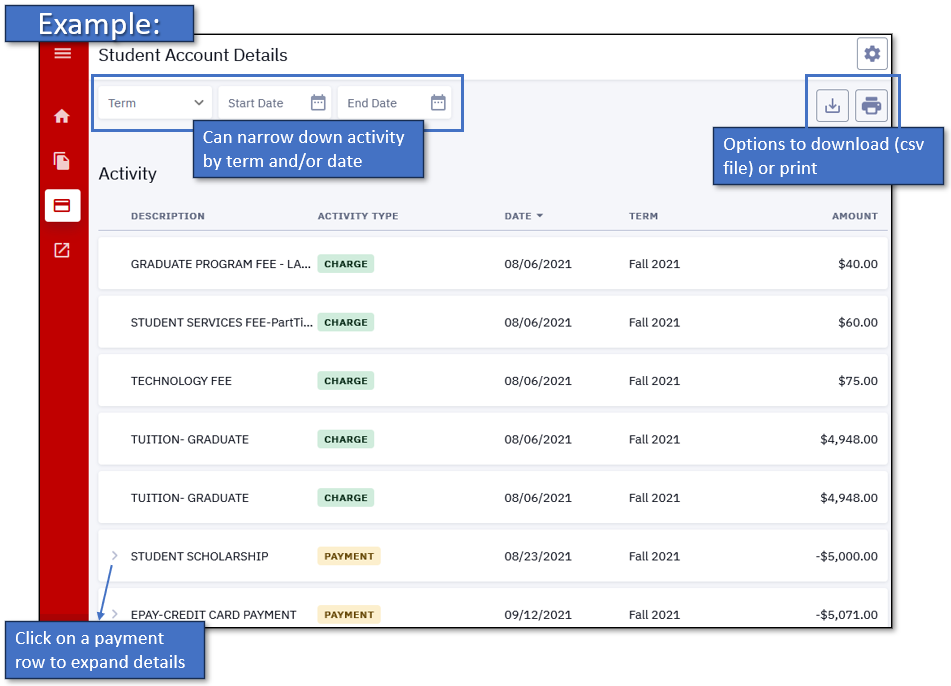
Unlike the Account Balance Due page, Student Account Details displays provides a list of all account activity, including all charges and payments/credits. This is a view-only page; it does NOT link to Nelnet or otherwise allow Guest Users to make payments or update payment information.
VIEW FINANCIAL AID
Only Guest Users who have been granted permission to View Financial Aid can access this page.
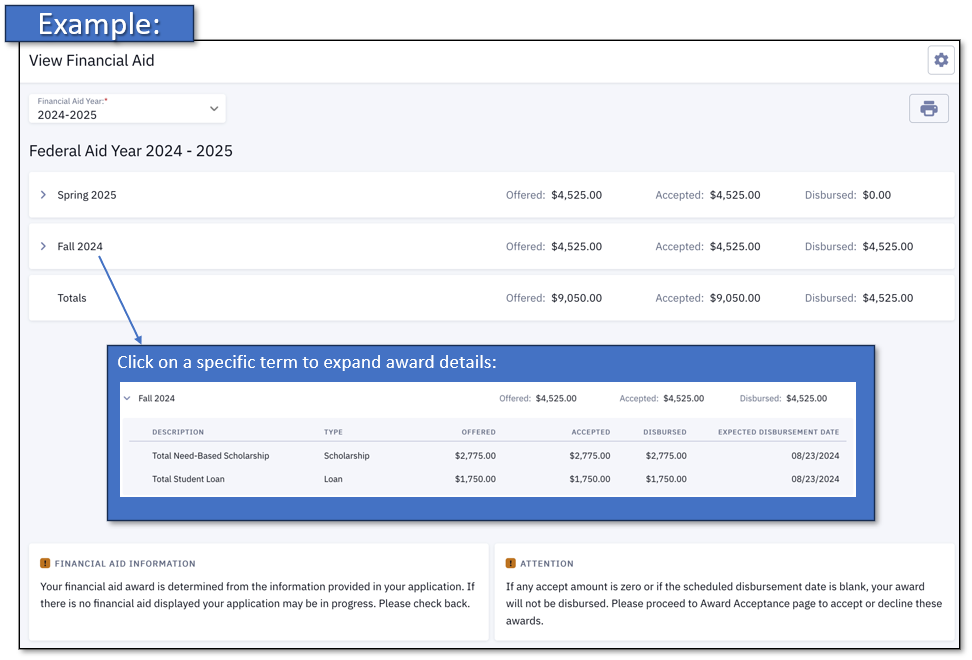
This page allows Guest Users to view the details of the student’s Financial Aid award.
Information about BU Financial Aid can be found at bu.edu/finaid.
Troubleshooting & Password Help
The ability for Guest Users to reset their own passwords (and to set up password recovery questions) is currently unavailable. If a Guest User loses or forgets their password, the student who granted their Guest access can use the Manage Guests page in MyBU Student to send a new password to the Guest User.
Remember that students can change or revoke Guest User access at any time. When changes are made to their access, Guest Users will receive an automatically generated email notification, but these emails may be directed to spam/junk folders. If a Guest User is experiencing any unexpected access issues, it’s a good idea to check in with the student first.
For other technical assistance, contact BU IT Help. Be sure to specify that the issue is related to a MyBU Student Guest Account.
FAQ
Q: Can I change my User ID?
A: No. Guest User IDs are auto-generated by the system and emailed to the Guest User after the students initiates access. Guest User IDs cannot be changed by the Guest User or the student. Keep in mind that Guest User IDs are case sensitive.
Q: Can I change my password to something easier to remember?
A: This functionality is not currently available. It might be helpful to use your browser keychain or other password tools to save the password on your browser/device.
Q: I’m not seeing certain information in MyBU Student that I believe I should see. What should I do?
A: The first recommendation is to communicate with the student who granted your access to make sure you are on the same page about which permissions have been granted.
If you still believe you are experiencing an error with guest access in MyBU Student, contact the BU IT Help Center at ithelp@bu.edu or 617-353-HELP (4357).
Q: I’m a former Sharelink user. Do I automatically receive the same access as a Guest User in MyBU Student?
A: No. For the most part, students will need to newly establish Guest Access in MyBU Student, even if they previously granted Sharelink access.
Q: Can my Guest User account be used to access information for multiple students?
A: No. A separate Guest User account must be used for each student.
Q: Can I submit financial aid forms such as a Parent PLUS Loan or Foreign Income Verification form in my guest account?
A: At this time, financial aid information is view-only for Guest Users. Please contact BU Financial Assistance for more information about how to submit various forms.
Q: How do I sign up for a payment plan?
A: Guest Users who have been granted access to View/Pay Student Account can then click through to Nelnet, where payment plans can be set up. Information about payment plans can be found on the BU Student Financials website: bu.edu/studentfinancials/your-bill/payment-plans
Q: Where can I view/access IRS Form 1098-T?
A: Form 1098-T for BU students is accessed via a vendor called Maximus. Additional information can be found here: bu.edu/studentfinancials/resources/irs-form-1098t.
Page last updated February 2026. For a PDF copy, print this webpage as a PDF.