Managing Guests
This information explains how students can use the Manage Guests page in MyBU Student to add new guest users and modify/revoke access for any existing guest users. Students can also use the Manage Guests page to authorize Consent to Disclosure, which allows the University to communicate with parents/guardians/others in certain limited circumstances.

Introduction
The Manage Guests page in MyBU Student allows students to grant guest access for third parties, such as family members, to view certain aspects of their student information. Guest users will have a view of MyBU Student similar to the student’s, but limited to the permissions they’ve set.
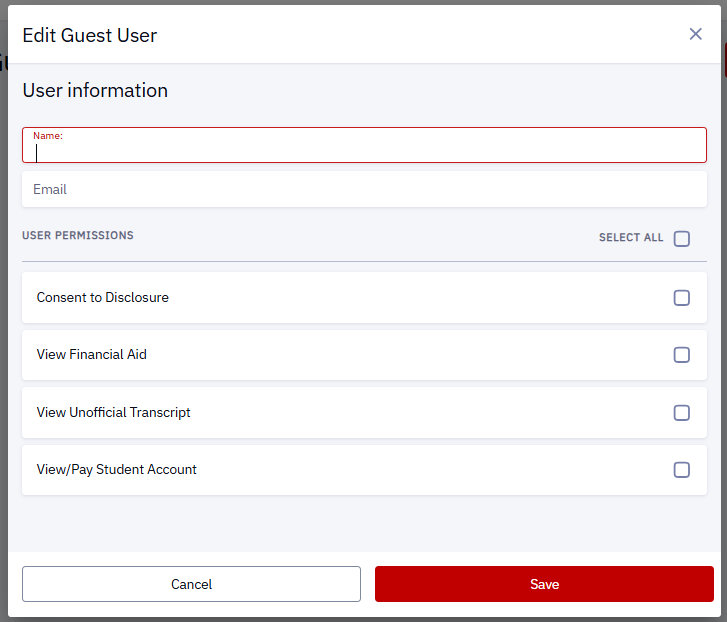
Students can designate which permissions each guest user has, including any or all of the following:
- Consent to Disclosure: Definition and Release of Information
- View Financial Aid
- View Unofficial Transcript
- View/Pay Student Account
(Note that this list of available permissions may change as updates are made to the system.)
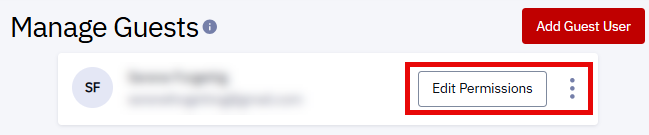
Students can also use the Manage Guests page to send a new password to a guest user if needed.
The ability to manage guest users in MyBU Student is in accordance with Boston University’s obligations under the federal Family Educational Rights and Privacy Act (FERPA). Additional information about FERPA, including the University policy on the release of student information can be found here: https://www.bu.edu/reg/academics/ferpa.
Instructions for Guest Users on how to access their account and how to navigate MyBU Student can be found in the MyBU Student for Guest Users guide.
NOTE: For former ShareLink users — Even if you’ve previously granted ShareLink access and/or Consent to Disclosure for someone, you will need to newly set up Guest Access for them in MyBU Student.
⚠︎ Screen options and menus will vary by user; please note that displays may differ for you based on access that has been granted. All screens shown are for training purposes only.
Add a new Guest User
Manage Existing Guest Users
Page last updated July 2024. To download a PDF copy of this resource, print this webpage as a PDF.