Graduate & Dental School Admissions Application Workflows
This resource provides an overview of how MyBU Student will interact with central Graduate and Dental School admissions processes and systems.


Introduction
Many of the major Graduate and Dental School admissions processes will operate primarily outside of MyBU Student.
- Communication with applicants and prospective students will occur through WebAdmit.
- Applications will be received in WebAdmit, and application review and decision making will occur in WebAdmit.
- Most application maintenance processes will remain in WebAdmit. For example:
- Adding mailed test scores.
- Withdrawing applications (program changes, semester of study updates, ineligible applicants, etc).
- Enrollment deferrals will require some manual work on the applicant’s record in MyBU Student; this will be performed by the Graduate Enrollment Operations team.
- Application data will automatically flow to MyBU Student from this, and other, systems.
For a comprehensive downloadable guide, please click the PDF icon.
BUID ASSIGNMENT
BUIDs will be assigned in IAM on a nightly basis, and then sent back to MyBU Student as the Campus ID and the EMPLID. This will be run on a schedule and generally should require no manual intervention, though it can be run ad-hoc when necessary.
Some records will become suspended through this process because they require manual effort to determine whether the biographical data from the incoming applicant matches the record in IAM or if a new BUID should be created. This should decrease the number of duplicate records created.
MATRICULATION
Matriculation, in MyBU Student terminology, refers to the process of turning an admitted applicant with an accepted offer into a student and creating the student record. Once this occurs, no changes can be made to the Application Program Data table on the MyBU Student application. Any changes to the students’ status in their program must be made on the Student Record. Because the Admissions integrations do not integrate to the Student Record, those changes will be made manually by staff in MyBU Student. More information about the specific matriculation process for some post-doctoral Dental programs can be found in in the Dental School Process section below.
The primary occurrence where admissions officers will make changes to the Student Record will be for enrollment deferrals, where an applicant would like to enroll in a future semester rather than the one they initially applied for.
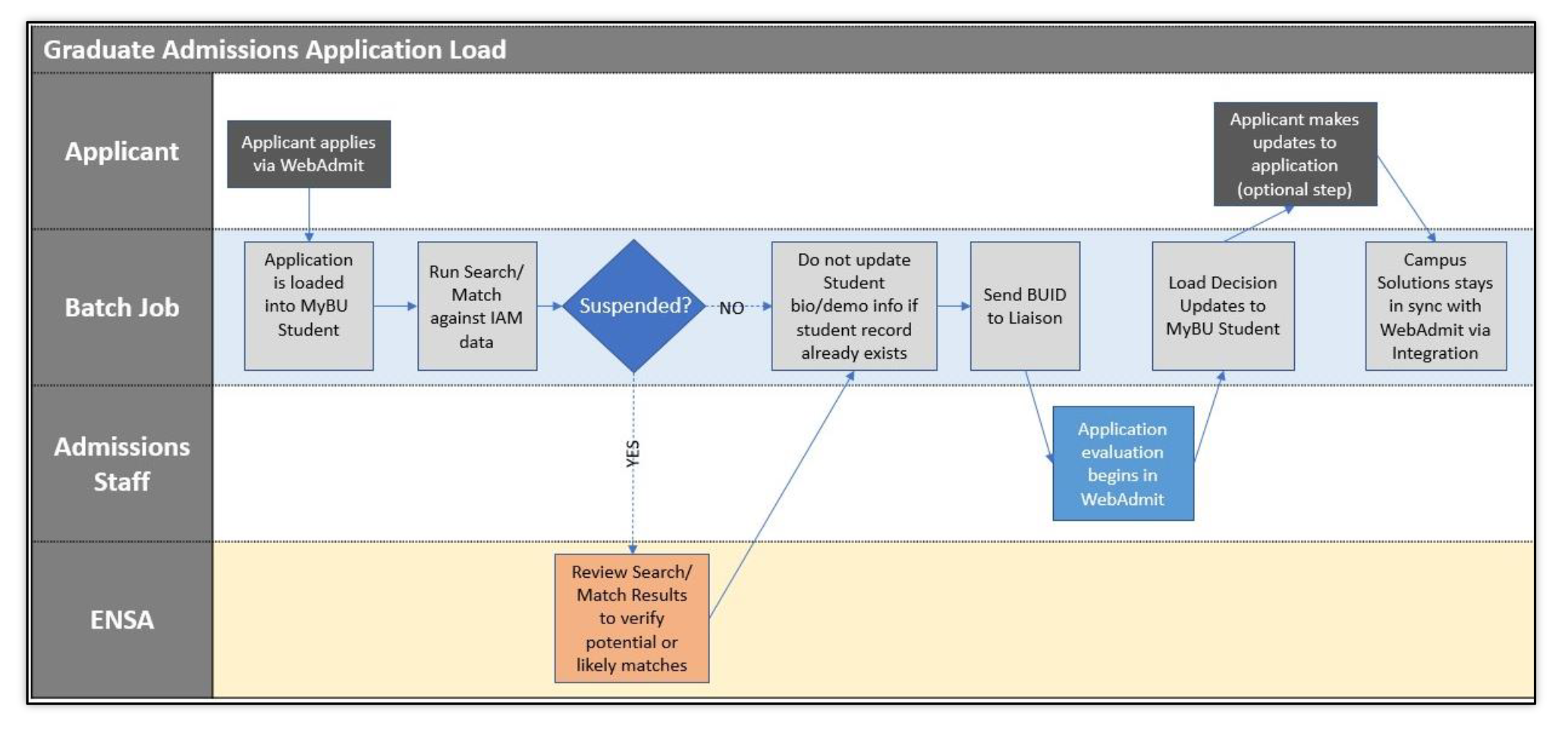
Graduate & Dental Application Load Workflow
WebAdmit applications will be loaded nightly. This process can be run ad-hoc when necessary, but likely will only need to do so in the event of an error.
- Applications will continue to be updated through this integration as decisions are made and student responses are received.

SEARCH/MATCH/POST OVERVIEW
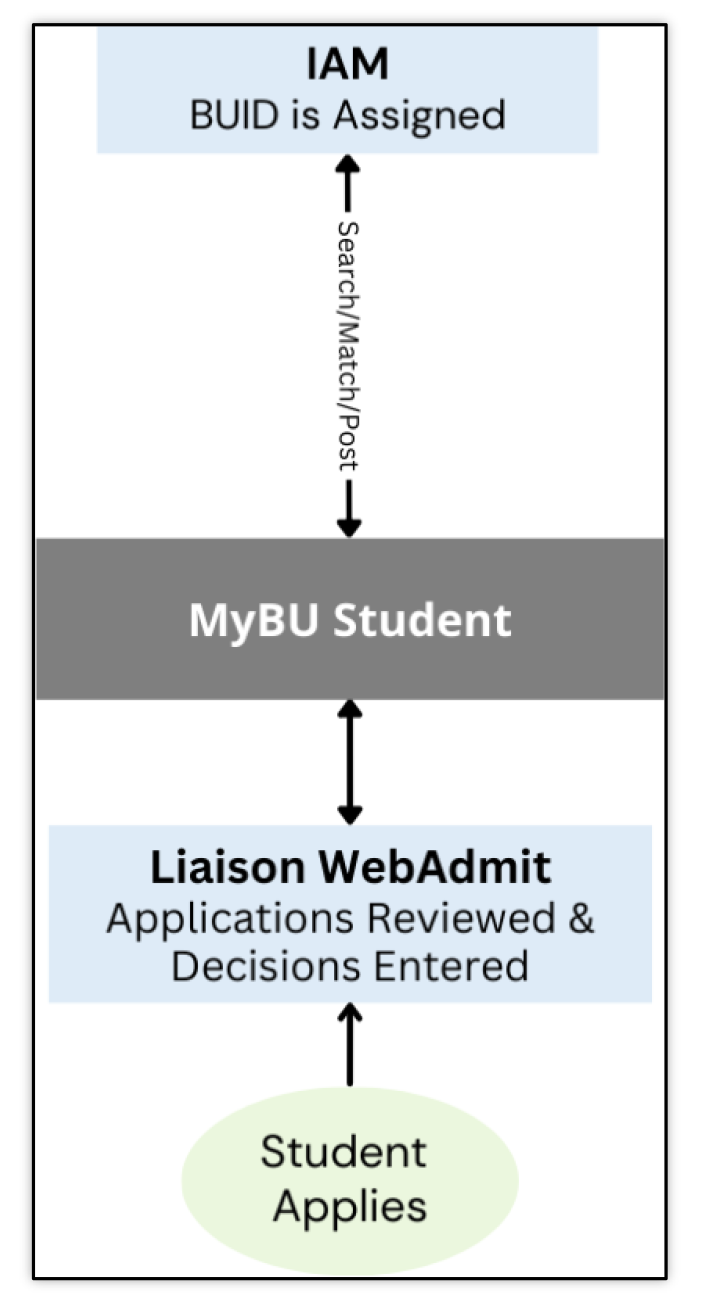
The search/match will be performed in the IAM system. The outcome of the search/match will be returned to MyBU Student.
The IAM system will perform the search/match for the application load. It will pass newly created or existing BUID to MyBU Student.
ENSA staff will review and maintain suspended applications.
DENTAL SCHOOL POST-DOCTORAL PROGRAM PROCESS
A manual process is needed for students who accept an admissions offer to a Dental School post-doctoral program; these are ADEA PASS applicants. The overall workflow is as follows:
- An admit offer is entered into WebAdmit for an ADEA PASS applicant.
- The MyBU Student application will be automatically updated with the admit
decision.
- The student accepts.
- On the MyBU Student application, staff will then manually put the student into the correct degree level, reflected by their plan, and matriculate them.
- These steps will require adding a data row with the proper effective date. Instructions on performing this are below.
Helpful definitions for the following steps:
| System Concept |
Definition |
| Data Row |
A single record or instance of information, often representing a new action or event. E.g., a new row is added when a student changes their program. Rows function in concert with effective dating. |
| Effective Date |
The date at which a piece of data is considered official or effective. MyBU Student uses effective dates to maintain a historical record of past data or to indicate a future change in data. Instead of deleting or overriding data, a new set of data is entered with a new effective date, which tells the system to use the new information from that date forward. |
| Program Action |
The change to a student’s program status, such as the initial applicant status, or a change from applicant status to admitted status in their program/plan. |
| Action Reason |
Notations that provide the reason for a program action. For example, an applicant may be denied admission (program action) because they failed to send their final high school transcripts (program action reason). |
For more details on data rows and effective dates, please refer to the Introduction to Using MyBU Student resource.
Navigation: Menu > Student Admissions > Application Maintenance > Maintain Applications
- The Biographical Details tab will appear first.
- Click on the Application Program Data tab, and click on the plus icon under the Program Data section of the page.
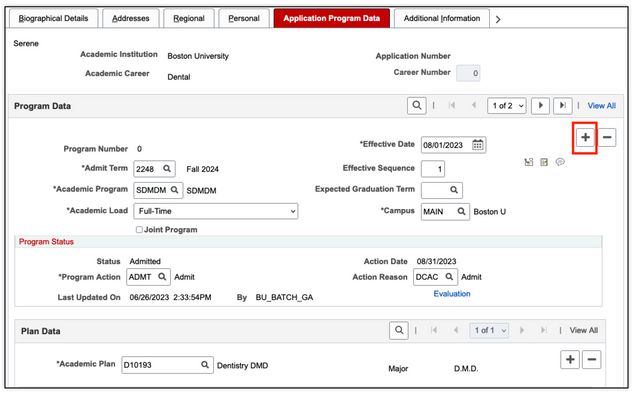
- A new data row will be added. In the fields on the new data row, enter the following information:
- Effective Date: today’s date will default, edit if needed.
- Program Action: select MATR – Matriculation.
- Action Reason: select MATR – Matriculation.
- Academic Plan: lookup to select the plan that will indicate the appropriate
degree level for the student.
- The plan that was stored there before this step is a placeholder value.
- Click the Create Program button, and Save.

At the point of matriculation, the application can no longer be modified. Any changes for the student need to occur within the Student Records Program/Plan.