Enrollment Pre-Requisites for Staff
The following information outlines the process for department administrators if students contact them for review of their pre-requisite status for a class.
Please refer to the Enrollment Pre-Requisites for Students overview to understand what students encounter during registration when attempting to enroll in a class with an associated pre-requisite that they have not fulfilled.
It is up to the department’s discretion if they wish to grant a student an exception. After reviewing with the student and the determination has been made to allow enrollment, an Enrollment Workflow Request should be submitted. Follow the steps below:
- Navigate to Manage Workflow > Request Enrollment Changes.
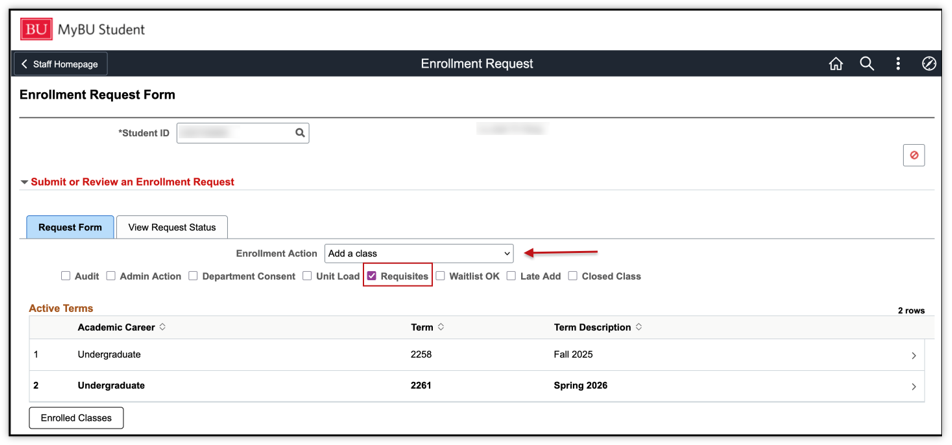
- The Enrollment Request Form page will open. Enter the student’s BUID.
- In the Enrollment Action dropdown, select ‘Add a Class’.
- To indicate the Enrollment Reason, check the box for Requisites.
- Select the appropriate Term.
- Search for the class (including all components, if applicable).
- Press Submit.
For more comprehensive details on the enrollment workflow process and searching for classes, please refer to the Enrollment Workflow: Request by Staff resource.
- If the request was submitted by an administrator without approval permissions, the workflow request will be routed to department approvers. Once they approve, the registration will automatically complete for the student.
- If the request was submitted by a department approver, then MyBU Student will automatically complete the student’s registration.
TIP! During enrollment appointments, it may be helpful for department approvers to monitor their workflow queues to address any requests in a timely manner.
This page was last updated August 2026. To download a PDF copy of this resource, print this webpage as a PDF.
