This resource outlines the process for Advisors to document and track their responses to Action Items submitted by Faculty through MyBU Student.
Introduction
The Student Outreach & Support Suite (SOS Suite) is a set of tools in MyBU Student designed to strengthen communication around student wellbeing and academic success. Action Items are the first tool within the SOS Suite.
Action Items are spontaneous, faculty-initiated alerts issued throughout the semester to indicate when a student may need additional support in non-emergency situations.
When faculty observe a student in their class facing academic or personal challenges, they can submit an Action Item to notify the student’s academic advisor. This allows for timely, individualized support and intervention for multiple types of concerns, including:
Academic Concerns
Personal or Wellbeing Concerns
Other Concerns
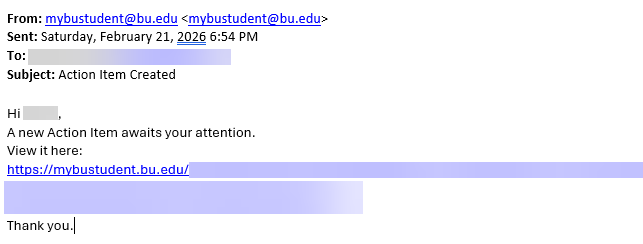
Faculty’s submission of an Action Item triggers an email alert to the student’s assigned academic advisor. The email will prompt an advisor to log into MyBU Student and review details of the Action Item so they can determine the appropriate outreach.
Action Items can only be initiated by faculty to an advisor. At this time, advisors cannot initiate Action Items to faculty.
ⓘ Action Items are not confidential. Although Action Items are not visible to students in MyBU Student, they are part of the student’s official record and thus the student could request access through the University Registrar.
This resource outlines advisor processes to follow in MyBU Student in response to the email alert. It introduces two different pathways for advisors to view and manage Action Items from their MyBU Student Dashboard:
Action Items page: Provides a complete list of all Action Items assigned to an advisor’s department.
Student Details – Notes tab: Lists Action Items created for a selected individual student.
⚠︎ Screen options and menus will vary by user; please note that displays may differ for you based on access that has been granted. All screens shown are for training purposes only.
ACTION ITEMS PAGE
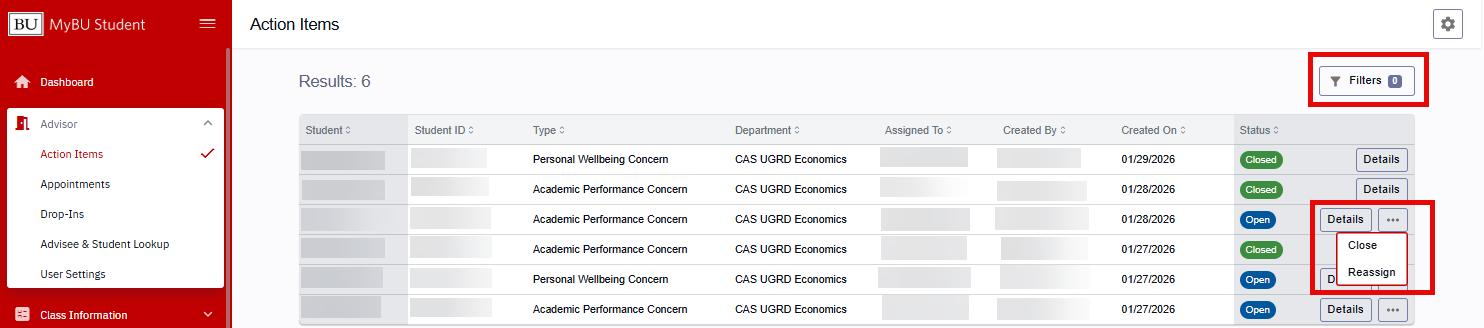
Advisors can see a complete list of their assigned Action Items assigned by navigating to Advisor > Action Items from the MyBU Student menu.
This opens the Action Items list page. The default view displays the total number of Action Items assigned to the advisor’s MyBU Department, including action items that are open and closed. Using the Filters button, advisors can narrow those results, as explained below. The Action Items list displays the following fields and function buttons:
Student name and ID number
Action Item Type (Academic, Personal/Wellbeing, or Other Concern)
Department that received the Action Item
Advisor assigned to the Action Item
Action Item creator (faculty name)
Date Action Item was created
Status tag (blue for Open, green for Closed)
Details: displays expanded views for all Action Items
Three dots menu: permits advisor to manage Open Action Items from this view. See the “Manage Action Items” section below for more information.
FILTERS
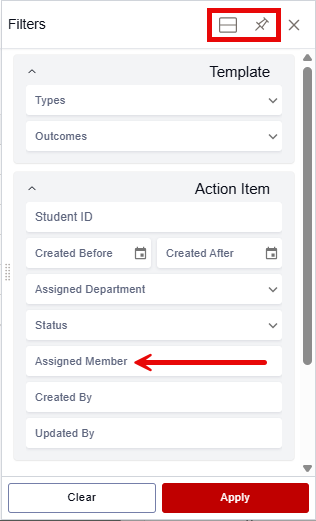
Use the Filters Button to sort and narrow down the Action Item list by Type, Outcome, Student ID, Date range, advisor’s Assigned Department, Status (Closed/Open), Assigned Member (advisor), Created By name (faculty), and Updated By name.
Click the display icon at the top of the list to switch between vertical (default) and horizontal displays.
Click the pin icon to integrate the Filter drawer into the page.
Click the Apply button when ready to reload search results with Filter(s) applied.
TIP! By default, the Action Items page displays the Action Items assigned to all advisors within an advisor’s Department. To display only their own assigned Action Items, an advisor can narrow down the list by selecting their name from the Assigned Member Filter dropdown, highlighted above.
DETAILS
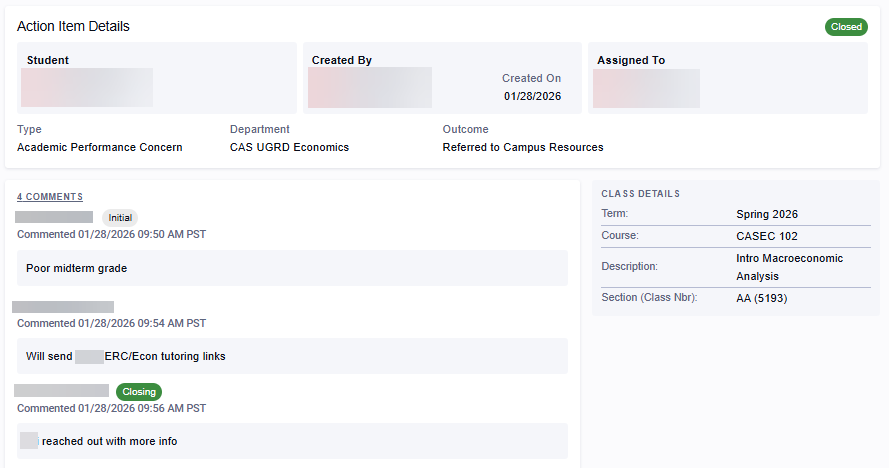
To access complete details for an Action Item, click the Details button on the right side of any Open or Closed Action Item row.
This opens an Action Item Details page that displays:
Student’s name and ID
Created By (faculty) name/ID, and date created
Assigned To (advisor) name
Action Item Type
Advising Department
Outcome (for Closed Action Items only)
Comments thread
Class Details: Term, Course, Description, Section/Class Number
Some details in Action Item Details pages vary by status:
Closed status:
Indicated by a green closed status chip in the top right and a green closing status chip attached to the final comment.
No further actions are available in this window.
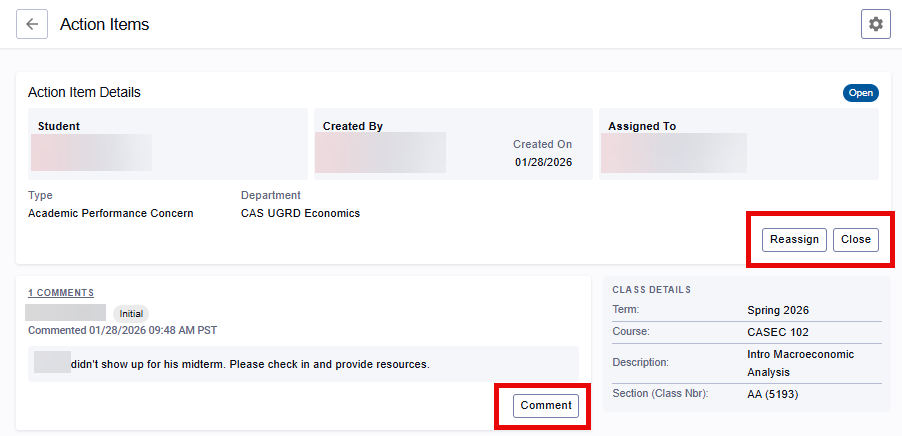
Open status:
Indicated by a blue open status chip in the top right.
Advisors and faculty can add to the Comment thread, Reassign, and Close Action Items in this window.
MANAGE ACTION ITEMS
For any visible, Open-status Action Item, advisors can add Comments, Reassign, and Close the Action Item. These functions are accessible from several points in MyBU Student:
On the Action Item List page.
Within a Student Details– Notes tab.
The same Action Item activity for a student can be performed in the Notes tab as through the Action Items page. The Student Details page provides an additional place to see all Actions Items for a particular student and to review alongside the other student information available.
ⓘ NOTE: In addition to Action Items submitted for their assigned advisees, advisors can view and manage Action Items assigned to any member of their department.
Please refer to this example for the following instructions:
RECEIVE
When a faculty member creates an Action Item for a student, the Action Item is assigned to the first person with the Academic Advisor role on the student’s Student Details page. The Academic Advisor will receive an email alert to prompt them to log into MyBU Student to view the Action Item.
Upon logging into MyBU Student, advisors should:
Navigate to Advisor > Action Items to view their Open Action Items.
Read the faculty Comments about the student.
Using their best judgement, copy or paraphrase the faculty member’s Action Item Comments into the student’s Notes page.
ⓘ Since Action Items are only visible to members of the Advisor’s Department, it is critical to add the Action Item’s contents to the student’s Notes page so staff in the student’s resource network that are in other departments can understand the student’s situation and also provide appropriate support.
Determine and provide the appropriate outreach to provide the student. Depending on the content of the Action Item, this may include emailing the student to offer support, referral to resources, or to schedule a check-in meeting.
Reach out to any other advising or student support staff that should be made aware of the faculty’s concerns about the student.
COMMENT
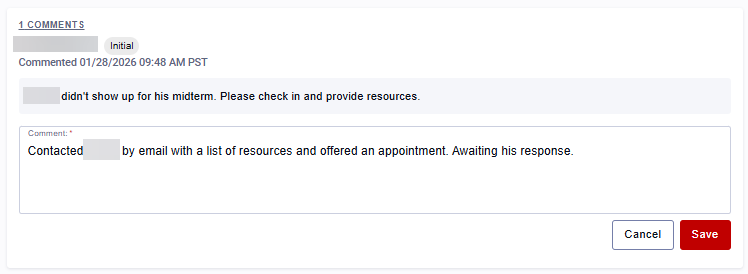
To add a Comment to a Comment thread:
Click the Comment button to open a text box.
Add Comment, then press Save.
The advisor can edit or delete their own Comments or add additional Comments to the thread.
REASSIGN
To Reassign an Action Item to another advisor:
Either click the Reassign button or select Reassign from a three dots menu.
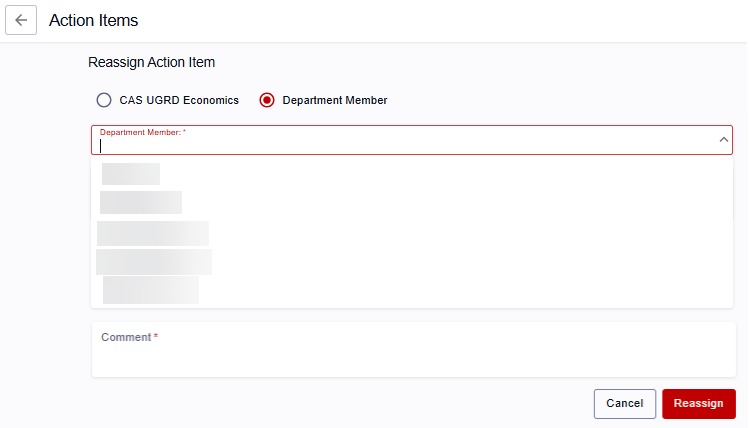
This opens a Reassign Action Item window. To Reassign to another advisor within the same MyBU Advising Department originally assigned to this Action Item:
Select the Department Member radio button.
Choose a new advisor name from the dropdown.
Add a Comment to explain the Reassign request.
Click Reassign to submit.
The Reassigned advisor’s name will populate all Assigned To boxes/rows for the Action Item, and an email notification will automatically be sent to the new advisor.
ⓘ In a Reassign Action Item window, advisors may see an option to Reassign to a Department, as shown above. At this time, Reassigning to a department is not recommended: it generates a request that will not be directed to a specific advisor.
Instead, choose Department Member and designate a specific new advisor’s name from the dropdown menu, as shown in the example above.
CLOSE
Once the Action Item’s outcome is ready to be recorded, the advisor can Close the Action Item:
Either click the Close button or select Close from a three dots menu.
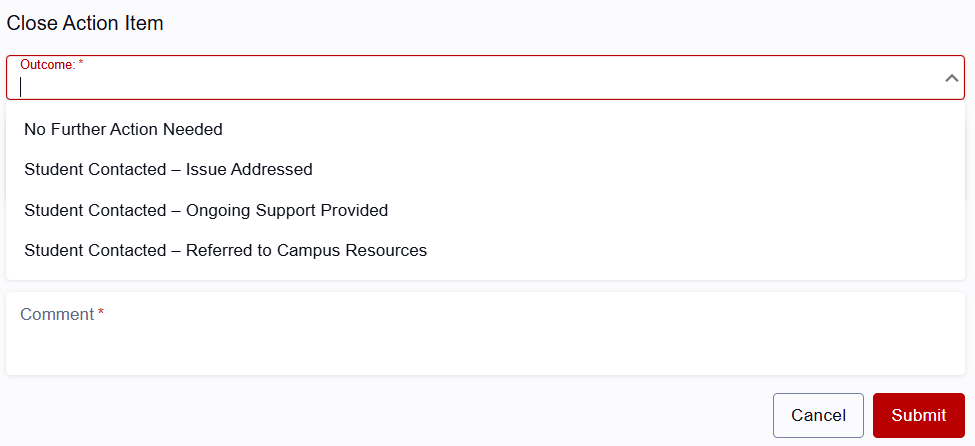
The Close Action Item window will open.
Select an Outcome from the dropdown menu.
Add a Comment and click Submit.
This changes the Action Item status to Closed (green chip) in all views, with no further changes permitted.
TIP! To view any Closed Action Item, click the Details button on the right side of an Action Item row or, from the Student Details – Notes tab, select View from the three dots menu.
ADVISEE & STUDENT LOOKUP - STUDENT DETAILS
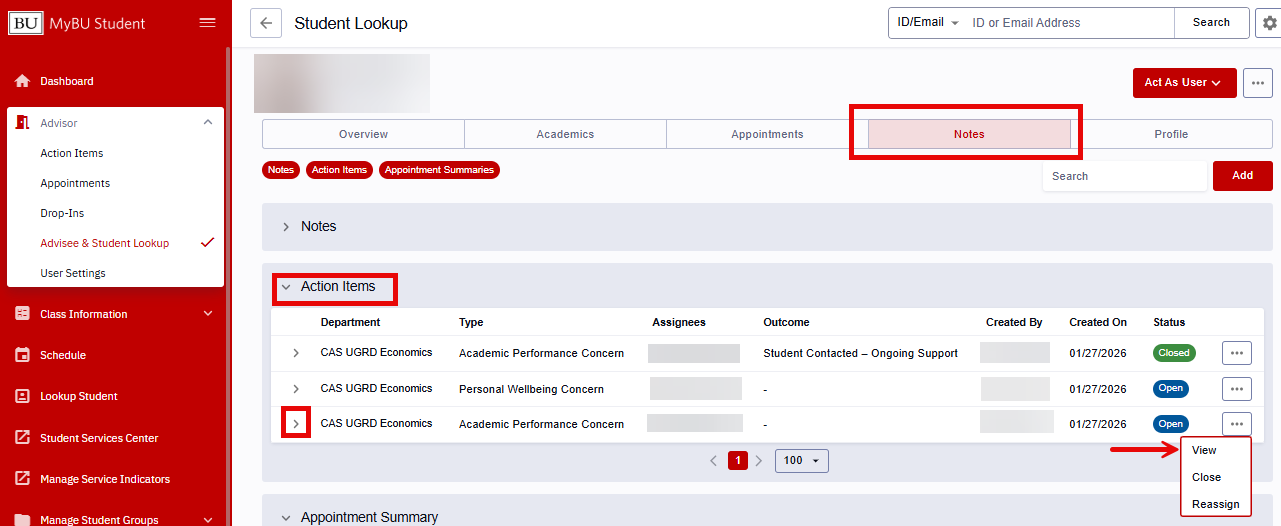
Action Items for individual students can be viewed in their Student Details page.
TIP! The same Action Item activity for a student can be performed here as through the Action Items page. This location provides an additional place to see all Actions Items for that student and to review alongside the other student information available.
Navigate to Advisor > Advisee & Student Lookup from the MyBU Student Dashboard.
Locate the student’s record; select the student to view their Student Details page.
Click the Notes tab.
Use the down arrow to expand the Action Items box and see a brief overview for each Action Item, including:
Advising Department
Action Item Type (Academic, Personal/Wellbeing, or Other Concern)
Assignees (advisors)
Outcome: for Closed Action Items
Created By name (faculty)
Created Date
Status: Open/Closed
From the Action Items section, the following functions are available.
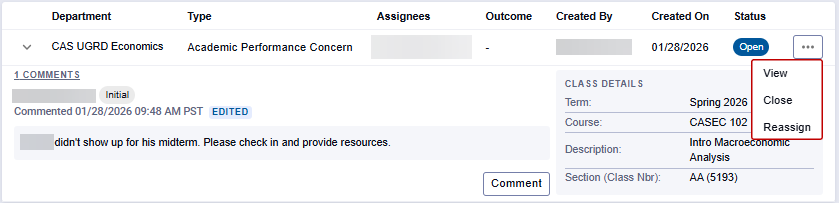
Expansion arrow: opens a more detailed box within this page that displays the Comments thread and Class Details (Term, Course, Description, Section/Class Number).
Three dots menu: View, Close, or Reassign. These steps are detailed in previous “Manage Action Items” section.
Page last updated February, 2026. For a PDF copy, print this webpage as a PDF. Other resource formats can also be accessed via the relevant icons.