Milestones
This resource explains how staff can apply Milestones to student records in MyBU Student.


Introduction
Milestones are used to monitor non-course-related requirement completion. Some frequent uses include:
- Graduate and Professional school requirements such as a thesis, dissertation, comprehensive and oral exams, and experiential requirements.
- Auditions or portfolio submissions or reviews.
- Monitoring or limiting the number of attempts of a requirement.
- Use as conditions in Degree Progress (i.e., Academic Advisement) reports.
- Use as part of prerequisite checking.
- Monitoring items that must be completed by a certain timeframe or date calculation.
⚠︎ Screen options and menus will vary by user; please note that displays may differ for you based on access that has been granted. All screens shown are for training purposes only.
Setup
Before Milestones can be managed by School/College staff, there are configuration steps to be completed by OUR and System staff.
- Navigation: Set Up SACR > Product Related > Student Records > Enrollment > Milestone Table > Milestone Table.
- Configurations completed on the Milestone Table populate the Student Milestones page by default. Configured values can be overridden on the Student Milestones page.
ⓘ NOTE: Changes made to configuration do not automatically carry down to students who are already in those altered Milestones. If a change is needed, the alterations would need to occur both on the Milestone Table, as well as on the Student Milestones page for each student.
Milestones can be set up to accommodate for various needs. Some available configurations include:
- Whether or not they are visible to students and/or advisors.
- Whether or not students and/or advisors can upload attachments to the Milestone.
- Whether or not the Milestone is displayed on transcripts (availability dependent on access).
- Whether or not a grade should be attached.
- Optional number of attempts allowed.
- Optional sub-categories called “Levels” to identify sub processes or progress toward the milestone completion.
- Creating a Milestone Template to apply given milestones to specific Careers, Programs, or Plans.
- Assignment to an advisor or evaluator for completion.
For information on how Milestones and Milestone levels are mapped to each other in MyBU Student, as well as how they mapped to prior Legacy UIS/Mainframe Milestone (Project) values, please refer to the Student Milestones & Levels: Legacy Mainframe to MyBU Student Crosswalk resource (file will download; please note that this list is meant to display mapping and may not reflect the most recent list of values).
View Milestones
To view, update, or apply a Milestone, navigate to the Student Milestones page:
- From the Dashboard: Select Manage Milestones in the left menu.
- In the Full Site: Click Main Menu > Records & Enrollment > Enroll Students > Student Milestones.
The Find an Existing Value page will display. From here, users can also Add a New Value by clicking the button in the upper right corner.
TIP! The Find an Existing Value option refers to looking up a student who already has a Milestone added to them, not to find an existing student in the system. If the student doesn’t have an existing Milestone record, the Add a New Value option should be selected, as explained below.
- Use the Find an Existing Value option for a student who already has a Milestone added to their record.
- Enter a Student ID, then press Search to see their existing Milestones.
- If viewing existing Milestone activity, be sure to view all rows.

- If the student does not have any existing Milestones associated to them, click the Add a New Value button to open a window to view fields to add a Milestone to a student record.
- When adding a new value, complete the Institution, Career, Program, and Plan to which you want the Milestone applied. Press Add when finished.
- Click the Find an Existing Value button to return to the previous search window.
Milestones for a student are organized by effective date. If viewing existing milestone activity, be sure to review all rows.
- Example: if the top level has multiple rows, this indicates that activity for milestones have occurred on multiple dates. This could include events like a new milestone, milestone level, or status being added to an existing milestone.
- Example: the second level rows indicate the milestone activities that are ongoing for the Effective Date selected.
- The two rows of milestone data in the image below are effective for the 04/27/2025 Effective Date.
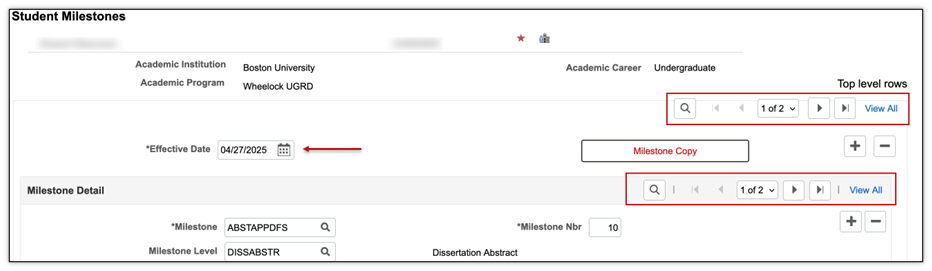
Refer to the Data Rows and Effective Dates section of the Introduction to Using MyBU Student resource for more information on effective dated rows.
TIP! Sometimes it helps to scroll to the bottom of the page to select the Include History button. This may offer staff a useful view to see all rows of data – the history of Milestone activities. Appropriate access is required.
Enter Milestone Details
Refer to the image below throughout this section:
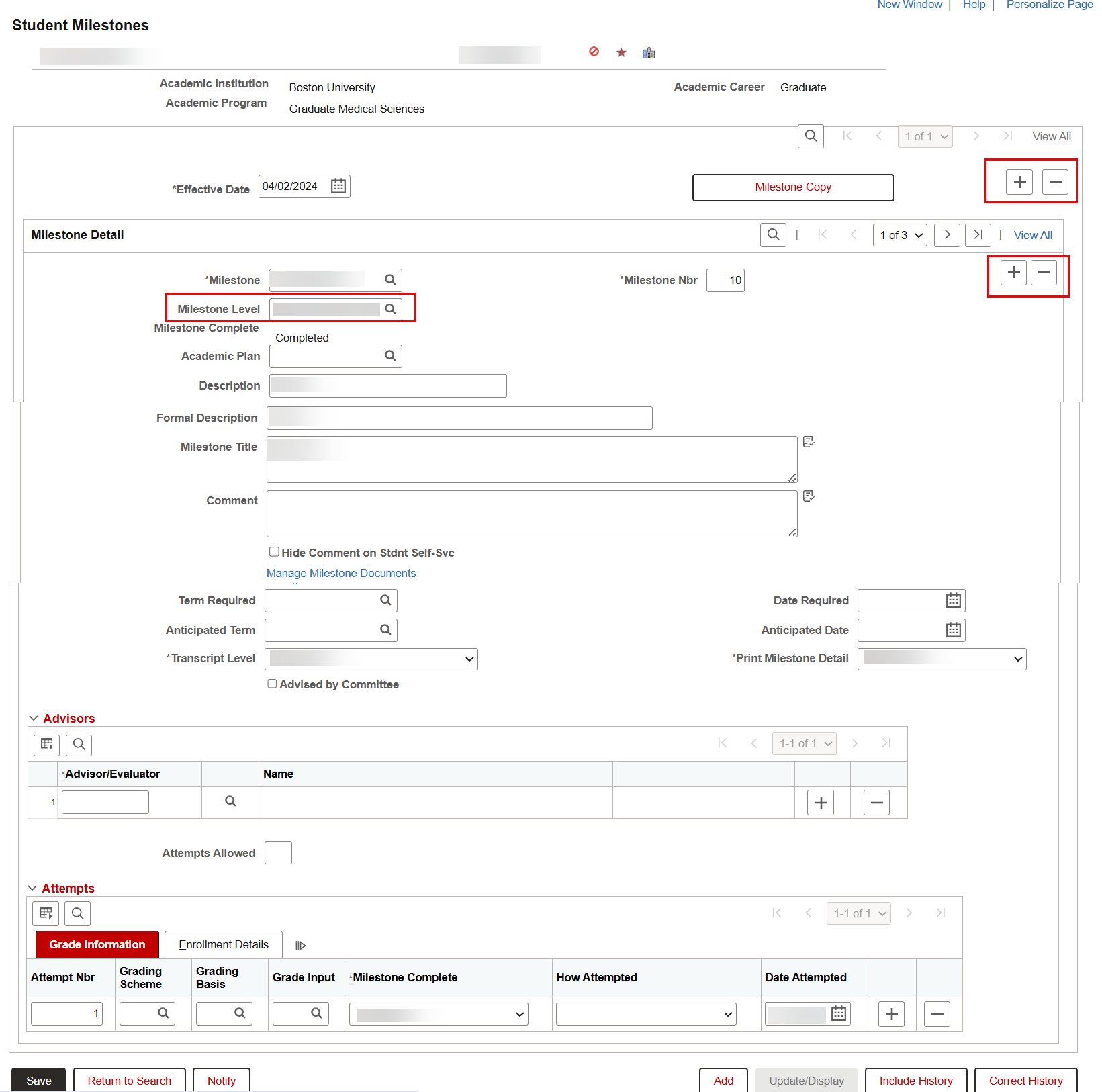
To enter initial Milestone Details:
- Enter or add the desired effective date for the Milestone in the top section of the page.
- The plus and minus buttons in this top section of this page control the effective date.
- The Milestone Copy button can be used to copy data from a Milestone Template to the student’s record.
- After selecting an effective date, select the desired Milestone to be applied in the Milestone Detail section.
- The second plus and minus buttons on the page control the addition of Milestones on the corresponding effective date.
- The Milestone Nbr is populated by default as 10 for the first Milestone entered. The Milestone Nbr is incremented by 10 with each additional Milestone added. These values can be overridden.
TIP! If the Milestones values needed are not displaying in the lookup, check with the appropriate School/College DSA to ensure access has been granted. Access to the Milestones will also allow the selection of the appropriate Milestone Level.
MILESTONE LEVEL
When a Milestone has a level, select the desired Level via the Milestone Level lookup.
- A Milestone Level is a sub-category of the Milestone, and is optional as part of configuration setup (refer to School/College policies to determine the needs for Milestone Level).
- Utilization of Milestone Levels will vary. When applicable, they often further describe or specify the type of Milestone that has been determined. For example, the Recital Milestone may be needed for a student. It then may be department policy to indicate that it’s a Doctoral Recital, Composition Recital, or other value.
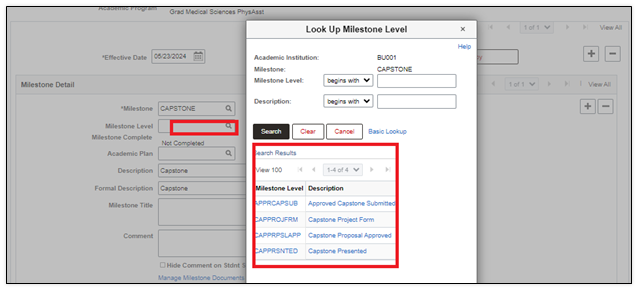
ADDITIONAL MILESTONE DETAILS
Complete additional values in the Milestones Details section that are needed to fulfill the business process needs:
- Academic Plan: If the Milestone should be applied to a Plan in which the student is enrolled, select that Plan here.
- Description and Formal Description: Populated by default per the Milestone configuration and can be overridden.
- Milestone Title: Optional. A Title can be entered and can be printed on a transcript.
ⓘ NOTE: Thesis and Dissertation titles should be entered as Mixed Case. These values are printed on the transcript and in efforts to maintain consistency, they should not be in all caps.
- Comment: Add comments if desired.
- Hide Comment on Stdnt Self-Svc: When checked, comments do not appear to students or staff in the Student Milestones area. Populated by default per the Milestone configuration and can be overridden.
- Manage Milestone Documents: Link to attach documents related to the Milestone.
- Term Required and Date Required: When a Milestone is required by a certain term, add that term here. Date is populated based on the selected Term. This value can be configured in the Milestone Table to automatically populate based on dates applied to the student’s record. Configuration options include:
- Expected Grad Term End Date
- Expected Grad Term Start Date
- Research Final Submission Date
- Research Start Date
- Start Date of Admit Term
When the Milestone configuration is not set to automatically populate this value, or when the configured value does not exist (i.e., the Expected Grad Term has not been applied to the student’s record), entering a term will cause the Term End Date to be populated as the Date Required.
- Expected Grad Term End Date
- Expected Grad Term Start Date
- Research Final Submission Date
- Research Start Date
- Start Date of Admit Term
When the Milestone configuration is not set to automatically populate this value, or when the configured value does not exist (i.e., the Expected Grad Term has not been applied to the student’s record), entering a term will cause the Term End Date to be populated as the Date Required.
MILESTONE ADVISORS
In the Advisors section, advisors who are evaluating and monitoring Milestones can be added.
- Advisor/Evaluator: Use the lookup to find the desired individual.
- Attempts Allowed: Use to populate the number of times a student can attempt the milestone.
- Use the plus button to add more than one advisor.
MILESTONE ATTEMPTS
The Milestone Attempts section is used to monitor information regarding each Milestone attempt. This information can be entered for reporting/tracking, however it does not impact functionality.
Grade Information Tab: Status and date values, if entered in these fields, will display in related reports and to the student’s view of their Milestones.
- Attempt Nbr: Use the plus button to add each Milestone attempt, with corresponding Attempt Nbr.
- Grading Scheme: Populated by default per the Milestone configuration. Can be overridden (populates if grade is required).
- Grading Basis: Populated by default per the Milestone configuration. Can be overridden (populates if grade is required).
- Grade Input: Populated by default per the Milestone configuration. Can be overridden.
- Milestone Complete: Select Completed, In Progress, or Not Completed.
- How Attempted: Select the desired value. These are translate values that can be altered if needed.
- Date Attempted: Enter the date the student attempted the Milestone.
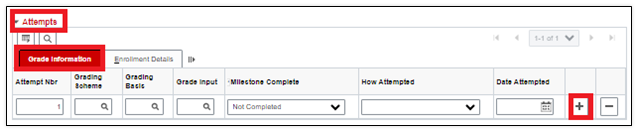
Enrollment Details Tab: This tab is populated when a Milestone is assigned to a student when the student enrolls in a class.

Related Resources
Staff and advisors also have Milestone viewing access via the Act As Student function, as explained in the Act As Student resource.
To learn how students can view their Milestones, visit the following resources:
- View Academic Information
- Unofficial Transcript Information
- Not all milestones are set up to display on the transcript. To review which values will be viewable, please review the “Prints on Transcript” column of the Student Milestones & Levels: Legacy Mainframe to MyBU Student Crosswalk resource (file will download).
See also:
- Introduction to MyBU Student: Data Rows and Effective Dates section
- PeopleBooks: Tracking Milestones section
- PeopleBooks: Setting Up Milestones section
Page last updated March, 2026. For a PDF copy, print this webpage as a PDF.