Maintain Student Budgets
This information allows users to update a student’s budget for a selected term and year. It is assumed that a budget exists for the student.


Introduction
Please note that this resource includes information related to Federal Financial Aid policies which are liable to change. Staff maintaining this documentation will update terminology, links, or processes in accordance with new information as it becomes available in conjunction with Student Information System updates. It identifies salient details regarding the usage of MyBU Student and is designed to be used in conjunction with Financial Aid Procedures and Processes.
When students have a circumstance or situation that requires a change to their budget based on their original eligibility, their budget needs to be adjusted. These scenarios include:
- Adding fees for a professional certification exam.
- Additional costs for a computer or software to meet program specific requirements.
- Unforeseen expenses because of special circumstances.
For a comprehensive downloadable guide, please click the PDF icon at the top or bottom of this page. Other resource formats can also be accessed via the relevant icons.
⚠︎ Screen options and menus will vary by user; please note that displays may differ for you based on access that has been granted. All screens shown are for training purposes only.
NAVIGATE TO STUDENT BUDGET MAINTENANCE
Financial Aid > Budgets > Maintain Term Budgets
- Search for the student by entering their ID. Fields marked with * are required.
- Academic Institution: Enter ‘BU001’ or click on the magnifying glass and select it.
- Aid Year: choose the aid year needed.
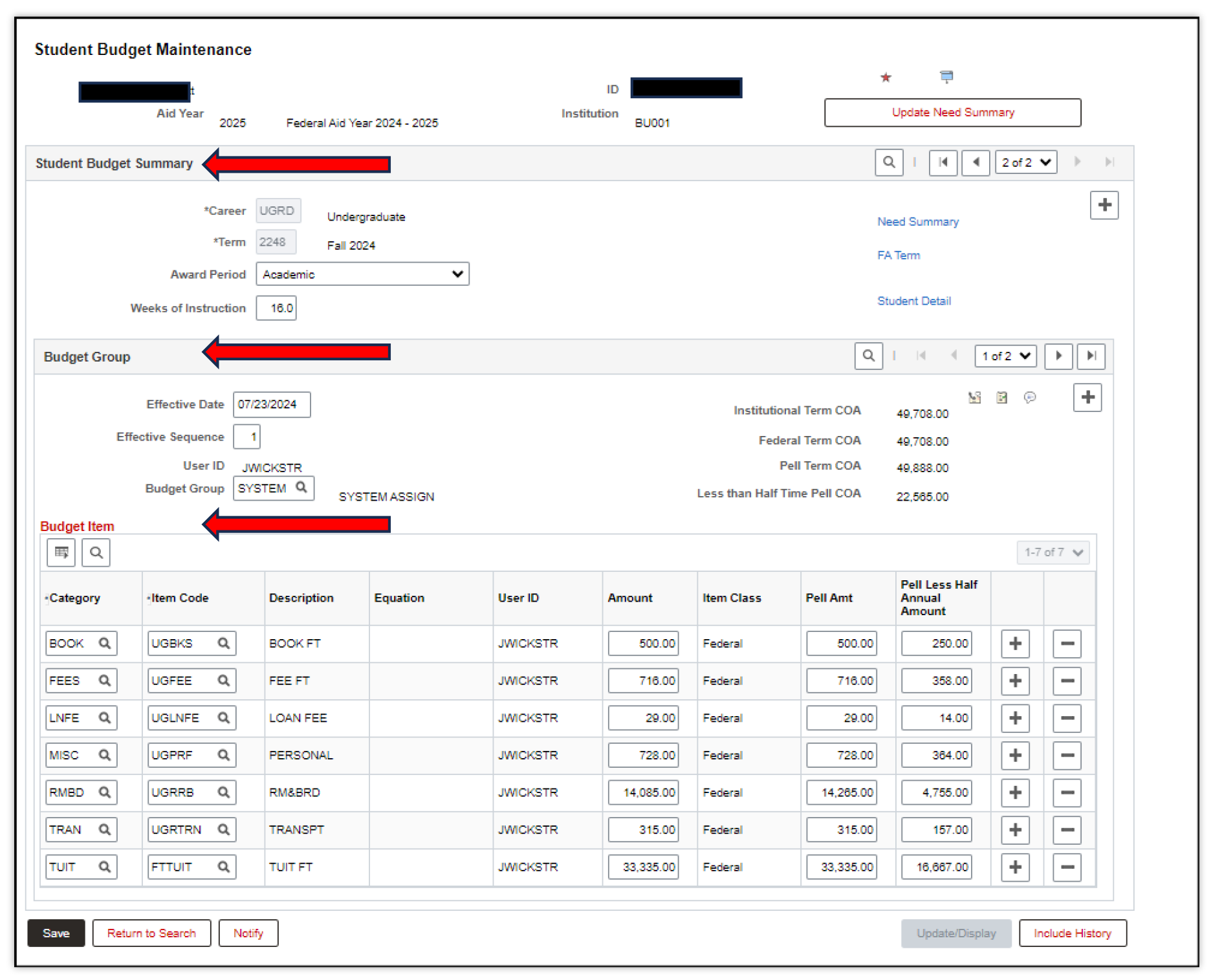
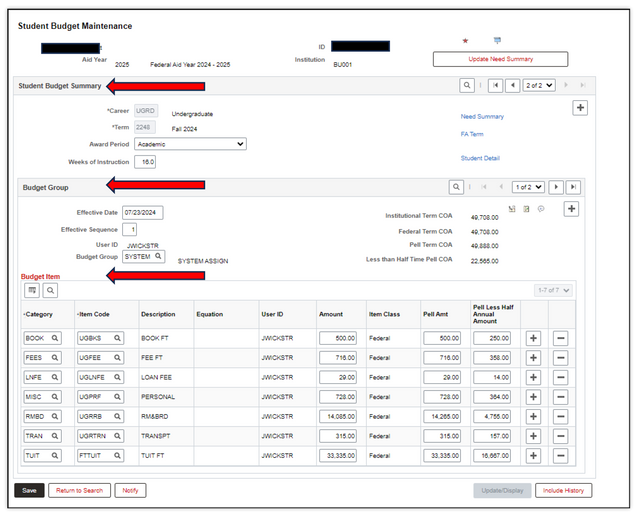
- The Student Budget Maintenance page has three sections:
- Student Budget Summary
- Budget Group
- Budget Item
STUDENT BUDGET SUMMARY
This section provides information about the student’s career, the term, and the award period for the student’s budget, along with links for additional student information.
- Use the arrow keys or First/Last links to navigate between semesters.
- The Need Summary, FA Term and Student Detail links on the top right-hand corner provide additional information about the student.
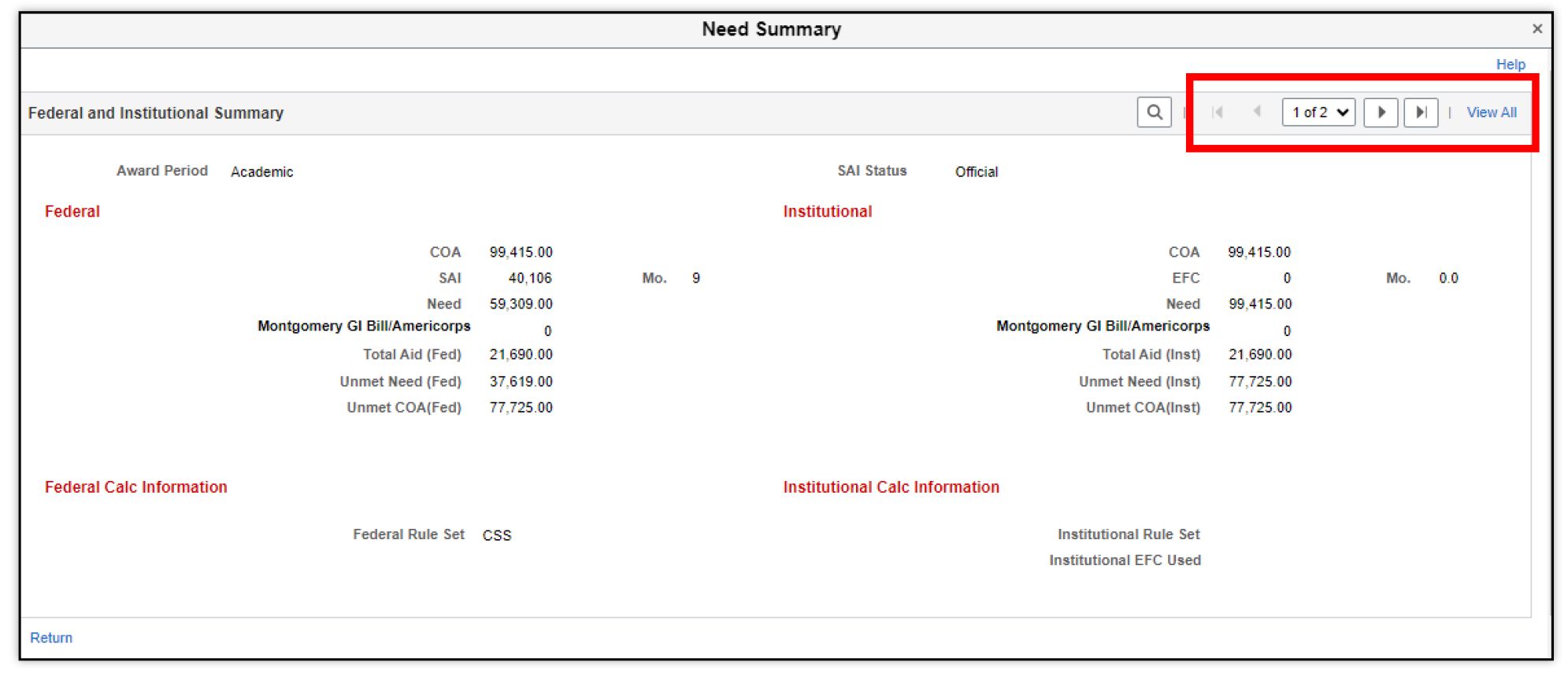
- Need Summary: View the student’s cost of attendance and need, calculated with both Federal and Institutional methodologies. Click Return to go back to the main Budget screen. Remember to check if there are multiple pages of information. Use the arrows or click View All to review.

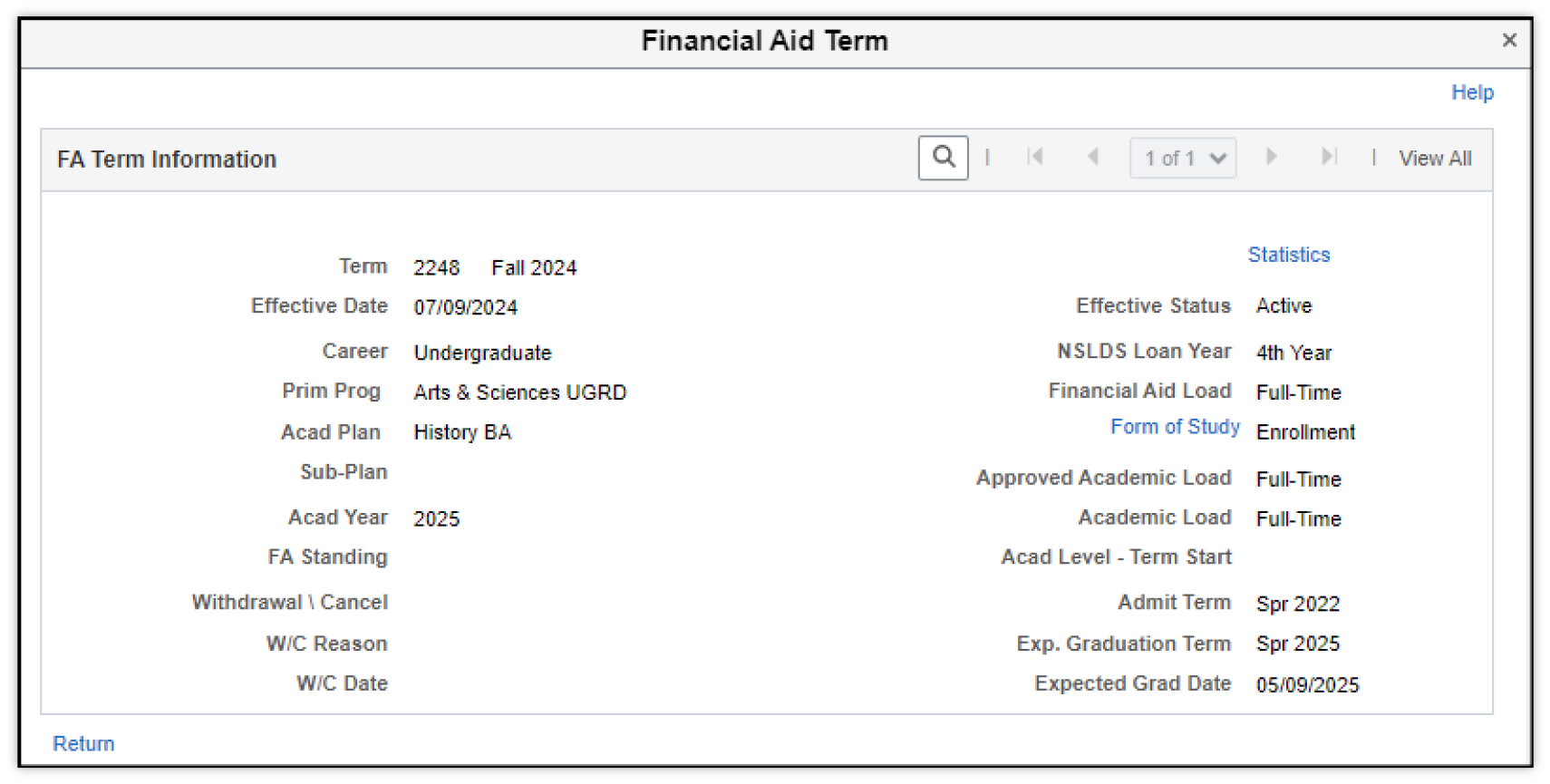
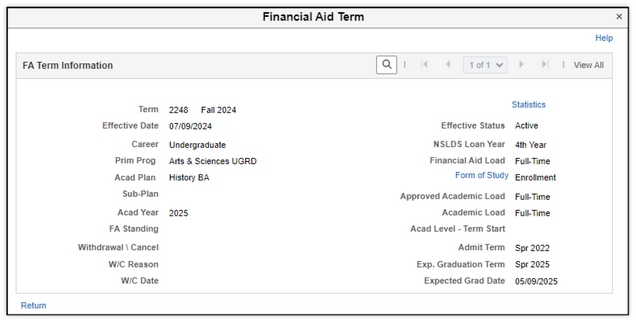
- FA Term: view the student’s Term, Career, Program, and other term information. Click Return to go back to the main Budget screen.
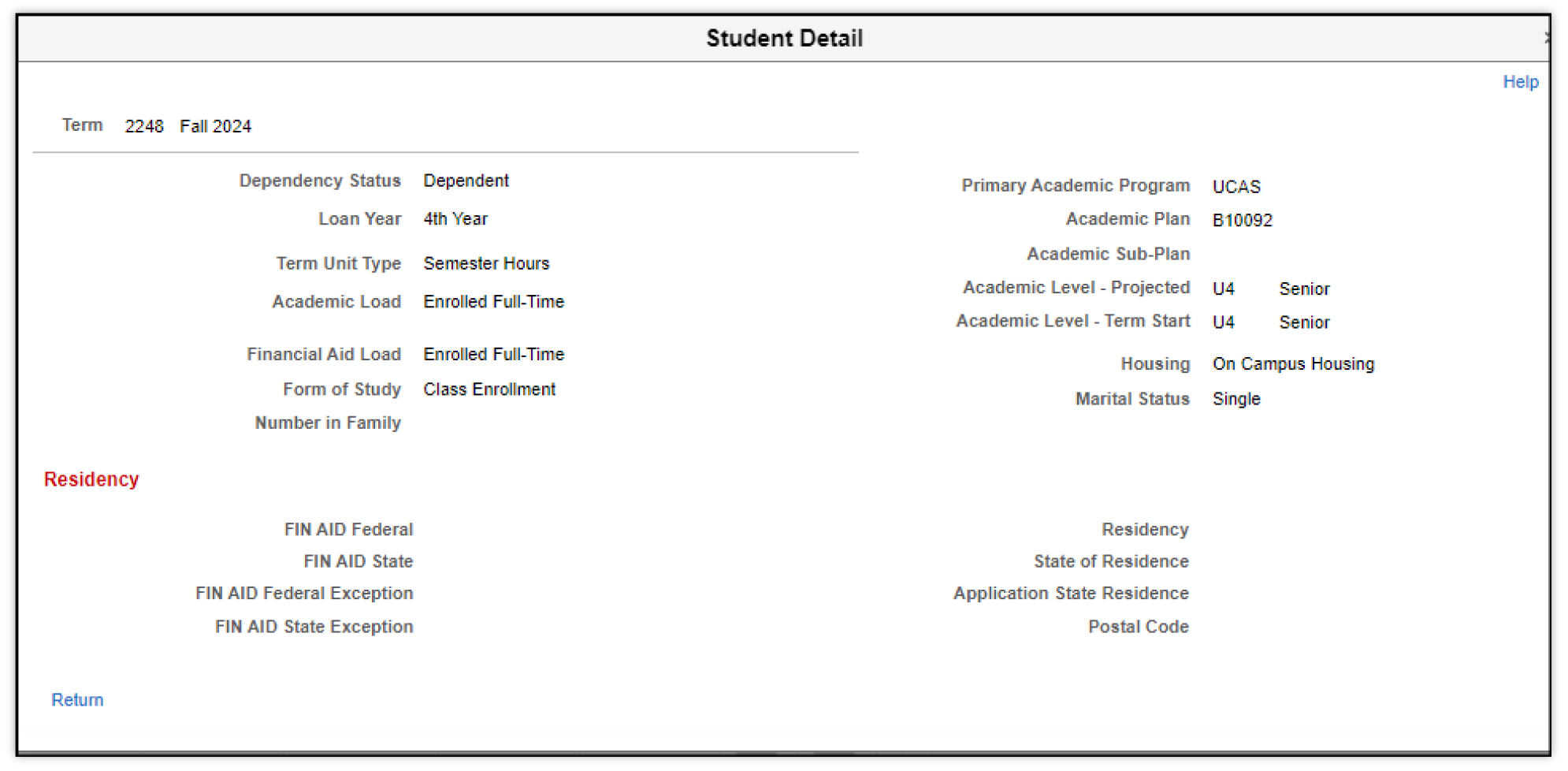
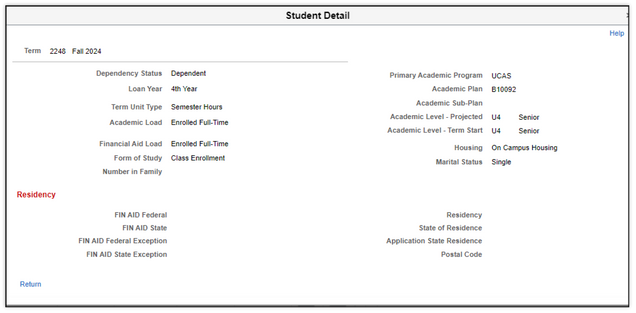
- Student Detail: View additional details about student’s Dependency Status, Academic Load, Primary Academic Program and Residency that was used to determine student’s budget. Click Return to go back to the main Budget screen.
- Award Period: Indicates a term or set of terms associated with a period of enrollment for needs analysis and awarding purposes. The default value is ‘ACADEMIC’ which indicates it is a part of the standard academic year. The other value is NON-STANDARD, which indicates that the term is nonstandard. Typically, this is a summer term.
BUDGET GROUP
This section provides information about the specific Budget Group that the student is a part of, along with the Effective Date, Effective Sequence, and other Cost of Attendance (COA) related information.
This information is used to define budgets for similar groups of students. Some use cases for multiple budget groups:
- Cost of attendance is different for undergraduate on-campus and undergraduate commuting from home.
- Graduate or Professional students (Medical or Law) may have some specific Budget Categories and Item codes that are different.
Budget Groups provide the flexibility to determine the appropriate cost of attendance for such different groups. This allows financial aid packaging to use the correct COA while determining awards based on appropriate packaging rules, without manual intervention.
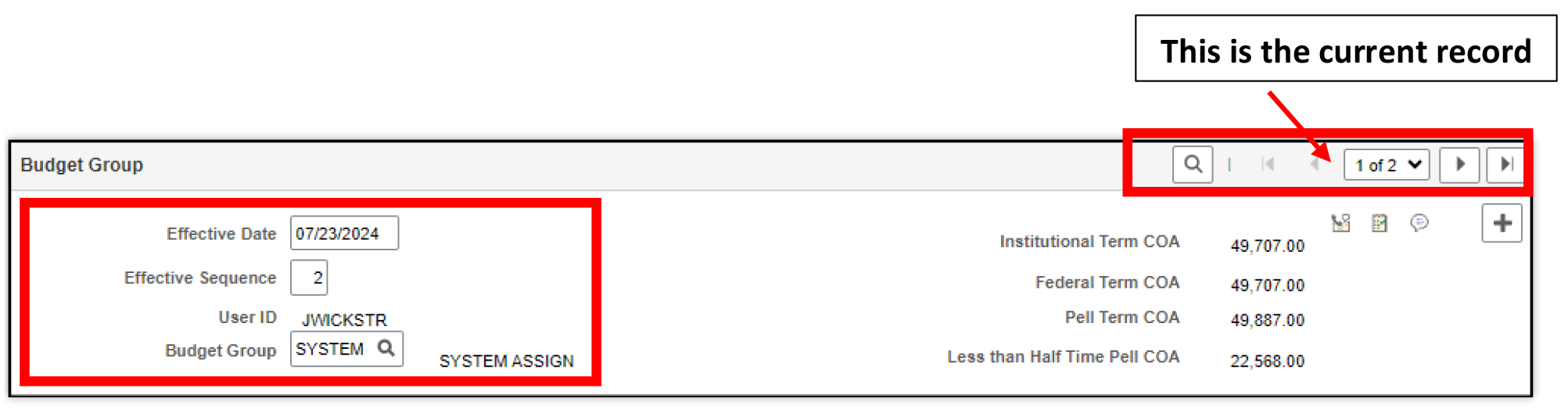
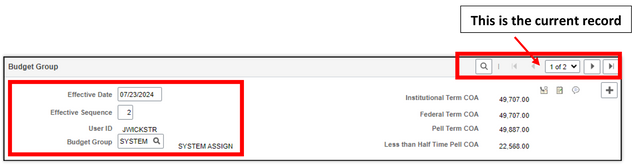
- Effective Date: Indicates the date upon which the Cost of Attendance for the student became effective. (The Effective Date is defined as the date upon which the currently displayed data row starts being used in MyBU Student.)
- Effective Sequence: Indicates the current sequence number for the Effective Date. This field serves different purposes, depending on whether it is paired with Effective Date.
- If Effective Sequence is not paired with Effective Date, then Effective Sequence has no special function and can be used as a simple sequencing field wherever needed.
- If Effective Sequence is paired with Effective Date, it enables the existence of more than one row with the same effective date. Assign a unique sequence number to each row that has the same effective date. (For example, if multiple changes to a student’s budget must be made on the same date, assigning them sequence numbers creates a record of the history of those changes.)
- The various COA types are listed on the right: Institutional Term COA, Federal Term COA, Pell Term COA, and Less than Half Time Pell COA.
- Checklists and Comments can also be accessed from this page.

Please refer to the Adding and & Updating Financial Aid Checklists and Managing Comments on a Student Financial Aid Record guides for more information.
BUDGET ITEM
This section of the page provides a detailed breakdown of Budget Item categories and costs for each item in a category.
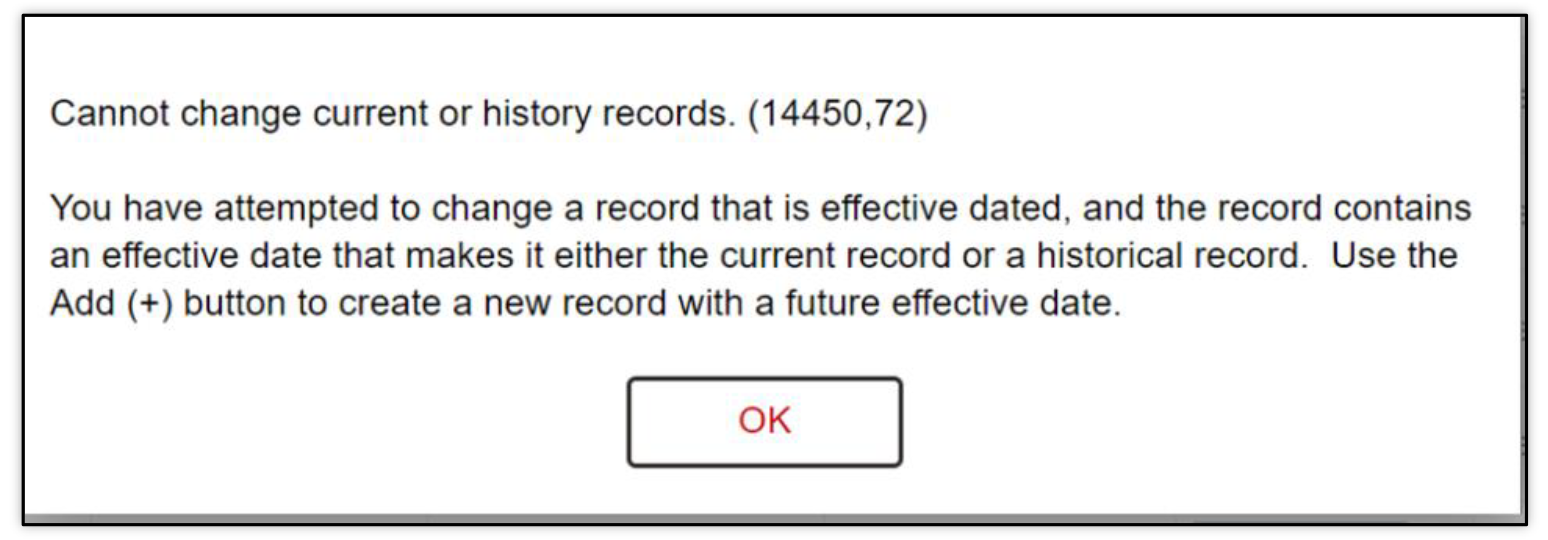
The correct method to make a change is also displayed as a part of the error message.
- Include History: This button allows the user to view current, future, and historical data for the record being searched (cost of attendance, in this use case), but change can be made only for future information. On the top right, the number of instances of this record displays (in this example 13). Using the arrow button, the user will be able to see changes made on each instance. However, a user will not be able to change information on a page while using the Include History page option. If a user attempts to change any information, the above error message is displayed.
The correct method to make a change is also displayed as a part of the error message.
BUDGET ITEM
Each line will list assigned budget items, based on student eligibility:
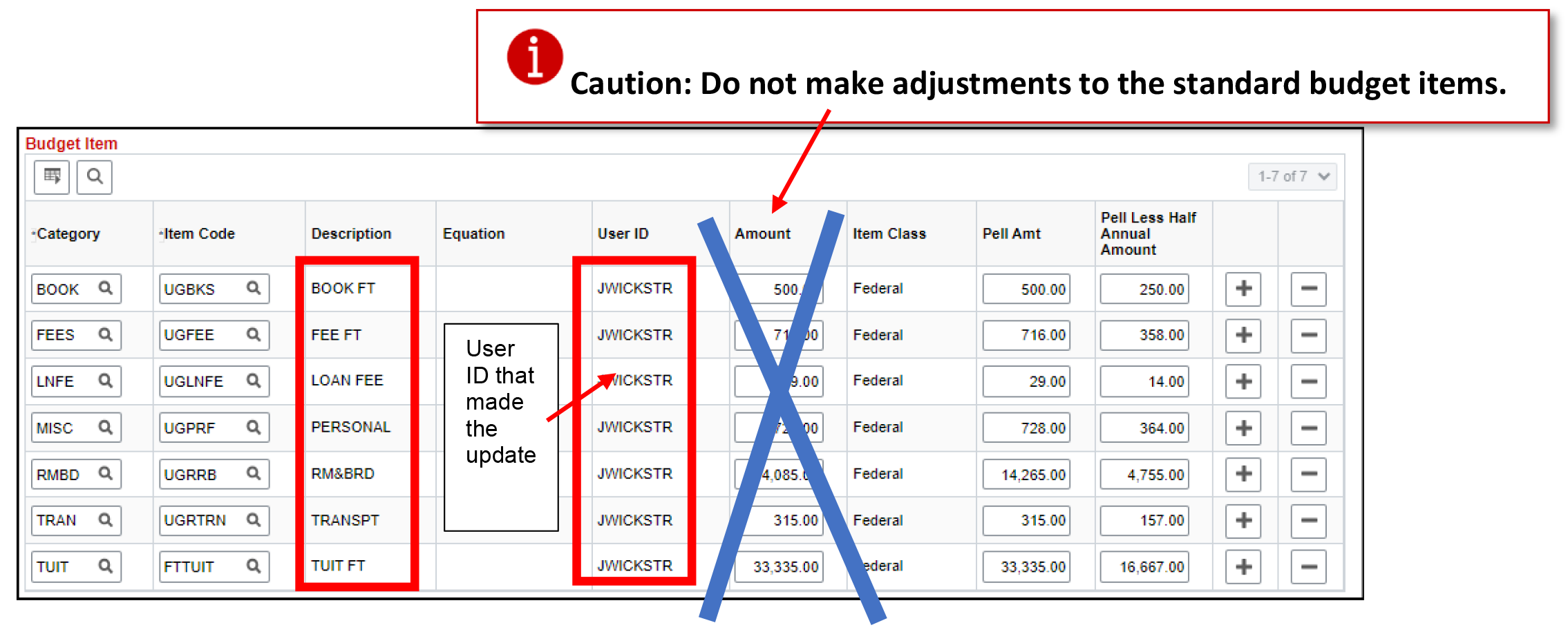
- Category, Item Code and Amounts, with the option to edit one or more items (ability to edit certain values is dependent on security access).
- Please note that each Category has one Item Code associated with it.
- Students who do not meet the eligibility criterion for a Category will not be assigned one, neither will Item Code and Amounts be assigned.
ⓘ TIP: Amounts for a Category and Item Code should NOT be edited directly in the existing fields, as they will be overwritten if the student goes through a rebudgeting process.
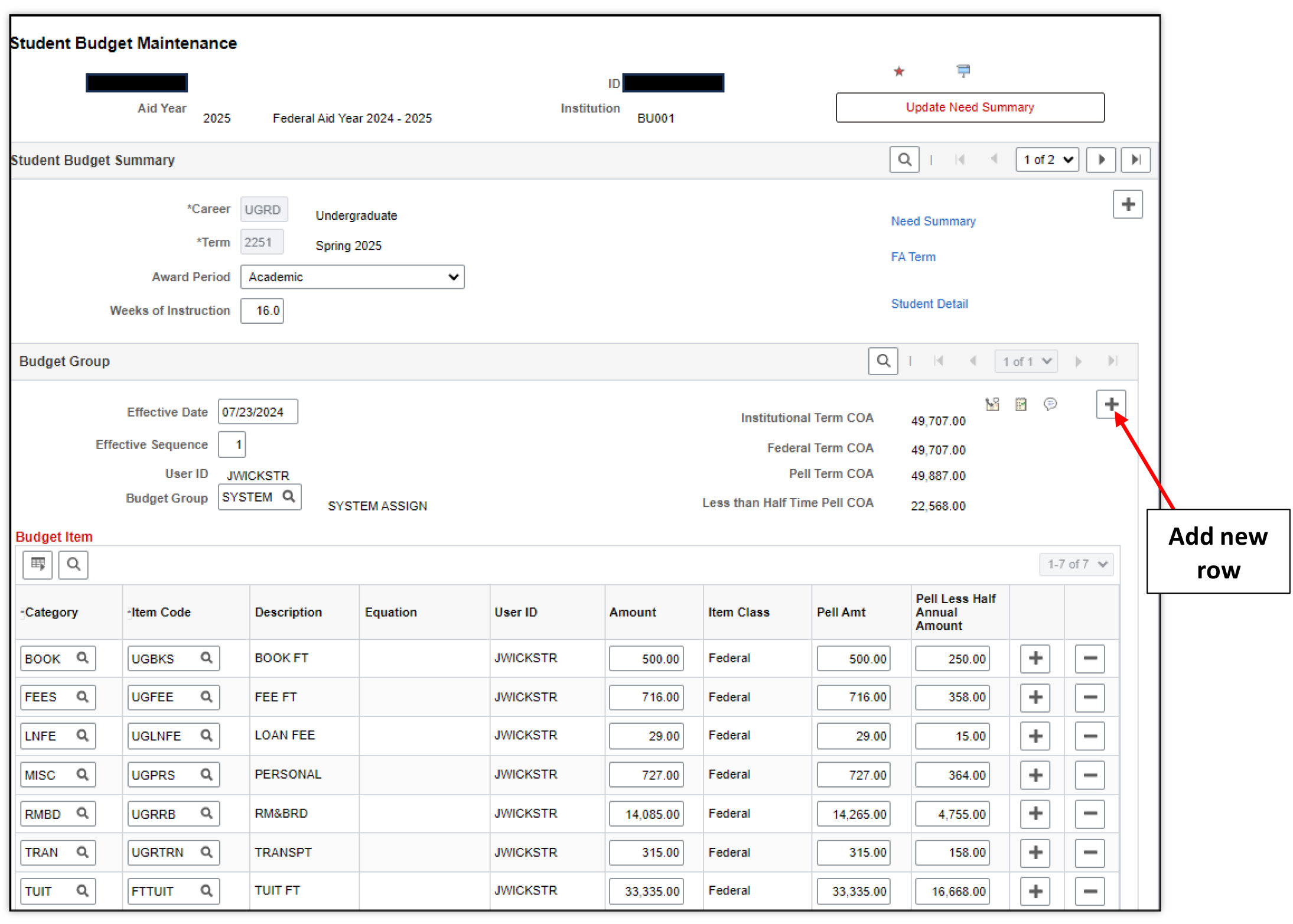
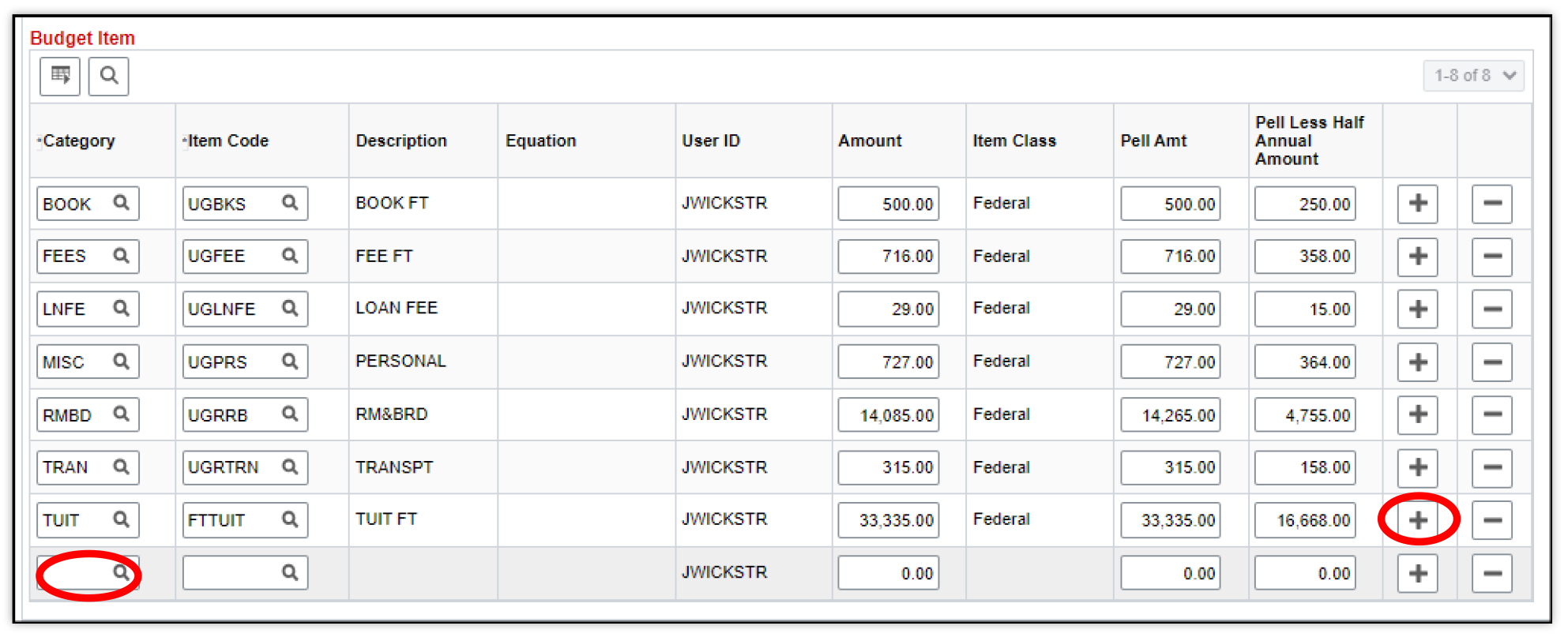
- In order to revise an existing budget, click on the plus icon for the in the Budget Group section.
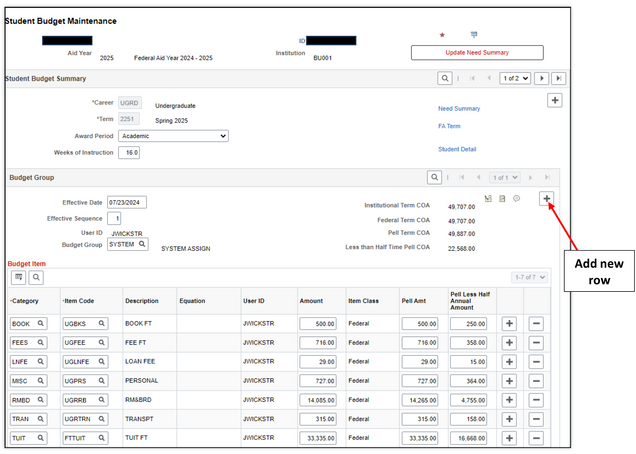
- A new row, will be displayed as follows:
- Add a new budget item.
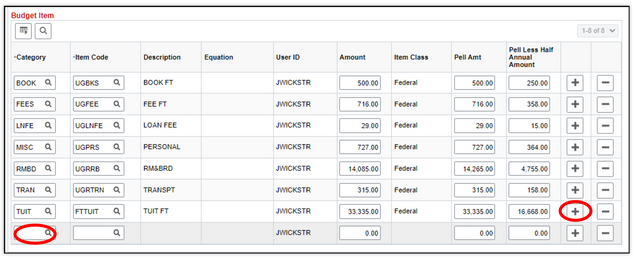
- Use the magnifying glass to select a new Category, and choose the appropriate Budget Item Category to adjust a student’s budget.
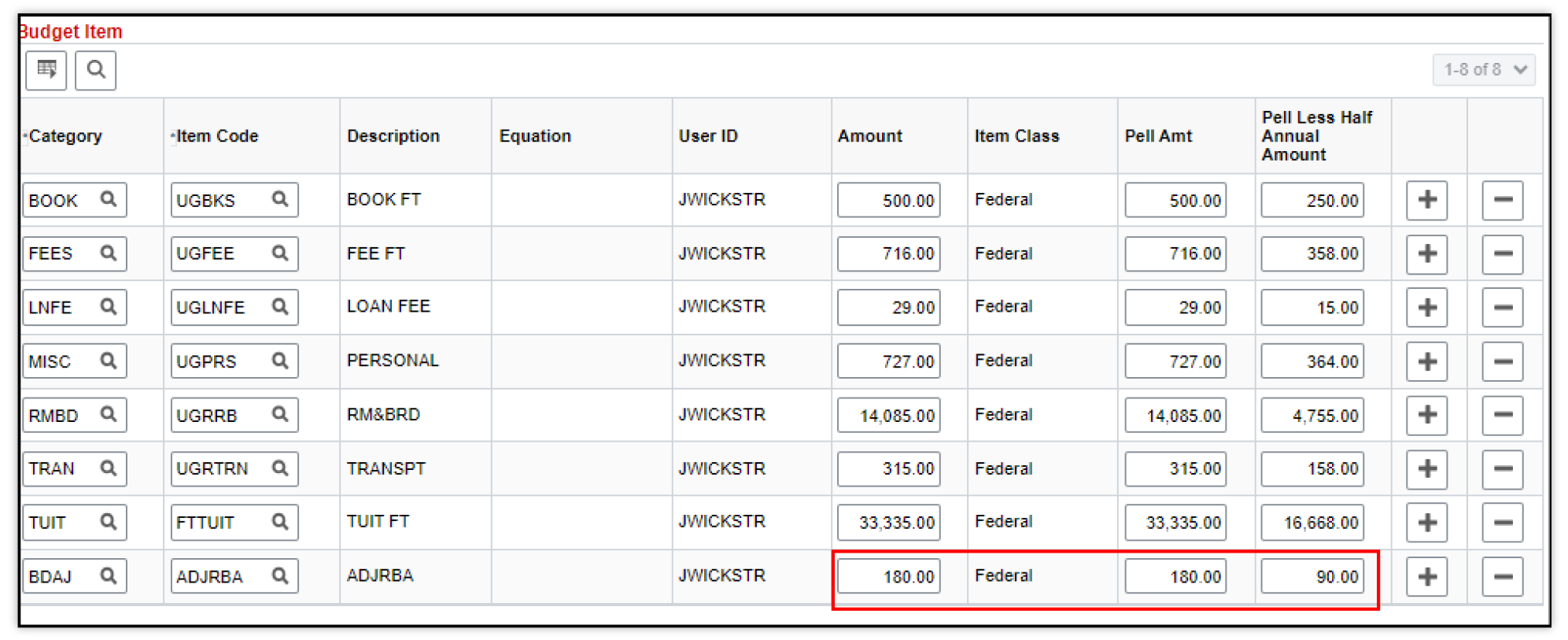
In this example, the category Budget Adjustment BDAJ will be used to provide an increase to Room & Board.
- Use the magnifying glass to select a new Item Code and choose the appropriate code to adjust a student’s budget.
- The Item Code lookup will be determined by the Category selected.
Select Room & Board Adjustment ADJRBA and enter the increase amount for the spring budget.
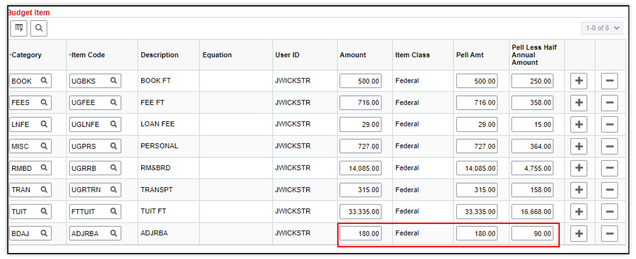
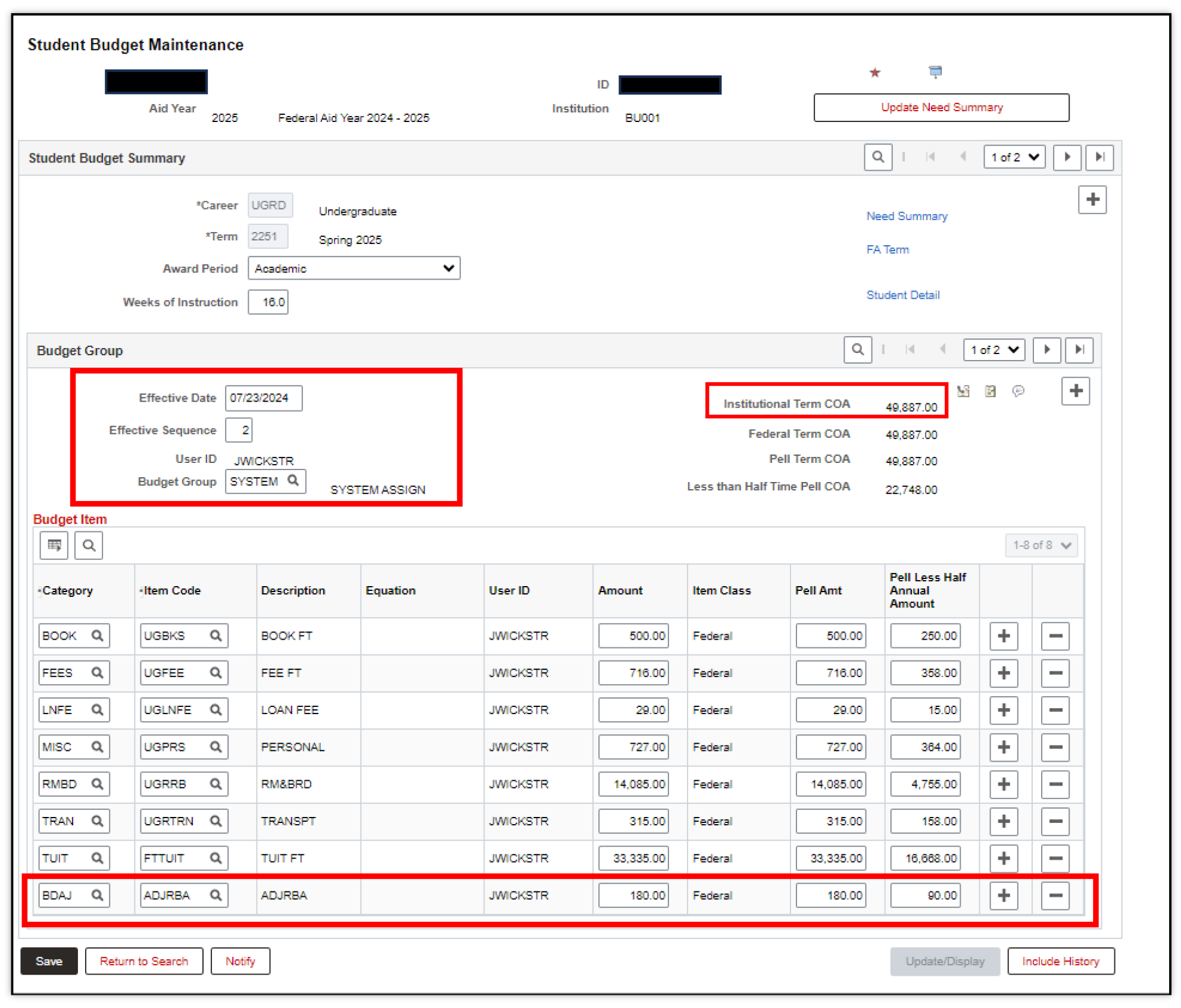
- Click on the Save button to update the new budget for the student for the term selected.
- Note that the USERID has now been updated appropriately.
- The Effective Date is also updated to reflect the date the changes were made, and the Institutional COA is revised to reflect the new amount and the Budget Item that caused the update to the Institutional COA is also shown below:
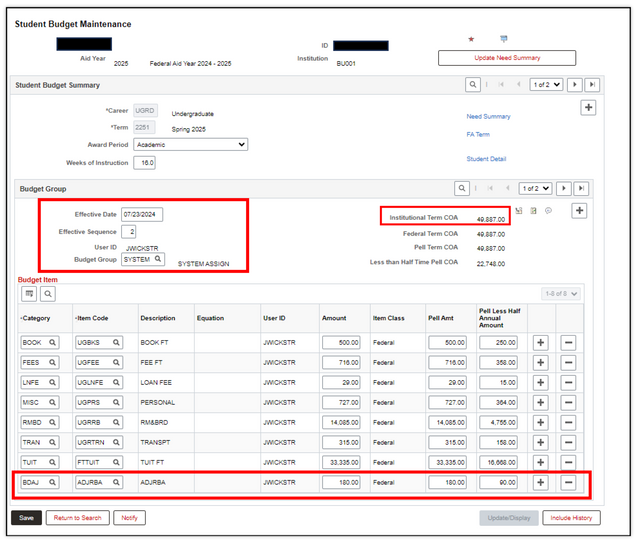
- Update Need Summary: Once the student’s budget has been adjusted by adding or changing a Category, Item Code, and amount, click on the Update Need Summary button. This action updates the student’s budget to reflect the change.
- Repeat steps to make adjustments for the fall term, if needed.
Page last updated July 2025. To download a PDF copy of this resource, print this webpage as a PDF. Other resource formats can also be accessed via the relevant icons below.