Enrollment Messages for Conflicts & Issues
This resource lists possible messages that may display in MyBU Student during enrollment activities due to conflicts or issues.

Introduction
This resource explains possible error, problem, and conflict messages students may encounter during their enrollment activities in MyBU Student, including:
- Enrollment Requisites – Error/Problem
- Hold On Record
- More Than 10 Possible Schedules
- Time Conflict
- Term Unit Maximum Exceeded
- Enrollment Not Allowed – Career Conflict
- Failed Validation – Department Consent
NOTE: This list is not exhaustive; other conflict and error messages may occur during enrollment. Reach out to an academic advisor if assistance is required.
For more information on the MyBU Student processes and concepts referenced here, see the Related Resources section below.
⚠︎ Screen options and menus will vary by user; please note that displays may differ for you based on access that has been granted. All screens shown are for training purposes only.
Information on Validation
Below are helpful items to keep in mind about the Validation feature:
- It represents any holds, conflicts, or issues, at the time of running the validation. It’s possible for new conflicts to arise between the time that the validation process is run and class registration. Be sure to stay up to date on any new activity. An additional validation will also always occur at the time of registration.
- If a reserve capacity condition (blocks of seats get reserved for specific groups of students) has been added to a class, that issue will not be present in a validation check before enrollment. Because reserve capacity limits will depend on how many students of a certain population have enrolled in the class, this cannot be checked before registration periods begin.
Validation examples are included here in the Enrollment Requisites Error, Hold on Record, and Failed Validation – Dept. Consent sections.
See the Preparing for Registration and Methods of Registration resources to learn more.
Enrollment Requisites Error
Occurs if attempting to enroll in a class that has pre-requisites defined that the student has not satisfied. An Enrollment Requisites – Error message will display in the Enrollment Results window, and the student will be prevented from registering for that class.
- To review options, the student should contact the department that defined the course pre-requisite for more information.

An Enrollment Requisites – Potential Problem message will also display if the student uses the Validation feature before enrollment.
- See the Information on Validation section above to learn more.
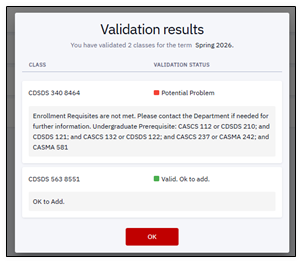
Refer to the Enrollment Pre-requisites resource for more information.
Hold On Record
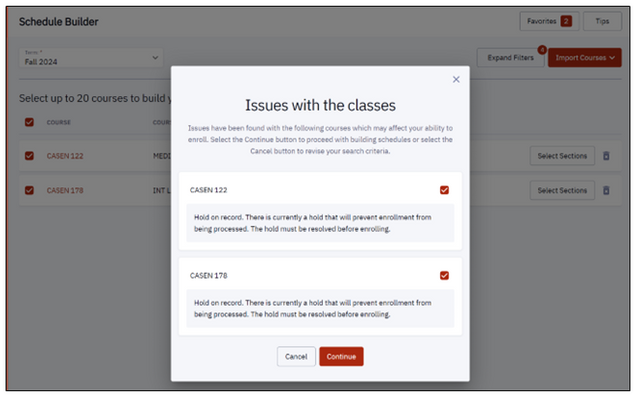
Occurs when trying to build a schedule or enroll in a class with a Hold on the student’s account.
- As in the examples below, the student may be advised that the hold will prevent enrollment from being processed; the hold must be resolved before enrolling.
Schedule Builder example:
Shopping Cart example:
- The Validation option in the Shopping Cart may only be open at certain times in the enrollment period.
- See the Information on Validation section above to learn more.

More Than 10 Schedules
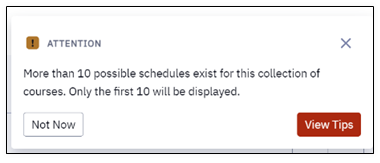
Occurs when classes put into Schedule Builder produce more than 10 possible schedules to compare.
- Schedule Builder will only display the first 10 possible schedules.
- Reduce the number of sections to consider by updating the class list on the previous screen. Click View Tips in the message box to return to Schedule Builder and re-compile the schedule with different selections.
Time Conflict
Occurs when trying to validate or enroll in one or more classes that are scheduled at the same time.
- This will need to be corrected before registration can proceed successfully.
TIP! Note the class numbers included in the message to make it easier to locate those classes in the Shopping Cart or Schedule.

Term Unit Max Exceeded
Occurs in Schedule Builder when trying to build a schedule with too many units per semester.
- Students can still preview a schedule with more units, but they will not be permitted to enroll in more than their approved unit level.
- Click Continue to proceed with building the preview schedule containing more than the permitted number of units; click Cancel to go back to Schedule Builder and revise criteria.

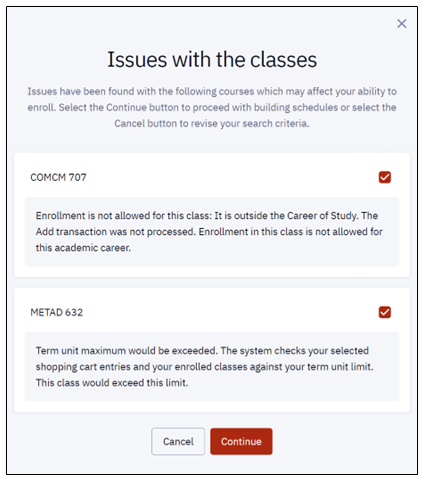
Messages may display multiple validation issues that the student will need to resolve:
- For example, trying to build a schedule that both exceeds the allowed unit level and includes classes outside career of study.
- Students may preview a schedule with these classes, but they cannot enroll.
- Click Continue to proceed with building preview schedules; click Cancel to return to Schedule Builder and revise criteria.
Enrollment Not Allowed – Career Conflict
Occurs when trying to enroll or build a schedule with classes that are outside the student’s career.
- For example, trying to enroll or build a schedule with graduate classes as an undergraduate student.
- A preview can be displayed in Schedule Builder with these classes, but the student cannot enroll.
- Click Continue to proceed with building the preview schedule containing the error; click Cancel to go back to Schedule Builder and revise criteria.

Messages may display multiple validation issues that the student will need to resolve:
- For example, trying to build a schedule that both exceeds the allowed unit level and includes classes outside career of study.
- A preview schedule can be displayed with these classes, but the student cannot enroll.
- Click Continue to proceed with building the preview schedule; click Cancel to go back to Schedule Builder and revise criteria.
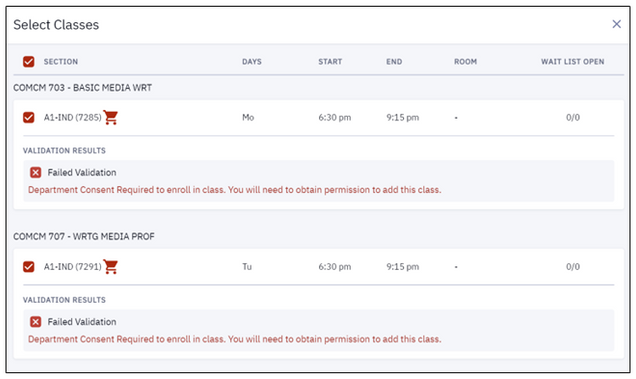
Failed Validation – Dept Consent
Occurs when trying to enroll in classes that require consent from the department.
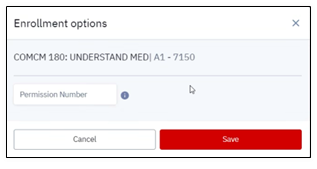
- These classes could require a permission number from the advisor, or from a department that has seats reserved for students from that major. The school/college can provide information on permission requirements encountered during enrollment.
- See the Information on Validation section above to learn more.
An example of an Enrollment options pop-up window for entering a Permission Number:
Refer to the Advisor Information Lookup and Advising Appointments for Students resources for guidance on contacting advisors through MyBU Student.
Related Resources
For more information on registration dates and times, please refer to the Registrar website.
Visit these links for guidance on the MyBU Student processes and concepts referenced in this resource:
This page was last updated March 2026. To download a PDF copy of this resource, print this webpage as a PDF.

