Class Search Filters Explained
MyBU Student Dashboard > Class Information Menu > Class Search
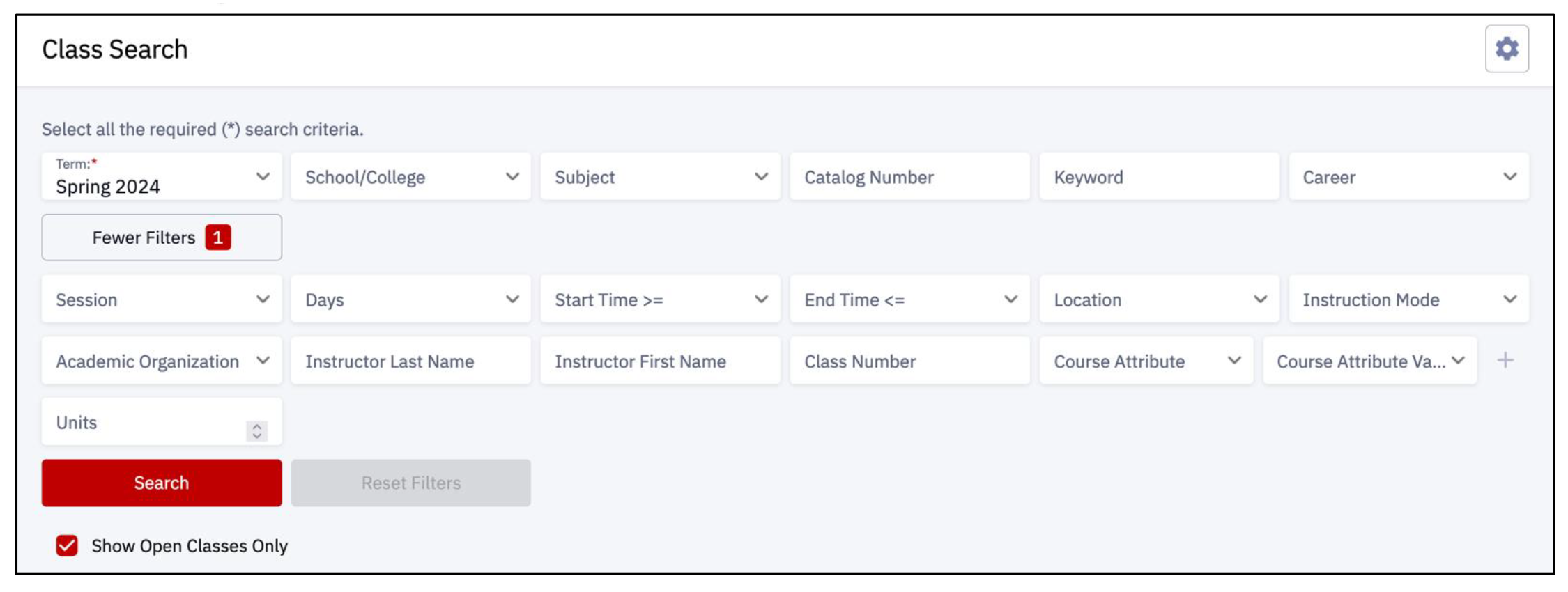
- Term (required): select the appropriate term.
- School/College: click the drop-down menu to identify the School/College.
- Subject: click the drop-down menu to indicate the specific area of instruction. Available options are impacted by the Career field selection.
- Catalog Number: enter a number and subject code identifying a course.
- Keyword: enter a descriptor (e.g., literature).
- Career: click the drop-down menu to select the Career category (e.g., Undergraduate, Graduate, Law, Medicine, Dental).
- Session: click the drop-down menu to specify a session.
- Days: click the drop-down menu to select desired day(s) to include in the search.
- Start & End Times: click the drop-down menus to select preferred class start or end times.
- Location: click the drop-down menu to select a campus location.
- Instruction Mode: click the drop-down menu to specify In-Person or Online methods.
- Academic Organization: click the drop-down menu to select an organization (department or School/College).
- Instructor Last Name: enter a faculty last name.
- Instructor First Name: enter a faculty first name.
- Class Number: enter a specific number identifying a class.
- Course Attribute: click the drop-down menu to specify a type or category of course (e.g., Hub).
- Course Attribute Value: enter specific value for the Course Attribute type identified. Options here are determined by the previous selection in the Course Attribute field.
- Click the plus icon to enter multiple values.
- Units: enter the number of class units to search.
- Show Open Classes Only: check the box to only display classes that are not full.
| MyBU Student Concept | Definition |
|---|---|
| Term | A period in which students are enrolled, billed, and academic statistics accumulated. May have one or many sessions. Different careers can have different term structures. (E.g., Fall 2024). |
| Career | All the course work undertaken by a student that is maintained in a single record. (E.g., Undergraduate, Graduate, Law, Medicine, etc.) |
| Subject | Specific areas of study at BU offered by Academic Organizations. (E.g., CASBIBiology, ENGEK-Engineering Core). |
| Catalog Number | A number used in combination with a subject code identifying a course. (E.g., CASEN 141, CFAMU 632). |
| Location | This is used in conjunction with campus to refer to where the course is being taught. (E.g., Medical Campus, London). |
| Class Number | A unique number assigned to a class. (multi digit number). |
| Academic Organization | An entity that is part of the administrative structure within BU. Course catalog and schedule of classes are organized by the academic organization. Can be a department or a School/College. E.g., Sargent College, CAS History. |
| Course Attribute | Attributes to further describe courses in the course catalog. (E.g., HUB). |
| Session | A period of time within a term during which BU holds classes. A term must have at least one session. (E.g., Regular, Dynamic). |