Advising Appointments for Students
The information provided here is for students and outlines how they can schedule and manage appointments with academic advisors.

Introduction
Advising Appointment scheduling within MyBU Student is available for students and advisors. This resource details how students can manage appointments. It includes how to schedule, view, reschedule, and cancel meetings.
When scheduling appointments, please keep in mind the following important impacts related to advisor and department setup:
- In order to schedule an appointment with a specific advisor, the advisor must be a member of a department that has enabled Advising Appointments.
- The advisor must have their schedule setup completed.
- If an expected advisor is not listed, please reach out to them directly. Alternatively, choose a listed advisor.
- Department settings will impact various aspects of appointment scheduling options for students and for advisors. Because of this, selections will be determined by the department where the appointment is being scheduled.
- If a department is selected with no available advisors, a “No Availability” message will display.
- If a student has reached the maximum number of appointments permitted by a department, a table of upcoming appointments will appear. From here, students can reschedule or cancel existing appointments to help them stay within the appointment limit (reschedule and cancel instructions are available below in the “Manage Appointments” section).
- It’s possible departments not directly related to a student’s program/plan will display in their Appointments Page. Some departments provide an open model allowing for any student to book.
⚠︎ Screen options and menus will vary by user; please note that displays may differ for you based on access that has been granted. All screens shown are for training purposes only.
SCHEDULE APPOINTMENTS
Navigate to Advising > Appointments in the MyBU Student Dashboard.
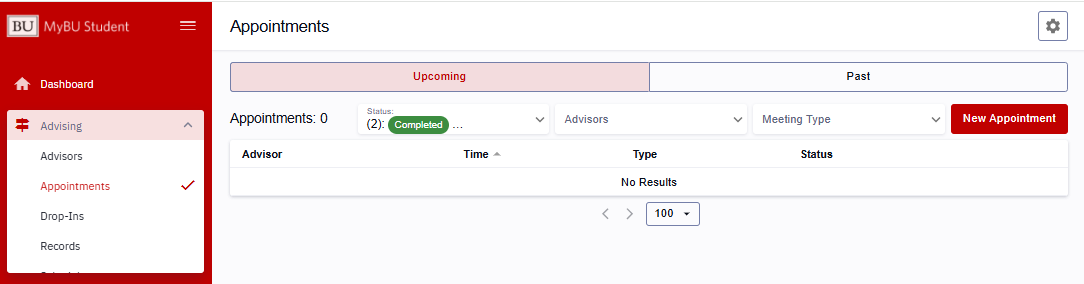
The Appointments page will open, displaying two tabs: Upcoming and Past. The Upcoming tab lists appointments scheduled in the future. If there are none, the list will note “0” appointments and “No Results,” as in the example below.

TIP! Some advisors will provide a Scheduling Link that will direct students to their scheduling page with the appropriate department and advisor populated in those fields on the booking page. If using this method, students can skip those fields and enter the remaining information.
ⓘ If an expected option is not available, please review the possible impacts noted in the Introduction above. Contact the advisor or department for additional assistance.
To schedule an appointment from the Appointments page:
- Click the New Appointment button. The Appointment Scheduling form opens. Use the dropdown menus and text box to create an appointment:
- Department: Make a selection from the dropdown menu of all available options, which vary by student.
- Advisor: From the dropdown menu, choose the appropriate advisor available for the meeting. A student’s assigned advisors will be indicated by a “My Advisor” label, but others may also be listed.
- Meeting Type: Choose the needed meeting type from the dropdown menu of available options.
- Meeting Modes: Choose the meeting mode preference. Availability of virtual, in-person, or phone modes will vary by department.
- What Would You Like To Accomplish: In the text box, enter the reasons for the meeting.
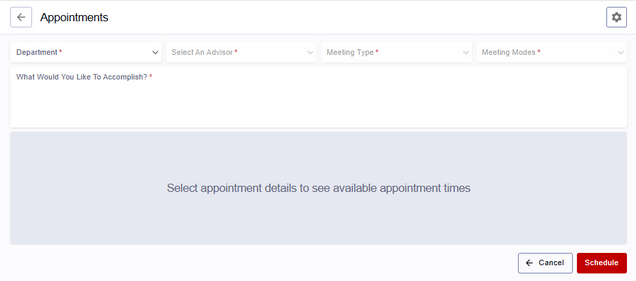
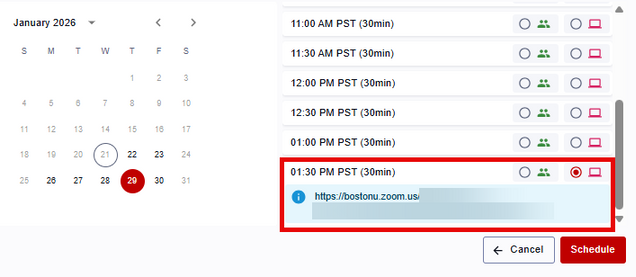
- The availability of the advisor selected will populate the Appointment Details window, shown below. Select the desired date, time, and mode from the list of options. Date/time options also reflect the student’s availability within their class schedule.
- Clicking a mode button will show the location for that meeting. For in-person mode, the specific building and room will display. For virtual mode, the URL will be listed, as shown below. This URL can be copied and pasted. A hyperlinked URL will be included in a calendar invite that is sent once the appointment is scheduled.
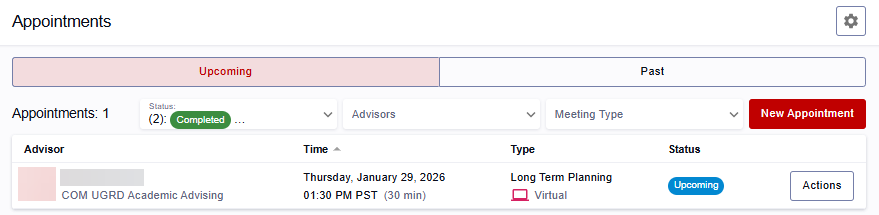
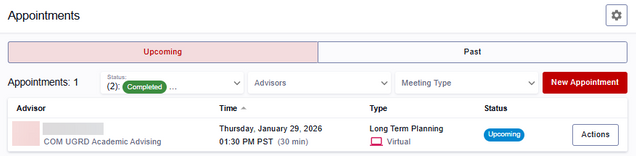
- Click the Schedule Button. The new meeting will populate the Upcoming tab on the Appointments page.
MEETING INVITES
When an appointment is scheduled by an advisor or by a student, that meeting invite is sent to the student’s BU email/calendar. The calendar invite will also automatically update to reflect any meeting cancellations or reschedules.
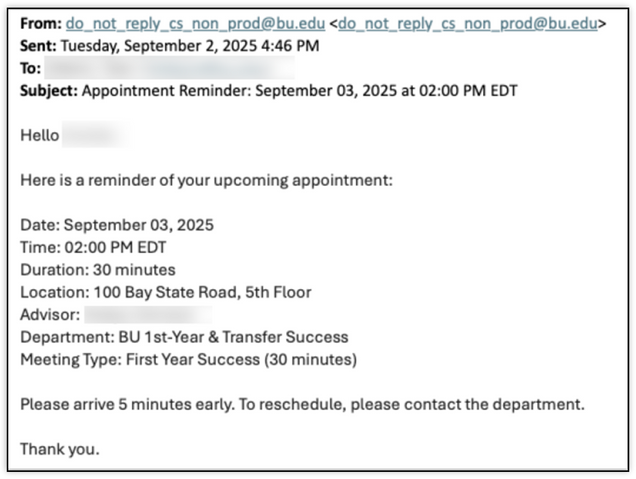
The student will also receive a reminder notification the day before their scheduled appointment. The image below shows a reminder for an in-person appointment with the meeting location provided. For virtual appointments, a meeting hyperlink will be provided.
VIEW APPOINTMENTS
Students can view their appointments in either a list format or a calendar format. These options are described below.
APPOINTMENTS PAGE
For a list format view of appointments for a student, navigate to: Advising > Appointments.
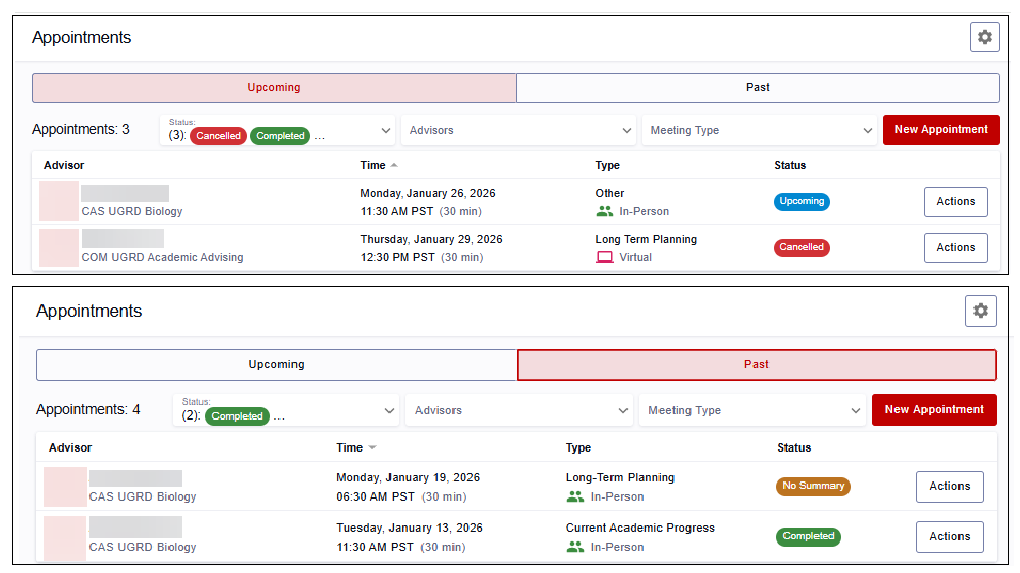
The Appointments page will open, displaying two tabs: Upcoming and Past, both shown below.
Each appointment will list the Advisor, Department, Date/Time details, Meeting Type, Meeting Mode, and Status. Possible statuses are:
- Upcoming (blue label).
- Cancelled (red label).
- Completed (green label): indicates a past appointment concluded with the advisor’s Appointment Summary.
- No Summary (brown label): indicates a past appointment that does not have an Appointment Summary added.

Descriptions of the cancel and reschedule processes that can be performed from the Actions buttons tabs are outlined in the “Manage Appointments” section of this resource.
ADVISING SCHEDULE
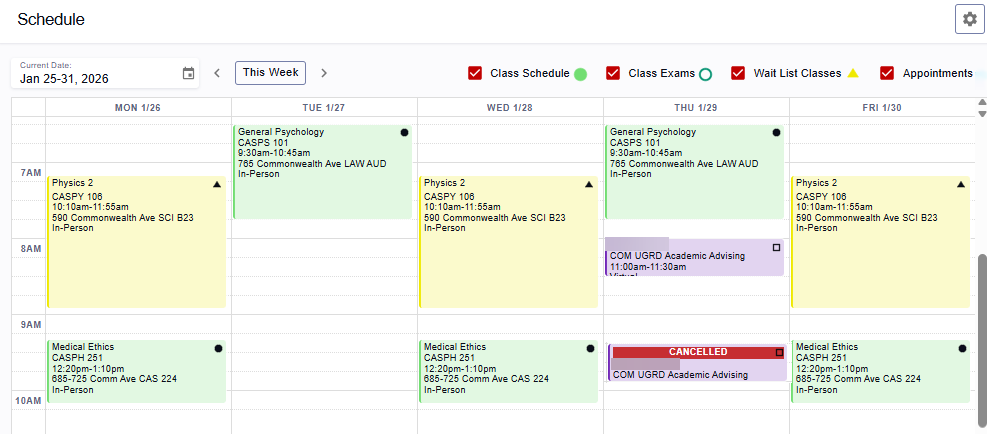
For a mobile friendly, responsive calendar format view, navigate to: Advising > Schedule.
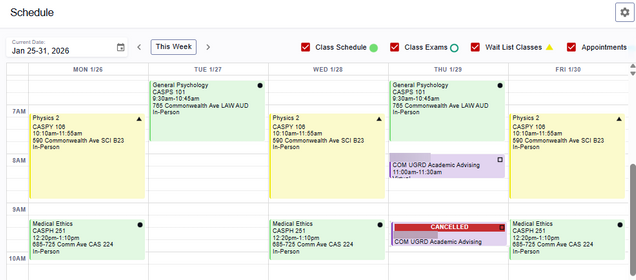
This displays a unified calendar, pulling in a student’s classes, final exams (at the appropriate time in the term), wait list classes, and appointments.
Click the calendar drop-down or arrows to change the dates that display. Use the checkboxes to display or remove the following options:
- Class Schedule: class meetings display as a green block with a black dot.
- Class Exams: display during the exam period as a green block with a circle outline.
- Wait List Classes: display as a yellow block.
- Appointments: display as a purple block with a black square. A red “Cancelled” indicator will display on a cancelled appointment.
VIEW APPOINTMENT DETAILS
Full details of the appointment can be performed from the Appointments page (list view) or the Advising Schedule (calendar view):
 If starting from the Appointments page:
- Click on the Actions button for the desired appointment.
- Select View to see Appointment Details.
If starting from the Advising Schedule:
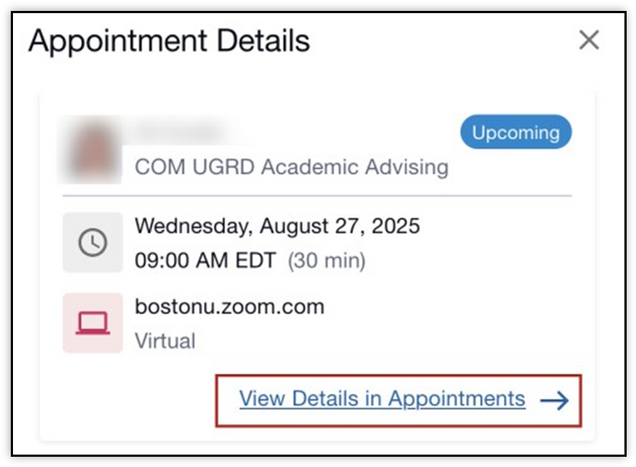
- Click directly on the Appointment block.
- A quick view detail window displays. Click the View Details in Appointments link to see Appointment Details.
Continuing from either the Appointments page or the Advising Schedule:
- The Appointment Details page will open, listing the following:
- Date and time
- Who booked the meeting and when
- Advisor Information: name, advisor type, advisor department, email, and phone if available
- Meeting Type
- Meeting Mode: virtual, in person, or phone
- Link or Location (the URL is not hyperlinked at this time, but it can be copied and pasted)
- Meeting Reason

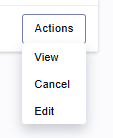
- Click the Actions button to Cancel or Edit (Reschedule) Appointment. Learn more about these options in the “Manage Appointments” section below.
- Click the top left arrow to return to the previous Appointments page or Appointments Schedule views.
MANAGE APPOINTMENTS
 While an appointment is upcoming, a student can reschedule or cancel.
To complete any of the actions referenced in this section, start from either the Appointments page list view or the Appointment Details page, and click the Actions button:
ⓘ NOTE: If an appointment has Cancelled, Completed, or has a “No Summary” status, students cannot cancel or reschedule it. They can continue to see the details of appointments in those statuses.
CANCEL APPOINTMENT
- On the Appointments page list view, or in the Appointment Details page, click the Actions button.
- Click Cancel.
- The Cancel Appointment window will display. Enter a message explaining the cancellation reason.
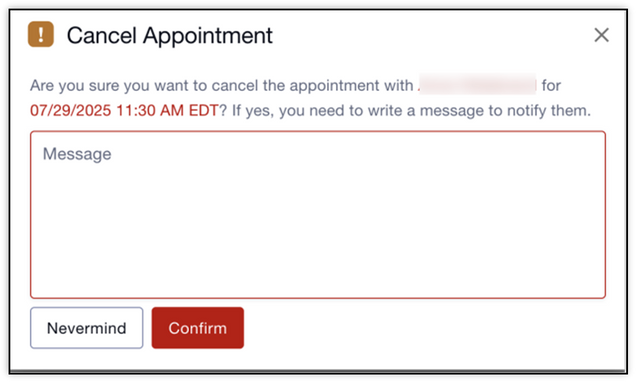
- Click the Confirm button.
Upon being returned to the Appointments page list, that appointment will now display in a “Cancelled” status. This action will also update the student’s external calendar, removing the appointment.
RESCHEDULE APPOINTMENT
Rescheduling is available to the student if the meeting has not yet started.
- On the Appointments page list view or in the Appointment Details page, click the Actions button.
- Click Edit Appointment.
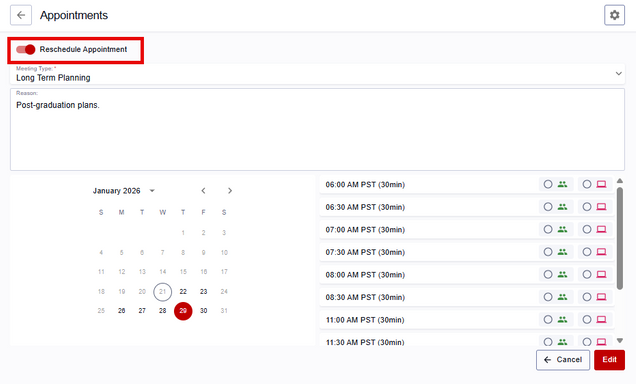
- In the Appointments window, toggle the Reschedule Appointment button. The availability of the advisor will display. Select the new date, time, and mode.
- Click the Edit button.
Upon being returned to the Appointments page list, that appointment will appear with the new date/time/mode details. A success message will also indicate that the appointment has been moved and the external calendar invite has been updated with the new time.
Page last updated February 2026. For a PDF copy, print this webpage as a PDF.