Advising Appointments: Department Support Role
Within the Advising modules of MyBU Student, staff can be designated as Department Support to help manage advising appointments. The following information outlines how users with this role can view, add, and manage appointments for their department.

Introduction
The Department Support role is a security role that can be granted to users who need to make and/or manage advising appointments for their department. Through the Department Appointments page, staff with this role can help facilitate appointments for both students and Advisors, particularly in any of the following use cases:
- Set up an appointment for a student who is unable to book one themselves due to system or departmental restrictions – this is commonly the case for students who are pursuing an Intra-University Transfer (IUT).
- Assist academic advisors with their appointment schedules.
- Check in students for their appointments (e.g., at the front desk).
To request the Department Support role, please contact your Data Security Administrator (DSA).
⚠︎ Screen options and menus will vary by user; please note that displays may differ for you based on access that has been granted.
All screens shown are for training purposes only.
Navigation
Department Support role activities are primarily conducted in MyBU Student in Advising Management > Department Appointments.
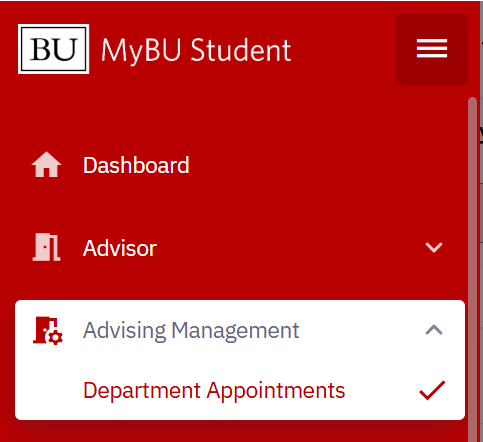
- Navigate to the Department Appointments page via the left-side navigation menu, under Advising Management.
- The Department Appointments page will appear for the department the user has access to. If the user is assigned to more than one department, they will have the option to select between them.
- On this page, the Calendar tab and Appointments tab provide different views of the combined appointment schedules for all the academic advisors in the department. Both tabs can be used to view upcoming and past appointments, as well as cancelled/no show appointments. Both tabs can also be used to add new appointments to the calendar on behalf of students or advisors.
View Calendar
Once the department is selected, the Calendar tab for the department will display.
- The default display will snap to the current week, day, and time.
- Each day shows the list of advisors with any scheduled appointments they have during the specified time.
- Only advisors who have an active availability schedule that includes the displayed date will display on that day. If the advisor’s availability schedule does not include the chosen date, that advisor will not appear in the display list for that date.
TIP! This calendar can be useful for any front desk staff to have up on their screen for checking students in for appointments, fielding drop-ins, etc.

VIEWING OPTIONS
- Click into the date field or use the arrows beside it to show a different week.
- Click on the row for a particular date to expand that day’s schedule as needed.
- Use the Status dropdown to filter for appointments in particular status(es). The default display will show upcoming, past, and completed appointments only.
- Use the ‘Show Busy Times’ checkbox to include times that are blocked off on the Advisor’s Outlook calendar in addition to their scheduled advising appointments.
- Use the ‘Available Advisors’ dropdown at the top-right to select specific advisors to include or exclude from the calendar display.
- Clicking into an open time slot will open a new appointment creation form for the selected time and Advisor. Refer to the Schedule An Appointment section of this resource for more information.
- To view appointment details:
- Hover over an appointment block to view basic info.
- Click on the appointment block to view all available details.

View Appointments List
The Appointments tab contains the same information as the Calendar tab, shown in a list view of appointments for the week.
- The list will display in reverse chronological order, and includes both past and upcoming scheduled appointments. The sort order can be changed by clicking on the header of any column.
- As with the Calendar view, a different week can be viewed using the date field or accompanying arrows. Appointments with a status of Upcoming, Past, and Completed will display by default. Use the Status dropdown and change the selections to view cancelled or no-show appointments.
- Click the ‘View’ button for an appointment to view details.

Appointment Details
Clicking into an appointment allows Department Support users to view the details of the appointment, including:
- Date, time and length of the appointment
- Student’s name, UID, and contact information
- Advisor’s name, UID, and contact information
- Appointment status:
- (any future-scheduled appointment)
- (appointment has been cancelled)
- (appointment has been marked as a no-show)
- (past appointment awaiting the Advisor’s summary)
- (past appointment with a completed summary)
- Meeting Mode, Type, and Location
- Appointment reason
- Who created the appointment, and when it was created
- If an appointment is cancelled, marked as no-show, etc., those details will also display here, as will the Advisor’s summary, once the summary has been added.
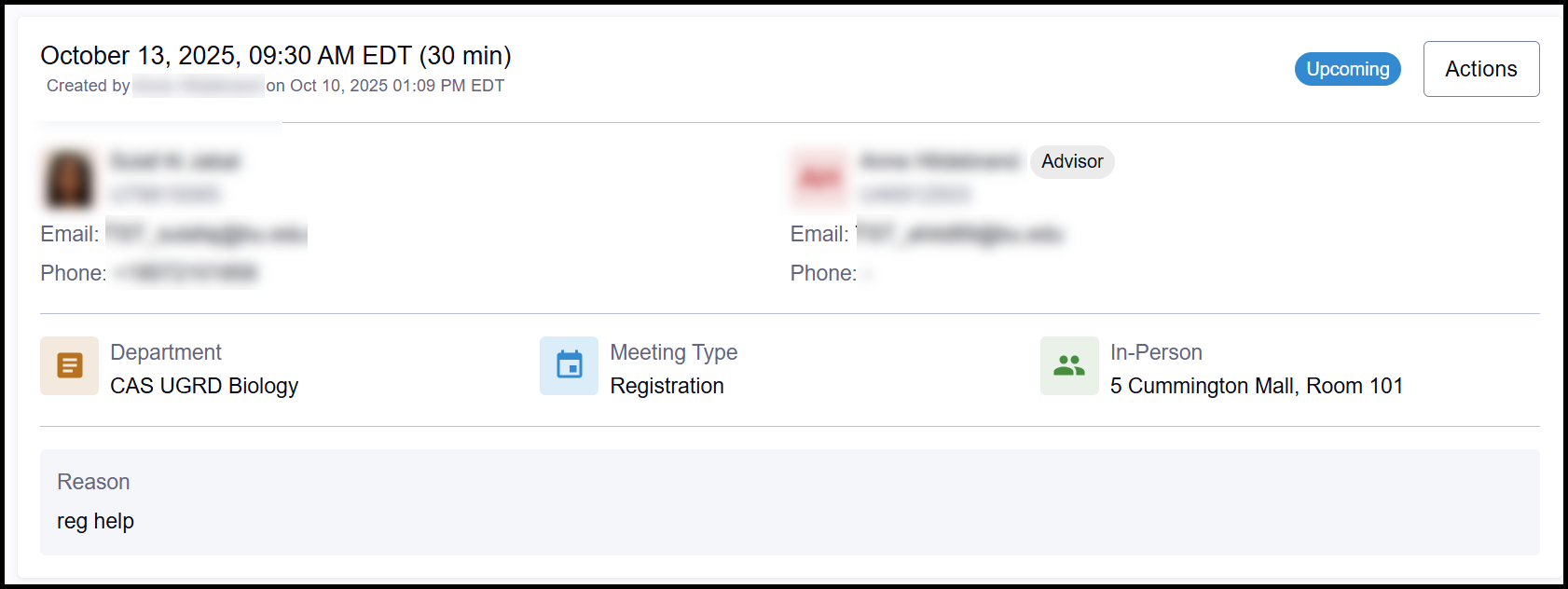
Note that these details also display to the student in their own appointment information.
Schedule an Appointment
In general, students and advisors can schedule their own advising appointments using the self-service tools in MyBU Student. Staff with the Department Support role most commonly assist with scheduling appointments when student self-service options aren’t available, for example:
- When the department configuration does not allow students in programs outside that department to schedule appointments (which is often the case for IUTs)
- During a student’s normally scheduled class time
- Same-day appointments – be sure to check with the advisor before scheduling any same-day appointments for them.
TIP! If a student or advisor needs help scheduling appointments on their own, feel free to refer to them to the resources linked below.
- For Advisors: Schedule Setup, Scheduling & Managing Appointments
- For Students: Advising Appointments for Students
To schedule an advising appointment from the Department Appointments page:
- From the Calendar tab OR the Appointments tab, select the Add Appointment button at the top-right.
- Alternatively, from the Calendar tab, click directly on an available time slot. This will pre-populate Appointment setup form with the selected Advisor, Date, and Time.
- The appointment setup form will display.
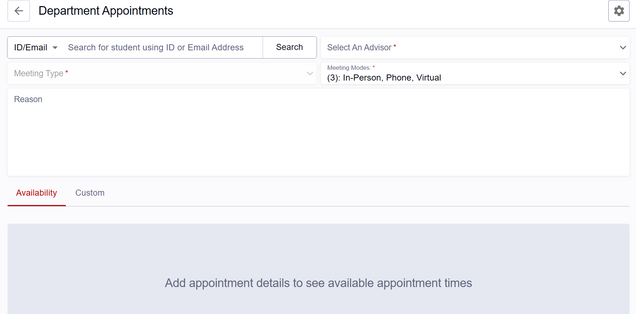
- Search for the student using their UID, email address, or name.
- To search by name, click the ID/Email dropdown field and select Name.
- An Appointment Warning may appear regarding departmental restrictions, but the user can continue scheduling. For more information regarding Department Setting restrictions, refer to the Appendix of the PDF guide linked on this page.
- Hit enter or the Search button to select.
- If the department is configured to restrict students outside of the department from making appointments, an ‘Appointment Warnings’ notification may appear. This notification is purely informational and will not prevent the next step of the process.
- As needed, select an Advisor from the dropdown of advisors in the department.
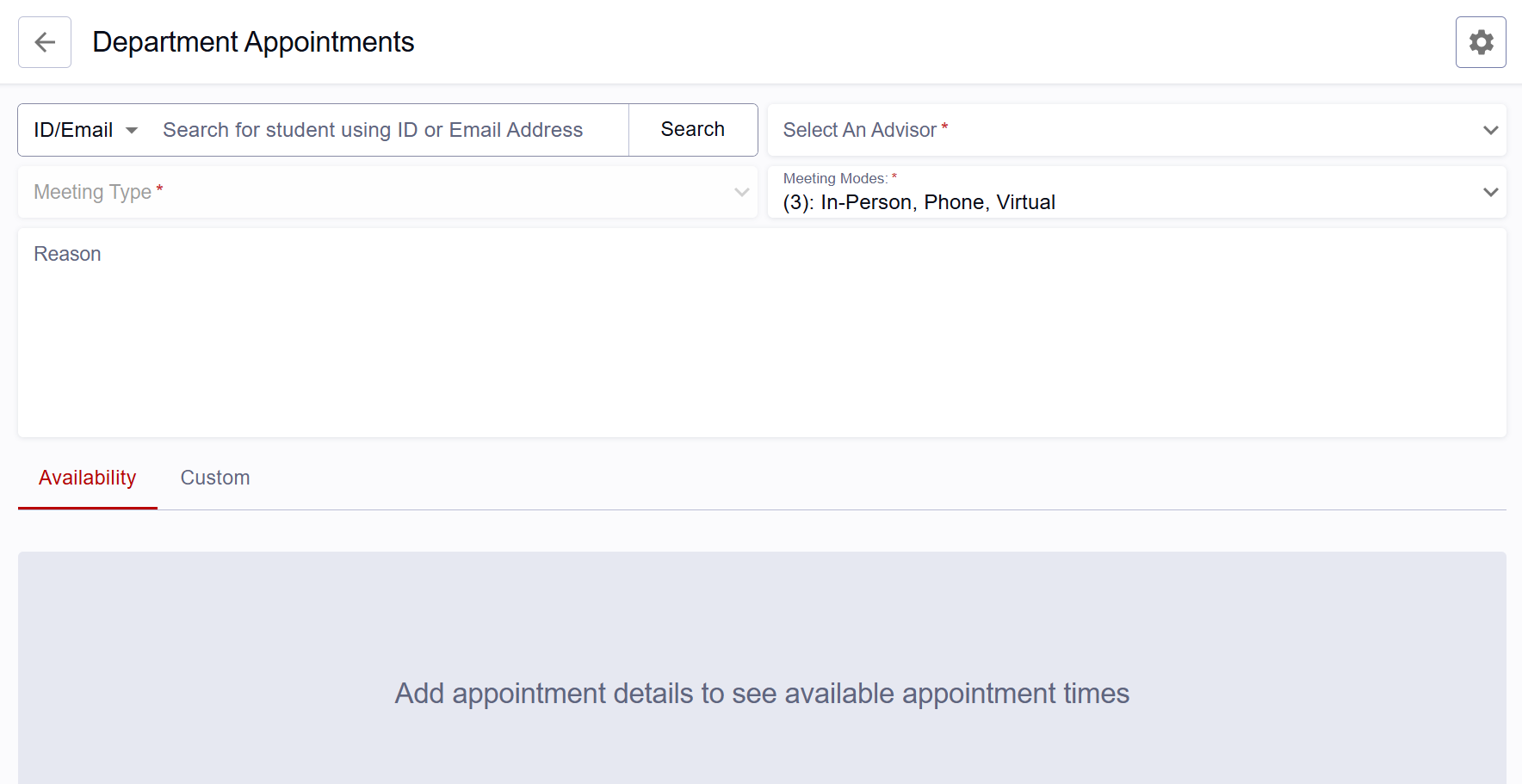
TIP! Since an Advisor must be selected before you can select an appointment time, it may be helpful to verify the advisor’s availability on the Calendar tab before setting up the appointment.
- Select Meeting Type.
- Meeting Type options vary by department.
- Select one or more Meeting Mode(s).
- Options vary by department, but may include in-person, virtual, or phone.
- If the student or advisor has no preference for a particular mode, leave all options checked to allow for the most appointment options.
- Input a meeting Reason. Include any information provided by the student or advisor regarding the reason for the appointment.
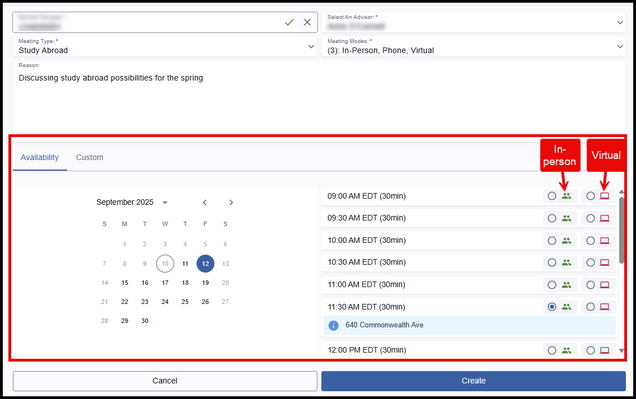
- Select the appointment date and time using either of the following options:
- Availability Tab: The date/time and mode options displayed here are determined by the availability blocks and Outlook calendar sync that have been set up by the Advisor selected, as well as the selected student’s class schedule.
- Select a day on the calendar to view and select from available appointment slots. Days with no availability are grayed-out on the calendar and cannot be selected.
- If multiple meeting modes are available during a time slot, select the mode accordingly. A blue box will appear confirming the location (e.g., office address or Zoom link, as configured by the Advisor).
- Custom Tab: If a meeting time is needed that falls outside of the pre-defined availability setup, that can be entered here (within the time increments setup for the department).
- If the appointment setup was accessed by selecting a specific time slot from the Calendar tab, the selected time will automatically populate in the Custom tab. The time can still be modified if needed, and a meeting Mode should still be selected.
- Availability Tab: The date/time and mode options displayed here are determined by the availability blocks and Outlook calendar sync that have been set up by the Advisor selected, as well as the selected student’s class schedule.
- “The student has a class at this time.”
- “The time is outside of the threshold times set by the department.”
- “There is an existing item in the synced calendar at this time.”
- “There is an existing teaching time at this time.”
- Click the Create button when complete.
- A success message will display in the top-right corner, and the screen will return to the page where the scheduling action originated (the Calendar tab view or the Appointments tab view).

ⓘ Use the Custom tab with caution, as it may result in double bookings. Please discuss with the Advisor before scheduling a meeting outside their defined availability.
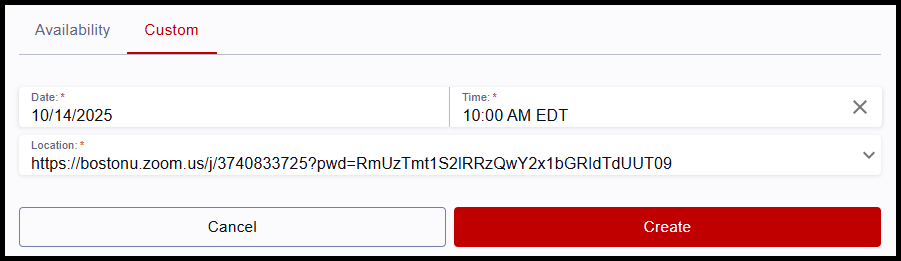
ⓘ NOTE:When using the Custom tab, a warning message may appear if the system catches a conflict with the selected time. This alert is for informational purposes only and scheduling can still proceed with the selected time. Possible alerts include:
- “There is an existing appointment at this time.”
Appointment Actions
Department Support staff may assist with appointment management by taking any of the following actions:
- Edit Appointment or Reschedule
- Cancel Appointment
- Mark as No Show
These options are available for both upcoming and past appointments.
ⓘ Please defer to any cancellation/rescheduling procedures within your department and/or discuss with the Advisor when using these options.

Note: In addition to the actions shown, Advisors also use appointment Actions to create appointment summaries. Users who have the Department Support role but not an Advisor role will NOT have the option to add a summary to an appointment.
EDIT/RESCHEDULE
Department Support staff can edit meeting type, meeting mode, location, reason, date/time, and assigned advisor of appointments in any status, including upcoming, past, completed, cancelled, and no-show.
- Advisors can edit most of the same details for their appointments, with the exception of reassigning to a different advisor.
- Students can also edit their own appointments but are limited to future appointments only.
To edit or reschedule an appointment:
- Select Edit Appointment from the appointment’s Actions menu.
- If editing Meeting Reason only, enter the changes into the Reason text field. Otherwise, toggle the Reschedule Appointment switch to further modify.
- Make changes as needed to the available components:
- Meeting Type: types will display that the department has configured for advisors to select from; choose the needed value.
- Meeting Modes: the modes available for the department selected will display; choose one or multiple values.
- Meeting Reason
- Meeting Date/Time can be modified using either of the following:
- Availability Tab: the date/time and mode options displayed here are determined by the selected student’s availability within their class schedule, as well as the availability blocks and Outlook calendar sync set up by the Advisor.
- Custom Tab: if a meeting time is needed that falls outside of the pre-defined availability setup, that can be entered here . Available appointment increments are determined by department settings.

ⓘ NOTE: When using the Custom tab to reschedule an appointment, a warning message may appear if the system catches a conflict with the selected time. This alert is for informational purposes only and scheduling can still proceed with the selected time. Possible alerts include:
- “There is an existing appointment at this time.”
- “The student has a class at this time.”
- “The time is outside of the threshold times set by the department.”
- “There is an existing item in the synced calendar at this time.”
- “There is an existing teaching time at this time.”
- To save the edited selections, scroll down and click the Edit button.
- A success message will display in the top-right corner, and the screen will return to the page where the scheduling action originated.
- The advisor’s Outlook meeting invite will update automatically, as will the student’s calendar in MyBU Student.
CANCEL & NO SHOW
Department Support users may cancel an upcoming appointment at the request of the student or advisor. Marking an appointment as a no-show is more commonly done by advisors, but it can be done by Department Support users if necessary.
To cancel or mark a no-show:
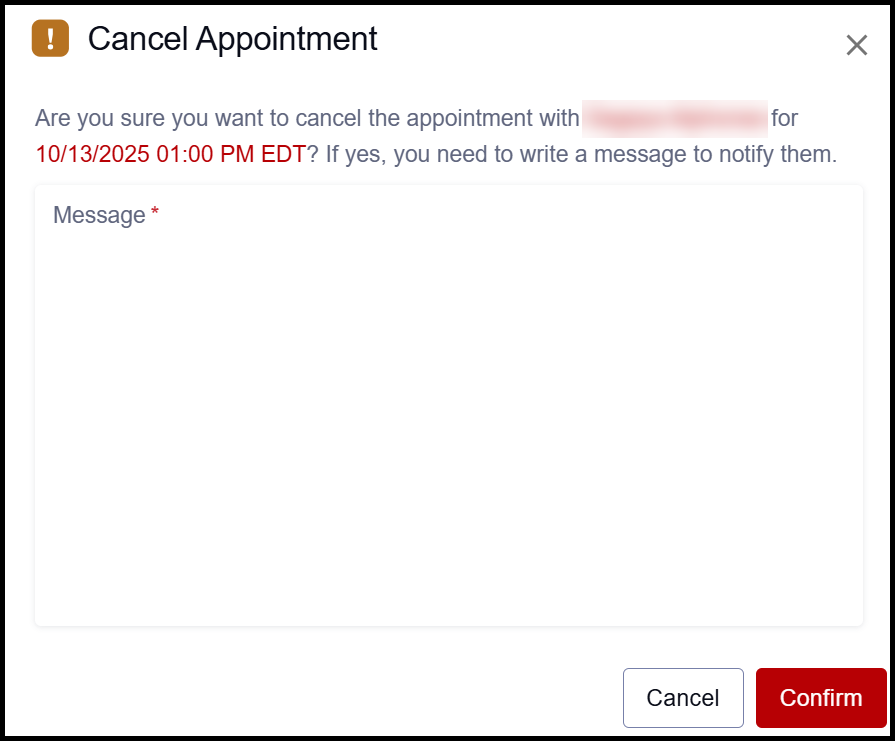
- Click the relevant Cancel or No Show option from the appointment’s Actions menu.
- A confirmation window will display. Enter message text describing the reason for the cancellation or no-show. The message written here will display in the record of the appointment, which is visible to the student.
- Click Confirm.
- A success message will display in the top-right corner, and the screen will return to the page where the scheduling action originated.

This page was last updated February 2026. To download a PDF copy of this resource, print this webpage as a PDF.