Why AnthroCollect?
A tool built for anthropologists, by anthropologists
AnthroCollect grew out of years of hands-on fieldwork in remote sites, where spotty connectivity, inconsistent name spellings, and complex social structures make standard data-collection tools hard to use.
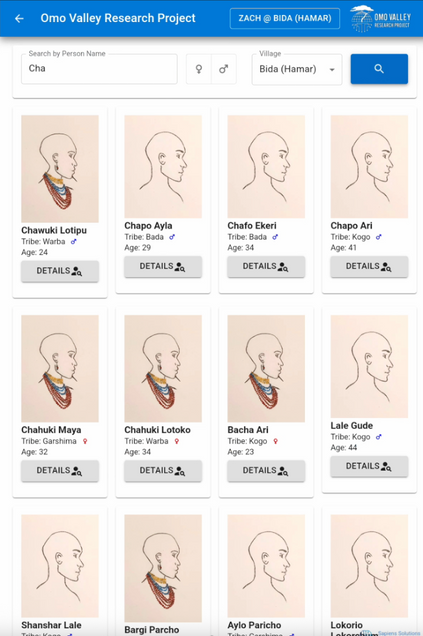
If you’ve ever asked a participant, “Who are your closest friends?”, you know the chaos that follows:
- a name spelled differently every time,
- a friend who introduced themselves under a completely different name,
- hours of post-field cleaning to match people across forms,
- or the classic workaround: printing hundreds of photos and asking participants to point.
We felt that pain too, so we built a fix.
Select Person: How to save your sanity
Select Person locates anyone already registered in your dataset. Start typing a name (any spelling, even partial) and phonetic search suggests the closest matches (it kicks in after three letters, or sooner if you tap search). Each result shows the person’s photo, gender, age (real or estimated), and clan/ethnic group/lineage, so identification is fast and reliable.
Unsure of the spelling? Show participants the candidate matches and let them confirm the right person visually. Participants love seeing the faces of friends, relatives, and community members, which builds engagement and trust in the interview.
Built for long-term data collection
Because AnthroCollect runs on ODK-X, every form feeds a relational database. We designed it for multi-year research from day one, keeping your data dynamic as communities change, households shift, and new people enter the system.
Dedicated update forms keep the database current as real lives evolve: the marital-history form tracks marriages, divorces, and new partners, while others record deaths, moves, and broader community change. The result is a dataset that grows with your field site and is accurate, consistent, and free of the usual long-term-tracking headaches.
Household to individuals
Flexibility
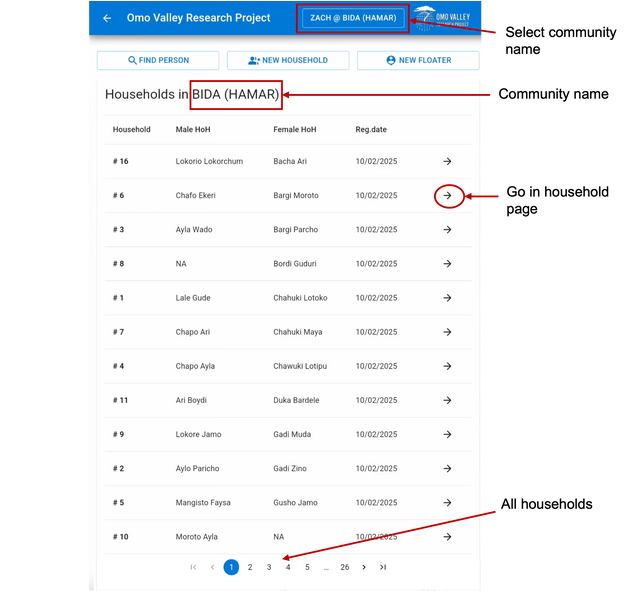
You can create a profile for every participant and then create households in which you can move them. This is not definite, and you will be able to move individuals out of the household in others if needed. The app will keep track of those changes, and we will develop a short interview which will record the potential time of moving (maybe you know the exact date, or maybe the participant moved a week, a month, or a few months ago). The individuals can then move through the app and then in your database, as they move in real life.
Household
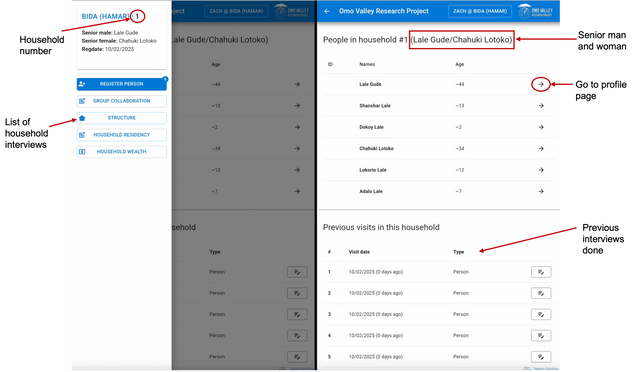
Each household page will display the name of the household heads as well as the list of individuals associated with this household. A table displayed below lists every interview that has been completed, along with the date it was conducted, to help you keep track of all household-level data.
For each household, you can also assign a senior male and a senior female (e.i., household heads). These individuals can be selected directly through the Select Person option, which links the household to its senior heads in a simple and reliable way.
House survey
Among the household surveys, you will find a house survey that allows you to photograph the house and record its GPS coordinates. If a household has multiple houses, you can enter as many as needed. Each entry will automatically appear in the table that lists all surveys completed for that household, and a number will be displayed on the interview button to help you keep track of the different houses associated with it.
New individual
You can also access a profile for each participant, which is created as soon as you register a New Person and complete the interview. We recommend creating profiles for all individuals in a household before creating the household itself. This makes it easy to use the Select Person option to find and link the senior household heads. For more details, see the Field Methods section of the User Guide.
Person profile
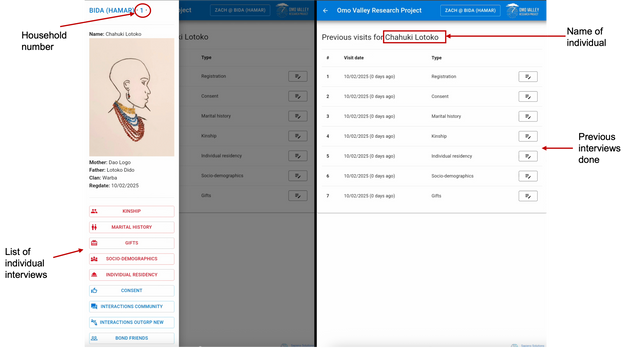
In the person profile, just like in the household profile, you will be able to see all the interviews available for that individual, as well as all the interviews already completed. The profile displays the person’s photo, their mother’s and father’s names, their age, gender, and clan. You can also see the household number they belong to. By clicking on this number, you will be taken directly to the household page associated with that individual.
Several household memberships
We often encounter cases where one individual is the head of more than one household. This is common, for example, when a man has multiple wives. Since a person can only appear in one household profile at a time (to avoid duplicate entries), AnthroCollect helps you identify their involvement in other households in two ways. First, if the person is selected as a household head in more than one household, this will immediately alert you to their multiple affiliations. Second, the Household Residency Survey allows you to list every person living in a given household. This tool is very useful for confirming whether individuals are in the correct household or whether they should be moved to another one.
Rank survey
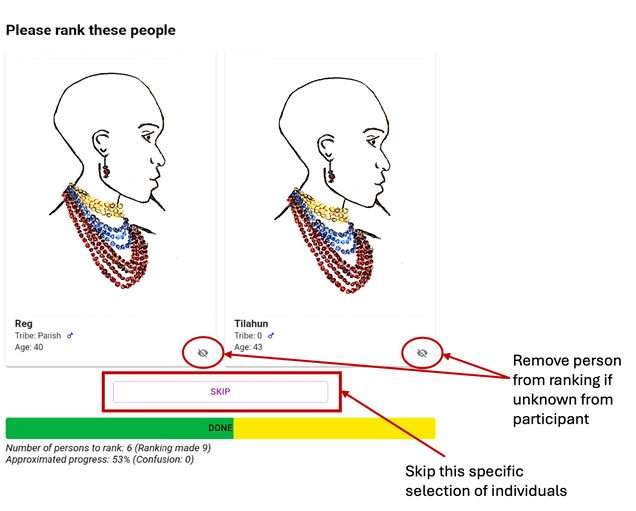
We created a ranking survey to collect data on status, among other possible uses. This survey is based on the Elo rating method. During the interview, two individuals are shown side by side, along with their photo, age, gender, and clan. The participant then selects which of the two they believe has, for example, higher status, according to the definition you choose for your project.
To keep the interview manageable, you can limit the number of individuals included and restrict the selection by age or gender. If the participant does not know someone displayed on the screen, they can remove that person from their ranking. If they cannot decide between the two individuals shown, they can simply skip the comparison. A progress bar helps you keep track of how far along you are in the interview. At the end, the survey produces an Elo rating score for each person who was evaluated.
Interview forms
We provide a set of field-tested forms, including marital history, kinship, socio-demographic surveys, ranking surveys, house surveys, and household residency forms, among others. You can use these forms as they are or modify them to suit your needs. You can also create your own forms, and the Field Guide will walk you through the process step by step.
A completed interview in AnthroCollect can be edited for up to one month, after which the form is locked to preserve data integrity. This time limit can be adjusted or removed if needed. Interviews can also be repeated whenever needed. Every submission is automatically time-stamped, which makes it easy to distinguish new entries from updates and to catch any potential duplicates.
Field tested
AnthroCollect has been put to the test in real field conditions for more than two years. Our team used it across three communities in the South Omo Valley in Ethiopia, ultimately recording more than 2,500 individuals and over 500 households. Thanks to the Select Person option, we were able to track relationships not only within each community, but also between them. Most of this work took place in remote areas, sometimes with no internet connection at all. AnthroCollect handled it (and so did we). AnthroCollect has survived field heat, dust, battery anxiety, name chaos, and endless interviews, and it continues to get better with every season of research!