Presentation, Wireframe, Mockup & Styleboard Kits

Presentations
As part of our effort to keep presentations clear and consistent with teams and clients, we’ve developed the ID Presentation Slide Kit—a library of templates and content components to help you build polished, on-brand decks with ease.
What to Annotate (for Clients)
Annotations should define, with brevity:
- what a section or component is,
- the purpose it serves to the end user, and…
- its value to the client and the strategy.
Makes for a great bookmark reference while presenting.
What to Annotate (for Devs)
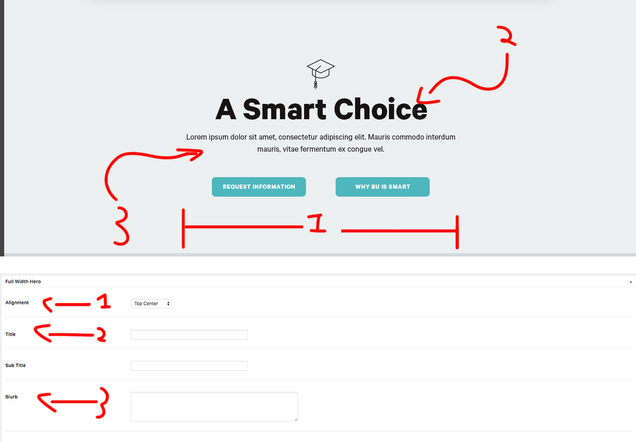
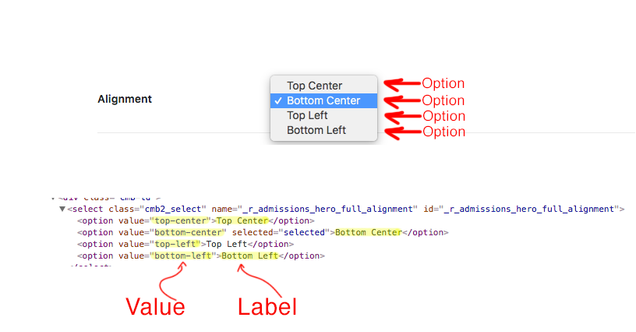
Wireframing
Wireframing is where we translate strategy with our capabilities to demo a structural blueprint of a vital page and how it functionally connects to others within the sitemap or user experience [flow].
Before presenting, always emphasize that all written copy is only placeholder text intended to demo layout and not final content. “Think of it like a blueprint. No aesthetics yet. What aspects will go where — not how they’ll look.” What pages from a sitemap are wired for a user flow should be determined by a project’s Associate or Assistant Creative Director and Lead Designer. These wireframes can serve as a jumping off point to duplicate and begin mocking up a site.
Passcode: qV%gvy75
Styleboards
Our Figma styleboard kits are designed to bring baseline consistency to our styleboard presentations—while still allowing space for individual visual flair and/or client needs.
Key Features:
-
Title Slide – Strong intro
-
Table of Contents – Easy navigation
-
Persistent Footer – Quick link back to TOC
-
Tone Slide – Sets mood and direction
-
Color Swatch Recommendation – Placed after the full board to show colors in context
This structure helps clients focus on design first, colors second, etc.
Passcode: jPrHb23+ (…Be mindful that the presentation recording started a bit late into the actual showcase and only lasts until about 5 minutes in to the recording.)
Questions? Reach out to our #figma slack channel.
Mockups
Mockups are the combination of the project’s approved styleboard aesthetics meeting the wireframe’s structural blueprint, illustrating how these elements integrate into the overall user experience.
Before presenting, always emphasize that all written copy is only placeholder text intended to demo layout and not final content. “Bringing in the paint, furnishings, and decor.” What pages from a sitemap are wired for a user flow should be determined by a project’s Associate or Assistant Creative Director and Lead Designer.
Most mockup files begin life after an approved Wireframe file has been duplicated and renamed entirely in a project space (on ID’s Figma team workspace). Alternatively, within a wireframe Figma file as duplicated pages, although this may not be a good fit.