Site Indexing
The Site Index plugin adds a page under Tools that lists posts, pages, and custom post types, with a download button. Clicking this button downloads the content as a CSV file for use in Excel or Google Sheets, showing post content, publish date, revisions, taxonomies, and meta.

To activate the plugin, go to the Plugins menu, find BU Site Inspection, and click Activate.
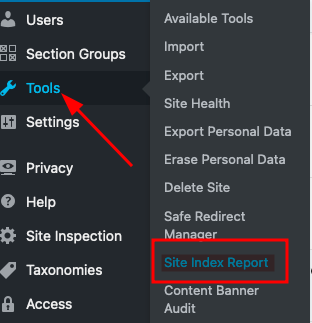
Once activated, you’ll see Site Index Report under Tools.

Use the Download Report button to get the CSV file, which may take time depending on content size.

For any questions or improvement suggestions, ask a designer or developer in the #interactive-design channel on Slack.