Typing in Newar
I learned how to type in Newar! Dipak Tuladhar taught me. No more studying long tables to find a match and copy-pasting. No more Google Lens to grab the character. Typing any letter, like a boss, even ones with ligatures (which are apparently called half-letters).
The easiest way to type on a computer is with Nepali Unicode Romanized keyboard:
Install Nepali Romanized as a keyboard layout. Download it here.
Here is the layout:
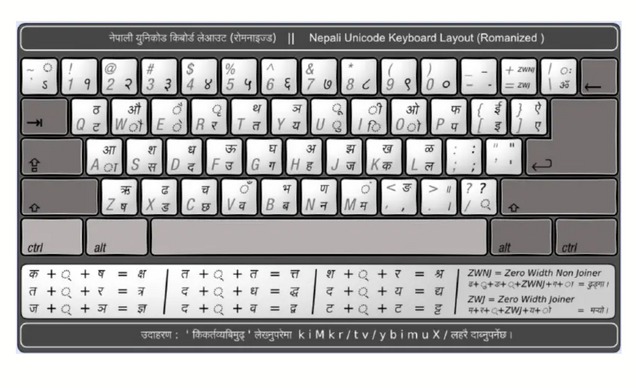
This image seems mostly to match what I get with Nepali Romanized keyboard activated, with some small exceptions (c and shift-c are switched).
On iPhone, one option is Hamro Keyboard (annoying though because it’s hard to switch out of).
The nasal diacritics are made with capital V and capital M, respectively:
- Chandrabindu: V, as in छेँ – typed `CeV’
- Anusvara: M, e.g सकसितं – typed `sksitM’.
For Newari, the convention (I believe) is to use the chandrabindu (the crescent-shaped nasal) for nasalized short vowels and the anusavara (which looks like a dot) for nasalized long vowels. In the case that the nasalized long vowel is `a’, the explicit vowel sign is optional (?).
You can make ligatures using /.
There are three ligatures that are special for Newari, not found in the Nepali alphabet:
- ल्ह – l/h
- म्ह – m/h
- न्ह – n/h
The visarga is not the same as the colon. The visarga is typed using | (above backlash).
You can use Control+space to switch between keyboards on a Mac.
Certain distinctions are not made in Newari (or Magar) even though they are made in Nepali (no retroflex consonants):
-
- त ट
- थ ठ
- द ड
- ढ ध
- न ण
The latter members of each pair are not part of the Newari alphabet.
Dipak was the only speaker I talked to who knew this typing method. Lucky that I encountered him early in the process!