Framework Plugins
A useful, centralized index with links to demos, wikis, and documentation of primary I.D. WordPress plugin components—for both new and experienced hires to reference.
Such plugins run the gamut from customized page templates, post type(s) modification and management, [shortcodes], sidebar and footbar widgets, block functionality, and more!
WordPress Documentation & Version Info
Documentation
As of August 2024, the classic editor is the default for client websites, except for certain post types*, until we are ready to transition to Gutenberg.
*BU Programs, BU Prepress, BU Blocks, and BU Learning Blocks.
Classic Editor WP Docs
Gutenberg WP Docs
Version
We are currently running on version 5.4.2 of WordPress.
WordPress 5.x Series (2018–Present)
5.0 (Bebo, 2018):
- Key Feature: Introduction of the block editor (Gutenberg), a significant change in the editing experience.
- Other Features: New default theme (Twenty Nineteen), improved REST API.
5.3 (Kirk, 2019):
- Key Feature: Enhanced block editor with new blocks and improvements.
- Other Features: Admin interface enhancements, expanded date and time capabilities.
[Where We Are] 5.4 (Adderley, 2020):
- Key Feature: Further improvements to the block editor, including new social icons block.
- Other Features: Block patterns and gradients, improved privacy tools.
5.5 (Eckstine, 2020):
- Key Feature: Built-in lazy loading for images, which improves page load speed.
- Other Features: Automatic updates for plugins and themes, XML sitemaps by default.
[Current Goal] 5.6 (Simone, 2020):
- Key Feature: New default theme (Twenty Twenty-One) and greater emphasis on site health.
- Other Features: Enhanced support for PHP 8, REST API authentication with application passwords.
5.8 (Tatum, 2021):
- Key Feature: Introduction of Full Site Editing (FSE) components, like the template editor.
- Other Features: Support for WebP images, block-based widgets editor.
5.9 (Josephine, 2022):
- Key Feature: Full Site Editing (FSE) comes to the forefront with block-based themes.
- Other Features: New site editing tools, improved block patterns, Twenty Twenty-Two theme.
[Future Goal] 6.0 (Arturo, 2022):
- Key Feature: Further enhancements to Full Site Editing (FSE) and new design tools.
- Other Features: Improved template part creation, enhanced global styles.
Our WordPress plugins [I.D. Components] are accessible and activated only by BU IS&T & Interactive Design users with the ‘ID Site Admin’ role.
Always reference a plugin’s GitHub style and functional code for an easier time integrating them into custom theme designs.
Notable Plugins
Post Type Basis
BU Landing Pages
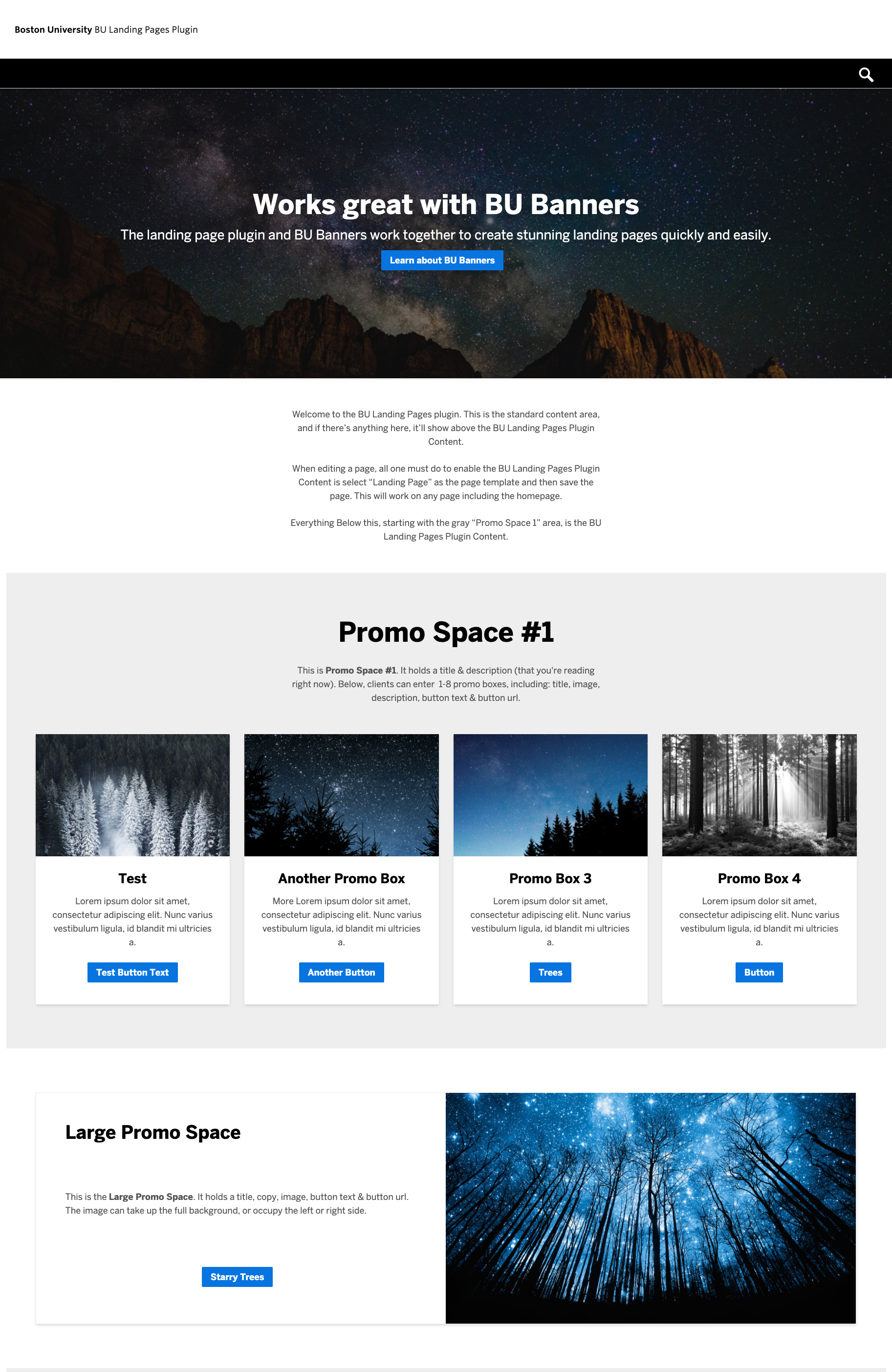
“BULP” (BU Landing Pages) is a WordPress template with preset content sections, offering a user-friendly interface for creating effective landing pages.
BULP Demo Site
Page Template Example
BULP GitHub Wiki
BULP Documentation
Helpful Pointers For New Designers
- Check BU Landing Page plugin’s partial structure and create partials in your child theme in a similar formation. This goes for all I.D. products.
- To add the Video Promo row, copy and paste this code to the end of your child theme’s
functions.php file and adjust false to true.
- CSS Scroll Snapping can be a [load time effective] alternative to implementing a third-party JS slider like slick.js for News & Events [possibly Promo]
bulp-items.
- It replaced BU Infographics and has been our default interim solution until we have greater block-editing capabilities with our next release of Responsive Child Starter.
BU Banners

BU Banners delivers impactful leading images, value propositions, and actionable links across various responsive page templates.
BU Banners Demo Site
BU Banners GitHub Wiki
BU Banners Documentation
Helpful Pointers For New Designers
- To add the Auto-Looping Video Banner Option, copy and paste this code to the end of your child theme’s
function.php file and adjust false to true.
- Take note how the
position CSS property of the banner’s .bu-banner-media and .bu-banner-content <div>‘s switch at a default viewport width of 768px[or $sm by Foundation standards].
.bu-banner-color-light applies white and .bu-banner-color-dark applies black to the banner text by default and is only available on Full-Width, No Image & Video Layout Options.- If your design calls for a different image size needed for a certain viewport — you’ll need to reach out to your project’s WordPress Developer for assistance. Some images sizes are here.
- BU Banner’s sunsetted I.D.’s [older] custom HTML Content Banner and is used on all websites using Framework Child Starter 2x and above.
BU Filtering

BU Filtering offers a streamlined, e-commerce-like search and sort experience of [a client websites’] post types, such as faculty profiles.
BU Filtering Demo Site
Page Template Example
BU Filtering GitHub Readme
BU Filtering GitHub Wiki
Helpful Pointers For New Designers
- The class names may be a bit long, so it may save you time and cognitive hassle to quickly sketch either a mind-map or a branch flow of BU Filtering’s main components and each type of filterable markup element so you can have a clearer sense for how to approach style selectors and how the filtering capabilities actually work and affect the results.
BU Stats


Hard facts and statistics best underscore our expertise as a research institution. BU Stat’s, a WordPress Custom Post Type, offers flexible presentation of statistics across BU Sites.
BU Stats Demo (No Sidebars Template)
BU Stats BULP Demo. (See “BU Stats Section”)
BU Stats Documentation
BU Stories

As vertical formats like Reels, TikToks, and Shorts gain popularity, BU Stories allows clients to incorporate a similar presentation as post types.
Demo
Documentation
Gutenberg Post Type-basis
Gutenberg emerged as Interactive Design developed the BU Prepress Plugin, aimed at enhancing BU’s printed alumni publications. Now widely used across various University publications, Prepress connects the community both inside and outside of BU.
Next, let’s dive into BU Prepress and BU Blocks…
BU Programs

BU Programs (bup) is a post type block-based content tool for BU clients — offering a streamlined, organized way for students to find information on programs, degrees, courses, and faculty. It showcases the potential of block editing that is on the horizon for us. You may hear it referenced as “Degrees & Programs” and it is listed as such as within the Plugins tab.
BU Programs Demo
BU Programs Demo Notes
BU Programs Documentation Page
Helpful Pointers For New Designers
- BU Programs presently doesn’t have any dedicated, comprehensive documentation site. It’s strongly recommended you read up on it’s rudimentary basics here and examine those details in our Core site to best understand how everything within it connects and integrates.
Recent Examples of BU Programs Documentation
BU Virtual
BU College of Fine Arts
BU Wheelock
Other I.D. Framework Plugins
Most components and plugins I.D.’s collaborated on or developed with BU IS&T are collected for reference on techweb.
View Public Reference
Add-On or Admin Features
BU Includes
Allows our clients to include content from one page onto another. Think of it almost like a content shortcut.
Documentation Site
BU Infographics
BU Infographics, now replaced by BU Landing Pages and BU Stats, offered a way to add stats to pages. Activation adds an options panel to every page template. (Included for reference: It was replaced by BU Stats & BU Landing Pages.)
Demo
GitHub Repository (See repo “readme” for documentation.)
Consolidated Plugins
BU Responsive Customizations
These components are available altogether as a combined plugin called “Responsive Customizations”. They function as an extension of Responsive Framework. Links for each aspect of this component are included below.
- BU Branding
- BU Banners
- BU Calendar (See Working With BU Calendar)
- BU Navigation
- BU Post Lists Shortcode
- BU Profiles
- BU Sharing
- BUniverse Shortcode
- Course Feed Shortcode
GitHub Repository
News Page Template Example
Profiles Page Template Example
[See List View - Page Template]
BU Brand
Part of Responsive Framework that controls the Boston University logo output.
GitHub Repository
BU Banner
See BU Banners near top of list.
BU Calendars
A plugin integration that translates event data from BU’s web-based [university] calendar app system into WordPress posts — which are then conveyed within page templates as a single event and list of events.
Demo
Documentation
BU Post Lists Shortcode
A [News] shortcode feature[native to Responsive Customizations] with parameters that outputs a sites posts and post metadata.
Documentation
BU Profiles
An underrated I.D. component that provides clients with a profile post type and page templates, allowing for faculty, staff, and many other BU Terriers to showcase their professional details and contact information.
Demo Site
Documentation
GitHub Shortcode Readme
BU Sharing
Appends sharable links to BU News posts.
Example (See “Share This:” at bottom of post.)
Documentation
BU Front End Library
These aspects are available altogether as part of a combined plugin called “BU Front End Library”.
- Collapsibles
- BU
<divs>
- BU Callouts
- BU List Child Pages
GitHub Repository
BU List Child Pages Shortcode
Widgets
BU Text Widget
Provides BU clients with the ability to include HTML in the side or footbar (with HTML, too!) on designated pages
Documentation
BU Links Widget
Provides BU clients with the ability to include a menu in the side or footbar.
Documentation
3rd-Party WP Plugin Policy
Integrating new WordPress plugins at BU involves a thorough process that requires immense resourcing. Plugins must show significant benefit to the entire university, not just one group. They must pass tests for development alignment, smart maintainability, and bulletproof security, and data/privacy terms.
Key considerations include:
- Can the plugin’s styles, JavaScript, and PHP be easily modified?
- Is the PHP secure and efficient?
- Does the plugin use data storage wisely?
- Is the CSS and JS optimized for performance?
- How active and reliable is the plugin’s developer?
- Do they use any data with the product provided to train a LLM AI model?
Ultimately, every new plugin adds a dependency (on that basis alone, it’s unlikely for adoption) and requires careful evaluation if adopted.
BU IS&T also requires sign-off regarding plugins that come with a client project.
Display Posts
A plugin that enables a shortcode with parameters that BU clients can add to output a sites posts and post metadata. It’s key benefit over the BU List Posts shortcode is it’s expansive parameters and layout options.

Demo Site
Documentation site
I.D. Product Feedback
We’re always looking for valid, helpful suggestions to reduce pain-points with our framework and enhance these plugin product components.
Feedback Repository
Next Section


