Common BU Hub Code Issues
Transients
Each individual page on a website that displays a course feed is cached via a transient. Transients are reset automatically every 4-5 hours. All transients can now be easily cleared by going to:
Settings -> BU Course Feeds
There will be a button labeled Flush Course Feeds Cache. Click and all course feed transients will be flushed for that website! This button is available to anyone with the ability to activate plugins and above.
Read this post for more information and history about clearing transients.
Verify Hub Codes via Advanced Course Search
After clearing the transient cache, sometimes a course is still not displayed as expected.
The first step is to verify if the course is listed correctly in the Advanced Course Search.
Go to the Advanced Course Search tool, search by course number, and check that all semesters available are displayed accurately.
- If the course is incorrectly listed on the Advanced Course Search, the issue is most likely that it has not been approved or was changed in upstream source systems by the registrar. Contact Marisa Pond and request that she verify the upstream systems via her contacts.
- If the course is correctly listed on the Advanced Course Search, but incorrect on the Course Feeds listings, check the items in the next set of collapsibles.
Note: While the data for the Advanced Course Search and the Course Feeds plugin come from the same source, they diverge, and the data for the Course Feeds plugin passes through many more layers before being displayed.
Verify Course Feeds Shortcode
The Course Feeds shortcode must have the correct information to display all courses correctly.
Sample shortcode: [bu-course-feed include="CGS" hub="D, H"]
Please read the TechWeb Documentation for shortcodes and ensure the following:
- College and/or Course is properly listed in the
includeparameter. Verify codes at - The Hub codes are listed properly
- The Hub match parameter is used correctly
- Semester information is correct
- On the shortcode if listed
- Settings -> BU Course Feeds
Update Description Tool
Link to Description Tool http://www.bu.edu/phpbin/coursedesc2/update/
Once the course listings are created for the Course Feeds plugin, they are static. They will not receive recent updates in the same way that the Advanced Course Search is updated.
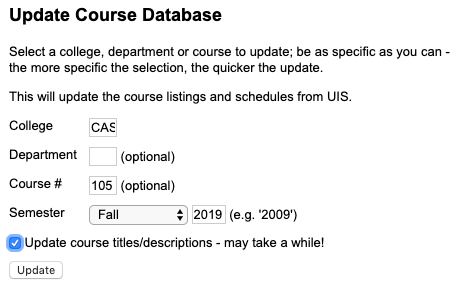
Using the link above to update the course information in the Course Feeds:
- Fill in the course information
- Select the checkbox to Update course titles/descriptions
- Do this for both semesters in an academic year
Note: It seems possible that a course might have a different Hub code on it for different semesters. This might be an issue on any web sites where we are using an academic year to display one course description for both semesters. The Hub code is displayed with the description information not the semester information. If a Hub code is only changed on one semester, or if a course description is only updated for one semester, the results may be inconsistent.
Course Missing in Results
If the course is a new course for the semester, it will need to be added to the current academic year data in the database that the Course Feeds pulls its information from. Open a ticket and request that Ben Fenster add the course to the current academic year.
Or this could be an issue with the shortcode having incorrect parameters. See above for verifying shortcode. Try using a shortcode with only that course in the includeparameter to verify if it is a problem with the shortcode.
No Hub Codes Are Displaying
There is a master setting to display Hub code information. Go to:
Settings -> BU Course Feeds
and select the checkbox to “Show Hub areas/toolkits in results”

This checkbox will be set to True (checked) on any new sites that activate the Course Feeds plugin for the first time. It’s possible some older sites in the wild will not have this box checked. Checking the box will display the Hub codes if any. If the theme for that site was not updated to show Hub codes, the codes may not display perfectly within the site’s design.
Hub Code Mapping and Descriptions
The Hub codes are mapped to the Hub titles in the Course Feeds plugin on the course-feeds.php file.
If the title of a Hub code needs to be changed or a new Hub code is added, it will need to be updated in the plugin.
Here is a link to a version of the Hub code descriptions and a copy/paste below. (Be sure to check the current branch on GitHub for updated data.)
$HUB = array(
        '*' => 'Part of a Hub Sequence',
	'A' => 'Philosophical Inquiry and Life\'s Meanings',
	'B' => 'Aesthetic Exploration',
	'C' => 'Historical Consciousness',
	'D' => 'Scientific Inquiry I',
	'E' => 'Social Inquiry I',
	'F' => 'Scientific Inquiry II',
	'G' => 'Quantitative Reasoning I',
	'H' => 'Quantitative Reasoning II',
	'I' => 'The Individual in Community',
	'J' => 'Global Citizenship and Intercultural Literacy',
	'K' => 'Ethical Reasoning',
	'L' => 'First-Year Writing Seminar',
	'M' => 'Writing, Research, and Inquiry',
	'N' => 'Oral and/or Signed Communication',
	'O' => 'Digital/Multimedia Expression',
	'P' => 'Social Inquiry II',
	'1' => 'Critical Thinking',
	'2' => 'Research and Information Literacy',
	'3' => 'Teamwork/Collaboration',
	'4' => 'Creativity/Innovation',
	'5' => 'Life Skills',
	'6' => 'Writing-Intensive Course'
	);
Divisional Studies Codes
A three-digit code is used in upstream source system to map which courses get the Hub indicator. This code could be the cause of a course having an incorrect Hub code.
See a version of this spreadsheet on the Trello card from the original project.
These codes are not something that we are reviewing or verifying within ID. However, it is useful information to know.
Last Gasp
If none of the above works, contact Ben Fenster. He has direct access to the database to view the raw data.