Smartsheet
ID Project Toolkit
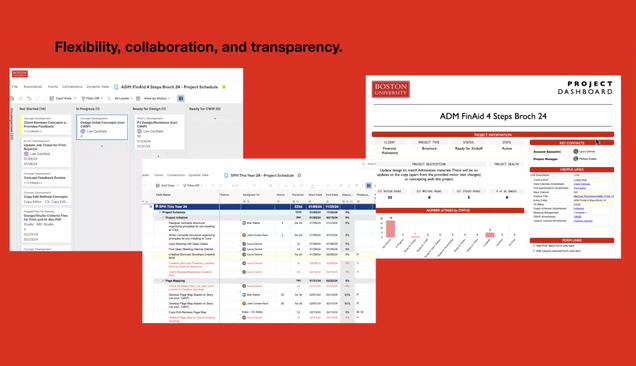
An ID Project Toolkit is a template folder containing a set of interconnected scheduling and management documents. Every project uses a unique ID Project Toolkit folder. The toolkit folder consists of:
- Project Schedule: Tasks, Status, % Complete.
- Resource Management: Your resource plan – what’s assigned to you now, and what is coming in the future.
- CRAID Log: Change, Risk, Action, Issue, Decision: this is your Project Log for everything that needs to be accomplished, has been decided, is an issue that needs some form of attention.
- Dashboard: What data is pulled into the reports, who is responsible for upkeep.
ID Toolkit Overview/Training Notes
- All project work is entered through a New Project Request, and all planning and project requirements are to be discussed and tracked within the ID Pipeline.
- Impact: All planning roles (AM, PM, ACD, Sina, and David)
- ID Pipeline NPR data (below) is used to create Project Toolkits.
- Project Name, planned start/end dates, ACD, AE, PM.
- Description: AE should update as project requirements are solidified. PM to update description once the SOW is approved.
- Project Toolkits: Toolkits are stored within the Interactive Design – Projects folder within Smartsheet. Toolkits contain:
- Estimation tool (Brockatron), including ‘Other Costs’ sheet
- Project Schedule
- CRAID Log
- Other items: Lessons Learned, actual hours, bug tracker
- Project Schedule – Now has multiple types of schedules.
- New Section: Project Planning, this is now laid out as a section. PM to update task/durations/deadlines.
- Resourcing: Directly connects schedule task assignments to a person’s Resource Plan.
- Strategy efforts = these will be set up for the PM already based upon a strawman view of the project, for roadmapping purposes.
- Action Required = Assigned to is responsible for updating Task
- Status: Not Started, In Progress, Complete, Cancelled, On Hold
- % complete: 10%, 25%, 50%, 75%, and 100%
- Project Data is now being pulled into several varied reports that can be found on the following:
- Project Dashboards – individual by project
- ID Portfolio – this is a roll-up of all ID project-level data. There is not a ton of data populating the reports, but data is actively being collected and used in reporting.
Watch a Training
-
-
ID Workplace
Smartsheet capabilities help us:
- Set up project schedules and task boards quickly to keep ID busy.
- Align task status, dates, and dependencies in one place (unlike Trello, where info was scattered).
- Update across all views when a card changes.
- Facilitate collaboration within task cards, reducing email/Slack clutter.
- Customize card views and fields, save/share filters.
Designers and developers have editor access to the entire workspace, including all toolkits and field-level data like status and % complete.
Access ID Smartsheet Workspace
(Login Required)