ID’s Dev Environment Setup
IS&T manages Boston University’s web servers and capabilities.
We use a multi-network, multi-site WordPress installation of these web servers for Lead Designers and Developers to build Responsive Framework projects and components.
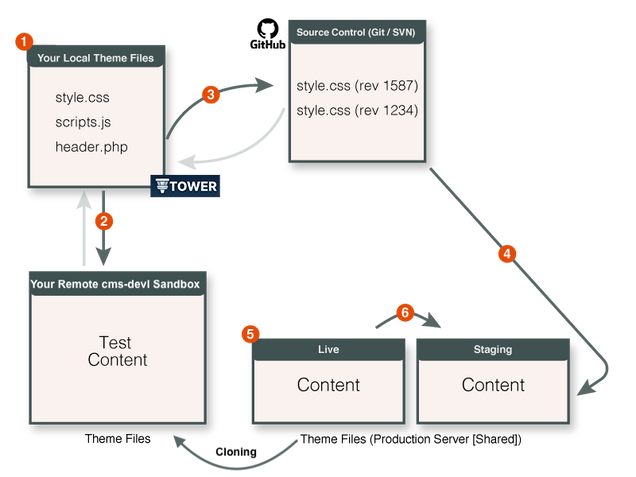
Development Server
Our Development [cms-devl] server consists of sandboxes for developing Responsive Framework themes, components, and product demos.
Production Server
Our Production server is an intermingling of publicly visible [bu.edu] BU websites and our private Staging BU sites for our clients to manage, review, and approve content, design, and development aspects up to launch day [sites-staging or www-staging].
Our Static Sites [webdev] are within the production environment [as part of AFS], consisting of dedicated space for our centralized CDN assets, “Webteam” client presentations, and project Documentation.
Server Support
If any server is ever unreachable and WordPress is lagging or giving 504 errors, clone tool is broken or media is not loading: we encourage all users to make it known to @istweb in the #webteam Slack channel, following up by filing a ticket with IS&T.
Deploys
Deployment is the process of transferring code, configurations, and assets from a GitHub repository branch [whose code has been QA tested and review-approved in our development server] to our production server. Lead Designers put in a request in our #interactive-design channel to Lead Developers who use a special deploy tool to do this.