Adding Milestones & GitHub Projects
Table of Contents
- Introduction
- Set up milestones in GitHub
- Set up project board in GitHub
- Current Sprint board
- Next section: GitHub & Smartsheet Workflow
Introduction
This section of the documentation will show you how to set up a project in GitHub.
Set Up Milestones in GitHub
Milestones help organize issues by release, and help track progress towards a feature being ready for the client. They also allow you to see at a glance all of the issues that are open or closed in that milestone. You can find Milestones under Issues > Milestones, or see a demo on the ID GitHub repo.
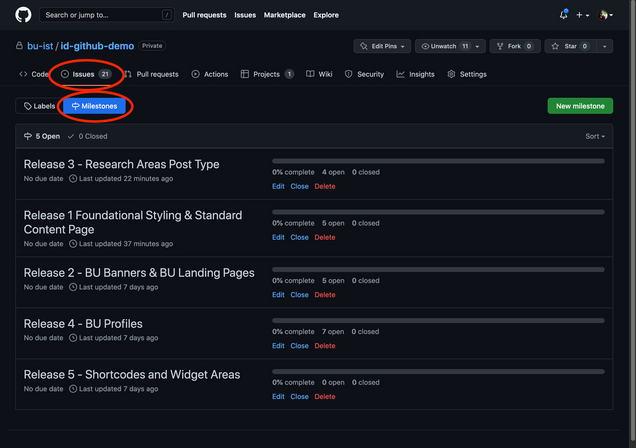
- The ACD should set up Milestones for each planned release and assign issues in that release to the milestone (referenced in GitHub Responsibilities section below).
- Don’t enter a date. All dates will be in the project schedule in Smartsheets.
- Additional Milestones can be used at the team’s discretion for tracking milestones such as prelaunch bugs, post launch bugs, etc.
Set Up Project Board in GitHub
At the start of the project create a project on the bu-ist github account: https://github.com/orgs/bu-ist/projects. These projects will use the new Github Projects that are global to our Github Organization.
Project Name Structure
- ID: Project Name YYYY or ID: Project Name YYYY-YYYY
- ID Product: Project Name
Create Custom Fields for:
- FE Hours (number field)
- BE Hours (number field)
- % FE Complete (number field)
- % BE Complete (number field)
Create Views of the Following:
Current Sprint View
- Layout: Board
- Name: Current Sprint
- Visible Fields:
- Labels
- Assignees
- Hours (custom field)
- Milestone (to show Releases)
- FE Hours
- BE Hours
- Status
- Sort: Manual
- Column by: Status
- Field Sums: FE Hours, BE Hours, and Count to show the amount of work in each status
A single sprint view should be created to track progress towards a release within each 2 week (or other timeframe) sprint. The ToDo column should only have issues directly related to the current sprint on it (and any work remaining from the previous sprint), and be managed by the entire team in a sprint planning meeting at the start of each sprint. During that meeting the previous sprint progress would be reviewed, and new issues added for the next sprint. The issues added to the ToDo column for that sprint should equal or less than amount of time available in that sprint for each resource.
- This board is not automated
- Columns on this Board:
- No Status – these are all of the issues added to the Github Project but are not in the current sprint. This is not quite a backlog as it will include completed items.
- On Deck – A column to add cards for upcoming sprints to. In a sprint planning meeting, groom issues for the following sprint and add them to this column.
- To Do – the items groomed and planned to be completed this sprint. Add the Dates of the Current Sprint to the description field for this column and update at the start of each sprint.
- In Progress (denote roles involved by label and by assignments to users)
- Blocked – tasks in this project that cannot be completed at this moment
- In Review – code and/or functional review
- Done – work is complete for the effort needed in this sprint, but not necessarily release ready or feature complete
All Issues View
- Layout: Table
- Name: All Issues
- Visible Fields:
- Labels
- Assignees
- Hours (custom field)
- FE Hours
- BE Hours
- % FE Hours Complete
- % BE Hours Complete
- Status
- Milestone (to allow assigning issues to releases quickly)
- Sort: Title
- Group by: None
This view should be created to show all the issues assigned to the project. It is useful for rapid entry of hours, percentages complete, assigning of milestones early in the setup of a project and for ensuring all issues have appropriate labels and other data assigned to the issue.
All Releases View
- Layout: Table
- Name: All Issues
- Visible Fields:
- Labels
- Assignees
- Hours (custom field)
- FE Hours
- BE Hours
- % FE Hours Complete
- % BE Hours Complete
- Status
- Sort: Manual (by priority or other agreed upon order)
- Group by: Milestone
- Field Sums: FE Hours, BE Hours, and Count to show the amount of work in each status
This view should be created to show all the issues assigned to the project, but grouped by Releases. This view allows everyone to see all of the issues needed to be completed for each release, as well as any issues that are not assigned to a release. This view should be created early in the project and shared with the project manger to aid in creation of the project schedule. Issues should only be added or removed to a release milestone by the ACD or during sprint planning meetings.
Additional views can be created as needed, however the team must ensure they are reviewing and planning the issues they are completing based on the information in these three views.